WordPress End of Life (EOL) Dates and End of Support (EOS) Dates
WordPress end of life (EOL) and end of support (EOS) dates: 31 WordPress versions have reached EOL, including WordPress 4.6 (EOL date: Jul 31, 2025) — no longer receiving security updates or patches. WordPress 7.1.4 is the current supported release — 25 versions in active support. Also see Cachet end of support dates for related end-of-life information.
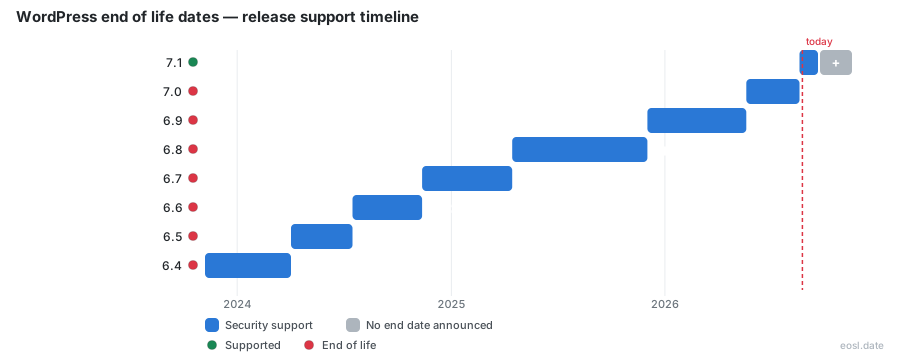
Currently Supported WordPress Releases - Active EOS/EOSL Support (25)
| Release | Supported Phpversions | Released | Security Support | Active Support | Latest |
|---|---|---|---|---|---|
| 7.1 | 7.4 - 8.5 | (2 months ago) | Active | Active | 7.1.4 (2 weeks and 1 day ago) |
| 7.0 | 7.4 - 8.5 | (5 months ago) | Active | (2 months ago) | 7.0.8 (2 weeks and 1 day ago) |
| 6.9 | 7.2.24 - 8.5 | (11 months ago) | Active | (5 months ago) | 6.9.11 (2 weeks and 1 day ago) |
| 6.8 | 7.2.24 - 8.4 | (1 year and 6 months ago) | Active | (11 months ago) | 6.8.12 (2 weeks and 1 day ago) |
| 6.7 | 7.2.24 - 8.4 | (2 years ago) | Active | (1 year and 6 months ago) | 6.7.11 (2 weeks and 1 day ago) |
| 6.6 | 7.2.24 - 8.3 | (2 years and 3 months ago) | Active | (2 years ago) | 6.6.11 (2 weeks and 1 day ago) |
| 6.5 | 7.0 - 8.3 | (2 years and 7 months ago) | Active | (2 years and 3 months ago) | 6.5.14 (2 weeks and 1 day ago) |
| 6.4 | 7.0 - 8.3 | (3 years ago) | Active | (2 years and 7 months ago) | 6.4.14 (2 weeks and 1 day ago) |
| 6.3 | 7.0 - 8.2 | (3 years and 3 months ago) | Active | (3 years ago) | 6.3.14 (2 weeks and 1 day ago) |
| 6.2 | 5.6.20 - 8.2 | (3 years and 7 months ago) | Active | (3 years and 3 months ago) | 6.2.15 (2 weeks and 1 day ago) |
| 6.1 | 5.6.20 - 8.2 | (4 years ago) | Active | (3 years and 7 months ago) | 6.1.16 (2 weeks and 1 day ago) |
| 6.0 | 5.6.20 - 8.1 | (4 years and 5 months ago) | Active | (4 years ago) | 6.0.18 (2 weeks and 1 day ago) |
| 5.9 | 5.6.20 - 8.1 | (4 years and 9 months ago) | Active | (4 years and 5 months ago) | 5.9.20 (2 weeks and 1 day ago) |
| 5.8 | 5.6.20 - 8.0 | (5 years and 3 months ago) | Active | (4 years and 9 months ago) | 5.8.19 (2 weeks and 1 day ago) |
| 5.7 | 5.6.20 - 8.0 | (5 years and 8 months ago) | Active | (5 years and 3 months ago) | 5.7.21 (2 weeks and 1 day ago) |
| 5.6 | 5.6.20 - 8.0 | (5 years and 11 months ago) | Active | (5 years and 8 months ago) | 5.6.23 (2 weeks and 1 day ago) |
| 5.5 | 5.6.20 - 7.4 | (6 years and 3 months ago) | Active | (5 years and 11 months ago) | 5.5.24 (2 weeks and 1 day ago) |
| 5.4 | 5.6.20 - 7.4 | (6 years and 7 months ago) | Active | (6 years and 3 months ago) | 5.4.25 (2 weeks and 1 day ago) |
| 5.3 | 5.6.20 - 7.4 | (7 years ago) | Active | (6 years and 7 months ago) | 5.3.27 (2 weeks and 1 day ago) |
| 5.2 | 5.6.20 - 7.3 | (7 years and 6 months ago) | Active | (7 years ago) | 5.2.30 (2 weeks and 1 day ago) |
| 5.1 | 5.2.4 - 7.3 | (7 years and 8 months ago) | Active | (7 years and 6 months ago) | 5.1.28 (2 weeks and 1 day ago) |
| 5.0 | 5.2.4 - 7.3 | (7 years and 11 months ago) | Active | (7 years and 8 months ago) | 5.0.31 (2 weeks and 1 day ago) |
| 4.9 | 5.2.4 - 7.2 | (8 years and 11 months ago) | Active | (7 years and 11 months ago) | 4.9.35 (2 weeks and 1 day ago) |
| 4.8 | 5.2.4 - 7.1 | (9 years and 5 months ago) | Active | (8 years and 11 months ago) | 4.8.34 (2 weeks and 1 day ago) |
| 4.7 | 5.2.4 - 7.1 | (9 years and 11 months ago) | Active | (9 years and 5 months ago) | 4.7.39 (2 weeks and 1 day ago) |
WordPress End of Life (EOL) Releases - No Longer Supported (31)
| Release | Supported Phpversions | Released | Security Support | Active Support | Latest |
|---|---|---|---|---|---|
| 4.6 | 5.2.4 - 7.0 | (10 years and 2 months ago) | (1 year and 3 months ago) | (9 years and 11 months ago) | 4.6.30 (1 year and 3 months ago) |
| 4.5 | 5.2.4 - 7.0 | (10 years and 7 months ago) | (1 year and 3 months ago) | (10 years and 2 months ago) | 4.5.33 (1 year and 3 months ago) |
| 4.4 | 5.2.4 - 7.0 | (10 years and 11 months ago) | (1 year and 3 months ago) | (10 years and 7 months ago) | 4.4.34 (1 year and 3 months ago) |
| 4.3 | 5.2.4 - 5.6 | (11 years and 2 months ago) | (1 year and 3 months ago) | (10 years and 11 months ago) | 4.3.35 (1 year and 3 months ago) |
| 4.2 | 5.2.4 - 5.6 | (11 years and 6 months ago) | (1 year and 3 months ago) | (11 years and 2 months ago) | 4.2.39 (1 year and 3 months ago) |
| 4.1 | 5.2.4 - 5.6 | (11 years and 10 months ago) | (1 year and 3 months ago) | (11 years and 6 months ago) | 4.1.42 (1 year and 3 months ago) |
| 4.0 | 5.2.4 - 5.5 | (12 years and 2 months ago) | (3 years and 11 months ago) | (11 years and 10 months ago) | 4.0.38 (3 years and 11 months ago) |
| 3.9 | 5.2.4 - 5.5 | (12 years and 6 months ago) | (3 years and 11 months ago) | (12 years and 2 months ago) | 3.9.40 (3 years and 11 months ago) |
| 3.8 | 5.2.4 - 5.5 | (12 years and 11 months ago) | (3 years and 11 months ago) | (12 years and 6 months ago) | 3.8.41 (3 years and 11 months ago) |
| 3.7 | 5.2.4 - 5.5 | (13 years ago) | (3 years and 11 months ago) | (12 years and 11 months ago) | 3.7.41 (3 years and 11 months ago) |
| 3.6 | 5.2.4+ | (13 years and 3 months ago) | (13 years ago) | (13 years ago) | 3.6.1 (13 years and 2 months ago) |
| 3.5 | 5.2.4+ | (13 years and 11 months ago) | (13 years and 3 months ago) | (13 years and 3 months ago) | 3.5.2 (13 years and 4 months ago) |
| 3.4 | 5.2.4+ | (14 years and 4 months ago) | (13 years and 11 months ago) | (13 years and 11 months ago) | 3.4.2 (14 years and 2 months ago) |
| 3.3 | 5.2.4+ | (14 years and 11 months ago) | (14 years and 4 months ago) | (14 years and 4 months ago) | 3.3.3 (14 years and 4 months ago) |
| 3.2 | 5.2.4+ | (15 years and 4 months ago) | (14 years and 11 months ago) | (14 years and 11 months ago) | 3.2.1 (15 years and 4 months ago) |
| 3.1 | 4.3+ | (15 years and 8 months ago) | (15 years and 4 months ago) | (15 years and 4 months ago) | 3.1.4 (15 years and 4 months ago) |
| 3.0 | 4.3+ | (16 years and 4 months ago) | (15 years and 8 months ago) | (15 years and 8 months ago) | 3.0.6 (15 years and 6 months ago) |
| 2.9 | 4.3+ | (16 years and 10 months ago) | (16 years and 4 months ago) | (16 years and 4 months ago) | 2.9.2 (16 years and 8 months ago) |
| 2.8 | 4.3+ | (17 years and 2 months ago) | (16 years and 10 months ago) | (16 years and 10 months ago) | 2.8.6 (17 years ago) |
| 2.7 | 4.3+ | (17 years and 11 months ago) | (17 years and 2 months ago) | (17 years and 2 months ago) | 2.7.1 (17 years and 9 months ago) |
| 2.6 | 4.3+ | (18 years and 3 months ago) | (17 years and 11 months ago) | (17 years and 11 months ago) | 2.6.5 (17 years and 11 months ago) |
| 2.5 | 4.3+ | (18 years and 7 months ago) | (18 years and 3 months ago) | (18 years and 3 months ago) | 2.5.1 (18 years and 6 months ago) |
| 2.3 | 4.2+ | (19 years and 1 month ago) | (18 years and 7 months ago) | (18 years and 7 months ago) | 2.3.3 (18 years and 9 months ago) |
| 2.2 | 4.2+ | (19 years and 5 months ago) | (19 years and 1 month ago) | (19 years and 1 month ago) | 2.2.3 (19 years and 2 months ago) |
| 2.1 | 4.2+ | (19 years and 9 months ago) | (19 years and 1 month ago) | (19 years and 1 month ago) | 2.1.3 (19 years and 7 months ago) |
| 2.0 | 4.2+ | (20 years and 10 months ago) | (19 years and 3 months ago) | (19 years and 3 months ago) | 2.0.11 (19 years and 3 months ago) |
| 1.5 | 4.1+ | (21 years and 8 months ago) | (20 years and 10 months ago) | (20 years and 10 months ago) | 1.5.2 (21 years and 2 months ago) |
| 1.2 | 4.1+ | (22 years and 5 months ago) | (21 years and 8 months ago) | (21 years and 8 months ago) | 1.2.1 (22 years and 1 month ago) |
| 1.0 | 4.1+ | (22 years and 10 months ago) | (22 years and 5 months ago) | (22 years and 5 months ago) | 1.0.2 (22 years and 8 months ago) |
| 0.72 | 4.1+ | (23 years and 1 month ago) | (22 years and 10 months ago) | (22 years and 10 months ago) | 0.72 (23 years and 1 month ago) |
| 0.71 | 4.1+ | (23 years and 5 months ago) | (23 years and 1 month ago) | (23 years and 1 month ago) | 0.711 (23 years and 4 months ago) |
Your WordPress end of life date depends on the version you run, because the open-source CMS only patches its newest branches. Anything older stops receiving security fixes, and your website then relies on luck, not on WordPress core. This guide shows which releases are still covered, why the PHP calendar matters just as much, and how to plan an upgrade before a deadline catches you.
WordPress End of Life: How the Support Policy Works
WordPress has no long term support edition like Ubuntu's. Its documentation states that the only officially supported version is the latest major release, and nothing guarantees how long older versions stay covered. A fresh major version arrives every few months, so each version has a short active life before the security team moves on.
Older branches get help only as a courtesy. Moderators on the support forums say the same thing in practice: bug fixes and compatibility fixes land only in the newest version, and the first suggestion for any problem is to upgrade. Treat every version that is not the newest as living on borrowed time.
Which Supported Versions Still Get Security Fixes
In practice the team backported security patches to many older versions, so the real cut-off is wider than the policy suggests. In July 2025 it ended those security updates for versions 4.1 through 4.6, the first time it publicly cut off whole families of versions. A website on that list receives no security fixes and no bug fixes at all, and a single compromised website can expose its visitors too.
WordPress EOL Dates for Every Release Branch
The table below summarises each version group as of 16 October 2026, using the public tracker at endoflife.date. Active support means regular bug and security work, while security support means critical fixes only.
| Branch | Active support | Security support |
|---|---|---|
| 7.1 (released 19 Aug 2026) | Yes | Yes |
| 7.0 | Ended 19 Aug 2026 | Yes |
| 6.9 | Ended 20 May 2026 | Yes |
| 4.1 to 4.6 | Ended in 2016-2017 | Ended 31 Jul 2025 |
| 3.7 to 4.0 | Ended 2013-2014 | Ended 1 Dec 2022 |
Notice that WordPress EOL support for each version ends at two separate moments. Active support stops first, then security support continues, so a version can show as "ended" in one column and still be patched. Your safe version is whichever row says Yes in both columns, which today means only 7.1.
Why End-of-Life WordPress Leaves Unpatched Vulnerabilities
Once a branch loses support, every newly found vulnerability becomes a permanent weakness. Roughly 1,600 extensions left the official repository in 2024 over unpatched security flaws, and your core installation faces the same exposure with no patch coming. An exploit for an old branch stays useful to attackers indefinitely.
The risk goes beyond security. Plugins raise their minimum requirements, so plugins and themes stop receiving updates that your old branch cannot run, which means broken screens, downtime and emergency repairs. Speed suffers too, since newer versions are faster and performance gains pass you by. A developer willing to maintain deprecated code becomes harder to hire every year.
There is a business side as well. A shop that handles cards or member logins may fail a compliance review, and an insurer or payment provider can ask why unsupported software handles customer data.
Maintenance Mode for TinyMCE, Customizer and XML-RPC
WordPress is also placing older components into maintenance mode: TinyMCE, the Customizer and XML-RPC receive no new features and minimal maintenance. That shrinks legacy support for code that old designs depend on, so a site built around them needs a rebuild plan.
PHP Deadlines Behind Legacy WordPress Support
WordPress itself is not the only clock. It runs on PHP, which has its own end-of-life calendar, and the PHP version your server runs decides how long a site stays defensible. Under the 2024 release cycle change, PHP branches from 8.1 onward get two years of active support plus two years of security fixes, ending on 31 December. PHP 7.4 reached its end in November 2022, yet many sites still run it.
| PHP branch | Active support until | Security support until |
|---|---|---|
| PHP 8.1 | 25 Nov 2023 | 31 Dec 2025 |
| PHP 8.2 | 31 Dec 2024 | 31 Dec 2026 |
| PHP 8.3 | 31 Dec 2025 | 31 Dec 2027 |
| PHP 8.4 | 31 Dec 2026 | 31 Dec 2028 |
| PHP 8.5 | 31 Dec 2027 | 31 Dec 2029 |
PHP 8.2 is the next branch to fall out: after 31 December 2026 the PHP project publishes no more fixes for it, even critical ones. Your site keeps running, but nobody fixes new holes. The WordPress compatibility matrix still lists PHP 8.2, and the official requirements page recommends PHP 8.3 or newer, so PHP 8.3, PHP 8.4 and PHP 8.5 are the realistic targets.
The same warning applies to the database layer that WordPress depends on. MySQL and MariaDB versions that reached their own end are common on shared server plans, so an old WordPress install can sit on three unsupported layers at once.
Active Support Ends Before Security Support
The two-stage model matters for enterprise teams budgeting upgrades. PHP 8.4 moves to security fixes only on 31 December 2026, which is normal and not a reason to skip it.
Check Whether You Run Legacy Versions of WordPress and PHP
Start with facts. In the dashboard, open Tools, then Site Health, then Info to read both your WordPress versions and the PHP version in use. Your hosting panel shows the same data, and a host can tell you which versions it offers and when it retires them. If your host does not offer a supported PHP version, that alone justifies moving.
Ask whoever runs your server which operating system and PHP series it uses, because a website cannot outrun the server beneath it. Compare the figures with the tables above. Any legacy versions of either layer deserve a dated upgrade task. Also confirm compatibility for each plugin, because a plugin that needs newer PHP will refuse to activate.
Upgrade Options for End-of-Life Sites: Move to the Latest Version
You have three realistic paths. Update in place if the gap is small, rebuild on a clean install if the theme depends on deprecated parts, or hand the work to a host that manages updates. Every path ends with the same goal: the latest version of WordPress on a supported PHP branch.
- Update in place: fastest, best for sites one or two branches behind.
- Rebuild and migrate: a clean migration suits sites running branches from 2016 or earlier.
- Managed upgrade: managed hosting, your host or an agency handles testing and rollback.
A small brochure website can often update in place over an afternoon, while a store with custom code needs a longer window and a full test pass on each version jump. Doing nothing is also a choice, but a costly one. Emergency fixes after an incident cost far more than a scheduled upgrade, and each year of delay widens the jump you eventually have to make.
Step-by-Step Upgrade Plan Before Security Support Ends
Treat this upgrade plan as a checklist and give each step an owner and a date.
Take an Inventory and a Tested Backup
List your plugins, themes, custom code, WordPress version and PHP version. Then take a backup and prove you can restore it, because an untested copy is only a hope.
Build a Staging Copy and Test Compatibility
Clone production into a staging copy that matches the live PHP and database versions. Run the PHP upgrade there first, then update plugins and exercise the paths that earn money, such as checkout and sign-in. A staging failure costs nothing; a live failure costs sales.
Switch Live, Monitor and Keep a Rollback Plan
Switch PHP on the live site during a quiet hour, then monitor error logs and key pages for a few days. Keep a written rollback plan that names who reverts the change and how long that takes.