VirtualBox End of Life (EOL) Dates and End of Support (EOS) Dates
VirtualBox end of life (EOL) and end of support (EOS) dates: 11 VirtualBox versions have reached EOL, including VirtualBox 7.1 (EOL date: Mar 31, 2026) — no longer receiving security updates or patches. VirtualBox 7.2.22 is the current supported release. Also see MySQL lifecycle dates for related end-of-life information.
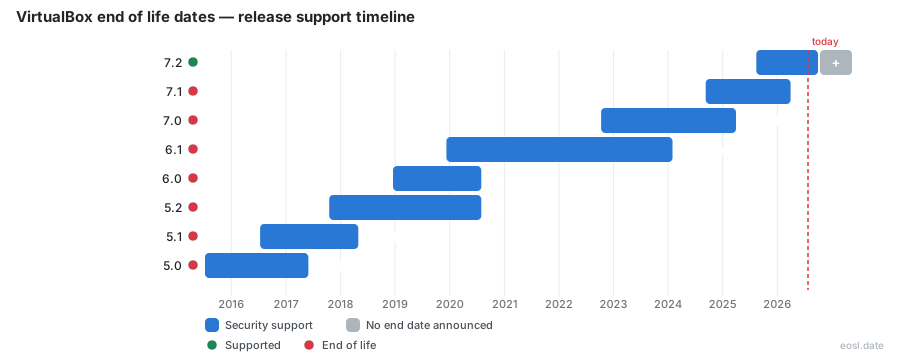
Currently Supported VirtualBox Releases - Active EOS/EOSL Support (1)
| Release | Released | Maintenance support | Latest |
|---|---|---|---|
| 7.2 | (1 year and 2 months ago) | Active | 7.2.22 (3 weeks and 2 days ago) |
VirtualBox End of Life (EOL) Releases - No Longer Supported (11)
| Release | Released | Maintenance support | Latest |
|---|---|---|---|
| 7.1 | (2 years and 2 months ago) | (7 months ago) | 7.1.18 (1 month and 4 weeks ago) |
| 7.0 | (4 years and 1 month ago) | (1 year and 7 months ago) | 7.0.26 (1 year and 6 months ago) |
| 6.1 | (6 years and 11 months ago) | (2 years and 9 months ago) | 6.1.50 (2 years and 9 months ago) |
| 6.0 | (7 years and 10 months ago) | (6 years and 3 months ago) | 6.0.24 (6 years and 3 months ago) |
| 5.2 | (9 years ago) | (6 years and 3 months ago) | 5.2.44 (6 years ago) |
| 5.1 | (10 years and 4 months ago) | (8 years and 6 months ago) | 5.1.38 (8 years ago) |
| 5.0 | (11 years and 4 months ago) | (9 years and 5 months ago) | 5.0.40 (9 years and 6 months ago) |
| 4.3 | (13 years ago) | (10 years and 10 months ago) | 4.3.40 (10 years and 2 months ago) |
| 4.2 | (14 years and 1 month ago) | (10 years and 10 months ago) | 4.2.38 (10 years and 1 month ago) |
| 4.1 | (15 years and 3 months ago) | (10 years and 10 months ago) | 4.1.44 (11 years ago) |
| 4.0 | (15 years and 10 months ago) | (10 years and 10 months ago) | 4.0.36 (11 years ago) |
Tracking VirtualBox end of life is awkward because Oracle never publishes a fixed calendar, so this guide gathers the support status of every release line in one place. As of October 26 2026, only the 7.2 branch is current, while 7.1 and every earlier line have all lost support.
VirtualBox End of Life Dates by Release
Each release line is superseded by the next, and endoflife.date records when maintenance support ended for every minor version. The table lists the release date, the end of maintenance and the latest patch version, meaning the last build shipped on that line.
| Release line | Released | Maintenance ended | Final build |
|---|---|---|---|
| 7.2 | August 14 2025 | Still supported | 7.2.22 (October 20 2026) |
| 7.1 | September 9 2024 | March 31 2026 | 7.1.18 (April 21 2026) |
| 7.0 | October 10 2022 | March 31 2025 | 7.0.26 (April 15 2025) |
| 6.1 | December 10 2019 | January 31 2024 | 6.1.50 (January 16 2024) |
| 6.0 | December 18 2018 | July 31 2020 | 6.0.24 (July 14 2020) |
| 5.2 | October 17 2017 | July 31 2020 | 5.2.44 (October 21 2020) |
| 5.1 | July 12 2016 | April 30 2018 | 5.1.38 (October 24 2018) |
| 5.0 | July 9 2015 | May 31 2017 | 5.0.40 (April 29 2017) |
| 4.0 to 4.3 | December 2010 to October 2013 | December 31 2015 | 4.3.40 (August 23 2016) |
Versio.io agrees that 7.2.22 is the newest build, and it marks every line as lacking long-term support, so 7.2 is the only supported release you can rely on today.
Does Oracle Support a Fixed EOL Schedule for VirtualBox?
No. The Oracle Virtual Box end of life picture has no official calendar: Versio.io describes a latest version model in which only 7.2 counts as current, and endoflife.date notes that the vendor documents no policy for support. Earlier branches stay usable, yet they are no longer the recommended version, and the changelog of a retired branch says plainly that it is no longer supported.
To watch this automatically, endoflife.date publishes the product through a JSON API, an Atom feed and an iCalendar feed, which is handy if you track many dates across a fleet.
What Is Oracle VM VirtualBox and Why Its Lifecycle Matters
Oracle VM VirtualBox is free, open-source, cross-platform virtualization software that acts as a hypervisor on Windows, macOS and Linux. It runs several guest operating systems as virtual machines on one host, so developers rely on it for testing, running legacy applications and building isolated environments without extra hardware.
That reach is why an unsupported build is risky: your host operating systems and guests depend on the kernel and graphics drivers it ships. Versio.io counts 218 versions of the product, 201 of them affected by a CVE, and lists the licence as commercial, so confirm which licence terms cover your use. Since 7.1, VirtualBox also runs on ARM hardware such as Apple Silicon Macs, which is why many entries mention ARM guests; those fixes reach you only while your line is still supported. Questions about a specific build usually end up in the community forums.
End-of-Life Timeline: Maintenance Releases and Changelog Links
Oracle has shipped a steady run of updates since October 2024. Every entry below is a maintenance release, and each one links to the official changelog, which lists what was fixed or added; the 7.2.22 notes also add security-related fixes.
- VirtualBox 7.2.22 (October 20 2026): Oracle maintenance release to improve stability and fix regressions (changelog)
- VirtualBox 7.2.20 (September 22 2026): Oracle maintenance release to improve stability and fix regressions (changelog)
- VirtualBox 7.2.18 (September 15 2026): Oracle maintenance release to improve stability and fix regressions (changelog)
- VirtualBox 7.2.16 (August 18 2026): Oracle maintenance release to improve stability and fix regressions (changelog)
- VirtualBox 7.2.14 (July 21 2026): Oracle maintenance release to improve stability and fix regressions (changelog)
- VirtualBox 7.2.12 (June 30 2026): Oracle maintenance release to improve stability and fix regressions (changelog)
- VirtualBox 7.2.10 (June 16 2026): Oracle maintenance release to improve stability and fix regressions (changelog)
- VirtualBox 7.2.8 (April 21 2026): Oracle maintenance release to improve stability and fix regressions (changelog)
- VirtualBox 7.1.18 (April 21 2026): Oracle maintenance release to improve stability and fix regressions (changelog)
- VirtualBox 7.2.6 (January 20 2026): Oracle maintenance release to improve stability and fix regressions (changelog)
- VirtualBox 7.1.16 (January 20 2026): Oracle maintenance release to improve stability and fix regressions (changelog)
- VirtualBox 7.2.4 (October 21 2025): Oracle maintenance release to improve stability and fix regressions (changelog)
- VirtualBox 7.1.14 (October 21 2025): Oracle maintenance release to improve stability and fix regressions (changelog)
- VirtualBox 7.2.2 (September 10 2025): Oracle maintenance release to improve stability and fix regressions (changelog)
- VirtualBox 7.1.12 (July 15 2025): Oracle maintenance release to improve stability and fix regressions (changelog)
- VirtualBox 7.1.10 (June 3 2025): Oracle maintenance release to improve stability and fix regressions (changelog)
- VirtualBox 7.1.8 (April 15 2025): Oracle maintenance release to improve stability and fix regressions (changelog)
- VirtualBox 7.1.6 (January 21 2025): Oracle maintenance release to improve stability and fix regressions (changelog)
- VirtualBox 7.0.24 (January 21 2025): Oracle maintenance release to improve stability and fix regressions (changelog)
- VirtualBox 7.1.4 (October 15 2024): Oracle maintenance release to improve stability and fix regressions (changelog)
- VirtualBox 7.0.22 (October 15 2024): Oracle maintenance release to improve stability and fix regressions (changelog)
Latest Version Fixes: Maintenance Support in Practice
That support means real maintenance work. Most of it is bug fixes: a typical bug is a crash on one kernel, host or guest, and each bug is traced to a github issue, so you can follow the bug report before you update. Recent notes list what was fixed or added for each platform, and the life cycle of 7.2 shows where the effort goes. Only the current line receives these fixes: a retired branch gets none of them, which is the practical cost of passing its end of life.
Linux Host and Linux Guest Changes
Kernel compatibility is the clearest case: new distribution kernels break old builds, and only supported lines are adapted.
- Linux Host: Fixed builds across the RHEL 9.8 file-open API transition (github:gh-830)
- Linux Host: Fixed builds for AMD systems where FRED is not available (github:gh-784, github:gh-835)
- Linux Host: Fixed issues with kernel 7.3 compilation
- Linux Host: Fixed kernel panic (github:gh-711, github:gh-712)
- Linux Host: Fixed VMs that could not start due to a kernel oops (github:gh-639)
- Linux Host and Guest: Added support for RHEL 10.3 kernel (github:gh-833)
- Linux Host and Guest: Improved shared clipboard handling in Wayland
- Linux Guest: Fixed builds for kernel 6.12.103 (github:gh-845)
- Linux Guest: Fixed support for updated RHEL 9.8 and 9.9 kernels
- Linux Guest Additions: Added initial support for clipboard sharing with Plasma on Wayland guests (github:gh-33)
- Linux Guest Additions: Fixed vboxvideo kernel modules failing to build on kernel 7.0 and newer (github:gh-655)
- Linux Guest Additions: Deprecated vboxvideo for kernel 7.0 and newer
- Linux Host: Fixed a possible kernel panic when using bridged networking (github:gh-16)
- Linux Host: Fixed vboxautostart-service not starting VMs on system boot (github:gh-309)
- Linux Guest Additions: Fixed VBoxService not starting due to an abandoned pid file
- Linux Guest Additions: Fixed Guest Additions processes left running on reboot or shutdown (github:gh-311)
- Linux Guest Additions: Added initial support for kernel 6.19 (github:gh-467)
- Linux Guest: Fixed a guest process crash due to low memory (github:gh-410)
Windows, Graphics and Storage Changes
Some of these, such as the VDI data-corruption fix, are exactly what an unsupported install misses.
- Windows Host: Fixed regression causing VMs to fail with VERR_SUP_VP_FOUND_EXEC_MEMORY (github:gh-870)
- Windows Host: Fixed clipboard handling of Unicode formats (github:gh-677)
- Windows Guest: Added DX11 performance improvements and fixes
- VMM: Fixed Windows 11 on ARM guests crashing with a blue screen after restoring from a saved state
- VMM: Avoided querying xcr0 on CPUs without xsave when using Windows Hyper-V as the virtualization engine
- UEFI: Fixed a possible bug check and reboot of Windows 11 when updating Secure Boot DBX entries
- Devices/EFI: Fixed a booting issue when an ARM VM had less than 1024 MiB of RAM (github:gh-679)
- USB: Fixed attaching a USB device to a headless VM on Apple Silicon with macOS 26.4.1 (github:gh-631)
- Storage: Fixed data corruption in VDI differencing images after writing full blocks of zeroes (github:gh-850)
- Graphics: Fixed a VM process crash on Linux hosts with 3D acceleration enabled (github:gh-829)
- Graphics: VMSVGA 3D performance improvements
- VMM: Fixed a VM crash on start after a Windows update (KB5066793) (github:gh-360)
- VMM: Fixed a guest process crashing inside a Windows guest on AMD systems (github:gh-400)
- VMM: Fixed a CentOS 10 VM not booting because the CPU lacked x86-64-v3 (github:gh-642)
- Network: Fixed an E1000 emulation issue that prevented an OS/2 guest from booting (github:gh-683)
- GUI: Fixed downloading update files failing (github:gh-327, github:gh-372)
- VBoxManage: Fixed a VM that could not be started from the command line (github:gh-418)
- Windows Guest Additions: Fixed Guest Additions installation on a Windows XP guest (github:gh-115)
- OS/2 Guest Additions: Fixed files that could not be copied from guest to host (github:gh-98)
- Main: Fixed a bug that kept some snapshots from being deleted (github:gh-75)
- Audio: Fixed a crash on Windows hosts after a host device changed (github:gh-72)
- BIOS: Fixed booting a VM using IPXE (github:gh-417)
What to Do When Your VirtualBox Install Is No Longer Supported
If your build sits on a retired branch, move to 7.2 before the next security issue lands. A sensible order:
- Run
VBoxManage --versionon the host to read your exact build. - Compare it with the table above to see whether its support window has closed.
- Back up every virtual machine and take a snapshot first.
- Install the newest 7.2 build during a maintenance window, then update Guest Additions inside each guest.
Check Support Status Before You Download
Confirm the current number on the official download page, and read the documentation for upgrade notes before you replace a production host. Pick the latest 7.2 build rather than an older one, since the newest build is the one Oracle expects you to run.