VMware vCenter Server End of Life (EOL) Dates and End of Support (EOS) Dates
VMware vCenter Server end of life (EOL) and end of support (EOS) dates: 8 VMware vCenter Server versions have reached EOL, including VMware vCenter Server 7.0 (EOL date: Oct 02, 2025) — no longer receiving security updates or patches. VMware vCenter Server 9.1.1.0 is the current supported release, with support through Aug 12, 2028 — 3 versions in active support. Also see VMware Cloud Foundation lifecycle dates for related end-of-life information.
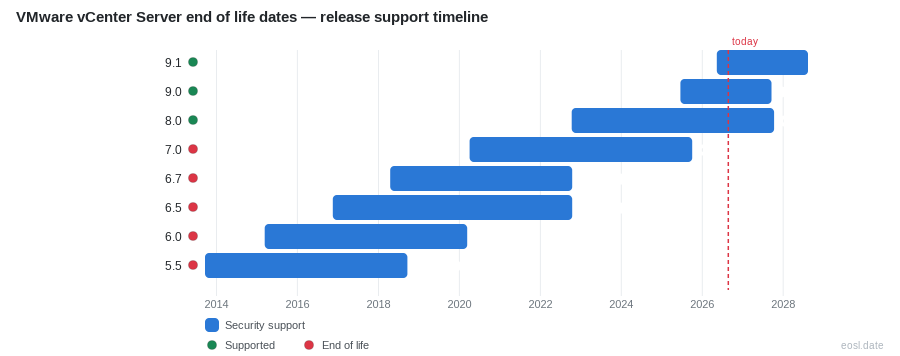
Currently Supported VMware vCenter Server Releases - Active EOS/EOSL Support (3)
| Release | Technical Guidance | Released | General Support | Latest |
|---|---|---|---|---|
| 9.1 | 2029-08-12 | (6 months ago) | (in 1 year and 8 months) | 9.1.1.0 (2 months ago) |
| 9.0 | 2028-09-17 | (1 year and 5 months ago) | (in 9 months) | 9.0.2.0100 (3 months ago) |
| 8.0 | 2029-10-11 | (4 years and 1 month ago) | (in 10 months) | 8.0 U3k (3 months ago) |
VMware vCenter Server End of Life (EOL) Releases - No Longer Supported (8)
| Release | Technical Guidance | Released | General Support | Latest |
|---|---|---|---|---|
| 7.0 | 2027-04-02 | (6 years and 7 months ago) | (1 year and 1 month ago) | 7.0 U3w (1 year and 1 month ago) |
| 6.7 | 2023-11-15 | (8 years and 7 months ago) | (4 years and 1 month ago) | 6.7 U3w (2 years ago) |
| 6.5 | 2023-11-15 | (10 years ago) | (4 years and 1 month ago) | 6.5 U3w (2 years and 4 months ago) |
| 6.0 | 2022-03-12 | (11 years and 8 months ago) | (6 years and 8 months ago) | 6.0 U3j (7 years and 2 months ago) |
| 5.5 | 2020-09-19 | (13 years and 2 months ago) | (8 years and 2 months ago) | 5.5 U3k (8 years and 2 months ago) |
| 5.1 | 2018-08-24 | (14 years and 3 months ago) | (10 years and 2 months ago) | 5.1 U3d (10 years and 6 months ago) |
| 5.0 | 2018-08-24 | (15 years and 2 months ago) | (10 years and 2 months ago) | 5.0 U3g (10 years and 6 months ago) |
| 4 | 2016-05-21 | (17 years and 6 months ago) | (12 years and 6 months ago) | 4.1 U3a (13 years and 9 months ago) |
Planning around VMware vCenter Server end of life starts with one question: which release are you running, and when does its support stop? vCenter Server 7.x passed its end of general support on October 2, 2025, so the fixes you relied on are gone. The dates below show where every release stands.
VMware vCenter Server End of Life Dates for vSphere 7 and ESXi
Each vCenter Server end of life date follows the release date of its major version. Since VMware vCenter Server manages vSphere, ESXi and vSAN together, their key dates usually match. Older versions of the server still appear in the table, which runs from general availability to the end of technical guidance, and every update to a version keeps its parent's dates.
| Version | General availability | End of general support | End of technical guidance |
|---|---|---|---|
| vCenter Server 9.1 | May 12, 2026 | August 12, 2028 | August 12, 2029 |
| vCenter Server 9.0 | June 17, 2025 | September 17, 2027 | September 17, 2028 |
| vCenter Server 8.0 | October 11, 2022 | October 11, 2027 | October 11, 2029 |
| vCenter Server 7.0 | April 2, 2020 | October 2, 2025 | April 2, 2027 |
| vCenter Server 6.7 and 6.5 | 2018 and 2016 | October 15, 2022 | November 15, 2023 |
Only the newer supported release lines still get patches. The EOL for 8.0 arrives on October 11, 2027, while extended support for anything older depends on your Broadcom contract.
The vCenter Server Lifecycle Policy Explained
The vCenter Server follows VMware's Enterprise Infrastructure Support model, and VMware publishes each update schedule in advance. Each major release receives seven years of coverage: five years of general support and two years of technical guidance. Those 7 years are a 5 years plus two split, and the support and subscription terms in your support contracts define what you can request in each stage. This lifecycle also covers every update to a major release, so an update stays supported only while its parent version does.
General Support Phase
During general support you receive bug fixes, security updates and security patches. VMware also issues service packs, adds hardware support to the compatibility guide and offers technical assistance. Each update release needs your server at the matching update level, and VMware software maintenance keeps every server update coming, with a critical update when needed.
Technical Guidance Phase
Once technical guidance begins, support narrows to low-severity issues on supported configurations. There is no new server update, no hardware update, and self-service support replaces tickets. A version reaches end of service life (EOSL), or end of service, when that maintenance period closes, and end of technical guidance is the date to circle.
What vCenter Server 7.x End of Life Means for You
With vCenter Server 7.x at end-of-life, you face growing security risks, because the end of support also ends access to Broadcom support. Outdated servers still run, and vCenter Server EOL does not switch anything off, but without an update any new flaw on the server stays open. VMware customers should begin transitioning to a newer version and upgrade to vCenter 9 soon, since Broadcom support will not take your case. Plan the update in order: update the backup, update the server, then update each host, because every update step depends on the one before it, and a skipped update leaves the server exposed.
Appliance, Windows and Companion Products
The vCenter Server appliance is the only form still sold; vCenter Server for Windows ended with 7.0. Every vCenter Server appliance update is installed through its management interface: take a snapshot, mount the update ISO, stage the update and install the update, then confirm the vCenter Server appliance reports the new build. The same vCenter Server appliance update path works for a patch release or an update release, so a vCenter Server appliance on an old update is the first server to refresh. VMware Update Manager and vSphere Replication follow the same dates as their parent server release.
Checking vCenter Server End of Support Status and Build Numbers
Administrators and IT teams need to know which server installations sit in their environment, and which versions they run. Run an audit report or lifecycle management view to list every management platform, then match each build number against the release notes. The centralized management console controls ESXi hosts, virtual machines and clusters, handling resource allocation, performance monitoring, automation and orchestration across hybrid clouds. Any server whose build falls on a past end of support date is the first one to upgrade.
Planning Your Upgrade Before the vCenter End of Life Date
Before the vCenter end of life date arrives, check that your hardware and software support the target release, including storage and the operating system of each host. If you must stay put, a third party maintenance provider can offer post-warranty cover, and a quote usually costs less than the original warranty. Compare that with a move to vCenter 9, where each server update ships through the same update channel, and ask whether your update window and your server hardware can absorb the update before support ends.