Umbraco CMS End of Life (EOL) Dates and End of Support (EOS) Dates
Umbraco CMS end of life (EOL) and end of support (EOS) dates: 10 Umbraco CMS versions have reached EOL, including Umbraco CMS 16 (EOL date: Jun 12, 2026) — no longer receiving security updates or patches. Umbraco CMS 13 (LTS) reaches its End of Support date on Dec 14, 2026 — plan your upgrade path now. Umbraco CMS 18.3.2 is the current supported release, with support through Jun 25, 2027 — 2 versions in active support. Also see Apache Subversion EOSL dates for related end-of-life information.
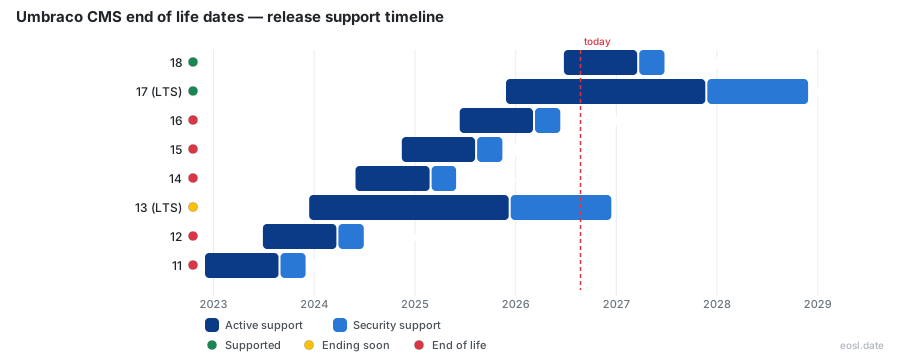
Currently Supported Umbraco CMS Releases - Active EOS/EOSL Support (2)
Umbraco CMS Releases Nearing End of Life - Support Ending Soon (1)
| Release | Released | Security | Support | Latest | LTS |
|---|---|---|---|---|---|
| 13 (LTS) | (2 years and 11 months ago) | (in 3 weeks and 1 day) | (11 months ago) | 13.16.5 (5 days ago) | LTS |
Umbraco CMS End of Life (EOL) Releases - No Longer Supported (10)
| Release | Released | Security | Support | Latest | LTS |
|---|---|---|---|---|---|
| 16 | (1 year and 5 months ago) | (5 months ago) | (8 months ago) | 16.5.1 (8 months ago) | - |
| 15 | (2 years ago) | (1 year ago) | (1 year and 3 months ago) | 15.4.4 (1 year and 3 months ago) | - |
| 14 | (2 years and 5 months ago) | (1 year and 5 months ago) | (1 year and 8 months ago) | 14.3.4 (1 year and 7 months ago) | - |
| 12 | (3 years and 4 months ago) | (2 years and 4 months ago) | (2 years and 7 months ago) | 12.3.10 (2 years and 6 months ago) | - |
| 11 | (3 years and 11 months ago) | (2 years and 11 months ago) | (3 years and 2 months ago) | 11.5.0 (3 years and 2 months ago) | - |
| 10 (LTS) | (4 years and 5 months ago) | (1 year and 5 months ago) | (2 years and 5 months ago) | 10.8.11 (1 year and 4 months ago) | LTS |
| 9 | (5 years and 1 month ago) | (3 years and 11 months ago) | (4 years and 2 months ago) | 9.5.4 (4 years and 2 months ago) | - |
| 8 (LTS) | (7 years and 8 months ago) | (1 year and 8 months ago) | (2 years and 8 months ago) | 8.18.15 (2 years and 1 month ago) | LTS |
| 7 (LTS) | (13 years ago) | (3 years and 1 month ago) | (5 years and 3 months ago) | 7.15.11 (3 years and 2 months ago) | LTS |
| 6 | (13 years and 7 months ago) | (8 years and 6 months ago) | (8 years and 6 months ago) | 6.2.6 (10 years and 8 months ago) | - |
Planning around Umbraco CMS end of life starts with one date: every major release moves from active development to security fixes and then stops. You will see when each release of this open-source CMS loses backing from Umbraco HQ, and what that means for your website.
Umbraco End of Life: What It Means for Your CMS
Once a release reaches end-of-support, there are no more security updates, bug fixes or security patches, and technical support from the vendor ends. Your site keeps running, but it becomes unsupported software. Every new flaw stays open, so a legacy install is a risk, and the support lifecycle no longer covers it.
Active, Support and Security Phase Explained
Each major starts in the active phase for six months, with minor releases every six weeks. The support phase then fixes regressions and flaws. Finally the security phase patches vulnerabilities only, and when it closes the release is end of life.
Umbraco CMS End of Life Dates by Version
This table lists each supported version and its end-of-life date. Umbraco 18 is the newest standard-term release, while Umbraco 17 is the current LTS.
| Major | Type | Security phase begins | Ends |
|---|---|---|---|
| 18 | STS | 25 Mar 2027 | 25 Jun 2027 |
| 17 | LTS | 27 Nov 2027 | 27 Nov 2028 |
| 13 | LTS | 14 Dec 2025 | 14 Dec 2026 |
| 10 | LTS | 16 Jun 2024 | 16 Jun 2025 |
| 8 | None | 24 Feb 2024 | 24 Feb 2025 |
| 7 | None | 31 Jul 2021 | 30 Sep 2023 |
Releases between LTS versions use standard-term support, or STS, and last about a year. Compare the table with your installed release before anything else.
Umbraco 7, 8 and 10 Are Already Past EOL
Umbraco 7 ended in September 2023, Umbraco 8 in February 2025 and Umbraco 10 in June 2025. A site on any of them needs a migration plan now, not next year.
Umbraco 13 End of Life in December 2026
Umbraco 13 end of life lands on 14 December 2026, closing long-term support for the .NET 8 release. That is the end-of-service point for the version: your website still loads, yet enterprise security teams and compliance auditors will treat it as unpatched.
Business Risk and Security Exposure After EOL
After 14 December 2026, flaws found in Umbraco 13 stay unpatched, which means security exposure and wider business risk. Maintenance costs climb, compatibility with third party integrations slips, and routine maintenance eats the budget meant for new features.
What Umbraco 13 Users Should Do Now
Before Umbraco 13 reaches its end of life on 14 December 2026, start planning: list your plugins, test your Umbraco 13 website against a newer release, and book development time. Early planning keeps the move calm.
LTS Releases and .NET Support Timeframes
An LTS major arrives shortly after each Microsoft LTS of .NET: 13 runs on .NET 8, 17 on .NET 10. Built on ASP.NET Core and C#, this platform gives Umbraco support timeframes of 18 months of support plus 12 of security fixes for LTS, against 3 plus 3 for STS.
Why LTS Follows .NET Long-Term Support
Matching the runtime means one patched stack, so long term support for an Umbraco major never outlives its host framework: the end of life for Umbraco 13 follows the lifespan of its runtime.
Umbraco Release Cadence and Support Lifecycle
A new major ships twice a year and a minor release every six weeks, following semantic versioning: majors carry breaking changes, minors add features, and a patch repairs regressions. This release schedule sets the release cycle that developers and packages must follow, and the release cadence explains why STS versions expire so fast.
Release Candidate and Deprecation Policy
Each major gets a release candidate first, and anything deprecated in a minor stays available until the next major, so check deprecated APIs before your version loses support.
Keeping Umbraco Support: Upgrade Path to Umbraco 17
Sites on older LTS releases lose fixes at end of life, so Umbraco 17 is the logical upgrade target. Since the new backoffice in version 14 replaced AngularJS, every backoffice plugin needs a rewrite, which is where most of the performance and effort sits.
Upgrade or Rebuild Your Website
If your design still works and you hold lots of content, upgrade the content management system; if it feels dated, rebuild. Either route must finish before your installed release reaches end of life, with Umbraco 17 as the target. A registered Umbraco partner or agency can scope either route.
Find Your Umbraco Version First
Log in to the backoffice and open the Help icon; the version shows at the top. Compare it with the end-of-life table above to see whether you are already unsupported, and note your hosting setup too.
Umbraco Cloud and Add-on End-of-Support Rules
Umbraco Cloud builds new projects on the latest LTS, while Umbraco Forms, Umbraco Commerce and Umbraco Deploy share the CMS LTS timeline, so each add-on is supported as long as the matching core release.
Retired Products: Courier, Contour and Uno
These retired products are out of support: Courier became Deploy, Contour became Forms, and Uno projects moved to Cloud on version 8, so the replacements are the supported path.
End-of-Service Options: XLTS After Umbraco EOL
XLTS offers extended long-term support that keeps an LTS release secure past its final date, a bridge while you finish the upgrade; it is a stopgap for security, not a destination.