JFrog Xray End of Life (EOL) Dates and End of Support (EOS) Dates
JFrog Xray end of life (EOL) and end of support (EOS) dates: 31 JFrog Xray versions have reached EOL, including JFrog Xray 3.118 (EOL date: Oct 28, 2026) — no longer receiving security updates or patches. JFrog Xray 3.124 reaches its End of Support date on Jan 29, 2027 — plan your upgrade path now. JFrog Xray 3.150.17 is the current supported release, with support through Jan 29, 2028 — 4 versions in active support. Also see Coder end of support dates for related end-of-life information.
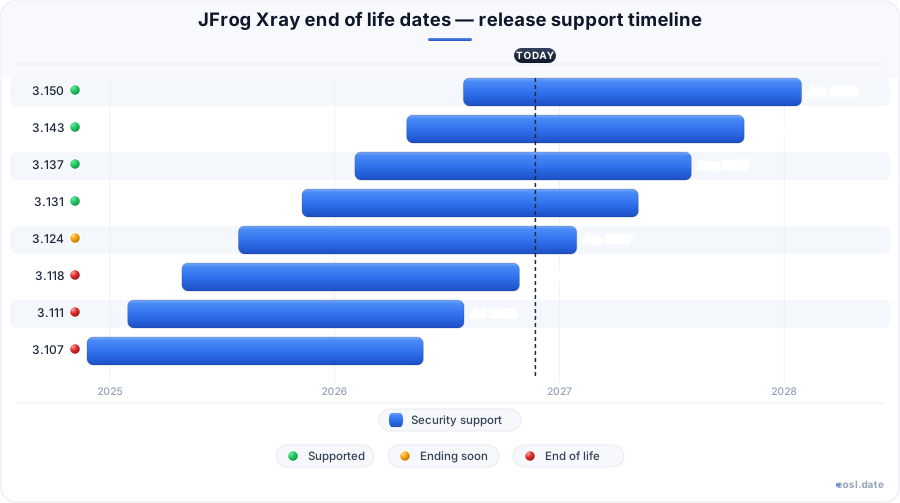
Currently Supported JFrog Xray Releases - Active EOS/EOSL Support (4)
JFrog Xray Releases Nearing End of Life - Support Ending Soon (1)
| Release | Released | Support | Latest |
|---|---|---|---|
| 3.124 | (1 year and 3 months ago) | (in 2 months) | 3.124.42 (7 months ago) |
JFrog Xray End of Life (EOL) Releases - No Longer Supported (31)
| Release | Released | Support | Latest |
|---|---|---|---|
| 3.118 | (1 year and 6 months ago) | (3 weeks and 3 days ago) | 3.118.44 (5 months ago) |
| 3.111 | (1 year and 9 months ago) | (3 months ago) | 3.111.31 (1 year and 3 months ago) |
| 3.107 | (1 year and 11 months ago) | (5 months ago) | 3.107.36 (1 year and 6 months ago) |
| 3.104 | (2 years and 1 month ago) | (7 months ago) | 3.104.19 (2 years ago) |
| 3.103 | (2 years and 2 months ago) | (8 months ago) | 3.103.6 (2 years and 2 months ago) |
| 3.102 | (2 years and 3 months ago) | (9 months ago) | 3.102.3 (2 years and 3 months ago) |
| 3.101 | (2 years and 3 months ago) | (9 months ago) | 3.101.5 (2 years and 3 months ago) |
| 3.100 | (2 years and 4 months ago) | (10 months ago) | 3.100.4 (1 year and 7 months ago) |
| 3.98 | (2 years and 4 months ago) | (10 months ago) | 3.98.5 (2 years and 4 months ago) |
| 3.97 | (2 years and 4 months ago) | (10 months ago) | 3.97.3 (2 years and 4 months ago) |
| 3.96 | (2 years and 5 months ago) | (11 months ago) | 3.96.1 (2 years and 5 months ago) |
| 3.95 | (2 years and 6 months ago) | (1 year ago) | 3.95.7 (2 years and 6 months ago) |
| 3.94 | (2 years and 7 months ago) | (1 year and 1 month ago) | 3.94.5 (2 years and 6 months ago) |
| 3.92 | (2 years and 7 months ago) | (1 year and 1 month ago) | 3.92.7 (2 years and 7 months ago) |
| 3.91 | (2 years and 8 months ago) | (1 year and 2 months ago) | 3.91.3 (2 years and 8 months ago) |
| 3.90 | (2 years and 8 months ago) | (1 year and 2 months ago) | 3.90.1 (2 years and 8 months ago) |
| 3.89 | (2 years and 9 months ago) | (1 year and 3 months ago) | 3.89.5 (2 years and 9 months ago) |
| 3.88 | (2 years and 9 months ago) | (1 year and 3 months ago) | 3.88.12 (2 years and 9 months ago) |
| 3.87 | (2 years and 11 months ago) | (1 year and 5 months ago) | 3.87.10 (2 years and 9 months ago) |
| 3.86 | (3 years ago) | (1 year and 6 months ago) | 3.86.10 (2 years and 10 months ago) |
| 3.85 | (3 years and 1 month ago) | (1 year and 7 months ago) | 3.85.7 (2 years and 11 months ago) |
| 3.83 | (3 years and 2 months ago) | (1 year and 8 months ago) | 3.83.10 (3 years and 1 month ago) |
| 3.82 | (3 years and 3 months ago) | (1 year and 9 months ago) | 3.82.10 (3 years and 2 months ago) |
| 3.81 | (3 years and 3 months ago) | (1 year and 9 months ago) | 3.81.8 (3 years and 2 months ago) |
| 3.80 | (3 years and 4 months ago) | (1 year and 10 months ago) | 3.80.9 (3 years and 3 months ago) |
| 3.79 | (3 years and 4 months ago) | (1 year and 10 months ago) | 3.79.11 (3 years and 3 months ago) |
| 3.78 | (3 years and 5 months ago) | (1 year and 11 months ago) | 3.78.10 (3 years and 4 months ago) |
| 3.77 | (3 years and 5 months ago) | (1 year and 11 months ago) | 3.77.4 (3 years and 4 months ago) |
| 3.76 | (3 years and 5 months ago) | (1 year and 11 months ago) | 3.76.7 (3 years and 4 months ago) |
| 3.75 | (3 years and 6 months ago) | (2 years ago) | 3.75.12 (3 years and 5 months ago) |
| 3.74 | (3 years and 6 months ago) | (2 years ago) | 3.74.8 (3 years and 5 months ago) |
Planning your JFrog Xray end of life timeline starts with one rule: every self-managed Xray version line is covered for 18 months, and the EoL date follows from the release date. This guide shows you how to find the EoL date for the build you run, what the JFrog Security team changes before a version retires and how to schedule an update so your security scanning never runs on an unsupported release.
JFrog Xray End of Life Policy and the 18-Month Support Window
JFrog supports self-managed versions of JFrog Security for 18 months from the release of the initial minor version. A patch such as 3.124.42 does not get its own clock; it inherits the EoL date of the 3.124 line. When that date arrives, the version is decommissioned: JFrog stops shipping fixes for it and moves its notes to the legacy docs archive. Treat the EoL date as the end of support for scanning rules, security patches and bug fixes alike. For a security team, an unsupported scanner is a gap in the software supply chain, not a cosmetic problem.
How the Release Date Sets the EoL Date
The release date of the first build in a version line starts the countdown. You can express the rule as a formula:
$$\text{EoL date} = \text{initial release date} + 18\ \text{months}$$
The release date of later fixes in the same line does not push the EoL date out, so a self-hosted team that stays on the newest patch of an old line still runs out of support on schedule. The page JFrog maintains is refreshed periodically and can lag the newest release, so confirm important dates in the official Xray documentation before you commit to a change window.
Cloud Versus Self-Managed Support
Xray runs as a cloud service or as a self-managed installation. On the cloud, JFrog updates the platform for you, so the EoL calendar matters mainly to teams that operate their own deployment and own its maintenance. Third-party catalogs describe the same policy in their own words: a version is covered for 18 months from its release, and the end-of-life date is specific to each version. InvGate, for instance, shows Xray 3.124 with an EoL date of January 29, 2027, which matches the official table below.
Xray EOL Dates for Self-Managed Versions
The table lists the self-managed versions of Xray that sit inside or just outside the window as of late October 2026, with the days left counted from October 27, 2026. Each row is one version line, and every patch release in that line shares the same date.
| Xray version line | EoL date | Days left | Support status |
|---|---|---|---|
| 3.107 | 25 May 2026 | Passed | Not supported |
| 3.111 | 30 July 2026 | Passed | Not supported |
| 3.118 | 28 October 2026 | 1 | Ends tomorrow |
| 3.124 | 29 January 2027 | 94 | Active |
| 3.131 | 9 May 2027 | 194 | Active |
| 3.137 | 3 August 2027 | 280 | Active |
| 3.143 | 28 October 2027 | 366 | Active |
| 3.150 | 29 January 2028 | 459 | Active |
Which Self-Managed Versions Are Supported Now
Every line marked active, from 3.124 through 3.150, still receives fixes. The fastest check is to compare your installed version string with the left column and read across to the EoL date. Because the 3.118 line ends on October 28, 2026, any team still on it has a one-day window and should treat the change as urgent.
Versions That Have Already Reached EoL
Lines 3.107 and 3.111 are past their dates, and 3.104 ended even earlier, in April 2026. If one of these is your production release, you receive no new fixes for the scanner itself, and auditors may flag the installation as unsupported software. Move to an active line, then record the decommissioned versions in your asset inventory so nobody reinstalls them from an old image.
Reading Xray Versions and Release Notes
JFrog publishes notes for the Xray product in chronological order, with the newest at the top. Each entry has a heading such as 3.157.2, a release date and sections for new features, enhancements and resolved issues. A version number has three parts: the major number (3), the line (such as 157) and the patch. Only the line decides the EoL date.
- Version line: the group that carries the 18-month clock, for example 3.143.
- Patch release: a fix build inside that line, such as 3.143.28, shipped on 28 June 2026.
- Resolved issues: a table of Jira keys (XRAY-xxxxxx) describing each fix, including security and scan accuracy fixes.
- Legacy docs: older notes and retired versions live in the Legacy Docs Archive.
The latest stable version shown by third-party catalogs often trails the official notes. InvGate lists Xray 3.131.8 for cloud and 3.124.32 for self-hosted deployments, while JFrog's own table already shows newer patches for those lines. When two sources disagree, trust the official release notes.
Artifactory End-of-Life Dates and the JFrog Platform
Xray rarely runs alone. It scans the repositories and artifacts stored in Artifactory, and both belong to the JFrog Platform. Artifactory follows the same 18-month rule, so its EoL dates live on a separate page, for example 23 October 2026 for the 7.111 line and 14 January 2027 for 7.117. A mismatch matters: an Xray build that is covered can still be paired with an Artifactory release that is not, and a DevOps team then debugs an integration problem instead of a vulnerability.
When you plan a change, check the whole stack: Artifactory, Xray, JFrog Pipelines and the JFrog CLI on your build agents. The platform ships these components together, and enterprise licensing for the suite is proprietary, so version alignment is part of your support agreement. Teams that update one component and forget another end up with a mismatch harder to trace than the EoL itself.
Xray Deprecation: Block Download Moves to JFrog Curation
EoL dates are not the only lifecycle signal. JFrog is announcing a deprecation of the Block Download feature for remote repositories in JFrog Xray. The capability moves to JFrog Curation, and the change rolls out in phases from April 1, 2026 through November 2026. The release page points to the Security Deprecations page for the full schedule, so read it next to the version table.
Why Curation Replaces Block Download
JFrog gives three reasons for the move, and each changes the daily work of your developers:
- Blocking at the gate: a scanner must see content to analyze it, so the file already sits in your cache. Curation blocks on metadata first, so threats never enter the environment.
- Protection before detection: Curation policies pick the newest mature version while a fresh package has no known verdict yet.
- Less friction: blocking tied to scanning can cause CLI timeouts and silent failures. A Curation policy decision is made before the download starts, and developers get a clear message.
Xray itself is not going anywhere. It remains the scanner for software composition analysis, and the newer jf xr status command in the JFrog CLI helps a developer find out why a download was blocked, including the policy and the CVE behind it. Recent releases added Curation conditions, audit filters and an integrity check that blocks a cached package whose checksum does not match the catalog. Review your Curation policies and your security policy set together, because both decide which packages reach your build pipeline.
Technical Requirements Before the Xray End of Support Date
A move to a newer line fails most often because the host is undersized, not because the installer is broken. Catalog data for Xray lists this baseline for a combined Artifactory and Xray installation:
- CPU and RAM: 8 CPU and 16 GB of RAM, with 24 GB recommended when you add JFrog Advanced Security.
- Storage: 300 GB of fast disk with 3,000 or more IOPS, because scanning large sets of artifacts is disk-bound.
- Operating systems: Debian, Ubuntu and RHEL for RPM installs, plus ARM64 for container installs through Helm and Docker. Lists such as Debian 10 and 11 or Ubuntu 20.04 and 22.04 change often, so verify the current list.
- High availability: run RabbitMQ and Xray on separate servers, and expect default external port 8082.
These are minimum requirements, not a sizing plan. If your last update was more than a year ago, rehearse the migration on a staging copy, because newer releases changed the SBOM catalog model and the migration can take hours on large instances. Back up the database before you start, and keep your Docker and Helm deployment files under version control so you can roll back.
What Xray Scanning Covers Until Its EoL Date
Xray is an enterprise software composition analysis (SCA) tool. It identifies, prioritizes and remediates security vulnerabilities and license compliance issues in open source components across your software supply chain. Because EoL means the scanner stops learning, it helps to know exactly what you give up. The core capabilities are:
- Continuous scanning of repositories, builds and container images, including binary-level detection in binaries and layers.
- CVE research and enrichment from JFrog's security research team, with contextual analysis that shows whether a vulnerable function is reachable.
- SBOM generation, so you see direct and indirect dependencies and can export a software bill of materials.
- Malicious package detection backed by a database of millions of open source packages.
- Exposed secrets and IaC checks, plus operational risk policies that block packages by version age, contributors or end-of-life status.
- Reports, Frogbot pull request scans and IDE views through the JFrog CLI, which fit into any CI/CD pipeline.
SBOM, CVE and Vulnerability Data in Practice
An SBOM is the inventory behind every scan: it lists each package and dependency inside a build, an image or a release bundle, so the scanner can match components against a CVE feed. Each matched CVE becomes a vulnerability record with a severity, a fixed version where one exists and a link to remediation advice. Without current SBOM logic, a vulnerability can stay hidden. Recent patches show why: one fix stopped components with an unknown version from matching every historical CVE, and another restored Ruby gems that were missing from the SBOM when the original files were no longer in the image.
Contextual analysis reduces the noise. It checks whether your code calls the vulnerable function, so a security team can rank the CVE list by what is actually reachable. A frozen, unsupported scanner stops getting these accuracy fixes, and the SBOM it produces slowly drifts from reality.
Security Features You Lose Without a Newer Version
Once a line passes its EoL date, the scanner no longer receives fixes, and new SBOM and exposure features never reach you. A scanner that misses a CVE is worse than none, because it creates false confidence. Pair scan results with Threat Hub or your own remediation workflow, and keep your Docker base images and Helm charts current. Analysts such as Gartner track software supply chain security vendors, so staying on a covered release also simplifies audits and compliance reviews.
Policies, Watches and Reports That Depend on a Current Release
Security policies and watches decide what happens when a scan finds a problem: warn, fail a build or block a download. Reports then summarize the findings by repository, build or project. These objects live in the Xray database, so a migration to a newer line is also a moment to prune stale policy rules, retire unused watches and confirm that every important repository still has coverage. When you add Curation, list which package types each policy covers, because a gap between the two systems is where a malicious package slips through.
A Simple Update Checklist
- Find your running version and read its EoL date in the table above.
- Pick a target line that is at least twelve months from its own EoL date.
- Check Artifactory compatibility and your Curation policies.
- Rehearse the change on staging, run the scan again and compare the CVE results with production.
- Schedule the production change at least thirty days before the EoL date.
Xray Security Policy, Packages and Build Pipelines on Supported Versions
Every JFrog Xray policy, watch and report reads from the same pipeline: a developer pushes a build, a repository in Artifactory stores the artifacts and the scanner inspects every package and dependency for a vulnerability. Keeping self-managed versions inside the support window keeps that chain trustworthy. If you must postpone an upgrade, document the exception and the date you will close it.
Policy, Watches and Repositories
A security policy defines the rule, such as "fail the build on a critical CVE", and a watch connects that policy to a set of repositories or builds. A license policy does the same for compliance. Review each policy before a change, because a rule that blocks a package on a scanner older than the vulnerability feed will quietly stop protecting the repositories it covers. List the repositories and builds attached to each watch, and make sure every artifact path with production images still has a policy.
- Vulnerability policy: blocks or warns on a vulnerability by severity, CVSS score or contextual analysis result.
- License policy: enforces compliance rules on open source licenses found in packages.
- Operational risk policy: flags a package by age, maintenance cadence or end-of-life status.
- Curation policy: stops an unwanted package before it reaches a remote repository, the role that replaces Block Download.
Packages, Artifacts and Docker Images
Xray detection works on binaries, so it handles Docker images, Maven and npm packages, PyPI wheels, NuGet packages and Helm charts alike. It unpacks each artifact, builds the SBOM, matches every component against known vulnerabilities and reports the impact path that explains how a vulnerable package entered your build. This is where an old scanner fails first: new package formats and new CVE feeds assume current SBOM and scanning logic, and a retired version cannot read them. A migration to a newer line restores that detection coverage across your repositories.
CI/CD, Frogbot and the JFrog CLI
Most teams reach Xray through integration points rather than the UI. The JFrog CLI scans a build or a dependency tree in CI/CD, Frogbot opens pull request comments with remediation advice, and IDE plugins show the vulnerability beside the code. All three call the Xray API of your installation, so a support gap hits developers too: a stale server returns old scan data, and a developer fixes a problem that no longer exists while missing one that does. After each update, run one test build through your CI/CD pipeline and confirm the scan results, the policy decision and the report still match.
Maintenance Windows and Deployment Planning
Plan the change like any production deployment. Choose a window outside peak build hours, stop new scans, take a database backup and update the Docker, Helm or Debian packages for each node. On Ubuntu and RHEL hosts, update the packages in the order the vendor documents, then check service health on port 8082. Afterward, review the integration points one by one and confirm that scheduled reports still run. For a cluster, update the high availability nodes one at a time so scanning continues, and keep an upgrade log with the old version, the new version and the date, because auditors ask for exactly that evidence.
Closing the Security Gaps Before Support Ends
Put the findings into one security review. List every Artifactory repository that Xray scans, the artifacts it holds and the packages that carry a critical vulnerability. For each one, note the SBOM status, whether SCA coverage includes the package type and whether a Curation policy guards the remote repository. The same review should cover Docker and Debian package sources, because those feeds carry many a vulnerability that pure application scanning misses. A short table of risk by repository is enough: it shows which integration needs attention first and which reports to hand to compliance.
Finally, keep the vulnerabilities you cannot fix yet visible. Contextual analysis and a remediation owner turn a long CVE list into a plan, and a documented release date for the fix keeps the security team honest. When SBOM data, scanning results and policy decisions all come from a version inside its support window, the vulnerabilities you report to leadership are the real ones. Repeat this check each quarter against the self-managed versions table, and treat a new JFrog Curation condition or SBOM change in the notes as a prompt to revisit your policy set, your dependencies and your build checks.
A last practical note on JFrog Xray scanning: security teams get the most value when Xray, Artifactory and Curation share one set of repositories and one security policy vocabulary. Run a vulnerability scan on every Docker image and every package a build produces, store the SBOM with the artifacts and let contextual analysis decide which vulnerabilities need an immediate fix. Support tickets, audit reports and SCA dashboards then show the same security story. Add the repositories that hold release artifacts first, since a vulnerability there reaches customers; a supported version, a current SBOM and a clear owner for every open vulnerability make that coverage defensible. Treat Curation and Xray as complementary security layers rather than competing tools, and review the reports they generate whenever a new version ships.
To make that review concrete, treat each Artifactory repository as a unit of risk. For every repository, record its packages, its artifacts, its dependencies, its SBOM and its open vulnerabilities, and note which Docker images and Helm charts it feeds. Vulnerabilities in direct dependencies come first; transitive vulnerabilities follow, filtered by contextual analysis. An SBOM that lists every package gives support staff and security reviewers a shared reference, and a current SBOM also speeds the next CVE response, because you can query which artifacts contain the affected package. Keep Curation rules, JFrog Curation conditions and Xray security policy notes in the same document, so the support team sees one picture of repository risk, SBOM freshness and vulnerabilities. Where risk is high, add scanning on push, extra Docker image scanning and a second SBOM export for the compliance team. If you need outside help, JFrog support can confirm whether a specific SBOM, CVE or Curation behavior is fixed in your target version, and that answer belongs in your change record next to the vulnerabilities it resolves.