Apache Subversion End of Life (EOL) Dates and End of Support (EOS) Dates
Apache Subversion end of life (EOL) and end of support (EOS) dates: 15 Apache Subversion versions have reached EOL, including Apache Subversion 1.14 (LTS) — no longer receiving security updates or patches. Apache Subversion 1.15.0 LTS is the current supported release. Also see RabbitMQ EOSL dates for related end-of-life information.
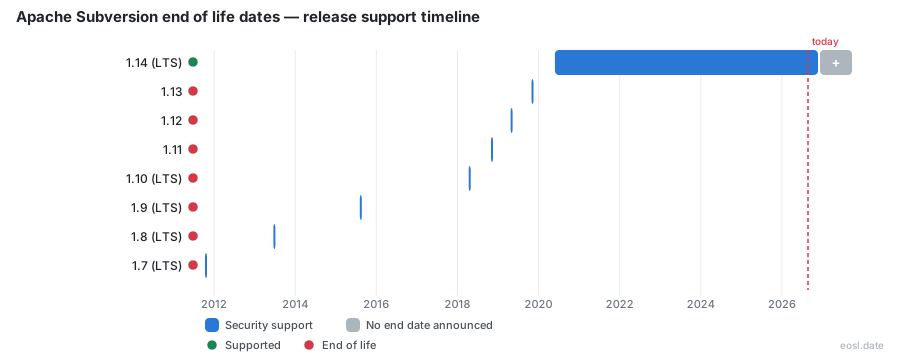
Currently Supported Apache Subversion Releases - Active EOS/EOSL Support (1)
| Release | Released | Support | Latest | LTS |
|---|---|---|---|---|
| 1.15 (LTS) | (1 month and 2 weeks ago) | Active | 1.15.0 (1 month and 2 weeks ago) | LTS |
Apache Subversion End of Life (EOL) Releases - No Longer Supported (15)
| Release | Released | Support | Latest | LTS |
|---|---|---|---|---|
| 1.14 (LTS) | (6 years and 5 months ago) | — | 1.14.5 (1 year and 11 months ago) | LTS |
| 1.13 | (7 years ago) | — | 1.13.0 (7 years ago) | - |
| 1.12 | (7 years and 6 months ago) | — | 1.12.2 (7 years and 3 months ago) | - |
| 1.11 | (8 years ago) | — | 1.11.1 (7 years and 10 months ago) | - |
| 1.10 (LTS) | (8 years and 7 months ago) | — | 1.10.8 (4 years and 7 months ago) | LTS |
| 1.9 (LTS) | (11 years and 3 months ago) | — | 1.9.12 (7 years and 3 months ago) | LTS |
| 1.8 (LTS) | (13 years and 5 months ago) | — | 1.8.19 (9 years and 3 months ago) | LTS |
| 1.7 (LTS) | (15 years and 1 month ago) | — | 1.7.22 (11 years and 3 months ago) | LTS |
| 1.6 (LTS) | (17 years and 8 months ago) | — | 1.6.23 (13 years and 5 months ago) | LTS |
| 1.5 (LTS) | (18 years and 5 months ago) | — | 1.5.9 (15 years and 11 months ago) | LTS |
| 1.4 (LTS) | (20 years and 2 months ago) | — | 1.4.6 (18 years and 11 months ago) | LTS |
| 1.3 (LTS) | (20 years and 10 months ago) | — | 1.3.2 (20 years and 5 months ago) | LTS |
| 1.2 (LTS) | (21 years and 6 months ago) | — | 1.2.3 (21 years and 2 months ago) | LTS |
| 1.1 (LTS) | (22 years and 1 month ago) | — | 1.1.4 (21 years and 7 months ago) | LTS |
| 1.0 (LTS) | (22 years and 8 months ago) | — | 1.0.9 (22 years and 1 month ago) | LTS |
If your team still keeps source code in a centralized version control system, you need to know exactly where Apache Subversion end of life falls for the release line you run. This guide lists every supported release, the unsupported ones, and the security fixes in each Subversion release, so you can plan an upgrade as soon as your line nears its final release. The newest line is 1.15, published on 2026-10-08, and this open-source software is maintained by the Apache Software Foundation community, and the Apache Subversion maintainers publish every Apache release, security fix and release announcement on subversion.apache.org.
Apache Subversion End of Life Policy and Support Period
The Apache Subversion project publishes its support period rules on the Apache roadmap page, and every Apache Subversion release follows them. The release process is documented there as well, and the Apache team says it prefers to roll a release in mid-week. A release line is a minor version such as 1.14 or 1.15, and each line keeps receiving patch releases until it is declared dead. Once a line reaches EOL, you get no more bug fixes, no security fixes and no new release from the maintainers, so the supported release is the only safe choice for a server that faces other users. Apache publishes each Apache Subversion release, release announcement and release note on its own Apache site.
Release Support Period Rules for Each Release Line
Starting with 1.15, every release line is supported for at least 3 years, and at least one release line is always supported. A line reaches end of support only when both conditions are met:
- It has been supported for at least 3 years.
- A new minor release line exists with an age of at least 6 months.
Among the supported lines, the latest release line (N) gets full support. Older ones (N-1, N-2) get security-only support and critical bugfixes, for example fixes related to data corruption. The roadmap page also notes there is no timetable for the next release, and that the team tries to roll each release on a Wednesday. Read the release notes of your line before you plan, because the release notes describe the policy that applied when the line shipped, and check the release announcement for the Apache Subversion version you plan to install.
Long-Term Support Versus Regular Releases
On 2018-06-22 the project moved to LTS and standard releases. Under that old scheme, regular releases were supported for six months, while an LTS release was supported for four years. Subversion 1.0 through 1.10 and 1.14 were LTS releases, and 1.11, 1.12 and 1.13 were regular releases. The long-term support label matters because it decides how long you can wait: a regular release left you six months, an LTS release left you roughly four years, and the new 3-year minimum replaced both. Release numbering, compatibility policies and deprecation rules are described in the Subversion Community Guide.
Subversion Release Support Status by Version
The table below combines the project's own announcements with the endoflife.date tracker and the Wikipedia version history. Use it as a quick lookup for each Subversion release, then read the notes underneath for the details.
| Release line | Original release | Last patch release | Status |
|---|---|---|---|
| 1.15 (LTS) | 2026-10-08 | 1.15.0 (2026-10-08) | Supported, latest version |
| 1.14 (LTS) | 2020-05-27 | 1.14.5 (2024-12-08) | Supported per Wikipedia, ended per endoflife.date |
| 1.13 | 2019-10-30 | 1.13.0 (2019-10-30) | Unsupported, end of life |
| 1.12 | 2019-04-24 | 1.12.2 (2019-07-24) | No longer supported |
| 1.11 | 2018-10-30 | 1.11.1 (2019-01-11) | No longer supported |
| 1.10 (LTS) | 2018-04-13 | 1.10.8 (2022-04-12) | Unsupported, end of life announced 2023-09-24 |
| 1.9 (LTS) | 2015-08-05 | 1.9.12 (2019-07-24) | No longer supported |
| 1.8 and older | 2004 to 2013 | 1.8.19 (2017-08-10) and earlier | No longer supported |
The sources disagree on 1.14. The roadmap says a line only reaches end of support after three years and once a newer line is six months old, and Wikipedia still shows 1.14 as fully supported. The endoflife.date tracker, which applies the older four-year LTS rule, already lists it as ended. Treat 1.14 as the last of the old LTS family and confirm its status on the project's own news page before you rely on it.
Supported Release: Subversion 1.15 and 1.14 LTS
Subversion 1.15.0 was announced on 2026-10-08 as the most complete Subversion release to date, after the 1.15.0-rc3 and 1.15.0-rc4 release candidate builds. Everything in 1.0 through 1.14 is in it, so a move to 1.15 is the natural upgrade path. Subversion 1.14 shipped on 2020-05-27 as the LTS release that followed 1.10, and its last patch release is 1.14.5, which fixed CVE-2024-46901. The 1.14 release notes explain that servers and clients interoperate across versions, so you do not need to dump and reload your repository when you upgrade as soon as the new binaries are in place.
Subversion 1.10 Is Now the Old Stable Version
The project announced Subversion 1.10.x end of life on 2023-09-24. The 1.10 line was released on 2018-04-13 and supported for four years under the LTS life-cycle. The team said it had stopped accepting bug reports against 1.10.x and will not make any more 1.10.x releases. The last one, 1.10.8, was made on 2022-04-12, and it remains available to anyone who cannot update to 1.14. The maintainers recommended that everyone upgrade as soon as practical to the current LTS release at that time, which was 1.14.2. The 1.14 release notes had already called 1.10.x the old stable version once 1.14 shipped.
Unsupported Release Lines 1.13 and Older
The same release notes state that Subversion 1.13.x is end of life and that 1.9.x is end of life. Release 1.13.0 was a regular release published on 2019-10-30, and its six-month window closed long ago. Every line from 1.0 to 1.12 is unsupported too. If a working copy or server still runs one of them, you are running software that no longer receives a security fix, so upgrade as soon as you can schedule a window.
SVN EOL Timeline and Release Announcement History
The news archive on subversion.apache.org is the primary source for each release announcement. Every entry follows the same pattern: a short release announcement, a link to the release notes, and a pointer to the download page where you pick the nearest mirror. The list below summarizes the milestones that matter for lifecycle planning, newest first.
- 2026-10-08: 1.15.0 released. See the release announcement, the release notes and the download page, then upgrade as soon as your tests pass.
- 2024-12-08: 1.14.5 released with a fix for a security issue, CVE-2024-46901. Check the release notes, grab it from the download page mirror and upgrade as soon as possible.
- 2024-10-08: 1.14.4 released with a fix for CVE-2024-45720; read the release announcement before you upgrade as soon as it is approved.
- 2023-12-28: 1.14.3 released, described as the most complete Subversion release to date.
- 2023-09-24: 1.10.x declared end of life.
- 2022-04-12: 1.14.2 and 1.10.8 released together with a security advisory.
- 2021-02-10: 1.14.1 and 1.10.7 released, and the 1.14 fix for path-based authorization shipped.
- 2020-05-27: 1.14.0 released after 1.14.0-rc2.
- 2019-10-30: 1.13.0 released as a regular release.
- 2018-04-13: 1.10.0 released after 1.10.0-rc1 and 1.10.0-rc2.
Each patch release in this list was built from a release candidate or a tarball that the team validated first. Their usual wording asks every user to upgrade as soon as reasonable, and that is the practical meaning of a release announcement: a stable build is waiting on the mirror, so upgrade as soon as your change window allows, and download the signed tarballs from the download page rather than a third-party site.
To get a build, open the Apache Subversion download page and pick the nearest mirror. Each Apache mirror carries the same release tarballs, and the download page links the matching release announcement and release notes for every release. Binary packages for Windows or Linux come from vendors such as WANdisco, who distribute Subversion software separately, so ask your vendor which release it packages and whether its own download page lags behind the Apache release. Whatever the source, confirm the checksums and signatures from the Apache download page before you install anything on a production repository, and avoid any mirror you do not recognize. Users who rely on a Linux distribution should wait for the distribution to publish the new release instead of building from the tarball.
Every Apache release page follows the same layout, so you can read a release in seconds. The Apache release announcement gives the version and the fixes, the release notes give the upgrade advice, and the download page gives the mirror links. For an Apache Subversion release candidate, the Apache announcement says the release is not for production use, so wait for the final release before you download it. A final release from the Apache team is the build to deploy, and the next release in the same release line replaces it. When a new release line appears, the previous release line moves to security-only support, and the release you run should be the latest release in your line. Compare your svn version with the latest release on the Apache download page, and follow the Apache release announcements so svn users on your team learn about each release the day it ships.
Security Advisory and CVE Fixes
A security advisory on the news page always names the CVE and who is affected. The 2022-04-12 advisory covered CVE-2021-28544 and CVE-2022-24070. It affected only the mod_dav_svn and svnserve servers, not Subversion clients, so server operators were told to upgrade as soon as reasonable. The 2021-02-10 advisory covered CVE-2020-17525, which affected mod_dav_svn servers only. In December 2021 the project also confirmed that Subversion was not affected by CVE-2021-44228 (Log4Shell), because it does not depend on the Apache Log4j library, although a vendor's bundled Java web interface or a hook written in Java could still be vulnerable. A security issue like these is exactly why an unsupported release line is risky: once the line is unsupported, no fix will ever arrive for the next advisory.
Release Notes and Compatibility Changes
The release notes list the compatibility concerns for each line. Older clients and servers interoperate transparently with a 1.14 server, though a new feature may need both ends to be current. The notes also contain a feature compatibility table, which shows the minimum client, minimum server and minimum repository for items such as svnadmin rev-size (server 1.13 or newer) and svnadmin build-repcache (server 1.14, FSFS format 4). Subversion keeps API and ABI compatibility within 1.x by only adding functions, so a program written for any earlier 1.x API compiles against 1.14 libraries. Read the release notes before you upgrade as soon as a patch appears, because that page also records known issues and the support planning for the line. The Apache release notes for each Apache Subversion release also point to the Apache API errata and Apache documentation, so check them before you upgrade a release that your own build tools depend on. A mirror may lag, so download the release again from the Apache download page if a checksum fails.
Upgrade Plan Before Your Supported Release Ends
A calm upgrade beats a rushed one, and a migration to a newer Apache Subversion release line is mostly a library swap. If you are weighing a bigger migration to another revision control system such as Git, do the Subversion upgrade first, because an unsupported server is a risk for every user while you plan the move. Start by checking which line your server and each client use, compare it with the table above, and then follow the steps below.
- Run
svn --versionon the server and on a typical client to confirm the line, and list every repository the server hosts. - Read the release notes and the release announcement for the target Apache Subversion release, then download the software from a mirror on the download page.
- Install the new libraries and binaries over the old ones, since no dump and reload of your repository is needed.
- Upgrade the working copy where required, then test a commit, a branch copy and an update with a few users before the whole team moves.
Upgrading the Working Copy with svn upgrade
Subversion 1.14 uses the same working copy format as 1.8 through 1.13. Before you use it on a 1.7 or older working copy, run svn upgrade to convert the metadata. The command can take a while, so for some users a fresh checkout from the repository is more practical. A 1.6 or older client must first run svn cleanup on any working copy that needs it, because 1.14 cannot upgrade a corrupt working copy or one that a 1.6 client would have refused to touch. A SQLite error during a 1.7 upgrade is a known issue, and a new checkout is the fix.
Server Operators and Repository Checks
If you operate a server, upgrade as soon as the patched release reaches your mirror, because the advisories above affect mod_dav_svn and svnserve. Two new commands help: svnadmin rev-size reports revision sizes on a FSFS repository, and svnadmin build-repcache rebuilds the representation cache of a repository. Apache Subversion software for the server and each repository should be upgraded together, and users should be told when the window starts. Check your path-based authorization rules too. From 1.10 through 1.14.0 the new implementation failed to combine global rules with per-repository rules, and the fix in 1.14.1 may change who has access, so review your authz file after the upgrade. Version 1.14 also disables plaintext passwords on disk by default.
Plan the mirror step too. If your build server pulls from a mirror, pin one trusted mirror and check that the mirror lists the new tarball before you trigger the job; a stale mirror is the most common reason a user installs yesterday's build. Users of WANdisco packages should ask WANdisco when its own release announcement and download page follow the Apache one, and users of a Linux distribution should watch the distribution's mirror. A user who tests the upgrade first, with a copy of the repository, gives every other user a safer rollout, and the same users can read the release announcement and the download page together. Tell your users which mirror and which download page you trust.
Client Improvements Worth Having
Newer clients bring faster working copy commands such as svn status, a better interactive conflict resolver, extra output from svn info and svn list, and the option to save a client certificate password. These improvements do not change when a release line loses support, but they give your users a concrete reason to accept the upgrade from an unsupported release line.
SVN Background: Version Control System History
Subversion, usually shortened to SVN after its command name svn, is an open-source, centralized version control system written in C. Developers use it to keep current and historical versions of source code, web pages and documentation. CollabNet founded the project in 2000 as a successor to CVS, version 1.0 arrived in February 2004, and it became a top-level Apache project on 2010-02-17.
Subversion Versus Git and CVS
Subversion's stated goal was to be a mostly compatible successor to CVS, fixing its non-atomic commits. Unlike Git, which came later, SVN repositories are more often kept on privately maintained servers, which is one reason the support period of each release matters: a server you run is a server you must patch, and a release line that stops receiving fixes leaves that server exposed. The Apache Software Foundation, FreeBSD and SourceForge are among the projects that used it, and GCC used it from 2006 to 2019.
Open Source License and Apache Software Foundation Roots
The software is distributed under the Apache License; the license applies since the 1.7 release, while earlier versions used a derivative of the Apache Software License 1.1. The Berkeley DB repository type is deprecated, so new repositories should use FSFS.
Subversion Features That Keep Teams on SVN
Atomic commits, cheap branches implemented as directory copies, merge tracking, file locking for unmergeable files, path-based authorization and native support for binary files explain why many teams stay on Subversion. None of those features protect you once the line you use is unsupported, so the feature list is a reason to upgrade, not to stand still.
Experimental Features and Known Issues in the Newest Release Line
Before you commit to a release line, read its known issues. The 1.14 notes list incomplete Python 3 support, a JavaHL crash, a merge that may fail when removing a folder, incorrect file sizes in svn list, and Ruby bindings that require SWIG 3.0.9. Experimental features such as shelving and commit checkpointing carry no promise of backward compatibility, so avoid building a team workflow on an experimental command. The experimental shelving feature in Apache Subversion is meant for users who want to set changes aside, and shelving is still marked experimental in the release notes of the newest release line. Users of shelving on 1.10 should read the shelving notes before they upgrade.
Shelving, Python 3 and Path-Based Authorization
Shelving changed significantly after 1.10, and shelves created by 1.10 are incompatible with 1.14, so the notes explain how to recover them. Python 3 is supported from 1.14 and Python 2.7 is being phased out, with py3c as a new build-time dependency. The path-based authorization fix is the one most administrators must test. Contributors are always welcome to report bugs, test a release candidate or help the maintainers of this long-lived open-source community project. Apache Subversion users who cannot move yet should at least take the last Apache patch release of their line, because each Apache release in a line carries the earlier fixes.