Twig End of Life (EOL) Dates and End of Support (EOS) Dates
Twig end of life (EOL) and end of support (EOS) dates: 2 Twig versions have reached EOL, including Twig 2 (EOL date: Dec 31, 2023) — no longer receiving security updates or patches. Twig 3.30.0 is the current supported release. Also see Backdrop end of support life for related end-of-life information.
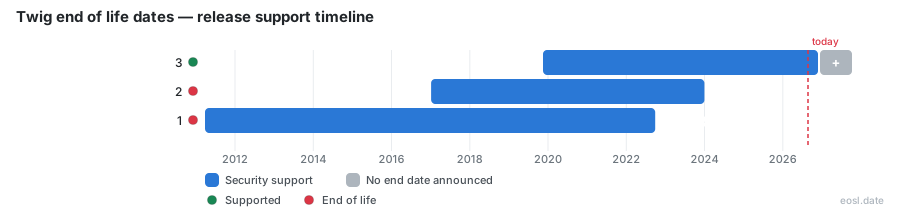
Currently Supported Twig Releases - Active EOS/EOSL Support (1)
| Release | Released | Security Support | Latest |
|---|---|---|---|
| 3 | (7 years ago) | Active | 3.30.0 (1 month and 4 weeks ago) |
Twig End of Life (EOL) Releases - No Longer Supported (2)
Twig end of life depends on which major line your PHP application runs: version 1 lost maintenance on 28 September 2022, version 2 ended on 31 December 2023, and only Twig 3 is still maintained. If your site renders pages through an older version of this template engine, the dates below show how exposed you are, and the steps after them show how a developer moves a PHP codebase to a supported line.
Twig End of Life Dates for Every Release
The table combines the lifecycle dates published by endoflife.date with Fabien Potencier's announcement on the framework's blog, which fixed the version 2 cutoff months in advance. The last column shows the final PHP package tag of each line.
| Version | Released | Maintenance ended | Last version |
|---|---|---|---|
| 1 | 27 March 2011 | 28 September 2022 | 1.44.8 |
| 2 | 5 January 2017 | 31 December 2023 | 2.16.1 |
| 3 | 15 November 2019 | Still maintained | 3.30.0 (25 September 2026) |
Version 1 Retirement
Version 1 had roughly 11 years and 6 months of life, from March 2011 to September 2022. Its final tag, 1.44.8, appeared on 9 September 2024, long after the PHP community had moved on to newer templates syntax and safer defaults.
Version 2 Retirement
Version 2 lasted just under 7 years. The maintainers announced in September 2023 that its end of maintenance would land at the close of December 2023, and that the next major Symfony version would not accept it.
Version 3 Support Today
Version 3 arrived in November 2019 and keeps receiving updates, so every new build should start on it, and its HTML output matches what earlier lines produced. Check the repository on GitHub for the newest tag: Wikipedia's infobox still showed 3.22.1, dated 16 November 2025, as the stable release when this page was checked, while endoflife.date already listed 3.30.0.
Twig PHP Support and Compatibility
The endoflife.date table lists PHP 7.2.5 or later for all three lines, so a server that already runs a modern PHP can usually take version 3 without a runtime upgrade. Each page is compiled to plain PHP code, and these compiled templates keep overhead close to hand-written PHP, so moving versions rarely changes performance. Check the package requirements of the exact tag you install, because PHP minimums can rise between minor versions.
Moving Off Twig 1 and Twig 2
Upgrade one major line at a time. Read the deprecation notices on your current version, fix each one in your PHP templates, then switch. The official notes explain what changed between versions 2 and 3, and you should learn which of those changes touch your own layouts before you touch the code.
Install Twig 3 With Composer
Run composer require "twig/twig:^3.0" from the project root, then clear the compiled files so every page is rebuilt on the next request. Keep the old tag in version control for a quick rollback.
Read the Documentation First
The documentation lists removed tags and renamed functions. Scan it for each feature your layouts use, then run your test suite and a visual comparison of the rendered HTML before deploying.
End of Life Risks for a Template Engine
An unmaintained PHP template engine stops receiving fixes, and a template engine sits on the path between user data and the HTML your visitors see. The risk is practical: bugs in parsing, output escaping and isolation rules found after the cutoff stay open, and they sit inside every one of your templates. Web development teams that pin an old version also find that new libraries stop installing alongside it.
Security Fixes and the Sandbox
Automatic output-escaping is on by default in version 3, and the sandbox mode evaluates untrusted code in a restricted way. The library is unit tested, but that protection only helps while patches keep arriving. Staying on a supported line is the cheapest defence this template engine can give your application.
Twig Templates in Symfony Releases
Symfony ships Twig as its default engine, so a framework upgrade often forces the choice. Symfony 7.0 refuses version 2, which means a team planning a move to the newest major version has to finish the template upgrade first. Other tools that embed the library follow the same rule: their own requirements decide which line you may run. The separation of logic from the presentation layer is why these upgrades stay small, because your controllers rarely change when templates do. Teams on custom code should still read the changelog before assuming the switch is a drop-in change.
Template Language Features to Retest After Upgrading
Because the template language is the part your designers touch, retest the pieces most likely to break after a version change. Features such as template inheritance and variables rarely move, while extensions, custom tags and debug output deserve a careful look. Good templates stay readable and maintainable only when each upgrade is checked against real pages.
Filters and Syntax Checks
Filters, such as escape and date, shape the syntax of nearly every page. Render a page that uses each of your filters and compare the HTML against the previous version. Every filter should produce byte-identical output, and any syntax error in the templates will show up as soon as the engine parses them. Custom filters registered in the environment need the same check, since the environment object is where extensions plug in. Review the filter list in your templates before and after.
Blocks, Loops and Cache
Child layouts depend on blocks, and list pages depend on loops and conditionals. Rebuild the cache, then load one page per layout, and keep best practices in mind: test macros and the environment options in a staging copy of the site, not on production. The online playground is handy for confirming how a snippet behaves on the current version before you edit the real templates.
Origins and Licence
The syntax descends from Jinja and Django, and Sensio Labs created Twig with Fabien Potencier. It is released under a BSD license, so upgrading carries no licence cost. An official certification exists for developers who want to prove their skills, and the templates you write today will keep working as long as you stay on a maintained line.