Thumbor End of Life (EOL) Dates and End of Support (EOS) Dates
Thumbor end of life (EOL) and end of support (EOS) dates: 8 Thumbor versions have reached EOL, including Thumbor 7.7 (EOL date: May 30, 2026) — no longer receiving security updates or patches. Thumbor 7.8.0 is the current supported release. Also see Ansible-core end of life dates for related end-of-life information.
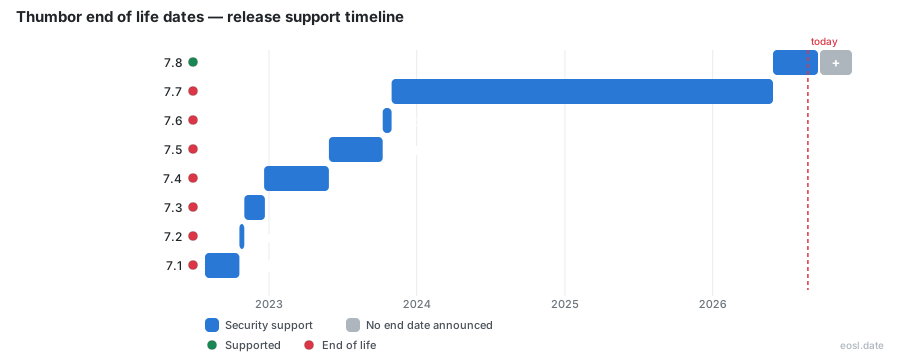
Currently Supported Thumbor Releases - Active EOS/EOSL Support (1)
| Release | Released | Security Support | Latest |
|---|---|---|---|
| 7.8 | (5 months ago) | Active | 7.8.0 (5 months ago) |
Thumbor End of Life (EOL) Releases - No Longer Supported (8)
| Release | Released | Security Support | Latest |
|---|---|---|---|
| 7.7 | (3 years ago) | (5 months ago) | 7.7.7 (1 year and 6 months ago) |
| 7.6 | (3 years and 1 month ago) | (3 years ago) | 7.6.0 (3 years and 1 month ago) |
| 7.5 | (3 years and 5 months ago) | (3 years and 1 month ago) | 7.5.2 (3 years and 4 months ago) |
| 7.4 | (3 years and 11 months ago) | (3 years and 5 months ago) | 7.4.7 (3 years and 9 months ago) |
| 7.3 | (4 years ago) | (3 years and 11 months ago) | 7.3.2 (3 years and 11 months ago) |
| 7.2 | (4 years and 1 month ago) | (4 years ago) | 7.2.1 (4 years and 1 month ago) |
| 7.1 | (4 years and 3 months ago) | (4 years and 1 month ago) | 7.1.2 (4 years and 1 month ago) |
| 7.0 | (6 years and 8 months ago) | (4 years and 3 months ago) | 7.0.12 (4 years and 4 months ago) |
Wondering about Thumbor end of life? As of 27 October 2026, only the 7.8 line is current: release 7.7 lost its fixes on 30 May 2026. This guide shows which version of the software still gets thumbor support, what the maintainers actually promise, and how to upgrade safely.
Thumbor End of Life Dates by Release
The project publishes no formal end dates, so its lifecycle is read from release history. The table lists recent minor lines, when each shipped and whether it still receives patches.
| Release | Released | Latest patch | Patches |
|---|---|---|---|
| 7.8 | 30 May 2026 | 7.8.0 | Active |
| 7.7 | 31 Oct 2023 | 7.7.7 | Ended 30 May 2026 |
| 7.6 | 9 Oct 2023 | 7.6.0 | Ended 31 Oct 2023 |
| 7.5 | 29 May 2023 | 7.5.2 | Ended 9 Oct 2023 |
| 7.4 | 20 Dec 2022 | 7.4.7 | Ended 29 May 2023 |
Each line stopped receiving patches when its successor shipped. Confirm any date against the project's changelog and the commit history on GitHub, because these dates come from a third-party tracker.
Supported Release and Minor Release Rules
Only the newest supported release is safe to run. When the next minor release ships, the previous one stops getting patches, so a 7.7.7 install is unsupported even though it was the last patch of its line.
Security Support Ended for Version 7.7
Fixes for 7.7 stopped on 30 May 2026, the day 7.8.0 arrived. Anyone still on it gets nothing for newly found flaws, so move up one line instead of staying where you are.
Thumbor Support Policy and Security Fixes
There is no documented release schedule. Judging by recent releases, only the latest line receives bug patches, so the practical support policy is stay current. In production, review each new minor line when it appears and test it against your own images, including your largest originals, before switching.
Using Thumbor as a Python Image Processing Service
This matters for lifecycle planning because an image server handles untrusted files, so running an unpatched line carries real risk. Thumbor began at Globo.com and is an open-source, Python-built tool for on-demand work on images. Released under the MIT License, it handles resizing and flipping, and applies filters such as brightness, contrast, grayscale and blur in a chosen order; chained filters run one after another on the same file. It can also serve WebP to browsers that support it, which shrinks each thumbnail with no extra effort.
Developers value how extensible it is: a plug-in can add a new loader, storage backend or filter, and Redis is supported out of the box. Operations teams can separate caching from storage, which helps performance on a busy platform, and client libraries exist for many languages and every common framework; check that your extensions still work before each upgrade. More than 140 contributors maintain it, and its website collects testimonials from adopters.
Smart Cropping With Face Detection
The headline feature is smart cropping. Instead of cutting from the centre, Thumbor uses face detection and feature detection to keep people and points of interest in frame. This image cropping logic avoids headless portraits, and different detection algorithms can be selected when OpenCV is installed. Read the changelog before upgrading in case detection behaviour changes.
Wikimedia and Other Production Users
The Wikimedia Foundation has served thumbnails for its public wikis through Thumbor since June 2017, and has run it on Kubernetes since April 2023. Amazon's Serverless Image Handler combines it with AWS Lambda behind a CDN, and it can read originals from Amazon S3. Deployments this large have to track supported lines and schedule upgrades.
HTTP Server and URL Structure
Thumbor works as a web service: you request an address and receive the processed file, so one original can yield many resized images without storing each copy by hand. An HTTP server parses the URL, for example /300x200/smart/example.com/photo.jpg, where 300x200 sets the size and smart picks the crop. Live setups replace unsafe with a hashed signature so strangers cannot request arbitrary sizes. Signed addresses matter most on an unpatched line, so keep your signature secret through upgrades. Results can sit in caching layers or storage you choose.
Installation and Running This Imaging Service
Plan your installation around the release you chose, and read the documentation for it first, since options change between lines. Settings control quality and allowed sources for incoming images, so keep your configuration file under source control and skim the project repository's notes before deploying this imaging service.
Install With Pip or Docker
Run pip install thumbor for the core, or add the OpenCV extra for detection. For containers, start the official Docker image from the GitHub Container Registry on port 8888, and pin a supported tag rather than latest. If something breaks, run thumbor-doctor and attach its output to your issue.
Upload, Put and Delete Endpoints
The upload endpoint accepts three verbs. Only post is allowed by default; put and delete stay disabled so nobody can overwrite or remove your originals. A successful write returns 201, and a duplicate post gets 409. After moving from 7.7 to 7.8, confirm these verbs still behave as you configured them.