SonarQube Community Build End of Life (EOL) Dates and End of Support (EOS) Dates
SonarQube Community Build end of life (EOL) and end of support (EOS) dates: 16 SonarQube Community Build versions have reached EOL, including SonarQube Community Build 26.10 (EOL date: Nov 04, 2026) — no longer receiving security updates or patches. SonarQube Community Build 26.11.0.134175 is the current supported release — 2 versions in active support. Also see Apache Grails Framework lifecycle dates for related end-of-life information.
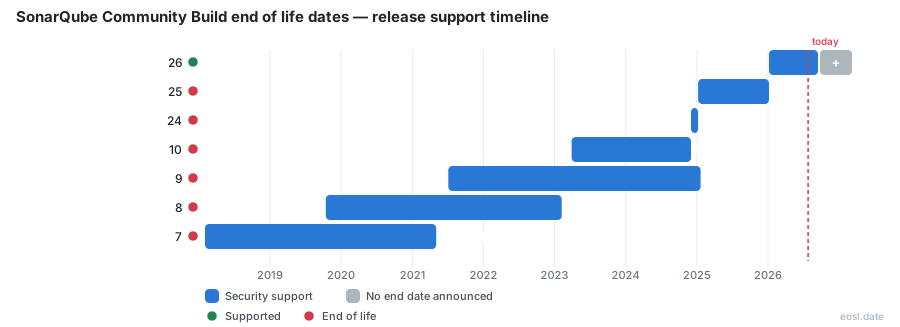
Currently Supported SonarQube Community Build Releases - Active EOS/EOSL Support (2)
| Release | Released | Support | Latest |
|---|---|---|---|
| 26.11 | (2 weeks ago) | Active | 26.11.0.134175 (2 weeks ago) |
| 26 | (10 months ago) | Active | 26.8.0.126808 (3 months ago) |
SonarQube Community Build End of Life (EOL) Releases - No Longer Supported (16)
| Release | Released | Support | Latest |
|---|---|---|---|
| 26.10 | (1 month and 6 days ago) | (2 weeks ago) | 26.10.0.133078 (1 month and 6 days ago) |
| 26.9 | (2 months ago) | (1 month and 6 days ago) | 26.9.0.129388 (2 months ago) |
| 26.8 | (3 months ago) | (2 months ago) | 26.8.0.126808 (3 months ago) |
| 26.7 | (4 months ago) | (3 months ago) | 26.7.0.124771 (4 months ago) |
| 26.6 | (5 months ago) | (4 months ago) | 26.6.0.123539 (5 months ago) |
| 26.5 | (5 months ago) | (5 months ago) | 26.5.0.122743 (5 months ago) |
| 26.4 | (7 months ago) | (5 months ago) | 26.4.0.121862 (7 months ago) |
| 26.3 | (8 months ago) | (7 months ago) | 26.3.0.120487 (8 months ago) |
| 26.2 | (9 months ago) | (8 months ago) | 26.2.0.119303 (9 months ago) |
| 26.1 | (10 months ago) | (9 months ago) | 26.1.0.118079 (10 months ago) |
| 25 | (1 year and 10 months ago) | (10 months ago) | 25.12.0.117093 (10 months ago) |
| 24 | (1 year and 11 months ago) | (1 year and 10 months ago) | 24.12.0.100206 (1 year and 11 months ago) |
| 10 | (3 years and 7 months ago) | (1 year and 11 months ago) | 10.7.0.96327 (2 years and 1 month ago) |
| 9 | (5 years and 4 months ago) | (1 year and 9 months ago) | 9.9.8.100196 (1 year and 11 months ago) |
| 8 | (7 years and 1 month ago) | (3 years and 9 months ago) | 8.9.10.61524 (4 years ago) |
| 7 | (8 years and 9 months ago) | (5 years and 6 months ago) | 7.9.6 (5 years and 7 months ago) |
Planning an upgrade? SonarQube Community Build end of life works differently from SonarQube Server: you get a new release every month, and only the newest release counts as supported. This guide shows which version to run, how the policy compares with SonarQube Server, and how to update safely.
SonarQube Community Build End of Life Explained
The Community Build is a free and open-source platform for code quality and continuous inspection. It runs on Java and uses static analysis to find bugs, vulnerabilities and code smells across many programming languages, so developers catch problems before release. Because it is open-source, the Community Build ships on a faster, simpler schedule than SonarQube Server. Every release replaces the one before it, and that single rule defines when support ends.
SonarQube Community Edition Rename and Version Scheme
Until the end of 2024 this product was called SonarQube Community Edition, and the old name still shows up in many guides. Since 24.12 its versioning scheme no longer matches SonarQube Server. It follows a calendar version scheme, and each build number is written as YY.M.0.BuildNumber: the year, the month, then an internal counter. Version 26.10.0.133078, for example, came out in October 2026.
EOL Policy: Monthly Releases and No Long-Term Active Track
A new version appears every month. The Community Build has no active version and no Long-Term Active (LTA) track, so a bug or security issue is not patched on an older version. It is only fixed in the next monthly release. In practice, each release reaches EOL the moment its successor ships.
Release Notes and New Features
Each regular release brings new features and enhancements, and the release notes plus a community announcement describe them. Nothing is backported, so you need the latest version to receive any change.
Which Releases Are Supported Before EOL
Only one supported release exists at a time. Here is how the current line stands:
| Release | Released | Support |
|---|---|---|
| 26.10 | 12 Oct 2026 | Supported |
| 26.9 | 2 Sep 2026 | Ended 12 Oct 2026 |
| 26.8 | 5 Aug 2026 | Ended 2 Sep 2026 |
| 9.9 | 5 Jul 2021 | Ended |
Bug Fixes and Security Patches
Bug fixes and security patches arrive only inside the next release. If you stay on 26.9, you keep known bugs and unpatched security weaknesses until you move up.
Non-Active Version Risks
A non-active version gets no patch fixes and no technical support, so a supported release is the only safe choice.
EOL Dates for Other Sonar Products
People often confuse the Community Build with the commercial offering, because both use the SonarQube name. The two schedules are independent.
SonarQube Server Active Versions
SonarQube Server ships a new version every 2 months. The active versions are the latest release, the latest LTA and the previous LTA for 6 months after a new LTA arrives. The current LTA is 2026.5. Starting with 2026.5, an LTA receives patches for 12 months for Developer, Enterprise and Data Center Edition customers, and for 18 months with Enterprise Support. After EOL, technical support continues for 2 months, or 6 months for an LTA. That combined active support and security support window is far longer than anything the Community Build offers.
Long-Term Active Cycle Length
A new LTA arrives every 6 months, and its features roll up from the regular releases in between. The SonarQube Server release schedule is therefore predictable, while the free build simply moves forward each month.
Risks of Running an EOL Release
Staying on an ended release raises operational risks: unpatched vulnerabilities, harder updates and failed compliance checks, and each unpatched flaw is a risk you carry. Cost savings from skipping upgrades rarely survive an incident.
Moving Off an EOL Build: Update Guide
Follow the official update guide and read the before you update section first. Back up your database, download the newest package from the downloads page, then test it against a copy of your instance. Questions go to the Sonar community forum.