SUSE Linux Enterprise Server End of Life (EOL) Dates and End of Support (EOS) Dates
SUSE Linux Enterprise Server end of life (EOL) and end of support (EOS) dates: 23 SUSE Linux Enterprise Server versions have reached EOL, including SUSE Linux Enterprise Server 15.6 (EOL date: Dec 31, 2025) — no longer receiving security updates or patches. SUSE Linux Enterprise Server 16.0 is the current supported release, with support through Nov 30, 2027 — 2 versions in active support. Also see Alpine Linux EOSL information for related end-of-life information.
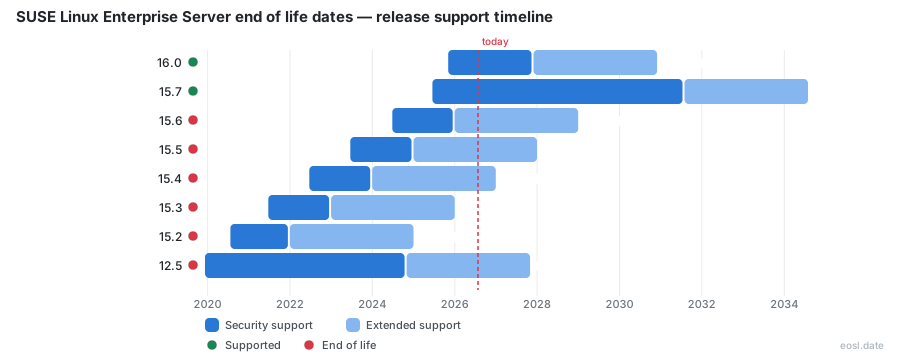
Currently Supported SUSE Linux Enterprise Server Releases - Active EOS/EOSL Support (2)
| Release | Released | General Support | Long Term Service Pack Support |
|---|---|---|---|
| 16.0 | (1 year ago) | (in 1 year) | (in 4 years) |
| 15.7 | (1 year and 5 months ago) | (in 4 years and 8 months) | (in 7 years and 8 months) |
SUSE Linux Enterprise Server End of Life (EOL) Releases - No Longer Supported (23)
| Release | Released | General Support | Long Term Service Pack Support |
|---|---|---|---|
| 15.6 | (2 years and 4 months ago) | (10 months ago) | (in 2 years and 1 month) |
| 15.5 | (3 years and 4 months ago) | (1 year and 10 months ago) | (in 1 year and 1 month) |
| 15.4 | (4 years and 4 months ago) | (2 years and 10 months ago) | (in 1 month and 2 weeks) |
| 15.3 | (5 years and 4 months ago) | (3 years and 10 months ago) | (10 months ago) |
| 15.2 | (6 years and 3 months ago) | (4 years and 10 months ago) | (1 year and 10 months ago) |
| 12.5 | (6 years and 11 months ago) | (2 years ago) | (in 11 months) |
| 15.1 | (7 years and 4 months ago) | (5 years and 9 months ago) | (2 years and 9 months ago) |
| 12.4 | (7 years and 11 months ago) | (6 years and 4 months ago) | (3 years and 4 months ago) |
| 15.0 | (8 years and 4 months ago) | (6 years and 10 months ago) | (3 years and 10 months ago) |
| 12.3 | (9 years and 2 months ago) | (7 years and 4 months ago) | (4 years and 4 months ago) |
| 12.2 | (10 years ago) | (8 years and 7 months ago) | (5 years and 7 months ago) |
| 12.1 | (10 years and 11 months ago) | (9 years and 5 months ago) | (6 years and 5 months ago) |
| 11.4 | (11 years and 4 months ago) | (7 years and 7 months ago) | (4 years and 7 months ago) |
| 12.0 | (12 years ago) | (10 years and 4 months ago) | (7 years and 4 months ago) |
| 11.3 | (13 years and 4 months ago) | (10 years and 9 months ago) | (7 years and 9 months ago) |
| 11.2 | (14 years and 8 months ago) | (12 years and 9 months ago) | (9 years and 9 months ago) |
| 10.4 | (15 years and 7 months ago) | (13 years and 3 months ago) | (10 years and 3 months ago) |
| 11.1 | (16 years and 5 months ago) | (14 years and 2 months ago) | (11 years and 2 months ago) |
| 10.3 | (17 years and 1 month ago) | (15 years and 1 month ago) | (12 years ago) |
| 11.0 | (17 years and 7 months ago) | (15 years and 10 months ago) | (15 years and 10 months ago) |
| 10.2 | (18 years and 5 months ago) | (16 years and 7 months ago) | (13 years and 7 months ago) |
| 10.1 | (19 years and 4 months ago) | (17 years and 11 months ago) | (15 years and 10 months ago) |
| 10.0 | (20 years and 4 months ago) | (18 years and 10 months ago) | (18 years and 10 months ago) |
Running a production Linux server past its cutoff is a risk you can avoid, and the SUSE Linux Enterprise Server end of life schedule tells you exactly when each release stops receiving fixes. This guide lays out the SUSE Linux Enterprise support dates for versions 11, 12, 15 and 16, shows what the paid extensions add, and helps you decide when to upgrade or buy extended coverage for your enterprise estate.
SLES Product Lifecycle Explained
SUSE Linux Enterprise is a commercial, open source Linux operating system that SUSE builds for servers, mainframes, workstations and supercomputers. The SUSE Linux Enterprise Server edition, shortened to SLES, is the one most companies run in production. Every major version of SUSE Linux Enterprise Server follows a thirteen year product lifecycle: 10 years of general support, followed by up to three years of Long Term Service Pack Support. A new major version of this enterprise Linux distribution arrives every three to four years, and each service pack follows about every twelve months in between.
That 13 years of coverage is not one block. SUSE divides the support lifecycle into phases, and each SUSE Linux Enterprise release moves through them in order. The support phase you are in decides what you can ask SUSE for: new features, hardware enablement, bug fixes, or only security fixes. Think of the SUSE Linux support lifecycle as a timeline with a hard stop at the end, and learn the phases first, because every date in the tables below only makes sense once you know which phase it closes.
SUSE Linux Enterprise Server General Support
In this first phase, SUSE ships everything: enhancement requests, hardware enablement, defect resolution at every severity level, and updates for every package. This phase begins on the release date of each service pack and ends at the end of general support. After that moment the Linux server is no longer covered for new deployments and falls back on the extended options described later. Your plan keeps technical support open for existing systems throughout this phase, which is why most teams treat it as the safe window for a stable, supported SUSE Linux Enterprise Server installation.
SUSE also defines an end of maintenance point for some products, the moment code-level maintenance stops. For the server product, the practical dates to track are the end of the standard phase, the end of LTSS and the end of the Core variant. Keep them in one support schedule so nobody on the team has to hunt for them when an audit arrives.
LTSS Coverage for Older Releases
Long Term Service Pack Support, usually written LTSS, extends the lifecycle of each service pack. It lets you stay on a given service pack for up to three more years beyond its normal support period, without requiring an upgrade. Defect resolution continues, critical bug fixes and security patches keep arriving for the most severe vulnerabilities, but enhancement requests and new deployments do not. LTSS is a costly add-on to your plan, so budget for it, since Long Term Service Pack Support is the usual bridge, when you compare the cost of moving against staying put.
In SUSE Linux Enterprise Server 16, SUSE renamed this idea. Each pack became a minor release, and LTSS became long term support, often shortened to LTS. The coverage logic is the same: more time on a release in exchange for an additional fee.
SUSE Linux Enterprise Server End of Life Dates by Version
The table below gathers the main SUSE Linux Enterprise Server dates in one place. Check the official lifecycle dates on the SUSE site for the final word, because SUSE can adjust a schedule and the exact day depends on your subscription. Each row shows when the standard phase ends and when the paid extensions run out for the last service pack of a version.
| SUSE Linux Enterprise Server version | Last service pack | First release date | General support ends | LTSS ends | LTSS Core ends |
|---|---|---|---|---|---|
| SUSE Linux Enterprise Server 10 | SP4 | 17 June 2006 | 31 July 2013 | 30 July 2016 | Not offered |
| SUSE Linux Enterprise Server 11 | SP4 | 24 March 2009 | 31 March 2019 | 31 March 2022 | 31 March 2028 |
| SUSE Linux Enterprise Server 12 | SP5 | 27 October 2014 | 31 October 2024 | 31 October 2027 | 1 October 2030 |
| SUSE Linux Enterprise Server 15 | SP7 | 16 July 2018 | 31 July 2031 | 31 July 2034 | 1 December 2037 |
| SUSE Linux Enterprise Server 16 | 16.0 | 4 November 2025 | 30 November 2035 | 30 November 2038 | 30 November 2041 |
SUSE skipped the 13 and 14 version numbers, so the numbering jumps from 12 straight to 15. Older SUSE Linux Enterprise Server 10 and 11 releases have already left the standard phase, which makes them the first candidates for migration.
SLES 11 and SLES 12 End of Support
The SLES 11 series reached the end of its standard phase on 31 March 2019, and its LTSS period closed on 31 March 2022. Only the Core variant, which runs to March 2028, still covers the core packages. For SLES 12, general support ended on 31 October 2024. The final service pack, SLES 12 SP5, is covered by LTSS until 31 October 2027, and the Core variant stretches to 2030. In practice, that gives a host on the last service pack less than a year to move before only the thinner extended coverage remains. The SUSE Linux Enterprise Server 12 series is therefore the one to prioritise this quarter, and SUSE Linux Enterprise Server 11 hosts need action now.
SLES 15 Service Pack Schedule
Each SLES 15 service pack gets its own date, because the standard phase is counted for each pack. Older ones have already left standard coverage, while the final service pack carries the longest runway. Service pack 7, released in June 2025, is covered until 31 July 2031, with LTSS running to 2034. Because every service pack overlaps with the next, you can usually plan a stepwise move each year in a SUSE Linux Enterprise Server 15 estate instead of one risky jump.
SLES 16 Minor Release and LTS
SLES 16 arrived on 4 November 2025. It replaces packs with a minor release cadence in the next-generation SUSE Linux Enterprise line, makes SELinux the default security module in place of AppArmor, and deprecates YaST. General support for this release runs to 30 November 2035, with LTS to 2038. If you are building a fresh Linux server fleet today, SUSE Linux Enterprise Server 16 offers the longest remaining runway of any version.
Why Unsupported Linux Servers Are a Risk
The end-of-support date is the point where the risk starts. An unsupported SUSE Linux Enterprise Server host keeps running, but it stops receiving security fixes, so every newly published CVE stays open on it. Auditors and compliance frameworks usually treat that as a finding, and an attacker only needs one unpatched vulnerability in a network service. The C library and the cryptography stack are the usual entry points, and SUSE only fixes them while you hold coverage.
The business effects add up as well. Software publishers often certify their products only for a supported operating system, so an application support case can be refused once the Linux server reaches its end of support. Insurance questionnaires ask for supported versions, and a hardware refresh may not ship drivers for an old release. Keep the update path open and an update window booked, and your SUSE Linux Enterprise Server hosts stay easier to defend, Typical risks include:
- Unpatched vulnerabilities in glibc or OpenSSL.
- Failed audits because the enterprise operating system is unsupported.
- Refused application support from third-party vendors.
- Longer downtime, since nobody at SUSE can troubleshoot an old release.
LTSS Options After General Support Ends
Once general support passes, you have several flavours of extended support. They differ in how many packages they cover, how quickly fixes arrive, and which service packs they apply to. SUSE sets one support policy for all of them: support covers only existing systems or like-for-like hardware replacements, a change to the virtualization platform counts as a hardware change, and an issue must occur while your plan is active.
| Option | Applies to | Security updates | Style |
|---|---|---|---|
| General support | All service packs but the last | All packages | Standard |
| ESPOS | Overlapped service packs after general support | CVSS level 7 and higher | Standard |
| LTSS Extended Security | Last service pack, during LTSS | CVSS level 4 and higher | Standard |
| LTSS Core | Last service pack, after LTSS | Core packages only | Core packages first |
| Reactive | Every service pack but the last | CVSS level 7 and higher | On request |
LTSS Core and Extended Security
LTSS Core adds three more years once the standard period ends, and it exists only for the last service pack of each family. It patches the core packages in a proactive style, and it handles other packages through level 3 support after you report a defect. LTSS Extended Security is available for the same last service pack, but during the LTSS phase, and it reaches down to medium severity vulnerabilities for customers with strict security needs. Neither option accepts new feature requests, and neither offers additional cryptography functionality.
LTSS Reactive and ESPOS
LTSS Reactive also adds three years after LTSS, but unlike its Core sibling it applies to every service pack except the final one. It works on demand: you raise a support request for a fix, and SUSE delivers it as a program temporary fix. ESPOS, short for Extended Service Pack Overlap Support, is the flavour bundled into SUSE Linux Enterprise Server for SAP Applications. It keeps every service pack covered for 4.5 years, so SAP customers rarely buy it separately.
SLES for SAP Applications and High Performance Computing Lifecycle
SUSE Linux Enterprise Server for SAP Applications follows its own rules. SUSE supports every SLES for SAP offering from version 12 onward for 4.5 years from the general availability of each service pack, a longer window than the standard one. ESPOS comes with the plan, so SAP Applications teams on SUSE Linux Enterprise Server for SAP Applications get overlapping coverage without extra paperwork. ESPOS does not apply to the last service pack, which already has enough coverage, and your SAP Applications contract states which ESPOS term you hold. When you run SAP HANA or SAP NetWeaver, check both the SAP Applications and operating system lifecycle and the certified combinations, because the SAP stack may demand an earlier move than SUSE does.
SUSE Linux Enterprise High Performance Computing uses the same modular packaging as SUSE Linux Enterprise Server 15, so it tracks the base system. Clusters that depend on specific hardware should plan around the same dates shown above. Both products are sold on a term basis, and that term decides how long you can download updates.
SLES 12 SP5 EOL on the Public Cloud and openSUSE
If your servers run in the cloud, the lifecycle depends on how you buy SUSE, and every cloud provider publishes its own image schedule. With pay-as-you-go images, the provider bundles the subscription and you receive updates while the image is supported. With bring your own subscription instances you keep your own entitlement, and the same dates as an on-premises host apply in the cloud. Reactive and Core coverage are not offered on pay-as-you-go instances, so read the support matrix before you commit.
The community distribution is different. openSUSE Leap shares a codebase with SUSE Linux Enterprise, but unlike that stable enterprise product it follows its own lifetime table and gets less intense testing. Never read an openSUSE end date as a SUSE Linux Enterprise Server date. Asset databases such as the InvGate catalogue list the last service pack of version 12 as commercial, subscription-based software with coverage to October 2027.
- Pay-as-you-go images: updates follow the image provider's schedule.
- Bring your own subscription: your own entitlement sets the dates.
- openSUSE: a separate community lifetime, not a SUSE commitment.
Release History of the Server Product
SUSE Linux Enterprise Server first shipped on 31 October 2000 as a build for IBM S/390 mainframe machines, and the first x86 release followed in April 2001. Version 9 appeared in August 2004, version 10 in July 2006 and version 11 in March 2009. Each major step of this Linux line brought a new default stack, and the Linux kernel moved from the 2.6 series in the early releases to modern long-term kernels in version 15. The enterprise edition also sits next to a desktop sibling and several derivatives, all built from one common code base.
Knowing the history helps you read the lifecycle: versions 9 and 10 had ten year product lifecycles, while versions 11 and later have thirteen. That change is why an old SUSE Linux Enterprise Server 10 host and a modern one differ so much in their remaining coverage.
SUSE Linux Enterprise Desktop and Related Products Lifecycle
SUSE Linux Enterprise Desktop, known as SLED, is built from the same code base as SUSE Linux Enterprise Server and ships with the GNOME desktop, LibreOffice and Firefox. Its dates follow the server product, so a workstation fleet on SUSE Linux Enterprise Desktop 15 reaches the same milestones as the matching server. Other SUSE Linux Enterprise products, such as SUSE Linux Enterprise Micro, publish their own tables on the SUSE lifecycle page, and SUSE Multi-Linux Manager gets a new version roughly every two years with three years of support for each.
| SUSE Linux Enterprise product | Typical support length | Extended option |
|---|---|---|
| SUSE Linux Enterprise Server 15 | Ten years of general support | LTSS for three more years |
| SUSE Linux Enterprise Server for SAP Applications 15 | 4.5 years per service pack | ESPOS bundled in |
| SUSE Linux Enterprise HPC 15 | Follows the base server release | LTSS for three more years |
| SUSE Linux Enterprise Desktop 15 | Follows the base server release | LTSS for three more years |
| SUSE Linux Enterprise Micro | Published on the SUSE lifecycle page | Check the matrix |
Use this second table as a quick map: every SUSE Linux Enterprise product in it draws on one shared SUSE Linux Enterprise code base, but each one publishes its own end dates.
SUSE Multi-Linux Support, formerly SUSE Liberty Linux, is a different case: it gives CentOS and RHEL users patches and technical support with zero changeover work, which makes it an option when a Red Hat compatible system loses its own coverage. Always check which SUSE Linux Enterprise edition a ticket belongs to before you rely on a date.
Planning a SLES Upgrade Before the EOL
A realistic plan starts well before the EOL, because testing applications on a newer SUSE Linux Enterprise Server release takes longer than the actual move. The following steps keep the work organised and give management dated milestones.
Check Your Version and Subscription
Every cutoff date depends on the exact release, so start by reading /etc/os-release on each host to see its exact version and service pack. Then match it to the table above and to your subscription terms. A server on service pack 3 sits in a different position than one on service pack 5, even though both carry the same major number. Record the phase, the end date and the owner of each system in one inventory sorted by date.
Choose Upgrade or Extended Support
You have two broad paths. A move takes the host to a newer service pack or major version, which restores general support. Extended support through LTSS buys time when an application cannot move yet. A one-year LTSS subscription usually costs less than an emergency rebuild, but it only postpones the work, so pair every renewal with a dated plan.
- Inventory every host and note its service pack.
- Rank hosts by the date their coverage ends.
- Test the target release, ideally version 15 SP7 or version 16.
- Migrate in waves, starting with the earliest end date.
- Keep LTSS only for the systems you cannot move in time.
Linux administrators at any SUSE shop have a few well-trodden Linux methods to move between SUSE Linux Enterprise releases. An online move runs on the live Linux server through the SUSE Customer Center, using SUSEConnect and the zypper migration command, and it suits a move between service packs of one SUSE Linux Enterprise release. An offline path boots the installation media of the next SUSE Linux Enterprise release and upgrades in place. Before either method, take a Btrfs snapshot so snapper can roll the enterprise system back if an application misbehaves, and confirm that every module and extension your SUSE Linux Enterprise Server host uses exists in the target release.
Test the new SUSE Linux release on a clone first, with the same enterprise workloads, the same drivers and the same monitoring agents. A SUSE Linux Enterprise move that passes on a clone usually passes in production, and a failure on the clone costs nothing. Plan the final cutover for a quiet maintenance window and keep the previous snapshot for at least one release cycle.
The SUSE ecosystem also gives Linux teams tools that make these dates easier to follow. The SUSE Customer Center shows each registered SUSE system and its entitlement, SUSE Multi-Linux Manager reports patch status across a Linux fleet, and the SUSE Linux release notes for each version list removed packages and changed defaults. Read the SUSE release notes before every Linux move, because a deprecated tool can break a script that worked for years, and keep the SUSE documentation for your Linux release bookmarked for the whole team.
Use this checklist for every SUSE Linux Enterprise host before you sign off a plan:
- Record the SUSE Linux Enterprise release, service pack and architecture.
- Confirm the SUSE Linux Enterprise registration and entitlement status in the SUSE Customer Center.
- List every SUSE Linux Enterprise module, extension and add-on product installed.
- Check that the SUSE Linux Enterprise kernel, drivers and storage multipathing exist in the target release.
- Verify third-party Linux software is certified for the target SUSE Linux Enterprise release.
- Back up the enterprise data and snapshot the SUSE Linux Enterprise root volume.
- Schedule the SUSE Linux Enterprise Server maintenance window and a rollback point.
- Update the runbook so the next SUSE Linux Enterprise Server owner knows the new end dates.
Treat the date from the vendor, SUSE, as the latest possible deadline, not the target. SUSE Linux support staff can only help while SUSE Linux support is active, and SUSE support for a Linux release ends on a fixed day. Your maintenance window, hardware warranty and application certifications matter as much as the calendar on the SUSE site.
Quick Summary for Server Owners
- Every SUSE Linux Enterprise Server release has ten years of general support and up to three years of extended coverage.
- SUSE Linux Enterprise Server 11 hosts are already out of standard coverage and need a plan now.
- SUSE Linux Enterprise Server 12 SP5 reaches the end of LTSS in October 2027.
- SUSE Linux Enterprise Server 15 and 16 offer the longest remaining runway for a new Linux server.
- Your SUSE Linux Enterprise subscription terms decide which extended option you can actually buy.
With this SUSE Linux Enterprise Server release map in hand, a Linux team can turn the SUSE calendar into a dated work plan. Pick the release, check its phase, and act before the SUSE date arrives, not after. SUSE publishes every change on its lifecycle page, so check the SUSE site each quarter and tell your SUSE account contact about any Linux host you cannot move, since a Linux exception needs an owner.