Ubuntu End of Life (EOL) Dates and End of Support (EOS) Dates
Ubuntu end of life (EOL) and end of support (EOS) dates: 41 Ubuntu versions have reached EOL, including Ubuntu 25.10 Questing Quokka (EOL date: Jul 01, 2026) — no longer receiving security updates or patches. Ubuntu 26.10 is the current supported release, with support through Jul 01, 2027 — 4 versions in active support. Also see Alpine Linux EOSL dates for related end-of-life information.
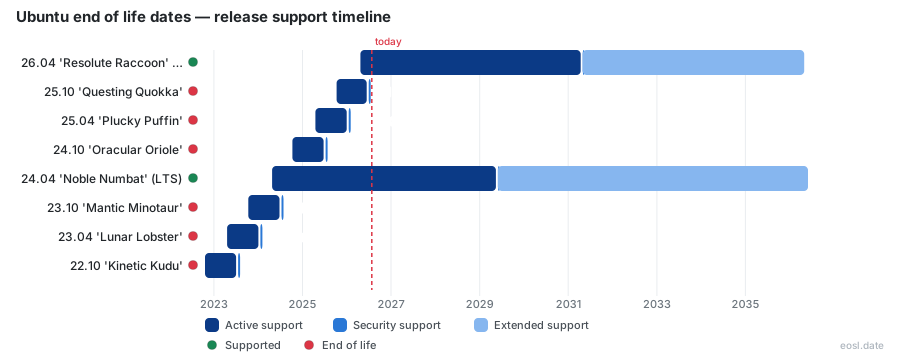
Currently Supported Ubuntu Releases - Active EOS/EOSL Support (4)
| Release | Released | Maintenance & Security Support | Hardware & Maintenance | Expanded Security Maintenance | Latest | LTS |
|---|---|---|---|---|---|---|
| 26.10 'Stonking Stingray' | (1 month and 2 days ago) | (in 7 months) | (in 7 months) | Active | 26.10 (1 month and 2 days ago) | - |
| 26.04 'Resolute Raccoon' (LTS) | (6 months ago) | (in 4 years and 6 months) | (in 4 years and 6 months) | (in 9 years and 5 months) | 26.04.1 (2 months ago) | LTS |
| 24.04 'Noble Numbat' (LTS) | (2 years and 6 months ago) | (in 2 years and 6 months) | (in 2 years and 6 months) | (in 7 years and 5 months) | 24.04.5 (2 months ago) | LTS |
| 22.04 'Jammy Jellyfish' (LTS) | (4 years and 6 months ago) | (in 6 months) | (2 years and 1 month ago) | (in 5 years and 5 months) | 22.04.5 (2 years and 2 months ago) | LTS |
Ubuntu End of Life (EOL) Releases - No Longer Supported (41)
| Release | Released | Maintenance & Security Support | Hardware & Maintenance | Expanded Security Maintenance | Latest | LTS |
|---|---|---|---|---|---|---|
| 25.10 'Questing Quokka' | (1 year and 1 month ago) | (4 months ago) | (4 months ago) | Active | 25.10 (1 year and 1 month ago) | - |
| 25.04 'Plucky Puffin' | (1 year and 7 months ago) | (10 months ago) | (10 months ago) | Active | 25.04 (1 year and 7 months ago) | - |
| 24.10 'Oracular Oriole' | (2 years and 1 month ago) | (1 year and 4 months ago) | (1 year and 4 months ago) | Active | 24.10 (2 years and 1 month ago) | - |
| 23.10 'Mantic Minotaur' | (3 years and 1 month ago) | (2 years and 4 months ago) | (2 years and 4 months ago) | Active | 23.10 (3 years and 1 month ago) | - |
| 23.04 'Lunar Lobster' | (3 years and 6 months ago) | (2 years and 9 months ago) | (2 years and 9 months ago) | Active | 23.04 (3 years and 6 months ago) | - |
| 22.10 'Kinetic Kudu' | (4 years ago) | (3 years and 3 months ago) | (3 years and 3 months ago) | Active | 22.10 (4 years ago) | - |
| 21.10 'Impish Indri' | (5 years and 1 month ago) | (4 years and 4 months ago) | (4 years and 4 months ago) | Active | 21.10 (5 years and 1 month ago) | - |
| 21.04 'Hirsute Hippo' | (5 years and 6 months ago) | (4 years and 9 months ago) | (4 years and 9 months ago) | Active | 21.04 (5 years and 6 months ago) | - |
| 20.10 'Groovy Gorilla' | (6 years ago) | (5 years and 3 months ago) | (5 years and 3 months ago) | Active | 20.10 (6 years ago) | - |
| 20.04 'Focal Fossa' (LTS) | (6 years and 6 months ago) | (1 year and 5 months ago) | (4 years and 1 month ago) | (in 3 years and 5 months) | 20.04.6 (3 years and 7 months ago) | LTS |
| 19.10 'Eoan Ermine' | (7 years and 1 month ago) | (6 years and 4 months ago) | (6 years and 4 months ago) | Active | 19.10 (7 years and 1 month ago) | - |
| 19.04 'Disco Dingo' | (7 years and 6 months ago) | (6 years and 9 months ago) | (6 years and 9 months ago) | Active | 19.04 (7 years and 6 months ago) | - |
| 18.10 'Cosmic Cuttlefish' | (8 years ago) | (7 years and 3 months ago) | (7 years and 3 months ago) | Active | 18.10 (8 years ago) | - |
| 18.04 'Bionic Beaver' (LTS) | (8 years and 6 months ago) | (3 years and 5 months ago) | (3 years and 5 months ago) | (in 1 year and 5 months) | 18.04.6 (5 years and 2 months ago) | LTS |
| 17.10 'Artful Aardvark' | (9 years ago) | (8 years and 3 months ago) | (8 years and 3 months ago) | Active | 17.10 (9 years ago) | - |
| 17.04 'Zesty Zapus' | (9 years and 7 months ago) | (8 years and 10 months ago) | (8 years and 10 months ago) | Active | 17.04 (9 years and 7 months ago) | - |
| 16.10 'Yakkety Yak' | (10 years and 1 month ago) | (9 years and 3 months ago) | (9 years and 3 months ago) | Active | 16.10 (10 years and 1 month ago) | - |
| 16.04 'Xenial Xerus' (LTS) | (10 years and 6 months ago) | (5 years and 7 months ago) | (5 years and 7 months ago) | (7 months ago) | 16.04.7 (6 years and 3 months ago) | LTS |
| 15.10 'Wily Werewolf' | (11 years ago) | (10 years and 3 months ago) | (10 years and 3 months ago) | Active | 15.10 (11 years ago) | - |
| 15.04 'Vivid Vervet' | (11 years and 6 months ago) | (10 years and 9 months ago) | (10 years and 9 months ago) | Active | 15.04 (11 years and 6 months ago) | - |
| 14.10 'Utopic Unicorn' | (12 years ago) | (11 years and 3 months ago) | (11 years and 3 months ago) | Active | 14.10 (12 years ago) | - |
| 14.04 'Trusty Tahr' (LTS) | (12 years and 7 months ago) | (7 years and 7 months ago) | (7 years and 7 months ago) | (2 years and 7 months ago) | 14.04.6 (7 years and 8 months ago) | LTS |
| 13.10 'Saucy Salamander' | (13 years and 1 month ago) | (12 years and 4 months ago) | (12 years and 4 months ago) | Active | 13.10 (13 years and 1 month ago) | - |
| 13.04 'Raring Ringtail' | (13 years and 6 months ago) | (12 years and 9 months ago) | (12 years and 9 months ago) | Active | 13.04 (13 years and 6 months ago) | - |
| 12.10 'Quantal Quetzal' | (14 years ago) | (12 years and 6 months ago) | (12 years and 6 months ago) | Active | 12.10 (14 years ago) | - |
| 12.04 'Precise Pangolin' (LTS) | (14 years and 6 months ago) | (9 years and 6 months ago) | (9 years and 6 months ago) | (7 years and 6 months ago) | 12.04.5 (12 years and 3 months ago) | LTS |
| 11.10 'Oneiric Ocelot' | (15 years and 1 month ago) | (13 years and 6 months ago) | (13 years and 6 months ago) | Active | 11.10 (15 years and 1 month ago) | - |
| 11.04 'Natty Narwhal' | (15 years and 6 months ago) | (14 years ago) | (14 years ago) | Active | 11.04 (15 years and 6 months ago) | - |
| 10.10 'Maverick Meerkat' | (16 years and 1 month ago) | (14 years and 7 months ago) | (14 years and 7 months ago) | Active | 10.10 (16 years and 1 month ago) | - |
| 10.04 'Lucid Lynx' (LTS) | (16 years and 6 months ago) | (13 years and 6 months ago) | (13 years and 6 months ago) | Active | 10.04.4 (14 years and 9 months ago) | LTS |
| 9.10 'Karmic Koala' | (17 years ago) | (15 years and 6 months ago) | (15 years and 6 months ago) | Active | 9.10 (17 years ago) | - |
| 9.04 'Jaunty Jackalope' | (17 years and 6 months ago) | (16 years ago) | (16 years ago) | Active | 9.04 (17 years and 6 months ago) | - |
| 8.10 'Intrepid Ibex' | (18 years ago) | (16 years and 6 months ago) | (16 years and 6 months ago) | Active | 8.10 (18 years ago) | - |
| 8.04 'Hardy Heron' (LTS) | (18 years and 6 months ago) | (13 years and 6 months ago) | (13 years and 6 months ago) | Active | 8.04.4 (16 years and 9 months ago) | LTS |
| 7.10 'Gutsy Gibbon' | (19 years ago) | (17 years and 6 months ago) | (17 years and 6 months ago) | Active | 7.10 (19 years ago) | - |
| 7.04 'Feisty Fawn' | (19 years and 6 months ago) | (18 years ago) | (18 years ago) | Active | 7.04 (19 years and 6 months ago) | - |
| 6.10 'Edgy Eft' | (20 years ago) | (18 years and 6 months ago) | (20 years ago) | Active | 6.10 (20 years ago) | - |
| 6.06 'Dapper Drake' (LTS) | (20 years and 5 months ago) | (15 years and 5 months ago) | (15 years and 5 months ago) | Active | 6.06.2 (18 years and 9 months ago) | LTS |
| 5.10 'Breezy Badger' | (21 years and 1 month ago) | (19 years and 7 months ago) | (19 years and 7 months ago) | Active | 5.10 (21 years and 1 month ago) | - |
| 5.04 'Hoary Hedgehog' | (21 years and 7 months ago) | (20 years ago) | (20 years ago) | Active | 5.04 (21 years and 7 months ago) | - |
| 4.10 'Warty Warthog' | (22 years ago) | (20 years and 6 months ago) | (22 years ago) | Active | 4.10 (22 years ago) | - |
Every Ubuntu release ships with an expiry date, and the Ubuntu End of Life table below shows when each version stops receiving updates. Canonical builds this open-source operating system on Debian and publishes the Linux distribution in Desktop, Server and Ubuntu Core (IoT) editions, and all follow the same clock: once a version reaches end of life (EOL), security fixes stop. The one number you need from this page is the date your own version runs out.
Ubuntu EOL Timeline: Release and End-of-Life Dates for Every Version
The table gives each version's codename, release date, the month its standard security maintenance stops and, for LTS releases, when Expanded Security Maintenance ends. These are Canonical's published support dates, so treat each as the end-of-life date for your version. Versions still inside their first window are the supported versions; everything else has reached EOL for standard updates. Ubuntu 26.04 LTS (Resolute Raccoon) is the current long-term support release, while Ubuntu 16.04 LTS has left even its Expanded Security Maintenance window and runs only under the Legacy add-on. The full version history of Ubuntu releases is on the Releases wiki.
| Version | Codename | Released | Standard support ends | ESM ends |
|---|---|---|---|---|
| 26.10 | Stonking Stingray | Oct 2026 | Jul 2027 | Not offered |
| 26.04 LTS | Resolute Raccoon | Apr 2026 | May 2031 | May 2036 |
| 25.10 | Questing Quokka | Oct 2025 | Jul 2026 | Not offered |
| 25.04 | Plucky Puffin | Apr 2025 | Jan 2026 | Not offered |
| 24.10 | Oracular Oriole | Oct 2024 | Jul 2025 | Not offered |
| 24.04 LTS | Noble Numbat | Apr 2024 | May 2029 | May 2034 |
| 22.04 LTS | Jammy Jellyfish | Apr 2022 | May 2027 | May 2032 |
| 20.04 LTS | Focal Fossa | Apr 2020 | May 2025 | May 2030 |
| 18.04 LTS | Bionic Beaver | Apr 2018 | May 2023 | May 2028 |
| 16.04 LTS | Xenial Xerus | Apr 2016 | Apr 2021 | Apr 2026 |
| 14.04 LTS | Trusty Tahr | Apr 2014 | Apr 2019 | Apr 2024 |
How the Ubuntu Release Cycle Sets Each EOL Date
Under the Ubuntu release cycle, Canonical ships a new version every six months, in April and October, numbered by year and month: 26.10 means October 2026. Every two years the April build is a long term support (LTS) version; the three in between are interim builds, and each goes EOL nine months after release (a .04 in January, a .10 in July). This release cadence has held since 2004. A point release such as 24.04.5 does not reset the clock; its release notes confirm it inherits the parent's date.
Ubuntu Support Lifecycle: LTS Releases vs Interim Releases
The Ubuntu lifecycle has two tracks, and yours decides your supported lifecycle. LTS versions, the long-term support track, suit production environments; interim releases suit people who want the newest tools now. Ubuntu flavors such as Kubuntu are community-maintained and usually support their packages for three years on an LTS base, so check the flavor's own dates.
Interim Release Support Window: 9 Months of Updates
An interim release such as 25.10 (Questing Quokka) ships the newest toolchain, a fresh Linux kernel and the latest GNOME desktop, which is why developers chasing new features and hardware support pick it. The trade-off is a support window of 9 months: software updates then stop and it becomes an EOL release.
LTS Release Support: Five Years of Standard Security Maintenance
An LTS release gets five years of standard security maintenance for the main repository and the restricted component, with CVE patches for critical and high issues. The first two years are hardware and maintenance updates, then three years of maintenance updates only; together that is the general support window. Packages in universe and multiverse get best-effort community fixes, so security support for those lands only with Ubuntu Pro.
What Ubuntu End of Life Means for Security and Compliance
Ubuntu end of life is the moment your vendor stops shipping security patches and bug fixes for that version. Nothing breaks that day; the system keeps running while every new vulnerability stays open. Attackers scan for known vulnerabilities on unsupported builds because exploits for them are public, so an EOL version widens your attack surface, with data breaches and ransomware as the usual result for your infrastructure. PCI DSS, HIPAA and ISO 27001 all expect supported, patched software, so EOL systems fail compliance audits even when nothing has been attacked. The security risks and compliance risks grow every month you stay on a release that is no longer supported.
Who Is Most Exposed When Ubuntu Is No Longer Supported
Some teams feel an expired release sooner than others:
- Sysadmins and DevOps teams running fleets of servers, virtual machines and cloud instances, where one forgotten host undermines the security of the estate.
- Maintainers of legacy applications pinned to old libraries, often in containers on an aged base image in Docker or Kubernetes.
- Organizations in regulated sectors such as healthcare and finance, where an enterprise security audit treats unsupported workloads as a finding.
Support Comparison Past End of Support: Ubuntu Pro and the Legacy Add-on
The end of standard support does not have to mean running unpatched. Ubuntu Pro, the subscription formerly sold as Ubuntu Advantage, doubles an LTS window to 10 years, and the Legacy add-on stretches it further; the support comparison below shows how far each tier reaches. Ubuntu Pro is free for personal use on up to five machines, with a 30-day free trial for paid deployments. The Support tier adds phone and ticket support with break fix and bug fix support, plus Landscape for fleet management and live patching of the running system, across all supported architectures from amd64 to riscv64.
| Coverage | Interim | LTS |
|---|---|---|
| Standard security maintenance (Main) | 9 months | 5 years |
| Expanded Security Maintenance with Ubuntu Pro (Main and Universe) | Not available | 10 years from release |
| Legacy add-on with Ubuntu Pro | Not available | 15 years from release |
| Break/bug support and Kernel Livepatch (Ubuntu Pro) | Not available | Included for the covered period |
| FIPS 140-3, CIS and DISA-STIG hardening (Ubuntu Pro) | Not available | Security certifications on LTS only |
Certification status differs by release, applies only with Ubuntu Pro attached, and lapses on the same date that release's coverage ends, so an expiring LTS loses its compliance standing too:
- 22.04 LTS: FIPS 140-3, DISA-STIG and CIS all achieved, so regulated security teams standardise on it.
- 24.04 LTS: DISA-STIG and CIS achieved, FIPS 140-3 still pending.
- 26.04 LTS: all three planned.
Ubuntu Pro ESM: 10 Years of Security Updates
Expanded Security Maintenance (ESM) is the part of the subscription that matters after year five. It keeps critical and high CVE fixes flowing for the main repository and also covers the open source packages in the universe repository that most Linux servers depend on. The security coverage runs to 10 years from the original release date, so Ubuntu 22.04 stays patched until 2032 and Ubuntu 24.04 until 2034. It is the cheapest way to keep security updates on an older LTS without a rushed migration.
Legacy Add-on: 15 Years of Legacy Support
After those 10 years, the Legacy add-on buys a further five, taking an LTS to 15 years. It exists for estates that cannot move: Ubuntu 14.04 is covered until 2029 and Ubuntu 16.04 until 2031, and Ubuntu 18.04 and Ubuntu 20.04 reach the same tier when their Expanded Security Maintenance windows close in 2028 and 2030.
Next Steps When Ubuntu Support Ends: Extended Support or a New LTS Version
Once you know the Ubuntu Linux end of life date for your version, you have three choices: move to a current LTS, attach extended support, or accept the risk for a short, documented period. Third-party endless lifecycle support services such as TuxCare's Endless Lifecycle Support apply critical security patches to components like OpenSSL and Apache on expired versions without a Pro contract; they help during a phased migration but add ongoing cost and never deliver new features, so an eventual move is still inevitable. Whichever route you take, start with an audit report of every host and its version.
Upgrade Path: Moving to a Supported LTS Version
The supported upgrade path runs LTS to LTS: 20.04 to 22.04, 22.04 to 24.04, 24.04 to 26.04, and the installer offers the next step once the first point release (26.04.1) is out. Expect changes: newer kernels (6.x), a newer systemd and a newer OpenSSL (3.x) can break scripts and old TLS clients, and a new GNOME changes the look. Deb packages carry over through normal dependency resolution, while snap packages update on their own schedule regardless of the base. Test the move on a clone of a supported version first and time the downtime.
End-of-Life Check: ubuntu-security-status and pro security-status
To confirm where a machine stands, run cat /etc/os-release to read the version, then ubuntu-security-status (ubuntu-support-status before 20.04) to see how many installed packages are outside coverage. With Ubuntu Pro attached, pro security-status shows the same breakdown including the expanded tiers. Any host reporting packages past their coverage, or a version in the lower half of the table above, goes on the patching backlog today.