Microsoft SharePoint End of Life (EOL) Dates and End of Support (EOS) Dates
Microsoft SharePoint end of life (EOL) and end of support (EOS) dates: 5 Microsoft SharePoint versions have reached EOL, including Microsoft SharePoint 2019 (EOL date: Jul 14, 2026) — no longer receiving security updates or patches. Microsoft SharePoint 16.0.20326.20278 is the current supported release. Also see Microsoft .NET Framework EOSL information for related end-of-life information.
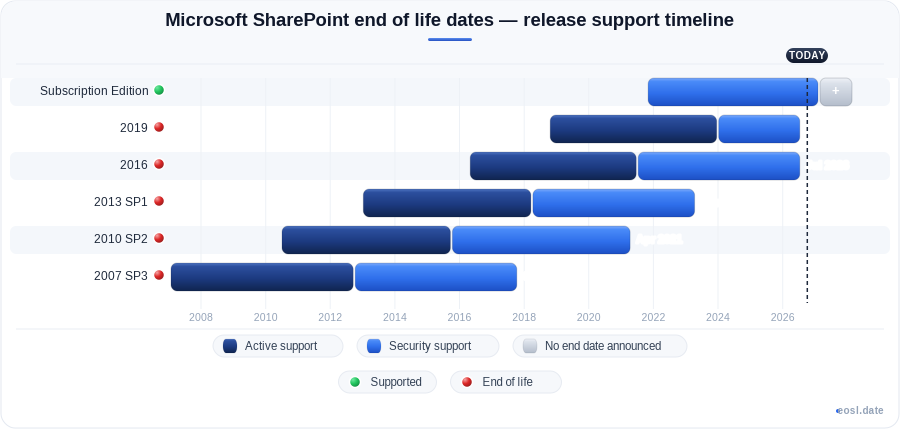
Currently Supported Microsoft SharePoint Releases - Active EOS/EOSL Support (1)
| Release | Released | Security Support | Active Support | Latest |
|---|---|---|---|---|
| Subscription Edition | (5 years ago) | Active | Active | 16.0.20326.20278 (1 week and 6 days ago) |
Microsoft SharePoint End of Life (EOL) Releases - No Longer Supported (5)
| Release | Released | Security Support | Active Support | Latest |
|---|---|---|---|---|
| 2019 | (8 years and 1 month ago) | (4 months ago) | (2 years and 10 months ago) | 16.0.10417.20198 (3 months ago) |
| 2016 | (10 years and 6 months ago) | (4 months ago) | (5 years and 4 months ago) | 16.0.5565.1001 (3 months ago) |
| 2013 SP1 | (13 years and 10 months ago) | (3 years and 7 months ago) | (8 years and 7 months ago) | 15.0.5545.1000 (3 years and 7 months ago) |
| 2010 SP2 | (16 years and 4 months ago) | (5 years and 7 months ago) | (11 years and 1 month ago) | 14.0.7268.5000 (5 years and 7 months ago) |
| 2007 SP3 | (19 years and 9 months ago) | (9 years and 1 month ago) | (14 years and 1 month ago) | 12.0.6690.5000 (12 years and 6 months ago) |
With Microsoft SharePoint end of life reached for SharePoint Server 2016 and 2019 on July 14, 2026, organizations still running this on-premises platform no longer receive security updates or bug fixes. Microsoft ended support for the collaboration product on that date, closing its lifecycle. This guide covers what changed and which option fits you.
Microsoft SharePoint End of Life Dates and July 14, 2026
Microsoft manages the older releases under its fixed lifecycle policy, so the end of extended support date was set years ahead, and a fixed policy rarely moves. The modern lifecycle policy covers Subscription Edition instead, which has no retirement date. The retirement also hit SharePoint Designer 2013 and InfoPath. Every product below received its last updates on the same day.
| Release | Active support ended | Security support ended | Latest version |
|---|---|---|---|
| Subscription Edition | Still active | Still active | 16.0.20326.20190 |
| SharePoint 2019 | Jan 9, 2024 | Jul 14, 2026 | 16.0.10417.20198 |
| SharePoint 2016 | Jul 13, 2021 | Jul 14, 2026 | 16.0.5565.1001 |
Check your own build numbers against that table to see how far behind your server sits.
What End of Support Means for On-Premises SharePoint Server 2019
Servers do not shut down at the support deadline. You can continue to use an existing farm, but the date is a hard stop for vendor help: no security patches or other patches, and no technical support, including paid support. Without that safety net, a support ticket is your only route to advice, and a moderator confirmed that no extension was announced, because a fixed lifecycle seldom changes. The extended support window is closed, so treat the software as unsupported.
Unsupported SharePoint Servers: Compliance Risk Past End-of-Life
Every month after end-of-life adds security risks, because attackers study each fix and target the unpatched farm. Servers exposed to the internet carry the most risk, and regulatory rules treat stale data platforms harshly. To mitigate that exposure, restrict access while you plan.
Security exploits and ransomware
Active exploits have already compromised outdated setups. Without monthly patches, cybercriminals use known vulnerabilities, and the result is data theft or ransomware.
Compliance and audit failures
An audit flags unpatched servers under GDPR, SOC 2, HIPAA and ISO 27001. Legacy sites also sit outside the Microsoft Purview audit trail, which raises compliance risk.
Customization breakage from InfoPath and the add-in model
Legacy customizations break first. The add-in model and Azure Access Control Service were retired on April 2, 2026, so apps built on them stopped working. InfoPath forms, custom scripts, custom workflows, classic sites and third-party integrations need a rewrite.
Migration Paths After the SharePoint Extended Support Deadline
A standard migration takes 6 to 18 months, so start now. The free SharePoint Migration Tool (SPMT) scans your farm, and an upgrade path then replaces legacy forms with Power Apps, Power Automate and Microsoft Teams. Match the path to your enterprise infrastructure.
SharePoint Online and Microsoft 365 in the cloud
Moving to SharePoint Online, part of Microsoft 365, is the default cloud route. As SaaS, it hands hardware upkeep and patching to Microsoft.
SharePoint Server Subscription Edition upgrade
SharePoint Server Subscription Edition keeps data on-premises and follows the modern lifecycle policy. Upgrade from 2019 with the database-attach method on Windows Server 2019 or 2022 and SQL Server 2019 or newer. Choose this Subscription Edition path if data sovereignty rules block the cloud.
The hybrid model
A hybrid model links a Subscription Edition farm to SharePoint Online. Search federation shows combined results, and a hybrid architecture lets you move heavy document libraries to the cloud gradually.
End of Life for SharePoint: Action Plan for IT Teams and MSPs
Treat the lapsed support date as more than a software upgrade. IT teams, MSPs and partners can turn the SharePoint lifecycle ending into a plan by working through this order:
- Build an inventory of sites, permissions, workflows and integrations.
- Rank every site by business criticality.
- Flag unsupported dependencies, then pick a path.
- Write the migration planning timeline and modernize one site at a time.