Renovate CLI End of Life (EOL) Dates and End of Support (EOS) Dates
Renovate CLI end of life (EOL) and end of support (EOS) dates: 4 Renovate CLI versions have reached EOL, including Renovate CLI 43 (EOL date: Jul 29, 2026) — no longer receiving security updates or patches. Renovate CLI 44.227.2 is the current supported release. Also see Blender EOSL information for related end-of-life information.
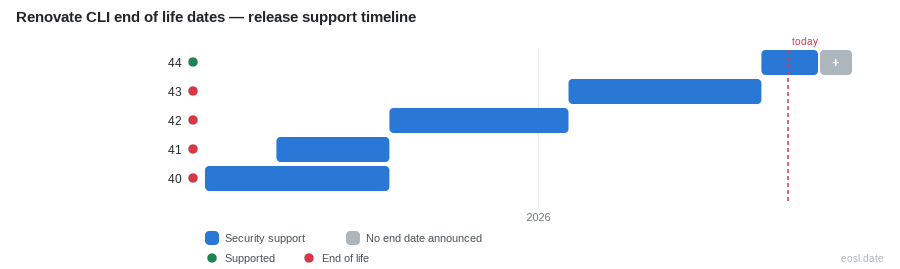
Currently Supported Renovate CLI Releases - Active EOS/EOSL Support (1)
| Release | Released | Support | Latest |
|---|---|---|---|
| 44 | (3 months ago) | Active | 44.227.2 (2 days ago) |
Renovate CLI End of Life (EOL) Releases - No Longer Supported (4)
| Release | Released | Support | Latest |
|---|---|---|---|
| 43 | (9 months ago) | (3 months ago) | 43.288.0 (3 months ago) |
| 42 | (1 year and 2 months ago) | (9 months ago) | 42.99.0 (9 months ago) |
| 41 | (1 year and 6 months ago) | (1 year and 2 months ago) | 41.173.1 (1 year ago) |
| 40 | (1 year and 8 months ago) | (1 year and 2 months ago) | 40.62.1 (1 year and 4 months ago) |
Planning around Renovate CLI end of life starts with one question: is your release still receiving fixes? Renovate, the open source dependency update tool also known as Renovate Bot, supports only its newest line, so older ones age out fast. Here are the current dates and what to do when yours expires.
Renovate CLI End of Life: Release Cycle and Support Dates
Renovate ships quickly, so every major version has a short life. The maintainers keep only the latest version as a supported release. They may backport security patches to older lines, but that is discretionary and mostly serves paying customers. New bug fixes and the project roadmap target the newest line, so the release cycle effectively dictates your upgrade pace. Check your install with renovate --version and compare it with the table.
Renovate EOL Dates by Major Version
| Release line | Released | Ended | Last release |
|---|---|---|---|
| 44 | 29 Jul 2026 | Still supported | 44.181.10 |
| 43 | 29 Jan 2026 | 29 Jul 2026 | 43.288.0 |
| 42 | 14 Aug 2025 | 29 Jan 2026 | 42.99.0 |
| 41 | 30 Apr 2025 | 14 Aug 2025 | 41.173.1 |
| 40 | 22 Feb 2025 | 14 Aug 2025 | 40.62.1 |
A minor version or a single patch inside a major line is routine, but a jump between majors deserves planning. Follow the dates on endoflife.date, through its API or the RSS feed.
Renovate Support Options and Commercial Offerings
Renovate support comes from the open project itself and from commercial offerings built by Mend. Each runs on a different platform, from an on-premises install to a software-as-a-service app in the cloud, and each has its own lifecycle outside the scope of the table above. Whichever you choose, the same rule applies once your Renovate release line stops being supported: upgrade.
Mend Renovate Community and Enterprise Plans
Mend Renovate Community is a free hosted app that adds job scheduling on top of the engine. Mend Renovate Enterprise is the paid tier with merge workflows and reporting, and the community edition shares its core code. The documentation for each product explains the differences, and the open source core stays free for every team of developers.
Mend Renovate Self-Hosted and Cloud Deployment
Pick Mend Renovate self-hosted when repositories must stay on your network, or the cloud app for GitHub and GitLab. The GitHub marketplace lists the hosted app, and the runner reads the same GitHub permissions. Teams running their own install must upgrade Renovate themselves when a major line ends, while the cloud app is updated for you. The CLI also talks to other git forges, including Gitea, Forgejo and Bitbucket.
Paid Consulting and Priority Support
Additional support exists too: enterprise customers get priority support for older majors, and one maintainer offers paid consulting for teams stuck on an ended release.
Track Renovate EOL Versions with endoflife.date
Renovate can watch lifecycle data itself, including the dates for Renovate, so a pinned Renovate version whose line has ended gets flagged. The lifecycle datasource reads release and lifecycle information for tools like Kubernetes, Node, Terraform and Docker, next to your usual npm and other package managers. Use a strict versioning scheme such as semver instead of loose versioning, and point at a custom registry when needed.
Configure Packagerules in renovate.json
Add a renovate.json to the repository root and extend presets instead of hand-writing options. This configuration merges small changes and leaves majors for review, and one file also covers monorepos. Set a schedule to batch the noise, then add a rule that flags any pinned Renovate version once its line ends.
{
  "extends": ["config:recommended"],
  "packageRules": [
    { "matchUpdateTypes": ["minor", "patch"], "automerge": true }
  ]
}
Pull Requests, Dependency Dashboard and Automerge
On first run Renovate opens a welcome pull request listing detected dependencies. Later it raises grouped pull requests for updates, tracked in the dependency dashboard. Because each batch of updates is small, developers review fewer changes, and outdated dependencies never pile up. Teams that skip updates for months face one large, risky jump instead, and the dashboard is where an ended Renovate line shows up first. This automation keeps repositories current, and the dependency updates stay small when you merge them often.
Dependency Management Risks After End-of-Life
Good dependency management prevents emergency upgrades. When a framework or software release stops receiving fixes, maintenance turns into a risk and the eventual cost grows. Running an unsupported Renovate major misses every new fix, and unpatched end-of-life packages are deprecated in practice, and security teams treat them as exposure.
Security Patches and Vulnerabilities in Unsupported Packages
Once support ends, new vulnerabilities and each CVE go unfixed upstream. The vulnerability then sits in your stack until you migrate, and any breaking changes in that jump make a late upgrade harder. Run an audit regularly.
Compliance and Deprecation Rules
Frameworks such as PCI DSS demand compliance with patching, and deprecation of a package does not excuse the gap. Third-party vendors sell extended coverage for retired packages, which is costly compared with simply upgrading on time.
Mend Renovate Merge Confidence and CI/CD Checks
Mend Renovate adds merge confidence ratings, and every change triggers your CI/CD pipeline before it merges. That keeps upgrades safe when you move off an expired release, including the jump to the next Renovate major.