Veeam Backup for Microsoft 365 End of Life (EOL) Dates and End of Support (EOS) Dates
Veeam Backup for Microsoft 365 end of life (EOL) and end of support (EOS) dates: 7 Veeam Backup for Microsoft 365 versions have reached EOL, including Veeam Backup for Microsoft 365 8 (EOL date: Sep 03, 2026) — no longer receiving security updates or patches. Also see Blender end of life dates for related end-of-life information.
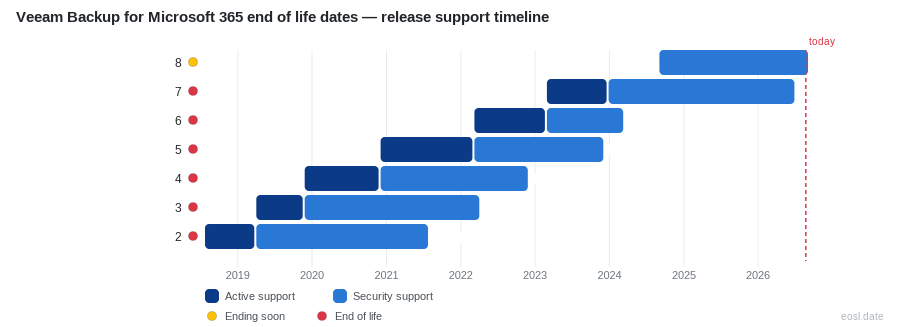
Veeam Backup for Microsoft 365 End of Life (EOL) Releases - No Longer Supported (7)
| Release | Released | End of Support | End of Fix | Latest |
|---|---|---|---|---|
| 8 | (2 years and 2 months ago) | (2 months ago) | Active | 8.6.0.5021 (4 days ago) |
| 7 | (3 years and 8 months ago) | (4 months ago) | (2 years and 10 months ago) | 7.1.0.2031 (2 years and 6 months ago) |
| 6 | (4 years and 8 months ago) | (2 years and 8 months ago) | (3 years and 8 months ago) | 6.1.0.1015 (3 years and 7 months ago) |
| 5 | (5 years and 11 months ago) | (2 years and 11 months ago) | (4 years and 8 months ago) | 5.0.3.1063 (4 years and 9 months ago) |
| 4 | (6 years and 11 months ago) | (3 years and 11 months ago) | (5 years and 11 months ago) | 4.0.1.625 (5 years and 9 months ago) |
| 3 | (7 years and 7 months ago) | (4 years and 7 months ago) | (6 years and 11 months ago) | 3.0.0.422 (7 years and 7 months ago) |
| 2 | (8 years and 3 months ago) | (5 years and 3 months ago) | (7 years and 7 months ago) | 2.0.0.814 (7 years and 10 months ago) |
Veeam Backup for Microsoft 365 end of life happens in stages, and the Veeam product lifecycle page lists version 8 reaching end of support in May 2027, while version 7 already lapsed in June 2025. This guide shows each date, explains what end of fix and end of support mean for your Microsoft tenant, and walks you through an upgrade before your supported version runs out.
Veeam Backup for Microsoft 365 End of Life Dates
Veeam publishes a release date, an end of fix date and an end of support and security fix date for every product. For the Microsoft 365 backup product, the current entries are:
| Version | Release date | End of fix | End of support and security fix |
|---|---|---|---|
| Veeam Backup for Microsoft 365 8 | September 2024 | Next GA date | May 2027 |
| Veeam Backup for Microsoft 365 7 | February 2023 | December 2023 | June 2025 |
Version 8 End of Life and the Support Date
Veeam Backup for Microsoft 365 version 8 end of life is tied to the next GA date: once a newer release ships, version 8 moves to end of fix, and support ends in May 2027. Some third-party trackers, such as Lansweeper, list September 2026 instead, so treat Veeam's own page as the authority and check it before you plan your upgrade.
Version 7 End of Life Is Already Behind You
Veeam Backup for Microsoft 365 version 7 end of life passed in June 2025. If you still run it, you get no security updates, so move to version 8, which also adds immutability, proxy pools that spread load and avoid throttling, Microsoft Teams private and shared channel protection, and better monitoring.
Veeam Product Lifecycle: End of Fix and End of Support
The Veeam product lifecycle policy moves each version through three phases, and your level of technical support depends on the lifecycle phase. The customer support policy describes the details.
Fully Supported
A current version is fully supported, and Veeam fixes vulnerabilities and bugs. A hotfix is only built for customers on the latest public build.
End of Fix
At end of fix, no further updates, patches or hotfixes are produced, with exceptions on a case-by-case basis. If your issue is solved in a generally available version, Veeam requires you to upgrade. Security fix delivery continues in this stage.
End of Support and Security Fix
The version no longer receives support or security updates. To get help you need an active maintenance contract and an upgrade to a version that has not reached this phase. Open a support case only after upgrading.
Lifecycle Dates for Other Veeam Products
Because teams often run several tools, here is how a Veeam end of life date looks across the wider portfolio of backup software:
- Veeam Backup & Replication 11 and Veeam ONE 11: support ended in February 2024.
- Veeam Agent for Windows 5, Veeam Agent for Linux 5 and Veeam Agent for Mac 1: also February 2024.
- Veeam Backup & Replication 12 and Veeam ONE 12: February 2027.
Running an audit report of installed versions across your IT environment shows how many days remain for each asset.
Why an Unsupported Version Puts Your Microsoft 365 Backup at Risk
Going end of life leaves vulnerabilities unpatched on the server that holds your recovery copies. Since ransomware and other cybersecurity incidents target backups, an unsupported install risks data loss exactly when you need a restore. Microsoft changes add pressure too: the EWS retirement means Veeam is moving to Microsoft Graph, so keep EWS enabled in your tenant and manage the app allow list, as the Veeam knowledge base explains. Mailbox data, SharePoint sites and Teams chats all depend on that connection, so a Microsoft change can break a Microsoft 365 job even on a supported build.
Good data protection also supports compliance: auditors expect the backup infrastructure, from the hardware to the operating system and every piece of software on it, to receive security patches. A server that falls out of support makes a disaster recovery plan harder to defend. Check the EULA and your contract for the terms that apply once a version is retired.
Upgrade Checklist for Veeam Backup for Microsoft 365 8
Finish the upgrade well before the end of support date. Download the newest release from the previous versions and download pages and confirm the system requirements first:
- Microsoft Windows Server 2016 to 2025 (or Microsoft Windows 10 and 11 for small labs), 8 CPU cores and 16 GB of memory.
- PostgreSQL 15 or 16 and a NATS server for the database layer.
- Exchange Online and SharePoint Online organizations; Exchange Server and SharePoint Server 2016 and 2019 support ends in the next version.
Plan the hardware first: Veeam recommends an SSD for the PostgreSQL data. Then back up the configuration database, because your Microsoft 365 data depends on it, then upgrade and test a restore and recovery job. Pair this with your Veeam Backup & Replication plan, since version 12 follows the same rules.
Veeam Data Cloud as a SaaS Alternative to Self-Hosting
If you would rather not maintain servers, Veeam Data Cloud is a SaaS option that stores Microsoft 365 backup copies in your chosen Microsoft Azure region for data sovereignty, with simple per-user licensing and a self-service restore portal. It integrates with Microsoft backup storage for fast recovery, and a service provider can manage it for you. It protects Exchange, SharePoint, OneDrive, Teams and Entra ID data in the cloud, so you skip the Microsoft Windows server patching and the version end of life dates entirely.