Citrix Virtual Apps and Desktops End of Life (EOL) Dates and End of Support (EOS) Dates
Citrix Virtual Apps and Desktops end of life (EOL) and end of support (EOS) dates: 20 Citrix Virtual Apps and Desktops versions have reached EOL, including Citrix Virtual Apps and Desktops 2503 (EOL date: Oct 29, 2026) — no longer receiving security updates or patches. Citrix Virtual Apps and Desktops 2607 LTS is the current supported release, with support through Aug 17, 2029 — 6 versions in active support. Also see Blender end of support dates for related end-of-life information.
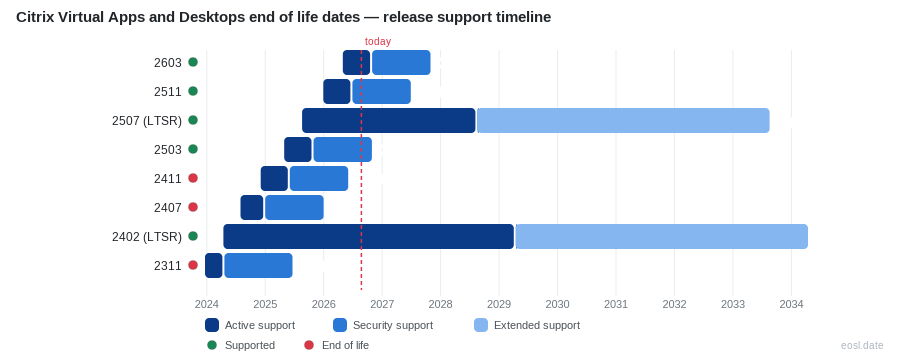
Currently Supported Citrix Virtual Apps and Desktops Releases - Active EOS/EOSL Support (6)
| Release | Released | Security Support | Active Support | Extended Support | Latest | LTS |
|---|---|---|---|---|---|---|
| 2607 (LTSR) | (3 months ago) | (in 2 years and 8 months) | (in 2 years and 8 months) | Active | 2607 (3 months ago) | LTS |
| 2603 | (6 months ago) | (in 11 months) | (3 weeks and 1 day ago) | Active | 2603 (6 months ago) | - |
| 2511 | (10 months ago) | (in 7 months) | (4 months ago) | Active | 2511 Update 3 (7 months ago) | - |
| 2507 (LTSR) | (1 year and 3 months ago) | (in 1 year and 8 months) | (in 1 year and 8 months) | (in 6 years and 8 months) | 2507 CU2 (3 months ago) | LTS |
| 2402 (LTSR) | (2 years and 7 months ago) | (in 2 years and 4 months) | (in 2 years and 4 months) | (in 7 years and 4 months) | 2402 CU4 Update 1 (3 months ago) | LTS |
| 2203 (LTSR) | (4 years and 7 months ago) | (in 4 months) | (in 4 months) | (in 5 years and 4 months) | 2203 CU7 Update 4 (3 months ago) | LTS |
Citrix Virtual Apps and Desktops End of Life (EOL) Releases - No Longer Supported (20)
| Release | Released | Security Support | Active Support | Extended Support | Latest | LTS |
|---|---|---|---|---|---|---|
| 2503 | (1 year and 6 months ago) | (3 weeks and 2 days ago) | (1 year ago) | Active | 2503 (1 year and 6 months ago) | - |
| 2411 | (1 year and 11 months ago) | (5 months ago) | (1 year and 5 months ago) | Active | 2411 (1 year and 11 months ago) | - |
| 2407 | (2 years and 3 months ago) | (10 months ago) | (1 year and 10 months ago) | Active | 2407 (2 years and 3 months ago) | - |
| 2311 | (2 years and 11 months ago) | (1 year and 5 months ago) | (2 years and 7 months ago) | Active | 2311 (2 years and 11 months ago) | - |
| 2308 | (3 years and 2 months ago) | (1 year and 8 months ago) | (2 years and 8 months ago) | Active | 2308 (3 years and 2 months ago) | - |
| 2305 | (3 years and 5 months ago) | (1 year and 11 months ago) | (2 years and 11 months ago) | Active | 2305 (3 years and 5 months ago) | - |
| 2303 | (3 years and 8 months ago) | (2 years and 2 months ago) | (3 years and 2 months ago) | Active | 2303 (3 years and 8 months ago) | - |
| 2212 | (3 years and 11 months ago) | (2 years and 5 months ago) | (3 years and 5 months ago) | Active | 2212 (3 years and 11 months ago) | - |
| 2209 | (4 years and 1 month ago) | (2 years and 7 months ago) | (3 years and 7 months ago) | Active | 2209 (4 years and 1 month ago) | - |
| 2206 | (4 years and 4 months ago) | (2 years and 10 months ago) | (3 years and 10 months ago) | Active | 2206 (4 years and 4 months ago) | - |
| 2112 | (4 years and 11 months ago) | (3 years and 5 months ago) | (4 years and 5 months ago) | Active | 2112 (4 years and 11 months ago) | - |
| 2109 | (5 years and 1 month ago) | (3 years and 7 months ago) | (4 years and 7 months ago) | Active | 2109 (5 years and 1 month ago) | - |
| 2106 | (5 years and 5 months ago) | (3 years and 11 months ago) | (4 years and 11 months ago) | Active | 2106 (5 years and 5 months ago) | - |
| 2103 | (5 years and 8 months ago) | (4 years and 2 months ago) | (5 years and 2 months ago) | Active | 2103 (5 years and 8 months ago) | - |
| 2012 | (5 years and 11 months ago) | (4 years and 5 months ago) | (5 years and 5 months ago) | Active | 2012 (5 years and 11 months ago) | - |
| 2009 | (6 years and 1 month ago) | (4 years and 7 months ago) | (5 years and 7 months ago) | Active | 2009 (6 years and 1 month ago) | - |
| 2006 | (6 years and 5 months ago) | (4 years and 11 months ago) | (5 years and 11 months ago) | Active | 2006 (6 years and 5 months ago) | - |
| 2003 | (6 years and 7 months ago) | (5 years and 1 month ago) | (6 years and 1 month ago) | Active | 2003 (6 years and 7 months ago) | - |
| 1912 (LTSR) | (6 years and 11 months ago) | (1 year and 11 months ago) | (1 year and 11 months ago) | (in 3 years) | 1912 CU10 (1 year and 11 months ago) | LTS |
| XenDesktop 7.15 (LTSR) | (9 years and 3 months ago) | (4 years and 3 months ago) | (4 years and 3 months ago) | (in 8 months) | 7.15 CU9 (4 years and 4 months ago) | LTS |
If you run Citrix Virtual Apps and Desktops end of life dates through your calendar, you can see which self-hosted builds are about to lose updates and which ones still have years left. This guide lays out the lifecycle for every version, so your customers, administrators and support teams know when EOL hits and what to move to. It also covers the older XenApp and XenDesktop 7.15 line, which has already left standard support.
Citrix Virtual Apps and Desktops End of Life Dates and Product Matrix
Citrix publishes its official product matrix and tracks each release through the same lifecycle phases: general availability, a notice of status change, end of sale, end of maintenance and finally the end of the line. The table below pulls the dates together as of late October 2026. Each Citrix Virtual Apps and Desktops version has a GA date, an EOM date, an EOL date and an EOES date, and N/A means no further coverage is offered for that build.
| Version | Type | GA | EOM | EOL | EOES |
|---|---|---|---|---|---|
| 2503 | CR | 29 Apr 2025 | 29 Oct 2025 | 29 Oct 2026 | N/A |
| 2511 | CR | 29 Dec 2025 | 29 Jun 2026 | 29 Jun 2027 | N/A |
| 2603 | CR | 30 Apr 2026 | 30 Oct 2026 | 30 Oct 2027 | N/A |
| 2203 | LTSR | 23 Mar 2022 | 23 Mar 2027 | 23 Mar 2027 | 23 Mar 2032 |
| 2402 | LTSR | 14 Apr 2024 | 15 Apr 2029 | 15 Apr 2029 | 15 Apr 2034 |
| 2507 | LTSR | 19 Aug 2025 | 18 Aug 2028 | 18 Aug 2028 | 18 Aug 2033 |
| 2607 | LTSR | 18 Aug 2026 | 17 Aug 2029 | 17 Aug 2029 | N/A |
The table follows the Citrix product lifecycle pages and the community-run endoflife.date calendar, which also offers an RSS feed. These lifecycle dates are the ones to track: once a build passes EOL it becomes a legacy product, and a product with no planned end of sale (EOS) date simply shows N/A until Citrix announces one. Citrix also notes that the standalone Citrix Virtual Apps and Desktops software is no longer renewed or expanded, because it now sits inside the Citrix Universal Hybrid Multi-Cloud and Citrix Platform License subscription bundles, each with a feature matrix of its own. Always compare the official lifecycle dates before you lock in a plan.
Current Release End of Maintenance and Support Rules
A Current Release of Citrix Virtual Apps and Desktops follows a fixed rhythm. Citrix ships one roughly every quarter, so the cadence is quick and the window is short. The support policy works out to a simple pair of rules, where \(\text{EOM} = \text{GA} + 6\text{ months}\) and \(\text{EOL} = \text{GA} + 18\text{ months}\).
- 6 months: the build stops receiving feature updates, which is the end of active support and the point where maintenance moves to the newer build.
- 18 months: the build reaches end-of-life, so security support, bug fixes and technical help all stop.
- Quarterly cycle: customers on this track should schedule an upgrade at least twice a year to stay covered.
Take a site running version 2503 as an example. Its EOL falls on 29 October 2026, only two days from now, so patching will stop at the same moment the 2603 build reaches EOM on 30 October 2026. Moving to the 2507 LTSR instead buys roughly 22 months, since that build stays in active support until 18 August 2028. Understanding these lifecycle milestones early keeps your schedule realistic.
Long Term Service Release (LTSR) Extended Support Timeline
A Long Term Service Release is built for stable environments that cannot take a new build every few months. Citrix delivers an LTSR every two to three years, and each one gets five years of mainstream support, so the 2203, 2402 and 2507 LTSR versions cover the long haul. Cumulative updates (CU) arrive on a regular schedule and contain fixes without new features, and each update sets a new maintenance baseline you must adopt to keep your customers protected.
After mainstream support ends, extended support is available for a fee through the Customer Success program, adding up to five more years of technical support. Do not confuse this with the separate three-year track Citrix runs for its Workspace app, which designates a new LTSR roughly every 12 months.
Supported Operating Systems for LTSR
The 2203 build's 23 March 2027 cutoff also limits which hosts stay covered, so confirm your VDA and controller hosts run operating systems the vendor still supports. The 2203 LTSR supports Windows 10, Windows 11 and Windows Server 2016, 2019 and 2022, plus several Linux distributions, while Windows 7, Windows 8.1 and Server 2008 R2 are gone. Any platform on an unsupported Microsoft release must move its session hosts to a supported one first.
Compliance and Security Requirements
To keep LTSR compliance, every baseline component must run the latest controller and VDA versions and the latest CU. Skipping one breaks that status, which raises your security risk and can leave known vulnerabilities open on endpoint and remote access paths. The same exposure follows any Citrix Virtual Apps and Desktops build once its final cutoff date passes.
Servicing Options Within the Product Lifecycle
Citrix describes three servicing options, and the release strategy you pick sets your update rhythm. These release types and their definitions are as follows:
- LTSR: predictable maintenance for on-premises deployments, with a long cycle and the extended support add-on.
- Quarterly build: new features every three months for virtualization teams that want the latest VDI capabilities, with a year and a half of coverage.
- Cloud service: a continuously updated hybrid offering with no version to retire, covered in the DaaS section below.
Choosing the right option for your workloads across the Citrix Virtual Apps and Desktops lifecycle is mostly a question of how much change your private cloud or datacenter can absorb, and the Citrix upgrade guide helps you compare them.
Upgrade and Migration Paths Before End of Support
Once you know your end of support date, start planning backwards from it. Deploy the target build in a pre-production environment, test your policies and published apps, and then move production in waves. Moves from the 7.15 LTSR are supported directly as long as you run one of the latest CUs, and Citrix consulting services can write a customized plan for your infrastructure. Customers with Citrix Virtual Apps and Desktops on older Windows hosts should expect to rebuild those hosts first.
Treat this as a deployment project with a deadline, not a patch. A basic checklist should include your operating system versions, license entitlement, third-party integrations, and a rollback option, and every migration milestone should land before the EOM date, not just before EOL.
Citrix DaaS as an Alternative to Legacy Releases
If you would rather not manage upgrades, Citrix DaaS removes the version treadmill for customers who want it. As a cloud-hosted service, it receives updates continuously, so no patching or server maintenance falls on your team, and it lowers infrastructure cost while strengthening security. Citrix has not announced an EOL for the existing DaaS services, and it promises notice before it ends support for any of them. The service stays supported as long as you remain licensed and keep your components current with the documented requirements, which makes it the lowest-effort alternative to the Citrix Virtual Apps and Desktops version cycle.
Workspace App Lifecycle Milestones for Your Clients
Your end users connect through the Workspace app, which follows its own lifecycle. A Workspace app build reaches EOM when the next version ships, and EOL arrives 18 months after its release date. The Windows rows below show how the dates stack, so check them against the Citrix Virtual Apps and Desktops build you run.
| Component | Version | GA | EOM | EOL |
|---|---|---|---|---|
| Citrix Workspace app for Windows | 2603 | 30 Apr 2026 | 11 May 2026 | 30 Oct 2027 |
| Citrix Workspace app for Windows | 2603.1 | 11 May 2026 | 18 Jun 2026 | 11 Nov 2027 |
| Citrix Workspace app for Windows | 2603.10 | 18 Jun 2026 | 12 Aug 2026 | 18 Dec 2027 |
Keep the client on the latest maintained build, since an older version drifts out of coverage even while your servers are still inside it.