Proxmox Datacenter Manager End of Life (EOL) Dates and End of Support (EOS) Dates
Proxmox Datacenter Manager end of life (EOL) and end of support (EOS) dates: 0 has reached EOL — EOL date: Dec 04, 2025. This version no longer receives security updates, patches, or support. Proxmox Datacenter Manager 1.1 is the current supported release. Also see Apache Subversion EOSL dates for related end-of-life information.
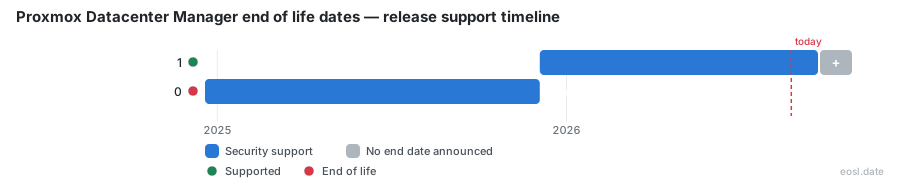
Currently Supported Proxmox Datacenter Manager Releases - Active EOS/EOSL Support (1)
| Release | Released | Security Support | Latest |
|---|---|---|---|
| 1 | (11 months ago) | Active | 1.1 (5 months ago) |
Proxmox Datacenter Manager End of Life (EOL) Releases - No Longer Supported (1)
| Release | Released | Security Support | Latest |
|---|---|---|---|
| 0 | (1 year and 11 months ago) | (11 months ago) | 0.1 (1 year and 11 months ago) |
Planning around Proxmox Datacenter Manager end of life starts with one fact: Proxmox has not announced a final EOL date, so your datacenter management plans follow the Debian release underneath it. You will see which versions are supported today, how the support window is likely to run, and what administrators should do to keep their infrastructure on a version that still receives fixes.
Proxmox Datacenter Manager End of Life: How the Debian 13 Support Window Works
Every Proxmox Datacenter Manager lifecycle follows the Debian release cycle. Each major version is built on one Debian release and stays supported for as long as that Debian release gets standard support, which is about 3 years. When a new major version ships, Proxmox typically keeps the previous one alive for an overlap period of roughly one year, with security and bug fixes only, so you have time to move.
The official FAQ shows where this stands now: PDM 1 sits on Debian 13, first released in 2025-12, and both the Debian EOL and the Proxmox Datacenter Manager EOL columns read TBA. Treat any date you see elsewhere as an estimate. If you count three years from the Debian 13 launch in 2025, you land around 2028 for the supported release window, but that is arithmetic, not an announcement.
Why the Trixie base sets your support window
The current Proxmox Datacenter Manager version is based on Debian 13 “Trixie”, so the operating system, the Linux kernel and ZFS come from that open-source stack, and the core software is written in Rust. Administrators should note that only the management node follows this Debian clock: the virtualization hosts it controls keep their own schedule. That also shapes end of life: the Rust-based datacenter software runs only on 64-bit AMD or Intel processors, so the hardware you pick should outlive the Debian 13 support window, as this open source project’s FAQ implies.
Release Dates and Support Status for Every PDM Version
The table lists each stable release, using dates from the Proxmox announcements and the endoflife.date tracker. The 0.1 first release is already out of support, and the latest release is the one to run.
| Release | Released | Base | Support status |
|---|---|---|---|
| 0.1 | 19 Dec 2024 | Debian 12 | Ended 4 Dec 2025 |
| 1.0 stable | 4 Dec 2025 | Debian 13.2, kernel 6.17, ZFS 2.3 | Supported, EOL TBA |
| 1.1 | 28 May 2026 | Debian 13.5, kernel 7.0, ZFS 2.4 | Supported, EOL TBA |
Each release comes as a complete ISO you can download, but to confirm that a release is still supported, check the documentation and roadmap or the tracker above. Enterprise teams keep the dashboard, monitoring and live migration between clusters only while their version stays supported.
Point release changes and release notes worth reading
Version 1.1 raised the supported baseline with unified Ceph monitoring and automated installations, on top of the Proxmox Virtual Environment and Proxmox Backup Server remotes that 1.0 already managed across many clusters. Read the release notes before each point release, because they flag breaking changes that affect your backup jobs, every VM and container, and your compliance reporting.
Upgrade Proxmox Datacenter Manager Before Support Ends
Moving between minor versions works like any normal update, such as 1.0 to 1.1. The best habit is staying on the latest minor version, since only the newest minor release in a cycle gets patches. Upgrading a major version, when Proxmox ships one, is the step that needs an overlap period and a plan for all your remotes, clusters and nodes, so administrators should schedule it ahead of time. Updates to the Proxmox Datacenter Manager host itself take minutes; the planning around clusters is the slow part.
- Confirm your current release is still supported before planning the move.
- Check the release notes for changes that touch your clusters, and test on one cluster first.
- Confirm the package repositories are set up correctly.
- Run the update from the web interface or the command line.
Rolling release upgrades with apt full-upgrade
Because the product is a rolling release on top of Debian, use apt full-upgrade rather than a plain upgrade, which cannot remove packages and may leave a partly upgraded system. Only continue if apt update finished without errors, then apply the updates.
Proxmox Datacenter Manager Support and Enterprise Subscription Rules
There is no dedicated subscription for PDM. Existing Basic or higher plans on your Proxmox VE and Proxmox Backup Server remotes include enterprise support for it at no extra cost, so Proxmox Datacenter Manager support follows the datacenter subscriptions you already hold.
Enterprise repository access and update management
The enterprise repository is how subscribers receive fixes for supported versions, and it becomes available when at least 80% of the configured remotes have a valid Basic subscription or better. The built-in update management panel then shows every pending patch and the updates waiting on each of your remotes, which is the quickest way to confirm you are on a release that still gets fixes.