PrivateBin End of Life (EOL) Dates and End of Support (EOS) Dates
PrivateBin end of life (EOL) and end of support (EOS) dates: 9 PrivateBin versions have reached EOL, including PrivateBin 2.0 (EOL date: Oct 18, 2026) — no longer receiving security updates or patches. PrivateBin 2.1.1 is the current supported release. Also see Coder EOSL dates for related end-of-life information.
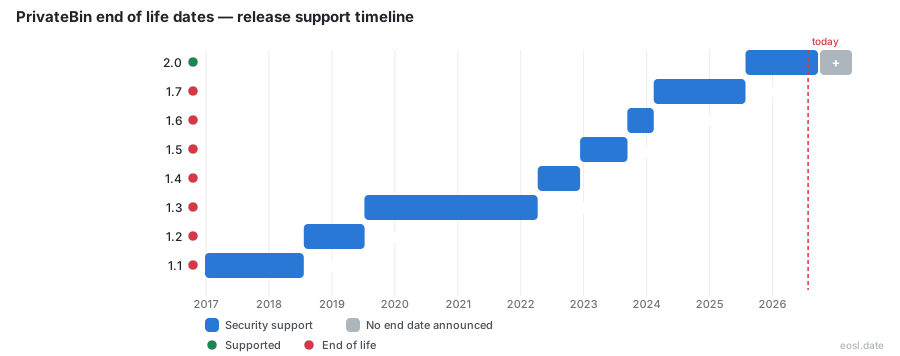
Currently Supported PrivateBin Releases - Active EOS/EOSL Support (1)
| Release | Released | Security Support | Latest |
|---|---|---|---|
| 2.1 | (1 month and 5 days ago) | Active | 2.1.1 (2 weeks and 4 days ago) |
PrivateBin End of Life (EOL) Releases - No Longer Supported (9)
| Release | Released | Security Support | Latest |
|---|---|---|---|
| 2.0 | (1 year and 3 months ago) | (1 month and 5 days ago) | 2.0.6 (3 months ago) |
| 1.7 | (2 years and 9 months ago) | (1 year and 3 months ago) | 1.7.9 (1 year ago) |
| 1.6 | (3 years and 2 months ago) | (2 years and 9 months ago) | 1.6.2 (2 years and 11 months ago) |
| 1.5 | (3 years and 11 months ago) | (3 years and 2 months ago) | 1.5.2 (3 years and 4 months ago) |
| 1.4 | (4 years and 7 months ago) | (3 years and 11 months ago) | 1.4.0 (4 years and 7 months ago) |
| 1.3 | (7 years and 4 months ago) | (4 years and 7 months ago) | 1.3.5 (5 years and 7 months ago) |
| 1.2 | (8 years and 4 months ago) | (7 years and 4 months ago) | 1.2.3 (6 years and 9 months ago) |
| 1.1 | (9 years and 10 months ago) | (8 years and 4 months ago) | 1.1.1 (9 years and 1 month ago) |
| 1.0 | (10 years and 2 months ago) | (9 years and 10 months ago) | 1.0 (10 years and 2 months ago) |
Knowing the PrivateBin end of life status of your install protects the point of this minimalist, open source pastebin: a zero knowledge design where the server never sees your data. This software guide shows which releases still get fixes, how to find the current build and what to do when your branch is retired, so your privacy and encryption stay intact.
PrivateBin End of Life Dates and Supported Release Lines
The project follows SemVer, and only the newest line receives fixes. A public lifecycle tracker lists each branch like this:
| Release line | Released | Security support ended |
|---|---|---|
| 2.0 | 28 Jul 2025 | Still supported |
| 1.7 | 11 Feb 2024 | 28 Jul 2025 |
| 1.6 | 11 Sep 2023 | 12 Feb 2024 |
| 1.5 | 11 Dec 2022 | 12 Sep 2023 |
| 1.4 | 9 Apr 2022 | 11 Dec 2022 |
| 1.3 | 9 Jul 2019 | 9 Apr 2022 |
Line 2.0 arrived the same day support for 1.7 stopped, so anything older than 2.0 is unmaintained.
How SemVer Defines a Supported Release
Your first check is the latest release line: a patch such as 1.7.9 is out of support since 28 Jul 2025, because only the 2.0 line is maintained. Anything older is retired even when its last patch is recent, and an unfixed build served without https exposes more than either flaw alone.
Purge and Administration Script Risks After Support Ends
An old build also keeps an old purge habit: cleanup only runs when someone creates a paste, so a quiet instance can leave expired pastes in the storage backend for months. A reporter called these dormant pastes a security risk, because a later breach would expose encrypted data users believed was gone. Maintainers answered with documentation: raise the purge limit when you use a database, schedule the administration script from a real cron job, or call the webcron endpoint with a timed POST request. Any server administrator can change that configuration in minutes, and reading an expired paste deletes it anyway. The vulnerability bites mainly when an admin has disabled cleanup, and a retired branch will never get a fix if it proves worse.
Latest Version Check and Upgrade Steps
Compare the latest version the project publishes, 2.1.0 at the time of writing, with the build your server runs; any gap is your upgrade list.
Tracking the Latest Release
To learn when your branch reaches end of life, follow the project on GitHub and subscribe to the lifecycle tracker's RSS feed, iCalendar calendar or JSON api. Repology and the CPE identifier help scanners map packages to the right product. Read the installation guide and the release notes, and watch GitHub for security advisories.
Upgrading a Self-Hosted Docker Install
A self-hosting upgrade is mostly a file swap, so rehearse it before you need it.
- Back up the data directory and your configuration file.
- Pull the new Docker image, or unpack the new PHP release over the old files.
- Re-check custom templates: the Bootstrap template ships by default, while a patched fork or a translation override needs testing.
- Create a test paste, read it back and delete it.
Security Support Risks for Self-Hosted Servers
Once your branch stops receiving fixes, the threat stops being theoretical: users must trust the operator, and without patches that trust shrinks. Every security decision below assumes you run a supported build.
Zero Knowledge Encryption Limits
Content is encrypted in your browser with 256bit AES in Galois Counter mode, and the decryption key sits in the URL fragment after the #, which browsers never send to the server. That cryptography keeps stored encrypted pastes unreadable after a breach and gives admins plausible deniability. It does not stop a compromised server from serving malicious code that steals the key, nor does it hide who opened a paste, because access logs can be handed over. Serve the instance with HSTS, add a DNSSEC protected DANE record if you can, and never open an instance you suspect is compromised.
Burn After Reading and Expiration Options
While an unpatched instance is still online, limit what it holds: combine burn after reading with a password rather than choosing forever for sensitive pastes. These options stay available after you move to a supported build:
- Password protection as a second layer on shared links.
- Discussions with comments, optional nicknames and identicons.
- Markdown and syntax highlighting through prettify.
- A QR code for moving a link to a phone.
- File upload, which is off by default.
Pastebin Alternatives When You Retire an Instance
If you cannot upgrade, retire the instance. A hosted service such as scrt.link offers the same idea without servers to patch, while PrivateBin, a ZeroBin descendant, has no official public instance, so trusting a stranger's host defeats the purpose. Another open source pastebin, paaster, always encrypts in the browser.