Proxmox Backup Server End of Life (EOL) Dates and End of Support (EOS) Dates
Proxmox Backup Server end of life (EOL) and end of support (EOS) dates: 3 Proxmox Backup Server versions have reached EOL, including Proxmox Backup Server 3 (EOL date: Aug 31, 2026) — no longer receiving security updates or patches. Proxmox Backup Server 4.2.10 is the current supported release. Also see Coder end of life dates for related end-of-life information.
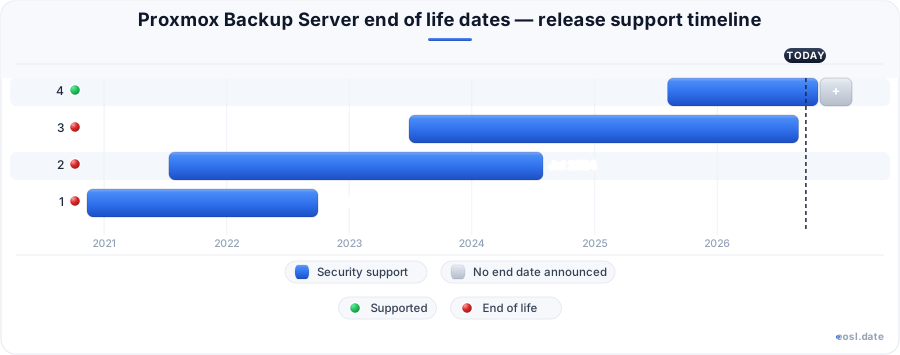
Currently Supported Proxmox Backup Server Releases - Active EOS/EOSL Support (1)
| Release | Released | Security Support | Latest |
|---|---|---|---|
| 4 | (1 year and 3 months ago) | Active | 4.2.10 (2 weeks and 3 days ago) |
Proxmox Backup Server End of Life (EOL) Releases - No Longer Supported (3)
If you run backups on Proxmox, Proxmox Backup Server end of life is the date after which a release stops getting security patches and bug fixes, even though your backup jobs keep running. Open-source virtualization projects rarely print a single tidy calendar for this, so the practical rule is to follow the Debian base and the Proxmox VE lifecycle. This guide shows how the release line maps to those dates, what the hypervisor-side warnings mean, and how to upgrade without risking a single restore.
Proxmox Backup Server End of Life: How the Support Lifecycle Works
Every Proxmox Backup Server release sits on a specific Debian release, and the project follows a rolling release model: the newest stable release is the only line that gets full attention. The roadmap wiki lists each version with its highlights, changelog and known issues, but it does not publish a separate dated table of support endings for the backup product. That gap is why people search for end of support information and end up reading Proxmox VE pages instead. Treat the Proxmox VE rule as your guide: a release is supported at least as long as the Debian release underneath it, and the supported release is the latest stable one. In plain terms, once the Debian base reaches its own end, the matching backup server version is living on borrowed time. Announcements about the product cycle usually arrive through the project's announcement posts and the community forum, so follow both. A version that is no longer supported has simply reached the end of development for its line, which is a quiet change rather than a sudden shutdown of your backup server.
What EOL Means for a Running Datastore
Reaching EOL does not switch anything off. Your datastore stays readable, scheduled backup jobs still run, and every restore still works, because the software is already installed. What stops is ongoing maintenance: no new security fixes, no patches for a newly disclosed vulnerability, and no help from the project when a bug surfaces. A backup server holds copies of everything you care about, which makes it an attractive target, so an unpatched node deserves more caution than its quiet behaviour suggests. Your backup data, its encryption keys and the stored credentials for remote storage all sit on that machine. Meanwhile the backup clients on each protected host keep sending VMs and containers to the backup server over the network, so every guest looks safely covered while the server itself ages. Server storage, whether local disks, a ZFS pool or an object store, keeps accepting data as before, which hides the problem even longer. A restore from the datastore will also succeed, so nobody notices the missing maintenance until a real incident forces a restore under pressure. Test restores of VMs, one per important datastore, are the cheapest way to prove the machine still does its job, and the support status of the underlying release tells you how long that proof will stay valid.
Why Debian Sets the Pace for Every Release
The operating system underneath supplies the kernel, the network stack, OpenSSL and ZFS userland that the backup software relies on. When Debian ends regular security updates for its release, Proxmox cannot keep that base safe on its own, so the corresponding product lines move to the next major version. The Linux kernel, storage drivers and network drivers all come from Debian, which means a backup server that falls behind also falls behind on hardware support and kernel security fixes. Watching the Debian calendar therefore gives you early notice for the whole lifecycle, long before any notice appears in the web interface.
Proxmox Backup Server 4 Release History on Debian Trixie
The 4.x line is the current generation. Proxmox Backup Server 4 arrived on Debian Trixie, and the 4.2 release, published on 29 April 2026, is based on Trixie 13.4 with Linux kernel 7.0 as the new stable default and ZFS 2.4.1. The release history shows a steady cadence of minor versions, each one carrying a refreshed kernel and installation ISO, so staying current means following the newest 4.x package set rather than parking on one point release. Before each major version the project also publishes a beta, and the 4.0 beta came with its own ISO, which is a handy way to rehearse an upgrade on a spare machine. The changelog overview groups every change by area: web interface, general backend improvements, client improvements, access control, tape backup and installation ISO, so scanning it takes minutes, and the changelog also names the Proxmox VE hosts and QEMU versions each release was tested with. Skim the changelog, the full changelog entries on known regressions, and the highlights for your target version before touching a production backup server.
Highlights of the 4.x Line
- Moving groups and namespaces: version 4.2 lets you relocate backup groups and namespaces inside the same datastore while keeping the data consistent.
- S3 backend: object storage as a datastore target began as a technology preview in 4.1 and is no longer marked that way in 4.2.
- Tape backup and client work: each release adds smaller improvements to tape backup drives, the backup client and the web interface, and the web interface also gains new views for managing a datastore. Staying on an EOL release forfeits all of them.
- Debian Trixie base: a newer kernel, newer ZFS and a fresh installation ISO come with every point release.
Known Issues and Breaking Changes in 4.x
Read the known issues before every upgrade. The 4.0 release renamed the test repository to pbs-test, warned that network interface names might change after the kernel update, introduced passkeys as a second factor, changed the order of the sync job filter and left some OpenID users logged out instantly. Version 4.1 added kernel 6.17 trouble: backups could hang on specific setups, and some Dell PowerEdge machines had problems booting. These breaking changes are why a test restore matters after every kernel jump. If your backup server uses bonded network ports or fixed firewall rules, check the interface names after the first reboot, because a changed name can leave the machine unreachable until you fix the network configuration.
Proxmox Backup Server 3 Support Window on Debian Bookworm
The 3.x line, including Proxmox Backup Server 3 at its 3.4 point release, was built on Debian Bookworm (Debian 12). Its practical support window closes as Bookworm ages out and the Proxmox VE 8 line it was paired with ended on 31 August 2026. If your backup server still reports a 3.x version today, you are on the previous generation and should plan the move to 4.x now. Anyone on Proxmox Backup Server 3.2 or 3.3 is a point release or two away from the 3.4 baseline, so install the final 3.x updates first and then jump to the newer major line. Staying on Proxmox Backup Server 3 only makes sense for the few days it takes to finish that upgrade.
Highlights of the 3.x Line
The 3.x releases are where much of the modern feature set landed: push-based sync arrived with 3.3, LDAP and Active Directory authentication followed, and notification targets beyond email arrived with 3.2. Version 3.2 also moved to kernel 6.8. If you rely on those features, they all carry forward into 4.x, so upgrading off the unsupported line costs you nothing.
Known Issues and Breaking Changes in 3.x
The known issues for 3.x are mostly historic: kernel 6.8 shifted network interface names on some machines in 3.2, and earlier kernels had their own quirks. The more important breaking changes belong to the jump into 4.x, covered above. Because Bookworm-based systems no longer get a steady supply of fixes, any newly found problem in that stack is yours to handle. When a CVE appears for the Linux kernel, OpenSSL or the backup software, a supported version gets a patch and a frozen one waits forever. A single missed patch on a backup server can expose every datastore it manages.
Proxmox VE 8 EOL and Your Backup Server
Your backup server rarely lives alone. It usually protects virtual machines and containers running on Proxmox VE, and that hypervisor has a published schedule: version 8 ended support on 31 August 2026, and Proxmox VE 9 on Debian 13 is the supported line, with 9.2 shipping in May 2026. When a host reaches EOL, its hypervisor stack of KVM, QEMU, LXC, ZFS and Ceph stops receiving patches, and the backup node holding those guests inherits part of the exposure. Run pveversion on each host to confirm what you have.
A Proxmox VE host reaches the backup server through a storage entry in the cluster, so a supported host paired with an unsupported backup server leaves one end of the chain unpatched, and the same is true in reverse. Newer servers generally accept older clients, so the usual order is to upgrade the backup server first and the hosts afterwards, unless the release notes say otherwise. Because Proxmox VE hosts run QEMU for each guest, Proxmox VE upgrades also bring a new QEMU, and that is another reason to restore-test VMs afterwards. Hosts in a cluster should move together, with Ceph health checked before and after.
Support Matrix for Debian, Proxmox VE and Proxmox Backup Server
| Product line | Debian base | Status in October 2026 |
|---|---|---|
| Proxmox Backup Server 4.x | Debian 13 (Trixie) | Current stable release |
| Proxmox Backup Server 3.x | Debian 12 (Bookworm) | Superseded, plan the upgrade |
| Proxmox VE 9 | Debian 13 (Trixie) | Supported, latest stable |
| Proxmox VE 8 | Debian 12 (Bookworm) | Support ended 31 August 2026 |
The pairing is the point: both products move together because both follow the Debian base. A fully supported host should be matched with a fully supported backup node.
Backup Server EOL Notices, Warnings and Repositories
Proxmox builds an end-of-life message into the interface. According to the roadmap, the message appears as a notice until three weeks before the end-of-life date and turns into a warning from that point on. If that banner shows up in your web interface, treat it as your working deadline. A second signal comes from the package repositories. After EOL the standard repositories, the enterprise one that needs a subscription and the free no-subscription one, usually keep resolving but stop publishing new patches. Run apt update and you will see a clean refresh, which is why a frozen node looks perfectly healthy.
Check what a node points at in its sources.list files, and compare the installed version against the support matrix above. If the list of upgradable packages is empty on a node that should have fixes, the node is probably frozen. Do not add the testing repository to chase newer packages, since mixed-in libraries can break the stack you are trying to keep alive. An archive of the retired release may exist, but archived packages are not a security feed, so use them only to rebuild an old machine.
- Enterprise repository: requires a subscription and gets the most tested updates.
- No-subscription repository: free and fine for a home lab, a little less tested.
- Test repository: early builds only, never a safety net for an EOL machine.
The backup server also keeps old archive data in each datastore, and that is separate from the package archive: retiring a release never deletes your stored backups. Also check your notifications: make sure the lifecycle notice reaches an inbox someone actually reads. Regular maintenance and a calendar entry for the Debian dates prevent most EOL surprises.
Upgrade Path Away From an EOL Release
The supported way to leave an old release is to upgrade the existing install to the newest minor version of your current line first, then jump one major version. Start by finding out what you run: proxmox-backup-manager versions --verbose lists every installed package on the backup node, much as pveversion -v does for a hypervisor. Bring the node fully current with apt update followed by apt full-upgrade, reboot, and only then plan the major upgrade. A stable window with no running garbage collection or verify job makes the whole process calmer. Pick a quiet period for the backup server, because every scheduled backup that overlaps the upgrade will fail and need a rerun. Keep support in mind as well, since vendor support, community support and the support lifecycle are three different things: a subscription gives you access to the project's technical support channel if something goes wrong mid-upgrade, which is worth a month of cost for production use.
Run the Upgrade Checker First
Proxmox ships an upgrade checker for major jumps on the hypervisor side. On a host, pve8to9 --full reports failures and warnings before you commit, and a backup node follows the same idea with its own major-version guide in the documentation. Aim for zero failures. Warnings rarely block the upgrade, but fix what you can: unexpected packages from third parties, old kernels and half-configured repositories are the usual suspects, and they are cheaper to deal with before the change than after.
Protect Your Configuration Before the Upgrade
Copy the configuration directory of the node somewhere else: datastore definitions, users, access control entries, sync jobs, prune jobs and certificates. A VM backup does not cover the host itself. Take extra care with unusual setups such as passthrough hardware or custom drivers on the hosts you protect, and write down the kernel you boot today so you can compare after the change. If the node has encrypted backups, store the encryption keys separately, because a datastore you cannot decrypt is data you have effectively lost.
Homelab or Production: The Risk of an EOL Backup Server
Context decides how fast you must move. In a homelab, a backup node often sits behind a router with no public exposure and no remote users. That is a tolerable risk for a short, defined period, as long as you keep the management interface off the internet and treat the box as time-boxed. In production, the same unpatched server is a liability. The management interface is reachable, other teams depend on the data, and compliance frameworks such as SOC 2, PCI-DSS and GDPR treat running unsupported software as an audit finding. The attack surface is also wider than people assume, because the backup node holds credentials that unlock your storage and your hosts.
- Home lab: isolate the machine on its own network segment, block inbound access and set a firm upgrade date.
- Production: do not accept the risk; schedule the upgrade now and document the exception if it slips.
- Both: keep the last good backup copy offline or on tape, so a compromised node cannot touch it.
Because the backup server is also a place where an attacker can delete or encrypt your backups, immutable or protected snapshots and a separate offline copy turn a bad day into an inconvenience. Treat the backup server as part of your security perimeter, give it a restricted network path, and review who holds admin rights. Doing so reduces the damage if a patch never arrives.
Parallel Node, In-Place Upgrade or Clean Reinstall After EOL
You have three realistic ways out. An in-place upgrade keeps your datastore, jobs and settings, needs the least effort and costs the shortest downtime. A clean reinstall from the current installation ISO gives you a fresh Trixie system and a tidy configuration, then you reattach the datastore or restore from a synced copy. The third route is to stand up a new node in parallel, sync your backup data across with a sync job, run both for a while and retire the old machine when the restore tests pass. This is the safest option for production, because the old node stays intact until you are sure.
When a cluster or Ceph storage is involved on the protected side, upgrade the hosts and the backup node in separate windows. Doing everything at once removes your safety net exactly when you need it. Plan for guests to be briefly unprotected, and take a manual backup before each step. If you choose to migrate to new hardware, size the storage for current backups plus growth, put the datastore on a fast ZFS or RAID layout, and check the network speed between the hosts and the server. A migration to a bigger box is also the moment to clear old namespaces and prune stale backup groups, so you carry less data across.
Release Lifecycle Features: Tape Backup, S3 and Installation ISO
Each release lists changes by area, and a few of them directly affect an upgrade decision. Tape backup support gets small refinements nearly every release, so if you rotate cartridges, read the tape section of the changelog. The S3 backend in 4.x lets a datastore live on object storage, which can change how you plan capacity. The installation ISO matters for a clean reinstall because it carries the newest kernel and ZFS. On the day-to-day side, the web UI gains new views, the backup client gets faster restores, and the access control system gains options such as LDAP and OpenID. None of this reaches an EOL machine, which is the quiet cost of waiting: every feature above is one you miss while the old release sits unpatched. Installation media also bundle newer ZFS and kernel versions, so a clean install on current hardware tends to improve storage throughput and network driver support in one step. If you run tape backup, test the drive and changer after the kernel changes, and confirm that your datastore still reads and writes at the speed you expect.
EOL Follow-Up: Checks After the Upgrade
Once the node is back, confirm that it works as a backup target rather than just booting. Check the version, the kernel in use, the network interface names, the network speed and that the web interface loads over the right address. Look at the datastore status and the storage usage of every datastore, then confirm that the next scheduled backup, prune and garbage collection run to the end.
Verify, Restore and Sync Jobs
Run a verify job on a recent snapshot and do a real restore of one VM or container to a scratch location; restore time on a quiet network tells you whether the new setup is healthy. Repeat the restore for a second VM to catch problems with a specific guest. A backup you have never restored is only a hope, and a restore that fails after an upgrade is the best early warning you will get. Next, check sync jobs, since 4.0 changed the filter order, and test that notifications still arrive. Also compare the new backup server's datastore size and the time of its last garbage collection with your notes from before the change. Finally, make sure immutable or protected snapshots are still marked, and that old encryption keys still decrypt the data they were made for.
Next Steps Before Your Proxmox Backup Server Reaches EOL
Treat the date as a project deadline, not a surprise. Confirm the version on every node, line it up against the Debian base and the Proxmox VE lifecycle, back up the configuration, run the upgrade checker, and pick in-place, clean reinstall or parallel node. For anything that is not isolated, move first. For a quiet home setup, schedule it and stick to the date. Either way, a supported backup server running a current release is the cheapest protection you can add to your virtualization stack.