Nutanix AOS End of Life (EOL) Dates and End of Support (EOS) Dates
Nutanix AOS end of life (EOL) and end of support (EOS) dates: 19 Nutanix AOS versions have reached EOL, including Nutanix AOS 6.10 (LTS) (EOL date: Oct 31, 2026) — no longer receiving security updates or patches. Nutanix AOS 7.6.0.10 is the current supported release, with support through Jul 31, 2028 — 4 versions in active support. Also see BIG-IP EOSL information for related end-of-life information.
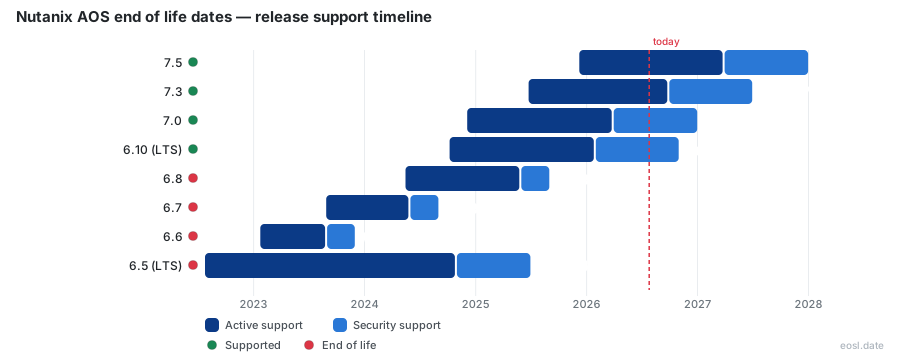
Currently Supported Nutanix AOS Releases - Active EOS/EOSL Support (4)
| Release | Released | End of Support Life | End of Maintenance | Latest | LTS |
|---|---|---|---|---|---|
| 7.6 | (3 months ago) | (in 1 year and 8 months) | (in 11 months) | 7.6.0.10 (1 week ago) | - |
| 7.5 | (10 months ago) | (in 1 year and 1 month) | (in 4 months) | 7.5.2 (3 weeks and 1 day ago) | - |
| 7.3 | (1 year and 4 months ago) | (in 7 months) | (1 month and 4 days ago) | 7.3.1.18 (4 weeks ago) | - |
| 7.0 | (1 year and 10 months ago) | (in 1 month and 4 weeks) | (7 months ago) | 7.0.1.15 (7 months ago) | - |
Nutanix AOS End of Life (EOL) Releases - No Longer Supported (19)
| Release | Released | End of Support Life | End of Maintenance | Latest | LTS |
|---|---|---|---|---|---|
| 6.10 (LTS) | (2 years ago) | (3 days ago) | (9 months ago) | 6.10.1.14 (8 months ago) | LTS |
| 6.8 | (2 years and 5 months ago) | (1 year and 2 months ago) | (1 year and 5 months ago) | 6.8.1.9 (1 year and 4 months ago) | - |
| 6.7 | (3 years and 2 months ago) | (2 years and 2 months ago) | (2 years and 5 months ago) | 6.7.1.8 (2 years and 5 months ago) | - |
| 6.6 | (3 years and 9 months ago) | (2 years and 11 months ago) | (3 years and 2 months ago) | 6.6.2.8 (3 years and 3 months ago) | - |
| 6.5 (LTS) | (4 years and 3 months ago) | (1 year and 4 months ago) | (2 years ago) | 6.5.6.7 (1 year and 10 months ago) | LTS |
| 6.1 | (4 years and 8 months ago) | (4 years ago) | (4 years and 3 months ago) | 6.1.1.5 (4 years and 4 months ago) | - |
| 6.0 | (5 years and 4 months ago) | (4 years and 5 months ago) | (4 years and 8 months ago) | 6.0.2.6 (4 years and 6 months ago) | - |
| 5.20 (LTS) | (5 years and 5 months ago) | (3 years and 3 months ago) | (4 years ago) | 5.20.5.1 (3 years and 3 months ago) | LTS |
| 5.19 | (5 years and 10 months ago) | (5 years and 2 months ago) | (5 years and 5 months ago) | 5.19.2 (5 years and 6 months ago) | - |
| 5.18 | (6 years and 2 months ago) | (5 years and 7 months ago) | (5 years and 10 months ago) | 5.18.1.2 (5 years and 11 months ago) | - |
| 5.17 | (6 years and 6 months ago) | (5 years and 11 months ago) | (6 years and 2 months ago) | 5.17.1.5 (6 years and 2 months ago) | - |
| 5.15 (LTS) | (6 years and 7 months ago) | (4 years and 5 months ago) | (5 years and 2 months ago) | 5.15.7 (5 years and 1 month ago) | LTS |
| 5.16 | (6 years and 9 months ago) | (6 years and 2 months ago) | (6 years and 5 months ago) | 5.16.1.3 (6 years and 5 months ago) | - |
| 5.11 | (7 years and 2 months ago) | (6 years and 6 months ago) | (6 years and 9 months ago) | 5.11.2.3 (6 years and 8 months ago) | - |
| 5.10 (LTS) | (7 years and 11 months ago) | (5 years and 6 months ago) | (6 years and 4 months ago) | 5.10.11.1 (6 years and 3 months ago) | LTS |
| 5.9 | (8 years ago) | (7 years and 6 months ago) | (7 years and 9 months ago) | 5.9.2.4 (7 years and 8 months ago) | - |
| 5.8 | (8 years and 4 months ago) | (7 years and 9 months ago) | (8 years ago) | 5.8.2 (8 years and 1 month ago) | - |
| 5.6 | (8 years and 6 months ago) | (8 years ago) | (8 years and 3 months ago) | 5.6.2 (8 years and 3 months ago) | - |
| 5.5 (LTS) | (8 years and 10 months ago) | (6 years and 1 month ago) | (7 years ago) | 5.5.9.5 (7 years and 2 months ago) | LTS |
Checking the Nutanix AOS end of life schedule tells you how long your environment's operating system keeps getting fixes before it is on its own. Under the end of support life (EOSL) rules, every AOS software version gets a fixed window, so you can compare your running version with the dates below and book the next upgrade before support ends.
Nutanix AOS End of Life Dates for Every AOS Release
Each release has three dates that matter: when it shipped, when active support stops adding bug fixes, and the final support date. The table below lists the current and recent releases as published in late October 2026. The latest dates were last updated on 14 October 2026 at the source, so confirm them before you commit to a plan.
| Release | Released | End of maintenance | Final support date |
|---|---|---|---|
| AOS 7.6 | 27 Jul 2026 | 31 Oct 2027 | 31 Jul 2028 |
| AOS 7.5 | 8 Dec 2025 | 31 Mar 2027 | 31 Dec 2027 |
| AOS 7.3 | 24 Jun 2025 | 30 Sep 2026 | 30 Jun 2027 |
| AOS 7.0 | 4 Dec 2024 | 31 Mar 2026 | 31 Dec 2026 |
| AOS 6.10 (LTS) | 7 Oct 2024 | 31 Jan 2026 | 31 Oct 2026 |
| AOS 6.8 | 15 May 2024 | 31 May 2025 | 31 Aug 2025 |
The pressing row is AOS 6.10, an LTS line whose support ends on 31 Oct 2026, only days away. AOS 6.8 has already ended, and anything older is out of support entirely. The latest release, AOS 7.6, reaches its final date on 31 Jul 2028.
Customers read this table differently depending on their support contract. If your contract is current, you are entitled to support in both phases of every release listed. If it lapsed, you are no longer entitled to anything, whatever version you run. Support requests on a release past that point are declined, and the software gets no fixes at all.
EOSL Date and Support Life Columns Explained
The EOSL date is the last day a release is entitled to support. The middle column marks the end of maintenance, when new fixes stop. The gap between the two dates is the remaining support life, and teams should treat the earlier date as the real planning deadline, because the later phase is a thinner service. A release past maintenance still receives help from support engineers, but it will not get a new update in the same upgrade family.
Checking AOS Versions Against the Dates With ncli
To see which AOS versions your nodes run, log in to a controller VM and run ncli cluster version. Compare the result with the table, and repeat for each cluster so a forgotten test environment does not slip past its cutoff. Then match each version to its row in the table above.
How the Nutanix EOL Policy Works
The Nutanix end of life policy applies only to customers with an active support contract. Versions follow the pattern X.Y.Z.n: X is the major release, Y the minor release, Z the maintenance release, and n the patch release. A patch version is the smallest unit, while the maintenance version covers fixes within a minor line. The end of life policy sets the product end of life date per release line, and gives each one 15 months of maintenance, followed by nine more months of limited help. Fifteen months of full fixes plus nine of troubleshooting means a release is supported for 24 months in total, and Nutanix support services apply the same rule to every customer.
For a worked example, imagine a release that ships on 12 March 2027. Maintenance would run to 30 June 2028, and troubleshooting would continue until 31 March 2029. Add the two windows to the release date, then round each result to the end of that month.
Upgrade Family Versus Update
An upgrade family is a major or minor line such as AOS 7.5. An update is a newer build inside that same upgrade family. When a new update arrives, the previous update in the upgrade family stops being maintained, so you must apply the newest update to keep receiving fixes. Each upgrade family has its own clock, and a newer upgrade does not extend an older upgrade family. Staying current inside one upgrade family is cheaper than jumping between families, because a new upgrade family brings new features and new compatibility checks. Treat each upgrade as a project, and plan each upgrade family transition on its own.
The Maintenance Phase and Security Fixes
During maintenance, Nutanix ships bug and security fixes for the release. That is the phase in which a defect you report can still be patched. Once the window closes, the release moves to the end of service life stage described next, and new code changes stop.
The Troubleshooting Phase After Maintenance
After maintenance, troubleshooting remains for nine months. Support engineers can still diagnose problems and point to workarounds, but troubleshooting only means no new fixes are built for that version. Treat the troubleshooting window as a grace period for finishing your upgrade, not as a place to stay.
Release Model Since AOS 7.0
Since that release, Nutanix replaced its older LTS and short-term streams with the unified NCI release model. A major or minor release now arrives roughly every six to nine months, and each one gets the same maintenance and troubleshooting windows. For workloads that cannot tolerate frequent change, that cadence means planning one upgrade a year, not waiting years between them.
Products That Follow the AOS EOSL Policy
The AOS rules are the baseline for much of the Nutanix software stack. Those components follow the same EOSL policy as the operating system itself, while other products carry their own schedule. Your support services cover all of them, but the software you must upgrade differs by component.
- AHV, the hypervisor, shares the AOS policy, so a virtualization host on an expired release has no supported path forward.
- Foundation and Nutanix Cluster Check (NCC) follow it as well.
- Prism Central has its own releases but uses the same 15-month and nine-month windows.
- Life Cycle Manager (LCM) only maintains the newest family, so LCM stays current through upgrades.
- Files and Objects keep three months of maintenance after the next upgrade, then nine months of troubleshooting.
Storage, network and server teams should check each of these services separately, because compatibility is not automatic and a compatible AOS can still sit next to an expired Prism Central. The AHV hypervisor, in particular, should be upgraded together with the operating system, since a mismatch breaks compatibility and support for both. A third-party hypervisor has its own vendor policy, so ask whether your support contract covers it. Every item here is software, and each has its own latest release.
The AHV hypervisor deserves its own check. When AHV runs your virtual machines, AHV and AOS upgrade together through Life Cycle Manager, and AHV compatibility with the guest operating system matters as much as AOS itself. Customers running AHV should confirm that the hypervisor build, the AOS software and the guest software all sit inside their support windows, and apply a new update when one is offered. If one AHV host falls behind, support may ask you to upgrade the AHV hypervisor first, and troubleshooting only applies once the release has left maintenance. Because AHV upgrades with AOS, its final support date matches your AOS release.
Nutanix Guest Tools Support Policy
Nutanix Guest Tools are the agents inside guest virtual machines. Their support follows the AOS cycle, so a guest tools build can lose compatibility when the platform moves on. Check the guest tools version against your AOS end of life date and guest operating system compatibility before upgrading a datacenter that runs older guests.
Nutanix Hardware Platform End of Support Dates
Software is only half the story. Each hardware platform also has an end of support life date, and replacing an appliance usually takes longer than an AOS upgrade. The dates below come from published hardware lists and show how generations differ for the same model families. Every row is a physical appliance made of one or more nodes, and each node counts as a separate piece of hardware for support.
| Hardware model | Configuration | Hardware support ends |
|---|---|---|
| NX-8035-G7 | 2-node appliance | 30 Mar 2027 |
| NX-8150-G7 | 1-node appliance | 30 Jun 2027 |
| NX-3060-G7 | 4-node appliance | 30 Dec 2027 |
| NX-8035-G8 | 2-node appliance | 30 Jul 2029 |
| NX-8150-G8 | 1-node appliance | 30 Jul 2029 |
| NX-3060-G8 | 4-node appliance | 30 Jul 2029 |
| NX-8150-G9 | 1-node appliance | 31 Oct 2031 |
| NX-3060-G9 | 4-node appliance | 31 Oct 2031 |
A G7 server reaches its hardware cutoff in 2027, while G8 and G9 servers last into 2029 and 2031. The newest software release must also support your hardware generation, so check both lists before you buy or upgrade. A hardware platform that is out of support cannot be fixed by upgrading the operating system, and replacement parts for an expired hardware node are no longer guaranteed. When you plan a refresh, count appliances and nodes separately, because support is tracked per node.
Hardware support is a different agreement from software support. Hardware support covers replacement parts, hardware repair and the return of failed hardware, while software support covers the AOS software and its fixes. Customers who own older appliances should ask which hardware is still covered, which hardware node needs replacing first, and whether the hardware vendor offers support services beyond the date. The newest AOS software must support your hardware platform, so list every hardware appliance with its support date next to its AOS maintenance date. Mixed hardware generations can share one deployment, but the oldest hardware sets the support limit for that platform. When you retire hardware, plan the data move first, then retire the appliance in stages, node by node, since a failed node can be replaced without taking down the other node.
End of Sale Versus End of Support
End of sale is the date a platform stops being sold, and EOSL comes later. Your support entitlement continues until the final date for any unit you already own, so that notice is a prompt to plan, not an emergency. Nutanix announces it through its portal bulletins before the final date, and a searchable EOSL library helps customers with mixed generations check each appliance individually.
Extended Support Services for Aging Hardware
When a platform reaches the end of its life, extended support from a third party is one route. Support services of this kind keep the hardware covered after the vendor stops, and some providers advertise savings of 30 to 40 percent against the original contract. The trade-off is that extended support services for hardware do not replace AOS fixes, so you still need a supported software version. Use them only to buy time.
Planning Around EOL Announcements and Contracts
Nutanix publishes each end of life announcement as a bulletin on its support portal. Build a short routine around them:
- List every cluster, its AOS version and its hardware generation.
- Mark the end of maintenance and final support date for each in a shared calendar.
- Book upgrades at least one quarter ahead of the earlier date.
- Subscribe to the portal list so a new bulletin reaches you.
Public trackers help too. You can subscribe to an RSS feed, import a calendar file, or pull the same data as JSON through an API so your own dashboards stay current.
Budget and Support Contract Checks
Keep a support log for every environment: record the support contract renewal date next to each software version and its maintenance cutoff. Support teams respond faster when your support history is on hand, and a clear support record shows your customers run supported software.
Match each environment's cutoff with its support contract renewal. If a contract expires before the release does, you lose entitlement early. Add upgrade labor and any hardware refresh to next year's plan while you still have a choice of timing.
Release Date Tracking With Calendar Feeds
A new AOS release date starts its own retirement clock for that upgrade family, so check the feed whenever a major release lands and update the maintenance and final support dates in your calendar when a bulletin appears, so your lifecycle plan stays accurate.