BIG-IP End of Life (EOL) Dates and End of Support (EOS) Dates
BIG-IP end of life (EOL) and end of support (EOS) dates: 28 BIG-IP versions have reached EOL, including BIG-IP 21.0 (EOL date: Aug 06, 2026) — no longer receiving security updates or patches. BIG-IP 21.1.0 LTS is the current supported release, with support through May 05, 2029 — 3 versions in active support. Also see Palo Alto Networks PAN-OS EOSL information for related end-of-life information.
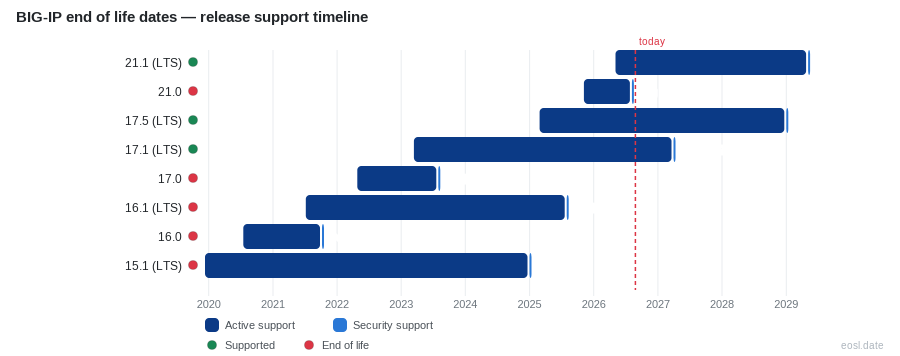
Currently Supported BIG-IP Releases - Active EOS/EOSL Support (3)
| Release | Released | End of Technical Support | End of Software Development | Latest | LTS |
|---|---|---|---|---|---|
| 21.1 (LTS) | (6 months ago) | (in 2 years and 5 months) | (in 2 years and 5 months) | 21.1.0 (6 months ago) | LTS |
| 17.5 (LTS) | (1 year and 8 months ago) | (in 2 years and 1 month) | (in 2 years and 1 month) | 17.5.1 (1 year and 4 months ago) | LTS |
| 17.1 (LTS) | (3 years and 7 months ago) | (in 4 months) | (in 4 months) | 17.1.3 (1 year and 1 month ago) | LTS |
BIG-IP End of Life (EOL) Releases - No Longer Supported (28)
| Release | Released | End of Technical Support | End of Software Development | Latest | LTS |
|---|---|---|---|---|---|
| 21.0 | (1 year ago) | (3 months ago) | (3 months ago) | 21.0.0 (1 year ago) | - |
| 17.0 | (4 years and 6 months ago) | (3 years and 3 months ago) | (3 years and 3 months ago) | 17.0.0 (4 years and 6 months ago) | - |
| 16.1 (LTS) | (5 years and 4 months ago) | (1 year and 3 months ago) | (1 year and 3 months ago) | 16.1.6 (1 year and 6 months ago) | LTS |
| 16.0 | (6 years and 3 months ago) | (5 years and 1 month ago) | (5 years and 1 month ago) | 16.0.1.1 (5 years and 1 month ago) | - |
| 15.1 (LTS) | (6 years and 11 months ago) | (1 year and 10 months ago) | (1 year and 10 months ago) | 15.1.10 (3 years and 2 months ago) | LTS |
| 15.0 | (7 years and 5 months ago) | (6 years and 2 months ago) | (6 years and 2 months ago) | 15.0.1 (7 years and 3 months ago) | - |
| 14.1 | (7 years and 11 months ago) | (2 years and 10 months ago) | (2 years and 10 months ago) | 14.1.5 (4 years and 5 months ago) | - |
| 14.0 | (8 years and 3 months ago) | (7 years ago) | (7 years ago) | 14.0.1 (7 years and 2 months ago) | - |
| 13.1 | (8 years and 10 months ago) | (2 years and 10 months ago) | (3 years and 10 months ago) | 13.1.5 (4 years and 6 months ago) | - |
| 13.0 | (9 years and 8 months ago) | (7 years and 5 months ago) | (8 years and 5 months ago) | 13.0.1 (8 years and 7 months ago) | - |
| 12.1 | (10 years and 5 months ago) | (4 years and 5 months ago) | (5 years and 5 months ago) | 12.1.6 (5 years and 7 months ago) | - |
| 12.0 | (11 years and 2 months ago) | (8 years and 11 months ago) | (9 years and 11 months ago) | 12.0.0 (11 years and 2 months ago) | - |
| 11.6 | (12 years and 2 months ago) | (4 years and 6 months ago) | (5 years and 6 months ago) | 11.6.5 (7 years and 2 months ago) | - |
| 11.5 | (12 years and 9 months ago) | (6 years and 7 months ago) | (7 years and 7 months ago) | 11.5.10 (7 years and 1 month ago) | - |
| 11.4 | (13 years and 5 months ago) | (9 years and 1 month ago) | (10 years and 1 month ago) | 11.4.1 (13 years and 1 month ago) | - |
| 11.3 | (13 years and 10 months ago) | (10 years and 10 months ago) | (11 years and 10 months ago) | 11.3.0 (13 years and 10 months ago) | - |
| 11.2 | (14 years and 5 months ago) | (7 years and 10 months ago) | (8 years and 10 months ago) | 11.2.1 (14 years and 1 month ago) | - |
| 11.1 | (14 years and 11 months ago) | (11 years and 11 months ago) | (12 years and 11 months ago) | 11.1.0 (14 years and 11 months ago) | - |
| 11.0 | (15 years and 2 months ago) | (12 years and 2 months ago) | (13 years and 2 months ago) | 11.0.0 (15 years and 2 months ago) | - |
| 10.2 | (16 years and 6 months ago) | (9 years and 10 months ago) | (10 years and 10 months ago) | 10.2.4 (14 years and 7 months ago) | - |
| 10.1 | (16 years and 10 months ago) | (10 years and 8 months ago) | (11 years and 8 months ago) | 10.1.0 (16 years and 10 months ago) | - |
| 10.0 | (17 years and 8 months ago) | (13 years and 2 months ago) | (14 years and 2 months ago) | 10.0.1 (17 years and 5 months ago) | - |
| 9.6 | (18 years and 10 months ago) | (14 years and 7 months ago) | (15 years and 7 months ago) | 9.6.1 (18 years and 6 months ago) | - |
| 9.4 | (19 years and 10 months ago) | (13 years and 2 months ago) | (14 years and 2 months ago) | 9.4.8 (17 years and 2 months ago) | - |
| 9.3 | (20 years and 6 months ago) | (14 years and 7 months ago) | (15 years and 7 months ago) | 9.3.1 (19 years ago) | - |
| 9.2 | (21 years and 1 month ago) | (18 years and 3 months ago) | (19 years and 3 months ago) | 9.2.5 (19 years and 9 months ago) | - |
| 9.1 | (21 years and 3 months ago) | (17 years and 6 months ago) | (18 years and 6 months ago) | 9.1.3 (19 years and 3 months ago) | - |
| 9.0 | (22 years and 2 months ago) | (19 years and 5 months ago) | (20 years and 5 months ago) | 9.0.5 (21 years and 6 months ago) | - |
If you run F5 gear, BIG-IP end of life is the date your appliance or software stops getting fixes, and this guide shows you how to read every F5 end of life date, spot the support phase you are in, and plan a replacement before downtime or unpatched vulnerabilities find you. Each F5 platform follows the same product lifecycle policy, so once you know the stages, any EOL notice becomes easy to decode.
Understanding BIG-IP End of Life and the Product Lifecycle
BIG-IP is F5's family of hardware and software products for load balancing, traffic management and application security, and every part of it follows a published lifecycle policy. The F5 hardware product lifecycle moves through two broad stages, Regular Support and Extended Support, and software releases follow their own, separate schedule. That split matters: a hardware appliance can still be covered while the software version on it has already lost standard support.
The support policy uses a handful of abbreviations you will see in every F5 end of life list and announcement:
- EoS (End of Sale): F5 stops selling the platform or license.
- EoNSS (End of New Software Support): no new software releases are built or tested for the platform, so it drops off the hardware and software compatibility matrix.
- EoSS (End of Software Support): bug fixes and security updates stop, and Extended Support begins.
- EoRMA (End of RMA): hardware replacement under a Return Merchandise Authorization ends.
- EoTS (End of Technical Support) and EoSCR (End of Support Contract Renewal): the final cut-off, when you can no longer open cases or renew a support agreement.
Put together, these marks form the F5 end of life timeline, and the last of them is what most people mean by F5 networks end of life or end of service life. The same F5 end of life dates drive the EoS, EoSS and EoTS columns in any F5 end of life matrix.
Regular Support Phase
The regular support phase starts when you accept the shipment and runs until EoSS. During it you get repair and maintenance of hardware, firmware and software, troubleshooting help and access to documentation, depending on the support tier in your contract. Talk to your F5 representative or an F5 partner before this phase closes, because upgrade options are widest while the platform is still fully supported.
Extended Support Coverage
In the extended support phase F5 still answers technical questions, isolates problems and honours RMA terms, and it may issue an abbreviated failure analysis report. It will not write patches for a CVE, ship hotfixes or security updates, produce a full failure analysis or escalate your case to engineering. Typically hardware reaches EoSS three years after End of Sale, then reaches EoTS and EoRMA four years after EoSS.
BIG-IP End of Support Dates by Software Release
For software, F5 alternates major releases with long-term stability releases. Under the software support policy each version gets a single standard support window starting on its first customer ship date, and only the newest maintenance release of a train receives software development. The table lists published end of software development and end of technical support dates for recent software versions, so you can check your release against today's date.
| Release | Type | End of software development | End of technical support |
|---|---|---|---|
| 21.1 | LTS | 5 May 2029 | 5 May 2029 |
| 21.0 | Major | 6 Aug 2026 | 6 Aug 2026 |
| 17.5 | LTS | 1 Jan 2029 | 1 Jan 2029 |
| 17.1 | LTS | 31 Mar 2027 | 31 Mar 2027 |
| 16.1 | LTS | 31 Jul 2025 | 31 Jul 2025 |
| 15.1 | LTS | 31 Dec 2024 | 31 Dec 2024 |
| 14.1 | LTS | 31 Dec 2023 | 31 Dec 2023 |
Every row is a software end of support date, and each end of technical support entry is the point after which you cannot open a case. Read the table as a countdown: anything with a past date is already out of support, and anything within twelve months should already be on your upgrade schedule.
Long-Term Stability Releases
Releases numbered x.1 are the long-term stability (LTS) line. They get the longest standard support, about three to four years in recent generations, which makes them the sensible target for a production TMOS upgrade. Major releases, by contrast, are supported for months rather than years.
End of Sale Dates for Each F5 Hardware Platform
A hardware platform has its own End of Sale, EoSS and EoTS dates, and these are independent of the software it runs. A third party list such as an EOSL library tracks more than two hundred F5 appliance, blade and chassis models, and the F5 End of Life Matrix groups them by series. The sample below shows how dates cluster by family.
| Platform | Family | Support end date (EOSL) |
|---|---|---|
| BIG-IP 2000s, 4000s, 5000s, 7000s, 10000s | Appliance | 1 Apr 2025 |
| VIPRION B4300 blade | Blade | 1 Apr 2025 |
| VIPRION 2400 chassis and C2200 chassis | Chassis | 1 Apr 2030 |
| BIG-IP i2600 to i11800 (iSeries) | Appliance | 1 Jan 2031 |
| VIPRION 4480 and 4800 chassis | Chassis | 1 Jan 2033 |
iSeries Lifecycles
Software support on iSeries continues with the 17.x releases until the hardware reaches its own EoSS, so check the compatibility matrix before assuming a newer release will install. The newer rSeries and VELOS platforms run F5OS and follow separate lifecycle tables.
VIPRION and Virtual Edition Lifecycles
A VIPRION chassis and its blades each have a date, and a mixed chassis is only as supported as its oldest blade. A Virtual Edition license, including cloud images, has its own End of Sale announcement, so a virtual deployment is not automatically safe from the same lifecycle. BIG-IQ, the management product, publishes its own software versions and EoTS dates too.
How to Check Your End of Service Life Status
Work from the serial number outward. Look up your appliance model in the F5 hardware lifecycle policy, then look up your installed software versions in the software support policy, and treat the earlier of the two as your real deadline. Your license, support agreement and renewal terms should be on the same checklist, since a lapsed contract can end support before the published EOL dates do.
Reading the Compatibility Matrix
The hardware and software compatibility matrix lists which releases each platform can run. If a release is missing for your model, the platform has hit EoNSS, and your upgrade path stops there.
Planning Your BIG-IP Replacement Before EOL
F5 names a recommended replacement for most retired models, and the usual route is a current iSeries or rSeries appliance or a Virtual Edition license. Start the refresh early: budget approval, migration testing and the data center change window all take longer than the notice period suggests, and running an unsupported appliance leaves your network exposed to known vulnerabilities.
Upgrade Paths From Older Platforms
An upgrade usually means new hardware, a new license and a configuration migration, so rehearse the move on a spare unit. Confirm that your modules, firmware and application security policies carry over before you cut over production traffic.
Support Contract Choices Before Your EOSL Date
You may buy one extra year of extended support at the end of your final full year, before the EoTS date; no new maintenance agreement can start afterwards. Plan renewal dates so your contract does not expire before the platform does, and ask your F5 partner about each support tier.
Maintenance Agreement Renewal
Renewal is the lever most teams forget. Check when each maintenance agreement ends and compare it with the EoSCR date in the announcement; the earlier one controls what you can still buy.
Third Party Maintenance
A third party maintenance provider can cover hardware after the vendor warranty ends, often for 30 percent or more less than the F5 contract, and some offer asset intelligence that tracks device health. It extends hardware repair only; it cannot produce vendor patches, so plan to upgrade software versions regardless.
Software Versions and Their End of Technical Support
Everything above comes down to software versions. A version past EoTS gets no vendor help, no hotfixes and no new security updates, so move to a supported long-term release before the date arrives, ideally with a maintenance window you booked months earlier.
Lifecycle Policy Changes
F5 reserves the right to change its lifecycle policy, and release support terms have shifted between generations. Re-check the official end of life dates in each announcement and policy page every quarter so a changed date does not catch your IT teams out.