NetApp ONTAP End of Life (EOL) Dates and End of Support (EOS) Dates
NetApp ONTAP end of life (EOL) and end of support (EOS) dates: 14 NetApp ONTAP versions have reached EOL, including NetApp ONTAP 9.13.1 (EOL date: Jun 30, 2026) — no longer receiving security updates or patches. NetApp ONTAP 9.19.1 is the current supported release, with support through Jul 31, 2029 — 6 versions in active support. Also see BIG-IP EOSL dates for related end-of-life information.
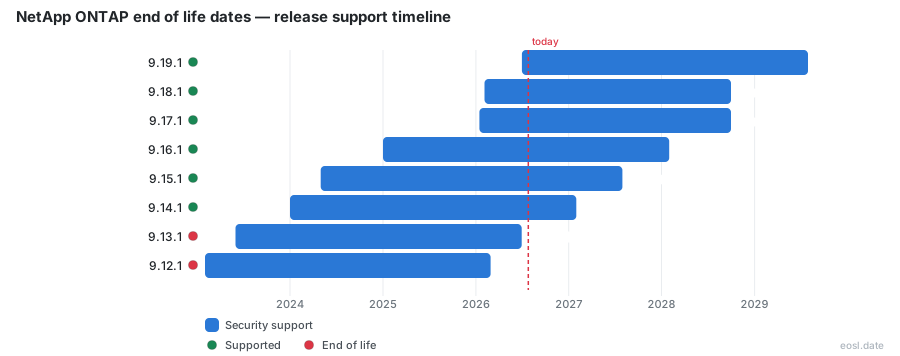
Currently Supported NetApp ONTAP Releases - Active EOS/EOSL Support (6)
| Release | Released | Full Support |
|---|---|---|
| 9.19.1 | (4 months ago) | (in 2 years and 8 months) |
| 9.18.1 | (9 months ago) | (in 2 years and 2 months) |
| 9.17.1 | (9 months ago) | (in 1 year and 10 months) |
| 9.16.1 | (1 year and 10 months ago) | (in 1 year and 3 months) |
| 9.15.1 | (2 years and 6 months ago) | (in 8 months) |
| 9.14.1 | (2 years and 10 months ago) | (in 2 months) |
NetApp ONTAP End of Life (EOL) Releases - No Longer Supported (14)
| Release | Released | Full Support |
|---|---|---|
| 9.13.1 | (3 years and 5 months ago) | (4 months ago) |
| 9.12.1 | (3 years and 9 months ago) | (8 months ago) |
| 9.11.1 | (4 years and 4 months ago) | (1 year and 3 months ago) |
| 9.10.1 | (4 years and 10 months ago) | (1 year and 9 months ago) |
| 9.9.1 | (5 years and 5 months ago) | (2 years and 4 months ago) |
| 9.8 | (6 years and 1 month ago) | (2 years and 10 months ago) |
| 9.7 | (7 years ago) | (3 years and 3 months ago) |
| 9.6 | (7 years and 6 months ago) | (4 years and 4 months ago) |
| 9.5 | (8 years ago) | (4 years and 9 months ago) |
| 9.4 | (8 years and 4 months ago) | (7 years and 4 months ago) |
| 9.3 | (8 years and 9 months ago) | (5 years and 9 months ago) |
| 9.2 | (9 years and 4 months ago) | (8 years and 3 months ago) |
| 9.1 | (9 years and 9 months ago) | (6 years and 9 months ago) |
| 9.0 | (10 years and 2 months ago) | (8 years and 10 months ago) |
If a controller in your data center still runs an aging build, NetApp ONTAP end of life is the date you need to know before an audit, a renewal or an outage forces the question. NetApp does not retire a build overnight: each one moves through three phases, and the end of version support for your build decides what help you can still count on for your storage and the data on it. This guide lists the dates for every ONTAP 9 line and shows how to read them for your own storage systems.
NetApp ONTAP End of Life and the Three Support Levels
The ONTAP operating system is the software that runs NetApp FAS and AFF arrays, and NetApp publishes the lifecycle of each build on its support site. Every build passes through three support levels in a fixed order, and a build is generally treated as past its useful life once it leaves the first one. Because the schedule is identical for every line, you can work out where any version stands from its dates alone, whether it protects a single cluster or hundreds of storage systems across several sites.
Full Support
The first phase lasts roughly three years. During it you get every service: technical support from NetApp engineers, root-cause analysis, software downloads, fixes and hotfix builds, plus alerts about newly found vulnerabilities. This is the only phase in which a version keeps getting new fixes, which is why most storage teams try to stay inside it.
Limited Support
The next two years narrow the service. You can still open cases, get help finding the cause of a failure and download software, but NetApp stops issuing new patch releases and no longer sends alerts when a security vulnerability is found. A cluster in this phase works fine on day one, but it slowly collects unfixed defects that put your data at risk.
Self-Service Support
The final three years leave you with online reference material and nothing more. There is no engineer to call and no new code, so any problem is yours to solve from the knowledge base. Treat this phase as the real EOL for production storage.
| Service | Full | Limited | Self-service |
|---|---|---|---|
| Knowledge base articles | Yes | Yes | Yes |
| Cases with NetApp engineers | Yes | Yes | No |
| Root-cause analysis and software downloads | Yes | Yes | No |
| Fixes delivered as P-releases | Yes | No | No |
| Alerts about vulnerabilities | Yes | No | No |
EOL Dates by ONTAP 9 Releases
NetApp ships major releases of ONTAP 9 twice per year, and the dates below come from the NetApp Knowledge Base. A listed line also covers every service update built on it, so ONTAP 9.13.1P8 follows the 9.13.1 row. The columns show when each phase ends.
| Version | Full ends | Limited ends | Self-service ends |
|---|---|---|---|
| 9.19.1 | 31 Jul 2029 | 31 Jul 2031 | 31 Jul 2034 |
| 9.18.1 | 31 Jan 2029 | 31 Jan 2031 | 31 Jan 2034 |
| 9.17.1 | 30 Sep 2028 | 30 Sep 2030 | 30 Sep 2033 |
| 9.16.1 | 26 Feb 2028 | 31 Jan 2030 | 31 Jan 2033 |
| 9.15.1 | 31 Jul 2027 | 31 Jul 2029 | 31 Jul 2032 |
| 9.14.1 | 31 Jan 2027 | 31 Jan 2029 | 31 Jan 2032 |
| 9.13.1 | 30 Jun 2026 | 30 Jun 2028 | 30 Jun 2031 |
| 9.12.1 | 28 Feb 2026 | 28 Feb 2028 | 28 Feb 2031 |
| 9.11.1 | 31 Jul 2025 | 31 Jul 2027 | 31 Jul 2030 |
| 9.10.1 | 31 Jan 2025 | 31 Jan 2027 | 31 Jan 2030 |
| 9.9.1 | 30 Jun 2024 | 30 Jun 2026 | 30 Jun 2029 |
| 9.8 | 31 Dec 2023 | 31 Dec 2025 | 31 Dec 2028 |
For most lines the pattern is simple: \(\text{limited ends} = \text{full ends} + 2\text{ years}\) and \(\text{self-service ends} = \text{full ends} + 5\text{ years}\). The newest rows bend that rule slightly, so always confirm against the table rather than the formula.
Release Date and Support Dates for ONTAP 9.19.1
The newest line, ONTAP 9.19.1, reached general availability in mid-2026 and has the longest runway of the group. Its support dates stretch to July 2034, so a new deployment starting this year has about eight years before knowledge base articles are all that remain. Older lines such as ONTAP 9.12.1 have already left the first phase, and the page that lists them is the one to bookmark.
Here is a worked example for 27 October 2026. Your cluster runs 9.10.1. Its full phase ended on 31 January 2025, so you are 634 days past it, and limited help ends on 31 January 2027, which leaves 96 days. Self-service ends on 31 January 2030, 1,192 days away. Moving that same cluster to 9.13.1 would push the end of limited help out to 30 June 2028, which is 612 days from today, and 9.16.1 would give 487 days of full service. The number that matters is the shortest one: 96 days is enough to plan a rolling move across the storage systems in the cluster, but not enough to wait for a budget cycle.
7-Mode and Clustered Data ONTAP End of Version Support
Many shops still carry equipment from the era before ONTAP 9, so the older code lines matter. Data ONTAP began in 1992, when it was developed with the WAFL file system, and it originally served NFS before adding SMB and iSCSI. In 2006 NetApp issued two variants, Data ONTAP 7G and Data ONTAP GX, and in 2010 these merged into Data ONTAP 8, which ran in either 7-Mode or Cluster-Mode.
The last supported 7-Mode build was 8.2.5, and every version from 8.3 onward runs only in cluster form. When NetApp introduced ONTAP 9 it dropped the word Data from the name and removed the 7-Mode image, so 9.0 is the successor of Clustered Data ONTAP 8. The old lines are long past their schedule: builds 8.1 and 8.0 reached the end of self-service help in 2020 and 2018, and the extended 8.2 line ended its limited phase on 31 December 2022 after NetApp stretched it for the FAS8000 and FAS2500 platforms. Treat any controller on these builds as unsupported and plan a migration, because it cannot be moved in place to ONTAP 9.
An old build is also an operational risk beyond the calendar. A cluster gets no new data protection fixes, no vulnerability advisories and no downloads you can trust to match your controllers, and a cluster that has been left alone for years often needs several stepping-stone moves before it can reach a current line. Each node in the cluster adds to that work, so a large cluster should start planning earlier than a two-node pair.
End of Availability for Hardware and Virtual Systems
End of availability is a different event from the software schedule above. It means a model can no longer be bought, while NetApp keeps supporting the units already installed. The ONTAP hardware list on the NetApp documentation site names every AFF system from the A150 to the A900 plus the C-series, ASA systems such as the A250 and A800, and FAS systems including the FAS2700, FAS8200 and FAS9500, along with guides to install and maintain each one.
The three families differ in purpose. AFF systems are all-flash storage arrays built for fast databases and virtual machines, ASA systems are all-flash storage arrays tuned for block data only, and FAS systems pair controllers with a mix of flash and spinning disk for bulk data capacity. An AFF system or FAS system that is no longer on sale can still run a current ONTAP build, but the platform eventually ages out of newer lines. The product version of each controller, the shelf type and the disk type all decide which releases it can take, so record all three for every AFF, FAS and ASA system before you purchase anything new.
Parts of a platform also age out on their own timetable: a newer line may drop an older controller, and a shelf can outlive the AFF or FAS head it was bought with. Before you add a shelf to an AFF or ASA system, check that it supports the build you plan to run. Third-party lists such as the Park Place Technologies end-of-service-life directory help when you need to price outside maintenance for equipment past its sale date. Keep your AFF and FAS systems in one inventory so the data on each one is easy to trace.
Cloud Volumes ONTAP
Cloud Volumes ONTAP follows the same dates as the on-premises code, with one exception: it treats minor versions such as 9.15.0 and 9.16.0 under a special policy, and NetApp has announced that 9.14.0 and earlier .0 versions have reached the end of the line. Cloud Volumes ONTAP runs inside your hybrid cloud on the major public clouds, and you can manage it from BlueXP next to your on-premises systems. Because a Cloud Volumes ONTAP instance is easy to launch, it is also easy to forget, so list every cloud instance in the same register as your physical storage.
ONTAP Select
ONTAP Select is the virtual storage option, running on an x86 server with a hypervisor instead of dedicated controllers. It began as ONTAP Edge on VMware vSphere, later gained KVM, and receives the same support period as the matching ONTAP line. Treat an ONTAP Select node like any other cluster member: its host must meet the requirements of the target build, so confirm the hypervisor version before you plan an ONTAP Select move. A mixed estate of ONTAP Select, Cloud Volumes ONTAP and physical arrays is common, and each ONTAP Select cluster should be tracked on its own row.
Planning Around NetApp ONTAP End of Life: Features and Upgrades
Treat the move as a data project, not only a software task. Your storage systems hold business data, so every AFF system, FAS system and ASA system, whether in a data center or in the cloud, needs a tested rollback plan and a recent backup of the data it holds. Storage in the cloud deserves the same care as on-premises storage, and cloud snapshots are not a substitute for a tested restore.
Choosing a target is more than picking the newest number. The features your applications rely on, from replication to storage efficiency, determine how much testing a move needs, and the order in which you update the cluster and its peers matters just as much.
SnapMirror and FlexGroup Dependencies
SnapMirror replicates volumes between clusters, and a destination generally has to run the same code as the source or a newer build. If your disaster recovery cluster sits on a build nearing its own end date, update that side first. SnapMirror Synchronous and SVM disaster recovery add extra checks, so review every SnapMirror relationship before the change. Replicated storage should move in a planned order so that no copy of your data is stranded. SnapMirror also copies FlexGroup volumes. Large namespaces built with FlexGroup volumes spread files across many nodes and aggregates, and a FlexGroup depends on the cluster staying healthy during a rolling change, so schedule the work for a quiet window. If a FlexGroup is also a SnapMirror source, confirm the SnapMirror destination can accept it.
NFS, SMB and iSCSI Protocols
ONTAP serves files over NFS and SMB and blocks over iSCSI, Fibre Channel and NVMe, and a release past its end date stops getting protocol fixes for all of them. Each protocol has its own client matrix, so check that your storage clients, meaning NFS clients, SMB servers and iSCSI initiators support the target build. An SMB share with legacy dialects or an export with old security settings is the most common reason a cluster needs extra testing, and a mismatched multipath setup can take a database offline, so run a rehearsal first.
Storage Efficiency and Data Protection
Deduplication, compression and compaction are part of what makes storage cheaper per terabyte, and each version refines them. Data protection features such as SnapLock, SnapMirror and encryption for your storage also gain improvements over time, so read the notes for the behavior changes that matter to your data. Better scalability for growing data is another reason to leave an old line, since each version raises limits on nodes, aggregates and volumes in the cluster.
Patch Releases and Service Updates
Between feature versions NetApp issues service updates, known as P-releases, and a fix aimed at a single bug can arrive as a hotfix. These fall away once a line enters limited help, so a cluster left on one build for years has to take a bigger step later. Apply the latest service update for your current line before any larger move, because it often contains the fixes that make the next step safer for your data.
Upgrade Order and Pre-Checks
Once you have picked a supported target ahead of the dates above, run NetApp's Upgrade Advisor, confirm that your firmware and drivers are current, and follow the supported path from your starting version to the target. Moving one or two lines at a time, with a pause to confirm that applications are healthy, is far safer than a long jump. When the work is done, record the new version and its dates in your asset register so the next review of your data estate starts from facts, and repeat the process for every cluster and all the storage systems on your list.