NetBackup Appliance OS End of Life (EOL) Dates and End of Support (EOS) Dates
NetBackup Appliance OS end of life (EOL) and end of support (EOS) dates: 9 NetBackup Appliance OS versions have reached EOL, including NetBackup Appliance OS 5.1 (EOL date: Sep 08, 2025) — no longer receiving security updates or patches. NetBackup Appliance OS 6.1.0.2 MR1 is the current supported release — 3 versions in active support. Also see Cisco IOS XE lifecycle dates for related end-of-life information.
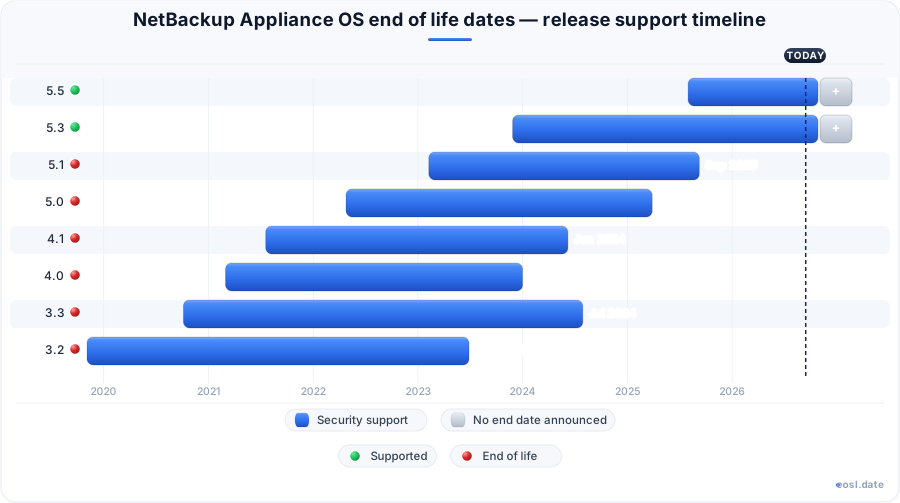
Currently Supported NetBackup Appliance OS Releases - Active EOS/EOSL Support (3)
| Release | Released | Primary Support | Latest |
|---|---|---|---|
| 6.1 | (9 months ago) | Active | 6.1.0.2 MR1 (2 months ago) |
| 5.5 | (1 year and 3 months ago) | Active | 5.5.0.1 MR2 (5 months ago) |
| 5.3 | (2 years and 11 months ago) | Active | 5.3.0.1 MR5 (11 months ago) |
NetBackup Appliance OS End of Life (EOL) Releases - No Longer Supported (9)
| Release | Released | Primary Support | Latest |
|---|---|---|---|
| 5.1 | (3 years and 9 months ago) | (1 year and 2 months ago) | 5.1.1 MR5 (2 years and 2 months ago) |
| 5.0 | (4 years and 6 months ago) | (1 year and 7 months ago) | 5.0.0.1 MR5 (3 years ago) |
| 4.1 | (5 years and 3 months ago) | (2 years and 5 months ago) | 4.1.0.1 MR5 (3 years and 8 months ago) |
| 4.0 | (5 years and 8 months ago) | (2 years and 10 months ago) | 4.0.0.1 MR4 (4 years and 4 months ago) |
| 3.3 | (6 years and 1 month ago) | (2 years and 3 months ago) | 3.3.0.2 MR2 (4 years and 11 months ago) |
| 3.2 | (7 years ago) | (3 years and 4 months ago) | 3.2 (7 years ago) |
| 3.1 | (9 years and 1 month ago) | (4 years and 4 months ago) | 3.1.2 (8 years and 1 month ago) |
| 3.0 | (9 years and 11 months ago) | (6 years and 1 month ago) | 3.0 (9 years and 11 months ago) |
| 2.7 | (10 years and 11 months ago) | (6 years and 1 month ago) | 2.7.3 (10 years and 5 months ago) |
If you run backups on Veritas hardware, NetBackup appliance OS end of life is the date that decides when your operating system stops getting fixes. This guide pulls the published end of life dates for each release and model into one place, so you can see which NetBackup EOSL deadlines are behind you, which are near, and when an OEM refresh or a replace decision becomes unavoidable for your data protection setup.
NetBackup Appliance OS End of Life Dates and Latest Support Status
The operating system that ships on every NetBackup appliance is versioned separately from the backup software, and each release has its own clock. Veritas, now documented under Cohesity, gives each version a general availability date, and primary support then runs from that date. The latest releases are 6.1, 5.5 and 5.3, and all three still receive fixes, while everything older has already ended.
| Release | Released | Primary support |
|---|---|---|
| 6.1 | 14 Jan 2026 | Active |
| 5.5 | 31 Jul 2025 | Active |
| 5.3 | 27 Nov 2023 | Active |
| 5.1 | 08 Feb 2023 | Ended 08 Sep 2025 |
| 5.0 | 25 Apr 2022 | Ended 28 Mar 2025 |
| 4.1 | 19 Jul 2021 | Ended 07 Jun 2024 |
Each row is a separate lifecycle, so a NetBackup appliance still on 5.1 is already outside primary support, and customers on 5.0 or 4.1 have been outside it longer. Moving to a current version is a software upgrade rather than new hardware, and it brings the newest patches and bug fixes.
Veritas NetBackup Hardware EOSL Date by Model
Hardware follows its own schedule. An end of life list for the appliance families shows the EOSL date for each model, and the end of service life for a chassis is often later than the end of support for an old operating system on it.
| Model | EOSL date |
|---|---|
| NetBackup 5220 | 14 Aug 2018 |
| NetBackup 5230 | 31 Dec 2022 |
| NetBackup 5330 | 30 Aug 2023 |
| NetBackup 5240 | 31 Oct 2025 |
| NetBackup 5340 | 31 Oct 2026 |
| NetBackup 5250 and 5350 | 31 Dec 2028 |
An appliance bundles compute, storage and the NetBackup software, and it can act as a master server, a media server or both. Larger units add storage expansion shelves, and those shelves usually share the host model's EOSL. Once the EOL passes, backup and recovery for physical, virtual and cloud workloads runs on an unsupported operating system, so the whole enterprise estate feels it, from the enterprise data center to branch sites, not just one server. Your technical support team can confirm a serial number against the model before you commit to a plan.
End of Support Phases Explained
Veritas splits support into three phases, and the phase your release sits in tells you what help you can still expect. The primary support window usually lasts 2 to 3 years, the extended window 1 to 2 years, and the sustaining window 1 to 6 years.
Primary Phase: Bug Fixes and Patches
The primary phase begins at release. You get bug fixes and patches that restore the software to what its documentation promises, plus maintenance packs from time to time.
Extended Phase and Sustaining Phase
In the extended phase no new fixes arrive, but you keep access to existing patches and phone help. The sustaining phase narrows that further to severe service restoration and data retrieval problems. Planning to stay there is risky for security and compatibility: without new fixes, a known security flaw stays open, and newer clients and Linux platforms may stop working against an old release, since a new Linux kernel or distribution is never tested against it. Past the sustaining phase, a Veritas NetBackup appliance OS gets no security fixes at all.
Planning Around NetBackup End of Life
A NetBackup end of life notice does not mean the box fails that day. It means the vendor stops promising help, so your IT teams should set a budget early and choose between migration to a newer appliance, moving the workload to software on your own servers, or keeping the old unit running.
- Check the EOSL table above against every unit in your racks.
- Pin each unit to a release and confirm its primary support status.
- Price a migration against a contract extension before the date arrives.
Third-Party Maintenance Options
Independent providers sell third-party maintenance that can extend the support cycle of aging hardware and prolong its useful life. Some providers sell post-warranty maintenance for the chassis, and asset intelligence tooling tracks device health so your lifecycle decisions rest on data instead of calendar dates. This covers hardware only: the appliance OS end of life exposure stays, so pair it with an OS upgrade plan.