NestJS End of Life (EOL) Dates and End of Support (EOS) Dates
NestJS end of life (EOL) and end of support (EOS) dates: 5 NestJS versions have reached EOL, including NestJS 10 — no longer receiving security updates or patches. NestJS 12.6.0 is the current supported release — 2 versions in active support. Also see Deno end of support dates for related end-of-life information.
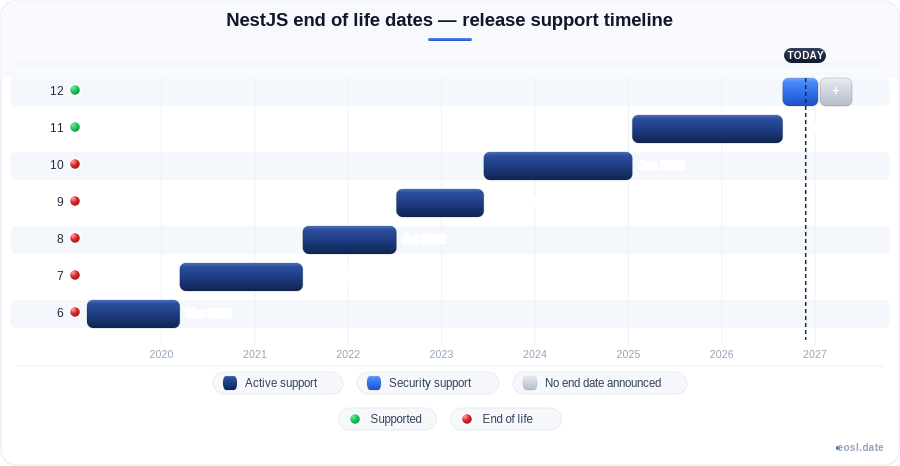
Currently Supported NestJS Releases - Active EOS/EOSL Support (2)
NestJS End of Life (EOL) Releases - No Longer Supported (5)
| Release | Released | Security Support | Active Support | Latest |
|---|---|---|---|---|
| 10 | (3 years and 5 months ago) | — | (1 year and 10 months ago) | 10.4.22 (10 months ago) |
| 9 | (4 years and 4 months ago) | — | (3 years and 5 months ago) | 9.4.3 (3 years and 5 months ago) |
| 8 | (5 years and 4 months ago) | — | (4 years and 4 months ago) | 8.4.7 (4 years and 5 months ago) |
| 7 | (6 years and 8 months ago) | — | (5 years and 4 months ago) | 7.6.18 (5 years and 5 months ago) |
| 6 | (7 years and 8 months ago) | — | (6 years and 8 months ago) | 6.11.11 (6 years and 8 months ago) |
NestJS end of life is not a single date on a calendar: the framework publishes no fixed retirement schedule, so you read the signals yourself. This guide shows how to tell when an older line stops being safe, what deprecations and Node.js changes usually trigger it, and how to move your server-side JavaScript app forward.
What NestJS End of Life Means for Your Project
Nest is a scalable, enterprise-grade platform for building Node.js back ends, and its community concentrates fixes on the newest major line. When an older line falls out of that focus, maintenance stops: no patches for new vulnerabilities, no compatibility work for newer runtimes, and no answers in the issue tracker. Your running app keeps working, but every month it ages without a safety net.
Watch for these warning signs that your line is close to the end:
- No patch releases have shipped for your major line in a long while.
- The Node runtime you deploy on has reached its own end date.
- Peer dependencies of newer plugins refuse to install next to your core packages.
- Your security audit reports issues that have no fixed build for your line.
Which NestJS Version Still Gets LTS Support
Because there is no official table, the practical rule is simple: only the latest major release gets fixes, and the runtime underneath it must itself still be maintained. Check the runtime line you deploy on first, because it sets the real deadline for your stack.
| Runtime line | Reaches end of life | Status in November 2026 |
|---|---|---|
| Node 16 | September 2023 | Unsupported |
| Node 18 | April 2025 | Unsupported |
| Node 20 | April 2026 | Unsupported |
| Node 22 | April 2027 | Maintenance |
If your app still runs on one of the unsupported lines, plan your move now rather than after the next security advisory.
Node.js End of Life and NestJS 10 Requirements
The clearest example of a runtime forcing a change is NestJS 10. It dropped Node v12, which reached end of life on 30 April 2022, and now needs Node 16 or higher. That let the team set the TypeScript target to ES2021 and stop shipping polyfills, so every official library compiles to a smaller build with slightly better performance. Moving from version 9 to version 10 was mostly a question of runtime and dependencies, and the team recommends running the latest LTS.
TypeScript 4.8 and CLI Plugin Changes
The same update also raised the floor for tooling: the CLI plugins used by @nestjs/swagger and @nestjs/graphql require TypeScript 4.8 or newer. Those plugins read the AST to generate OpenAPI and schema files automatically, and 4.8 changed that tree enough to break older compilers.
NestJS Deprecations to Fix Before You Upgrade
A deprecated method is the earliest warning you get. Nest removed every deprecated method and module in a major step, so any warning left in your logs becomes a compile error later. Fix them while you can still choose the order, and use a codemod where one exists. Your API surface is easier to test when changes arrive in small batches.
Class-Based Integrations in the Sentry SDK
Third-party packages deprecate things too. Sentry's SDK moved from class-based integrations to functions, so new Integrations.LinkedErrors() becomes linkedErrorsIntegration(), and its Hub gave way to the Scope API. Skim the project's GitHub notes whenever you bump a monitoring dependency.
Breaking Changes in the NestJS 7 Release
Older lines show how maintainers handle change. When maintainers announce a major line, as they did for NestJS 7, they replaced the type-graphql integration with native code and kept the public interface backwards-compatible, so moving from Nest 6 meant a search-and-replace of imports rather than a rewrite. Even so, any breaking changes in a major release deserve a read of its notes.
GraphQL Code First and Schema First
The rewrite supported both the code first approach, where decorators generate the schema, and the schema first approach, where you write it by hand. Pick one per project, because mixing them doubles the review work and the GraphQL surface you must keep in sync.
Decorators, Pipes and Microservices
The same update added more flexible custom decorators, new pipes with implicit type conversion, and improved microservices transports. Teams that skip a major line often miss these small shifts, such as a pipe now converting query strings into numbers before your handler sees them, so read each changelog in order instead of jumping straight to the newest tag.
Retire a NestJS 10 App Before the Node 22 Deadline
On 18 November 2026 Dana, who maintains a booking back end, opens her package file and finds Node 20 under NestJS 10. She wants one answer: how many days does the team have before NestJS end of life turns into a real outage risk? Node 20 reached its end on 30 April 2026, which is 202 days ago, so the runtime is already unsupported, and the target is Node 22, whose end date is 30 April 2027.
She counts the window: 18 November to 30 April is 163 days, or 11.6 two-week sprints. Running ncu shows 14 outdated dependencies, and her notes list the work: move the cache module to @nestjs/cache-manager, fix deprecated decorators, and confirm compatibility of two GraphQL plugins. She budgets nine sprints, 126 days, which finishes on 24 March 2027 and leaves a 37-day buffer.
| Scenario | Days of work | Buffer before 30 April 2027 |
|---|---|---|
| Baseline plan, nine sprints | 126 | 37 days |
| Cache module and plugin surprises add two sprints | 154 | 9 days |
| Any further slip of two weeks | 168 | -5 days |
What stands out is that the buffer shrinks faster than the estimate grows: two surprises eat 28 of the 37 days. The number to watch is the nine-day margin, because a single failed staging deploy erases it. Dana therefore starts with the riskiest piece, the breaking changes in the GraphQL layer, and treats TypeScript and ES2021 targets as a second-week task.
One caveat: day counts assume sprints never overlap with releases. If the team ships features during the migration, plan on 20 percent fewer working days, and consider a paid support contract as a stopgap rather than skipping the upgrade. Dana also pins the 24 March date and the 30 April cutoff in the team tracker, so everyone who approves sprint scope sees the deadline.
Nest JS Application Lifecycle and Shutdown Hooks
Upgrades also touch the application lifecycle. A Nest app goes through bootstrap, module initialization, listening and finally shutdown: onModuleInit runs per module, onApplicationBootstrap after all of them, and beforeApplicationShutdown and onApplicationShutdown on exit. Providers and controllers are created before these hooks fire, which is why shutdown logic that closes connections must be rechecked after every upgrade.
Migration Steps Before You Retire an Old Release
Run the update in this order: read the release notes, bump the package set together, then test. The tool ncu (npm check updates) lists newer releases of every dependency in one pass, and the packages under @nestjs/common's scope should move at the same time to avoid mismatched pairs. Commit once the tests pass, run the app locally, then deploy to staging. A clean migration is mostly discipline about order and compatibility.
- Create a branch and record your current test results as a baseline.
- Upgrade one major line at a time, never two at once.
- Fix every compiler error and deprecation warning before moving on.
- Rerun the end-to-end tests, including startup and graceful shutdown.
- Deploy to staging, watch error rates for a day, then promote.
Cache Module Moves to Its Own Package
In that release the cache module left the common library and became @nestjs/cache-manager, so install it explicitly and update your imports.
Enterprise Support for a Closing Down Framework Release
If you cannot leave an old line yet, its authors sell paid consulting, and the official documentation covers each release. Treat paid help as a bridge, not a plan: a closing down release will still need a service window to migrate in the end.