Mule Runtime End of Life (EOL) Dates and End of Support (EOS) Dates
Mule Runtime end of life (EOL) and end of support (EOS) dates: 13 Mule Runtime versions have reached EOL, including Mule Runtime 4.11 Edge (EOL date: Oct 31, 2026) — no longer receiving security updates or patches. Mule Runtime 4.6 LTS reaches its End of Support date on Feb 28, 2027 — plan your upgrade path now. Mule Runtime 4.13.1 is the current supported release, with support through Jun 30, 2027 — 3 versions in active support. Also see Graylog EOSL information for related end-of-life information.
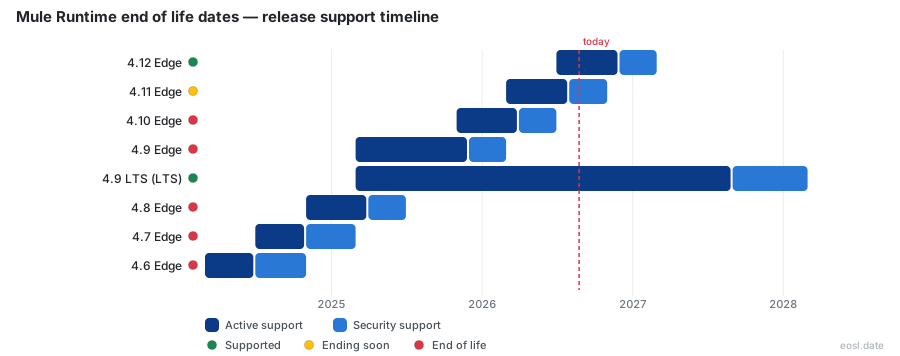
Currently Supported Mule Runtime Releases - Active EOS/EOSL Support (3)
| Release | Released | Extended Support | Standard Support | Latest | LTS |
|---|---|---|---|---|---|
| 4.13 Edge | (3 weeks and 1 day ago) | (in 7 months) | (in 4 months) | 4.13.1 (4 weeks ago) | - |
| 4.12 Edge | (4 months ago) | (in 3 months) | (in 1 week and 1 day) | 4.12.1 (4 months ago) | - |
| 4.9 LTS (LTS) | (1 year and 8 months ago) | (in 1 year and 3 months) | (in 9 months) | 4.9.16 (7 months ago) | LTS |
Mule Runtime Releases Nearing End of Life - Support Ending Soon (1)
| Release | Released | Extended Support | Standard Support | Latest | LTS |
|---|---|---|---|---|---|
| 4.6 LTS | (2 years and 8 months ago) | (in 3 months) | (2 months ago) | 4.6.22 (1 year and 2 months ago) | - |
Mule Runtime End of Life (EOL) Releases - No Longer Supported (13)
| Release | Released | Extended Support | Standard Support | Latest | LTS |
|---|---|---|---|---|---|
| 4.11 Edge | (8 months ago) | (3 weeks and 1 day ago) | (3 months ago) | 4.11.6 (4 months ago) | - |
| 4.10 Edge | (1 year ago) | (4 months ago) | (7 months ago) | 4.10.5 (8 months ago) | - |
| 4.9 Edge | (1 year and 8 months ago) | (8 months ago) | (11 months ago) | 4.9.16 (7 months ago) | - |
| 4.8 Edge | (2 years ago) | (1 year and 4 months ago) | (1 year and 7 months ago) | 4.8.6 (1 year and 5 months ago) | - |
| 4.7 Edge | (2 years and 4 months ago) | (1 year and 8 months ago) | (2 years ago) | 4.7.4 (2 years and 1 month ago) | - |
| 4.6 Edge | (2 years and 8 months ago) | (2 years ago) | (2 years and 4 months ago) | 4.6.22 (1 year and 2 months ago) | - |
| 4.5 Edge | (3 years ago) | (2 years and 4 months ago) | (2 years and 8 months ago) | 4.5.3 (2 years and 9 months ago) | - |
| 4.4 | (5 years and 2 months ago) | (1 year and 1 month ago) | (2 years and 1 month ago) | 4.4.0-20250919 (1 year ago) | - |
| 4.3 | (6 years and 6 months ago) | (1 year and 8 months ago) | (3 years and 8 months ago) | 4.3.0-20240424 (2 years and 6 months ago) | - |
| 4.2 | (7 years and 6 months ago) | (3 years and 6 months ago) | (5 years and 6 months ago) | 4.2.2-20221027 (4 years ago) | - |
| 4.1 | (8 years and 8 months ago) | (4 years ago) | (6 years ago) | 4.1.6-20240112 (2 years and 3 months ago) | - |
| 3.9 (LTS) | (9 years and 1 month ago) | (2 years and 8 months ago) | (5 years and 8 months ago) | 3.9.5-20240122 (2 years and 10 months ago) | LTS |
| 3.8 (LTS) | (10 years and 6 months ago) | (5 years ago) | (8 years ago) | 3.8.7 (8 years and 5 months ago) | LTS |
If you run API and integration applications on Anypoint Platform, Mule runtime end of life decides when each application stops receiving fixes. Knowing every version's retirement date lets you plan an upgrade before Anypoint security patches stop. This guide lists the support dates for every Mule 4 version, explains how the Edge and LTS release channels differ, and shows what to do when your Mule runtime engine nears retirement.
Mule Runtime End of Life at a Glance
Every Mule runtime version passes through two stages after its release date: Standard Support, then Extended Support. Once both stages finish, the version is retired, meaning MuleSoft no longer ships fixes for it and your Anypoint Platform tooling treats it as unsupported. Mule follows semantic versioning, so a number like 4.9.23 is a patch of the 4.9 minor version, and each minor version has its own retirement clock. Customers who keep an old Mule runtime engine in production gain flexibility in timing but lose protection, because the engine itself stops receiving fixes.
Standard Support covers bug fixes and security updates. Extended Support is narrower: only critical bug and security issues receive a patch. After that, the version still runs in your environment, but it collects unpatched vulnerabilities, and new deployment on managed platforms such as CloudHub is blocked. You can read the full list of versions on the Mule 4 release notes page in the Anypoint documentation, and each version's own release notes explain which Java version and API changes it brings.
Which Mule 4 Versions Are Already Retired
As of late October 2026, Mule 4.4 is past both stages, so is Mule 4.3, and Mule 3.9 (the last Mule 3 LTS) retired in March 2024. If your application still runs on Mule 4.4 or earlier, it receives no fixes at all, and any new security vulnerability stays open. Treat these versions as the highest-priority maintenance work on your integration platform, and treat Mule 4.6 as the next one in line, because its standard window ended in August 2026.
Mule 4 Release Cadence and Support Dates
The table below combines the public release cadence with the retirement date of each version. The Mule runtime release cadence changed with Mule 4.5, when MuleSoft split releases into two channels, so earlier versions follow the older ad-hoc schedule. Check the Anypoint release notes before you rely on a date, since MuleSoft can adjust a version's window.
| Mule version | Channel | Released | End of Standard Support (EOSS) | End of Extended Support |
|---|---|---|---|---|
| 4.13 | Edge | October 2026 | March 2027 | June 2027 |
| 4.12 | Edge | June 2026 | November 2026 | February 2027 |
| 4.11 | Edge | February 2026 | July 2026 | October 2026 |
| 4.10 | Edge | October 2025 | March 2026 | June 2026 |
| 4.9 | LTS | February 2025 | August 2027 | February 2028 |
| 4.6 | LTS | February 2024 | August 2026 | February 2027 |
| 4.4 | Original | September 2021 | October 2024 | October 2025 |
| 4.3 | Original | April 2020 | March 2023 | March 2025 |
| 3.9 | LTS | October 2017 | March 2021 | March 2024 |
Anypoint documentation also publishes a per-deployment table with the Java version for each release. Mule 4.9 and later runs on Java 17, so Java 17 is the baseline for any new application, while Mule 4.6 LTS supports Java 8, 11 and 17, which is a big reason it received a longer window. Each Mule runtime release also has a published release date, and the Mule runtime support dates for it follow from that date.
Reading the Standard Support and Extended Support Columns
The two date columns are the part of the table to act on. A version in standard support gets regular fixes and monthly patch updates. A version in extended support gets only critical fixes, so you should schedule the upgrade now rather than wait for the final date. The support period you actually have left is the gap between today and the second date, not the first. Mule runtime support for a version ends only when the second date passes, but the version you run in each application is the one that counts, and every API deployed on it inherits that version's window.
Edge Release Channel Support Window
MuleSoft ships the Edge channel up to three times a year, in February, June and October, aligned with the Salesforce release cycle. An Edge release carries the newest features, such as new connectors, performance work and security hardening, and it suits teams that prefer frequent innovation and have the resources to upgrade often. The tradeoff is the Edge release's shorter lifespan: Edge versions are not FedRAMP approved, and each one is supported for a much smaller time span than an LTS version.
How Long an Edge Version Stays Supported
For Edge versions 4.9 and later, Standard Support runs until one month after the next Edge version arrives, followed by three months of Extended Support. Versions 4.5 to 4.7 had four months of each stage, and version 4.8 had five months of standard support. In practice an Edge version is fully retired roughly eight months after release, so a team on the Edge channel should schedule an upgrade every four months. That frequency is the main cost of choosing this release channel.
LTS Channel and the Support Policy
The LTS channel (Long-Term Support) delivers one release each year, scheduled for February. Each LTS release bundles the features introduced by earlier Edge releases and adds those from the February Edge release, so an LTS release and its February Edge twin share the same underlying code. When both release in February, as Mule 4.9 did, the LTS version simply gets a longer lifecycle under MuleSoft's support policy.
The LTS window is the longest available: a minimum of 18 months of Standard Support plus a minimum of 6 months of Extended Support for version 4.6 and later. Earlier, MuleSoft offered 12 months of each, and the change followed customer feedback that business-critical integrations need more time to plan an upgrade. Mule 4.9 LTS, for instance, is covered until February 2028.
Why Mission-Critical Apps Favor LTS
MuleSoft recommends LTS for mission-critical application workloads and for on-premises runtime deployments. A payment API, for example, benefits from adopting features only after Edge users have exercised them, and from facing one retirement date a year rather than three. For such customers, a version with a long support window matters more than novelty. The platform stays stable, your regression testing happens on a predictable schedule, and your API consumers see fewer breaking changes in each application.
End of Standard Support Versus Extended Support
The end of standard support is the first retirement milestone, often shortened to EOSS. After it, MuleSoft stops issuing regular bug fixes and new feature backports, though critical security fixes continue. The end of extended support, or EOES, is the final milestone, after which no patches of any kind are released.
- Standard Support: bug fixes, security fixes and monthly patch updates.
- Extended Support: critical bug and security fixes only.
- After the end of extended support: no fixes, and new deployments are generally blocked.
Support coverage also affects compliance. An auditor reviewing an integration platform will often flag a runtime that no longer receives security fixes, even when the application itself works, so the retirement date is a security deadline as much as a technical one.
Switching from Edge to LTS Before EOL
You can move between channels, but the direction matters. Going from Edge to LTS requires a later LTS version than the Edge release you are on. For example, if you adopt Mule 4.7 Edge to get a specific feature, you can merge into Mule 4.9 LTS once it ships, but MuleSoft does not support moving an app from 4.7 Edge back to the older 4.6 LTS, because that would lose features.
The same logic applies to CloudHub and CloudHub 2.0. Once Standard Support for Mule 4.4 ended, new apps on those platforms had to deploy on a newer LTS or Edge version. If you are on Mule 4.4 or 4.6, you do not need to land on the newest Edge version; Mule 4.9 LTS is the sensible target because it carries a long window and keeps your upgrade cadence annual.
Monthly Patch Updates Before and After EOSS
Whatever channel you choose, MuleSoft ships a monthly patch update for every supported version, delivered independently of the main release cadence. A patch update fixes bugs and security vulnerabilities without changing features, and the monthly patch schedule continues through standard support. Each patch is described in the release notes for your deployment model, so the release notes are the right place to confirm which fixes your build already contains, and Java 17 builds have their own entries in those release notes. Anypoint Runtime Manager and Anypoint Monitoring also show the patch version each application runs.
Build identifiers follow semantic versioning with extra suffixes. In a Runtime Fabric image tag such as 4.9.23:4-java17, 4.9.23 is the Mule patch version, 4 is the image build number and java17 is the Java version. After EOSS, the monthly patch updates for an Edge version become limited to critical fixes.
Auto-Upgrading and Self-Upgrade Periods
On CloudHub and CloudHub 2.0, MuleSoft can apply an auto-upgrade to your app when you opt in to it, which keeps you on the latest patch with no manual work. Without it, a patch update waits on you, and you get a self-upgrade period during which you choose when the upgrade happens before MuleSoft forces one. The best practice is to test patch updates in a lower environment, then promote them, so a faulty fix never reaches production first. The Mule upgrade tool handles minor and patch upgrades for standalone instances.
EOL Dates by Deployment Model
The same Mule runtime version can reach you through four deployment options, and each handles the retirement date differently. Anypoint Platform ties all of them together through Anypoint Runtime Manager, so you manage the application lifecycle for each API in one console, and Anypoint Exchange keeps the matching API assets.
CloudHub and CloudHub 2.0
On CloudHub and CloudHub 2.0, MuleSoft hosts the runtime and offers both channels. Auto-upgrade and self-upgrade periods apply, and once a version loses Standard Support you can no longer deploy new apps to it. Anypoint Runtime Manager shows each app's version so you can spot ones near retirement.
Runtime Fabric
Runtime Fabric runs Mule apps in containers you control. Anypoint Runtime Fabric publishes monthly images, and appliance-based Runtime Fabric 1.13.x clusters cannot run Mule 4.6.x or later, so those clusters need a platform migration before an upgrade is possible.
Hybrid Standalone and On-Premises
For Hybrid Standalone and other on-premises servers, you install each patch yourself, using the Mule upgrade tool. These teams carry the most retirement risk, because nothing forces an upgrade when a version loses support, and MuleSoft recommends LTS for them. Anypoint Monitoring, Anypoint Exchange, Anypoint Studio and Anypoint Security keep working on the retired runtimes, but security fixes for the engine itself are gone.
Planning Your Upgrade Ahead of EOES
An upgrade strategy starts with an inventory. List every Mule application, its runtime version and its deployment model, then compare each version against the retirement table above. Sort the list by the end of extended support date and start with the earliest.
- Export your application inventory from Anypoint Runtime Manager and note the Mule runtime version of each application.
- Pick a target: Mule 4.9 LTS for stability, or the latest Edge version if you need new features.
- Read the release notes for every version between your current one and the target, since Java and API changes can break connectors.
- Upgrade a non-critical application first, run your regression tests and then roll the change through other environments.
- Re-check Anypoint security policies and every API definition after the upgrade, then schedule the next upgrade before the new version's window closes.
Upgrade Checklist
Beyond the steps above, confirm that every custom connector supports the new version and that your Java runtime matches the release. A rushed upgrade after EOES is far costlier than one scheduled while the version still has support, so put the date in your team's calendar today and tell the application owners and API consumers. In an Anypoint organization, every application owner should know which Mule runtime version their API runs on. Mule runtime end of life is predictable, which means with a short inventory you will never be caught by it.