Graylog End of Life (EOL) Dates and End of Support (EOS) Dates
Graylog end of life (EOL) and end of support (EOS) dates: 26 Graylog versions have reached EOL, including Graylog 7.0 (EOL date: Nov 03, 2026) — no longer receiving security updates or patches. Graylog 7.1 reaches its End of Support date on May 04, 2027 — plan your upgrade path now. Graylog 7.2.2 is the current supported release, with support through Oct 13, 2027. Also see Spring Boot end of support dates for related end-of-life information.
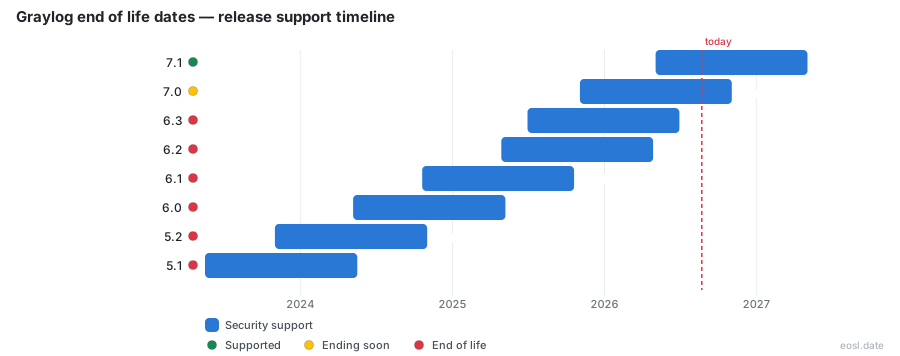
Currently Supported Graylog Releases - Active EOS/EOSL Support (1)
| Release | Released | Support | Latest |
|---|---|---|---|
| 7.2 | (1 month and 1 week ago) | (in 10 months) | 7.2.2 (2 weeks and 4 days ago) |
Graylog Releases Nearing End of Life - Support Ending Soon (1)
| Release | Released | Support | Latest |
|---|---|---|---|
| 7.1 | (6 months ago) | (in 5 months) | 7.1.12 (2 weeks and 4 days ago) |
Graylog End of Life (EOL) Releases - No Longer Supported (26)
| Release | Released | Support | Latest |
|---|---|---|---|
| 7.0 | (1 year ago) | (2 weeks and 5 days ago) | 7.0.16 (2 weeks and 4 days ago) |
| 6.3 | (1 year and 4 months ago) | (4 months ago) | 6.3.15 (3 months ago) |
| 6.2 | (1 year and 6 months ago) | (6 months ago) | 6.2.14 (7 months ago) |
| 6.1 | (2 years and 1 month ago) | (1 year and 1 month ago) | 6.1.16 (1 year and 1 month ago) |
| 6.0 | (2 years and 6 months ago) | (1 year and 6 months ago) | 6.0.14 (1 year and 7 months ago) |
| 5.2 | (3 years ago) | (2 years ago) | 5.2.12 (2 years and 1 month ago) |
| 5.1 | (3 years and 6 months ago) | (2 years and 6 months ago) | 5.1.13 (2 years and 7 months ago) |
| 5.0 | (3 years and 11 months ago) | (2 years and 11 months ago) | 5.0.13 (3 years and 1 month ago) |
| 4.3 | (4 years and 5 months ago) | (3 years and 5 months ago) | 4.3.15 (3 years and 6 months ago) |
| 4.2 | (5 years and 1 month ago) | (3 years and 11 months ago) | 4.2.13 (4 years and 2 months ago) |
| 4.1 | (5 years and 4 months ago) | (4 years and 6 months ago) | 4.1.14 (4 years and 7 months ago) |
| 4.0 | (6 years ago) | (5 years and 1 month ago) | 4.0.17 (4 years and 4 months ago) |
| 3.3 | (6 years and 6 months ago) | (4 years and 7 months ago) | 3.3.17 (4 years and 7 months ago) |
| 3.2 | (6 years and 9 months ago) | (6 years and 6 months ago) | 3.2.6 (6 years and 5 months ago) |
| 3.1 | (7 years and 3 months ago) | (6 years and 9 months ago) | 3.1.4 (6 years and 10 months ago) |
| 3.0 | (7 years and 9 months ago) | (7 years and 3 months ago) | 3.0.2 (7 years and 6 months ago) |
| 2.5 | (7 years and 11 months ago) | (7 years and 9 months ago) | 2.5.2 (7 years and 8 months ago) |
| 2.4 | (8 years and 11 months ago) | (7 years and 8 months ago) | 2.4.7 (7 years and 8 months ago) |
| 2.3 | (9 years and 3 months ago) | (8 years and 11 months ago) | 2.3.2 (9 years and 1 month ago) |
| 2.2 | (9 years and 9 months ago) | (9 years and 3 months ago) | 2.2.3 (9 years and 7 months ago) |
| 2.1 | (10 years and 2 months ago) | (9 years and 9 months ago) | 2.1.3 (9 years and 9 months ago) |
| 2.0 | (10 years and 6 months ago) | (10 years and 2 months ago) | 2.0.3 (10 years and 5 months ago) |
| 1.3 | (10 years and 11 months ago) | (10 years and 6 months ago) | 1.3.4 (10 years and 8 months ago) |
| 1.2 | (11 years and 2 months ago) | (10 years and 11 months ago) | 1.2.2 (11 years ago) |
| 1.1 | (11 years and 5 months ago) | (11 years and 2 months ago) | 1.1.6 (11 years and 3 months ago) |
| 1.0 | (11 years and 9 months ago) | (11 years and 5 months ago) | 1.0.2 (11 years and 6 months ago) |
Running an unsupported log platform means no more fixes, so Graylog end of life dates matter to every admin. This guide shows when each release stops getting support, which ones are covered today, and how to check which release you run before the window closes.
Graylog End of Life Dates by Release
Each release line gets a fixed support window, and once it closes, no more patches arrive. The table uses the schedule on endoflife.date, last updated 20 October 2026, and tracks the open source, self-hosted builds.
| Release | Released | Status | Support date | Latest patch |
|---|---|---|---|---|
| 5.0 | 6 Dec 2022 | Ended | 6 Dec 2023 | 5.0.13 |
| 5.1 | 17 May 2023 | Ended | 17 May 2024 | 5.1.13 |
| 5.2 | 1 Nov 2023 | Ended | 1 Nov 2024 | 5.2.12 |
| 6.0 | 7 May 2024 | Ended | 8 May 2025 | 6.0.14 |
| 6.1 | 20 Oct 2024 | Ended | 20 Oct 2025 | 6.1.16 |
| 6.2 | 28 Apr 2025 | Ended | 28 Apr 2026 | 6.2.14 |
| 6.3 | 30 Jun 2025 | Ended | 30 Jun 2026 | 6.3.15 |
| 7.0 | 3 Nov 2025 | Ends soon | 3 Nov 2026 | 7.0.15 |
| 7.1 | 4 May 2026 | Supported | 4 May 2027 | 7.1.11 |
Every 5.x and 6.x line has ended support. Release 6.3, the newest of them, ended on 30 June 2026.
Which Supported Releases Still Get Patches
As of October 2026 only two lines are covered. Release 7.1 runs to 4 May 2027, while 7.0 loses support on 3 November 2026, just over a week after the snapshot. A single supported release is enough to stay patched, so aim for the newest.
Graylog's supported releases are listed in its official documentation, and the project announces each patch on its releases page. Graylog also sells cloud offerings, but the dates above cover the downloadable builds. endoflife.date adds a JSON API, an RSS feed and an iCalendar feed so you can follow changes without visiting the page.
Checking Your Installed Graylog Version
Before trusting any date, confirm the installed version on your Graylog server. Ask the package manager on a Linux host:
dpkg -l | grep -E ".(elasticsearch|graylog|mongo)."
dnf list installed | grep -E ".*(elasticsearch|graylog|mongo).*"
The first command suits Debian based systems and the second suits RedHat based ones. Compare the number you see with the table, and remember that Graylog needs a Java runtime, so check that too.
Tracking Each EOL Date With Monitoring
Checking by hand does not scale. A Nagios and Icinga plugin from Linuxfabrik, published on GitHub, compares your installed release with the endoflife.date API and warns 30 days before the official EOL date. The offset is configurable, and the check can run once a day.
The same plugin can raise alerts when a new major release, a minor release or a patch release appears. Feed those alerts into your existing monitoring so the warning reaches the people who own the upgrade, not only the person who read this page. Cached release data keeps the daily lookup light.
Graylog Version Differences Across Open, Enterprise and Security
Graylog ships as one platform in three editions. The schedule above follows the free build, while paid editions carry support terms of their own that you should confirm with the vendor.
Graylog Open and Self-Managed Installs
This is the edition endoflife.date follows. Because you operate it yourself, applying each patch is your job, and nobody pushes data about new builds to you unless you set up the checks above.
Graylog Enterprise and Log Management
Beyond collecting logs for centralized logging, this edition adds reporting, search and alerting, plus tiering and policy-driven retention for log management at volume.
Graylog Security and SIEM
Here the same platform adds SIEM detection and response, turning risk-scored alerts into a single incident to investigate. A SIEM that falls out of support loses patches for the very component watching your systems.
Upgrading Before Your Release Reaches End-of-Life
Pick a target while a supported release still exists, which today means 7.1, and move to the latest patch of it. Follow the documented upgrade path for your install method and take a backup of your data first.
Unsupported builds also raise compliance questions: an audit can flag software that no longer receives security patches. Before the move, confirm that your pipeline rules and any add-ons from the marketplace work on the target release. Upgrade a test node first, then production.