Microsoft Build of OpenJDK End of Life (EOL) Dates and End of Support (EOS) Dates
Microsoft Build of OpenJDK 25.0.5.1 LTS is the current supported release, with support through Sep 30, 2030 — 4 versions currently in active support. Track Microsoft Build of OpenJDK end of life dates — EOL, EOS and EOSL dates — across all 4 releases. Also see GraalVM Community Edition end of life dates for related end-of-life information.
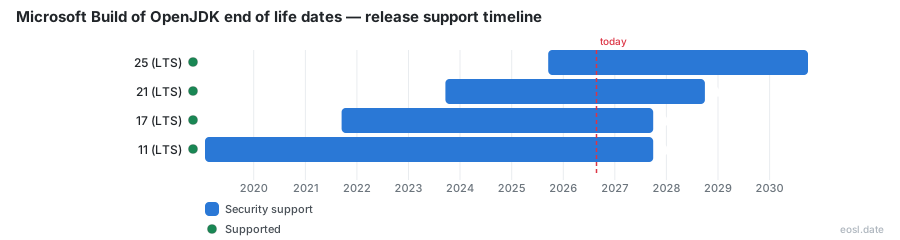
Currently Supported Microsoft Build of OpenJDK Releases - Active EOS/EOSL Support (4)
| Release | Released | Security Support | Latest | LTS |
|---|---|---|---|---|
| 25 (LTS) | (1 year and 2 months ago) | (in 3 years and 10 months) | 25.0.5.1 (6 days ago) | LTS |
| 21 (LTS) | (3 years and 2 months ago) | (in 1 year and 10 months) | 21.0.13.1 (6 days ago) | LTS |
| 17 (LTS) | (5 years and 2 months ago) | (in 10 months) | 17.0.21.1 (6 days ago) | LTS |
| 11 (LTS) | (7 years and 10 months ago) | (in 10 months) | 11.0.33.1 (4 days ago) | LTS |
If your Java services run on Microsoft Build of OpenJDK end of life dates you have not checked, this guide gives you the exact cutoffs. The Microsoft Build of OpenJDK is a free, long-term support distribution of the OpenJDK, and Microsoft backs its OpenJDK releases on Azure, so each LTS version has a published support window you can plan around.
Microsoft Build of OpenJDK End of Life and Support Policy
Microsoft compiles, packages and tests its own binaries of the OpenJDK project, then runs its long-term releases through the Oracle Java Technology Compatibility Kit (TCK) and the AQAvit quality suite. The support policy applies to LTS releases only. Those Java builds get quarterly updates in January, April, July and October, and the OpenJDK builds are free of charge, open source under the GPL with Classpath Exception, and usable anywhere the license allows.
Each update can carry new or backported security fixes and patches that Microsoft considers important. Changes that have not reached the upstream OpenJDK project are flagged in the release notes with source code available, so you can compare exactly how a build differs from the Oracle-led Java SE reference. If you want the Java Development Kit (JDK) and nothing else, the site offers it for each LTS line.
Commercial support on Azure
Commercial support exists only for customers with active Azure Support Plans, and it covers Java workloads running on Microsoft's cloud, its on-premises stack and its Kubernetes clusters. It follows Microsoft's Modern Lifecycle Policy, and your systems must stay on the latest update to qualify.
Community support through GitHub
Everyone else, including people running other OpenJDK builds, can raise issues and join discussions in the project's GitHub repository. That help is best-effort and stops with the patches once a release passes its end-of-support date.
Support Roadmap and EOL Dates for Each LTS Version
The OpenJDK project ships a new feature release every six months, but each OpenJDK vendor decides how long its own build is maintained. This support roadmap lists the dates for the versions Microsoft supports, with the earliest end-of-support date shown for each. The 2027 cutoff for OpenJDK 11 and the 17 line is only about 11 months away from late October 2026.
| Version | Microsoft release date | Earliest end-of-support date |
|---|---|---|
| OpenJDK 11 LTS | May 2021 | September 2027 |
| OpenJDK 17 LTS | September 2021 | September 2027 |
| OpenJDK 21 LTS | September 2023 | September 2028 |
| OpenJDK 25 LTS | September 2025 | September 2030 |
These are initial targets, and Microsoft may extend them. The release cadence brings a new major OpenJDK line about every two years, and each one gets at least four years of maintenance. When the cutoff for a Java release passes, the quarterly critical patch updates stop, and the JDK you installed no longer receives fixes from Microsoft. An OpenJDK 11 end of life check is therefore really a question about which date applies to your build.
OpenJDK 11 and other long-term support builds
Microsoft supports only LTS releases. Other OpenJDK builds may appear, but Microsoft reserves the right to skip their updates, so treat the table above as the OpenJDK dates that matter in production.
Support Lifecycle Across Windows, Linux and macOS
The support lifecycle also depends on where the build runs. Microsoft certifies each LTS line on two hardware architectures, and the OpenJDK builds target operating systems that still receive security fixes. On Windows, Linux and macOS you get the same Java binaries on the same schedule, unlike the Red Hat matrix further down.
| Version | Architecture | Linux | macOS | Windows |
|---|---|---|---|---|
| 11 and 17 | x64 | Yes | Yes | Yes |
| 11 and 17 | AArch64 | Yes | Yes | Yes |
| 21 and 25 | x64 | Yes | Yes | Yes |
| 21 and 25 | AArch64 | Yes | Yes | Yes |
The older 11 and 17 lines also ship on Alpine (musl), but only for Intel and AMD processors. The Java runtime (JRE) comes bundled in each download, whether you install it on a Windows desktop or a Windows Server host.
Operating systems and Linux distributions
A Linux distribution that has itself reached the end of its own support drops out of coverage, even if the OpenJDK build is still current. The end-of-support dates in the table above apply only while the host system is itself supported.
Java 8 Lifecycle and the Eclipse Adoptium Working Group
Microsoft does not publish its own build of Java 8. A few cloud services still run it, and for those Microsoft relies on Eclipse Temurin builds from Eclipse Adoptium, where it is a strategic member. For containerized Java 8 workloads it publishes Temurin-based Docker container images with security updates for supported base systems such as Ubuntu, and Eclipse Temurin is the runtime inside them. Outside the cloud, download Eclipse Temurin builds straight from Adoptium and follow that OpenJDK 8 timeline instead of Microsoft's.
How the Life Cycle Compares With Other OpenJDK Vendors
The upstream OpenJDK project commits only to six months of updates, so every longer timeline is set by a downstream vendor. The life cycle of one Java version therefore ends on different EOL dates depending on whose build you installed. Here is OpenJDK 11, where Red Hat and Eclipse Temurin lead the community builds:
| Vendor build | Free updates end |
|---|---|
| Oracle JDK (Premier Support) | September 2023 |
| Red Hat build of OpenJDK | October 31, 2024 |
| Microsoft Build of OpenJDK | September 2027 |
| Eclipse Temurin | At least October 2027 |
| Amazon Corretto | January 2032 |
| Azul Zulu | January 2032 |
LTS and non-LTS releases
The LTS label is a vendor convention. A non-LTS release gets half a year of updates and then vanishes, so it rarely belongs in production. Microsoft supports only LTS lines, so a non-LTS build has no date to plan around.
Red Hat and Oracle extended support
Red Hat delivers four OpenJDK updates a year, and Red Hat and sells an optional ELS-1 phase for version 11 that runs to January 31, 2032. Its free OpenJDK 17 support runs to December 31, 2027, version 21 to December 31, 2029 and version 25 to December 31, 2030. Red Hat also supports Eclipse Temurin. Oracle adds Extended Support after Premier Support ends. Against Microsoft's September 2027 date for version 11, both are paid support, usually with backported fixes and no new features.
What Happens After End of Support
For the Microsoft build, EOL generally means no more free updates from that provider. Your support window closes, and the patch level of your Java runtime freezes at the last OpenJDK release you installed.
Risk from unpatched runtimes
Every new CVE published after the cutoff stays open on your server, and a second CVE a month later adds to the pile. That is a security exposure and a possible compliance problem, because auditors expect a vulnerability in a production runtime to have a path to patches.
Library and framework lock-in
Java teams stay on an old release because a framework, certified application stack or vendor appliance pins it, and that is how they miss the September 2027 cutoff for versions 11 and 17. Weigh the migration cost against how long your OpenJDK runtime can tolerate that exposure.
Upgrade Paths Before Your Microsoft OpenJDK Support Timeline Ends
Pick one of three Java routes before the support timeline closes:
- Move your Java workloads to a newer OpenJDK LTS release.
- Buy coverage that extends the old line past its cutoff.
- Accept the exposure, but record that decision in writing.
Migrate to OpenJDK 17 or OpenJDK 21
Plan to migrate your Java code to the newest LTS your dependencies allow. The 21 line gives you support until September 2028 and the 25 line until September 2030, and the upgrade is easier if you run your test suite on each interim release.
Extended lifecycle support
If you cannot move in time, Microsoft does not sell extended support past its dates, so a third-party extended lifecycle support contract is the only route that keeps patching an old Java line while you plan the migration.