Apache Log4j End of Life (EOL) Dates and End of Support (EOS) Dates
Apache Log4j end of life (EOL) and end of support (EOS) dates: 3 Apache Log4j versions have reached EOL, including Apache Log4j 2.12 (EOL date: Dec 14, 2021) — no longer receiving security updates or patches. Apache Log4j 2.26.1 is the current supported release. Also see Dependency-Track lifecycle dates for related end-of-life information.
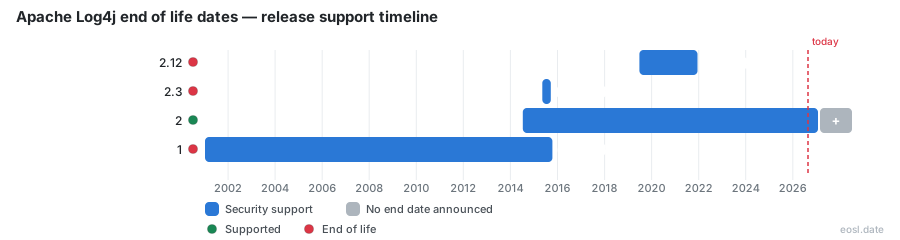
Currently Supported Apache Log4j Releases - Active EOS/EOSL Support (1)
| Release | Released | Supported | Latest |
|---|---|---|---|
| 2 | (12 years and 4 months ago) | Active | 2.26.1 (4 months ago) |
Apache Log4j End of Life (EOL) Releases - No Longer Supported (3)
| Release | Released | Supported | Latest |
|---|---|---|---|
| 2.12 | (7 years and 4 months ago) | (4 years and 11 months ago) | 2.12.4 (4 years and 10 months ago) |
| 2.3 | (11 years and 6 months ago) | (11 years and 2 months ago) | 2.3.2 (4 years and 10 months ago) |
| 1 | (25 years and 10 months ago) | (11 years and 1 month ago) | 1.2.17 (14 years and 6 months ago) |
If a scanner flagged your Java stack, you need to know which releases still get security fixes, and the Apache Log4j end of life picture is simpler than it looks: Log4j 1.x is dead, only the two newest Log4j 2 branches receive patches, and everything older is unmaintained. This guide covers the open source logging library, every Log4j release series, the vulnerabilities attached to each and the safest way to upgrade your application.
Apache Log4j End of Life Status by Version
Apache Log4j is a Java-based logging utility and logging framework, developed by committers of the Apache Software Foundation as part of Apache Logging Services. Its lifecycle is unusual, so the table below combines the project's own maintenance status with what each series means for your applications today.
| Series | Status | Last release | What it means for you |
|---|---|---|---|
| 3.0.x | Active development | 3.0.0-beta3 | Beta only, not for production |
| 2.26.x | Active development | 2.26.1 | Newest line, gets all updates |
| 2.25.x | Active maintenance | 2.25.5 | Still patched, a safe landing spot |
| 2.24.x and older | End of maintenance | 2.24.3 | No new patches |
| 2.12.x | End of maintenance | 2.12.4 | Final line for Java 7 |
| 2.3.x | End of maintenance | 2.3.2 | Final branch for Java 6 |
| 1.x | Retired in 2015 | 1.2.17 | Never patched again |
Log4j Maintenance Status and Latest Release
The latest release is Log4j 2.26.1, shipped in mid-2026, and the newest patch on the previous line is 2.25.5. Release 2.26.0 was itself affected by CVE-2026-49844, so skip it and take 2.26.1. If you ask which is the latest version, that is the answer for now. The status labels come straight from the Apache download page: development, maintenance and end of maintenance. A series that has dropped out of the first two labels is not coming back, and the other versions in the table are best treated as retired.
How the Log4j Release Policy Works
Unlike Spring, .NET or Node.js, Log4j has no published schedule. The Apache team patches the current minor line and, lately, the one before it. When CVE-2026-49844 was disclosed in July 2026, the fix landed in both 2.25.5 and 2.26.1. That is a courtesy, not a commitment, so you cannot put a date in a compliance calendar and trust it.
Support Policy and Supported Release Lines
There is no LTS designation, no advance deprecation notice and no "active support" phase. In practice a supported release means one of at most two recent branches. The Apache versioning and maintenance policy page explains the labels, and the Apache Logging Services security team handles every vulnerability disclosure through a private reporting process.
That team also publishes a common threat model for its logging frameworks. It treats application developers and administrators as trusted users, treats configuration files and environment variables as trusted, and treats the content your application logs on behalf of end users as untrusted. The practical lesson: an attacker who controls log content is expected, so you must protect your configuration and never let untrusted parties write to it. Treat each vulnerability report against that configuration as a security question first. A leaked configuration lets an attacker redirect logging to a destination they control, and a writable configuration file is itself a vulnerability. Reports that break those assumptions are rejected on every branch, so support status does not change them.
- Patches go to the newest branch first, and occasionally to the one before it.
- Backports happen only for catastrophic flaws, as the Log4Shell response showed.
- Every other line is on its own, however popular it still is.
Log4j 1.x End-of-Life Since 2015
Log4j 1.x was the original Apache logging library, first released in January 2001. The Apache Software Foundation's Logging Services project management committee announced on its blog on August 5, 2015 that the series had reached end of life, and the final release, 1.2.17, dates from May 2012. Apache points users to Log4j 2 or SLF4J, and the Apache security page repeats that no vulnerability found in Log4j 1 will be fixed. Even so, enterprise applications written between 2002 and 2014 bundled it as a direct dependency, and many still run in production. Maven Central pull counts for log4j:log4j:1.2.17 stay high every year, which is exactly why the series remains a risk to your applications.
Security Vulnerabilities Apache Will Not Fix
Every vulnerability reported after August 2015 goes unchecked, and none of the issues below will ever be patched. An attacker only needs one reachable component in your application, and the CVSS score of each flaw tells you how bad the exploit could be:
- CVE-2019-17571 (CVSS 9.8): the SocketServer performs unsafe deserialization of untrusted log events, a deserialization bug class, which allows remote code execution.
- CVE-2020-9488: improper certificate validation in the SMTPAppender, open to a man-in-the-middle attack that leaks log messages.
- CVE-2021-4104 (CVSS 7.5): the JMSAppender uses JNDI without protection, so an attacker-controlled LDAP store can trigger RCE.
- CVE-2022-23302: the same JNDI pattern in JMSSink.
- CVE-2022-23305: SQL injection in the JDBCAppender, because the PatternLayout message converter feeds logged input into the SQL statement.
- CVE-2022-23307: a critical flaw in the bundled Chainsaw viewer.
Log4j 1 also does not restrict DTD entities in log4j.xml, so every entity in the configuration must be one you trust, and any appender your logging configuration does not use should be removed. Apache will not fix this either. Version 1.2 also misbehaves on Java 9, where the changed version detection breaks the MDC.
Reload4j as a Drop-In Replacement
If a rewrite is impossible this quarter, the reload4j project offers a drop-in replacement for Log4j 1.x with maintenance and security fixes. It lets you mitigate the exposure while you plan the migration, but it is a bridge. Plan the move to Log4j 2 anyway.
Unmaintained Log4j 2 Versions Still in Production
Every Log4j 2 version below 2.25.x is at end of maintenance, including the 2.17.x line where most teams stopped after December 2021. The final Apache release on that branch is 2.17.2, not 2.17.1, and many teams that froze at 2.17.1 never picked it up. Freezing was a reasonable reaction to the crisis. As a long-term plan it no longer holds, because newer vulnerabilities were never backported, and a scan of the old versions will show seven of them still open.
Log4Shell and the Backport Branches
Log4Shell is the nickname for CVE-2021-44228, a CVSS 10.0 unauthenticated remote code execution flaw that CISA called one of the gravest software flaws it had seen. Apache shipped an emergency release for the Java 7 branch (2.12.x) and the Java 6 branch (2.3.x) only because the severity justified a backport, and those were declared the final updates. Three follow-up issues round out the story:
| CVE | CVSS score | Issue |
|---|---|---|
| CVE-2021-45046 | 9.0 | The incomplete first patch |
| CVE-2021-45105 | 5.9 | A denial of service through infinite recursion |
| CVE-2021-44832 | 6.6 | A JNDI vector through the JDBC Appender |
The 2026 CVE Wave
Between December 2025 and July 2026, seven CVE entries were disclosed against Log4j 2, and every fix landed in 2.25.3 or later. None reached 2.24.x, 2.18.x, 2.17.x, 2.12.x or 2.3.x. None is remote code execution, but five damage log integrity, which is why teams under-triage them. In CVE-2026-34480 a single forbidden XML 1.0 code point in a logged field makes the XML record invalid. With Woodstox on the classpath, common on Spring Boot WAR deployments, the appender throws and the event never reaches disk or your SIEM. CVE-2026-34479 is the same defect in the Log4j 1 bridge, CVE-2026-34481 is the JSON variant and CVE-2026-49844 affects MapMessage. A silently truncated audit trail is a control failure under SOC 2, PCI DSS and FedRAMP, so the low CVSS numbers understate the business risk. A CVSS score measures severity, not your exposure: a CVSS 5.9 denial of service can matter more than a CVSS 9.8 flaw in a component your application never loads.
The two TLS issues, CVE-2025-68161 and CVE-2026-34477, matter for another reason. If you set verifyHostName and Log4j ignored it, you believed your channel to the log collector was authenticated when it was not.
Java Support: Which Log4j Versions Run on Which JDK
The only supported Java baseline today is Java 8 and above. Your JDK often decides how far you can upgrade, and each upgrade has to fit the application's runtime, so check the runtime of every application before choosing a target among the Log4j versions.
Java 8, Java 7 and Java 6 Compatibility
- Java 8 and above: Log4j 2.13.0 and greater require it, which covers every maintained branch.
- Java 7: versions 2.4 through 2.12.x run here. Release 2.12.2 was an emergency build for CVE-2021-45046 and CVE-2021-44228, and the team no longer supports Java 7.
- Java 6: 2.3 was the last 2.x release to support it. Version 1.x covered Java 1.4.
- Java 9: Log4j 1.2 breaks the MDC there.
Anyone still on Java 6 or Java 7 is running a retired Log4j by default. Upgrading the runtime and the library together is the cleaner route, because both move your application onto versions that still get security updates.
What Happens When Log4j Is No Longer Supported
Older versions that are no longer supported keep working, which is the trap. Dozens of past versions sit in that state, and all of these versions still resolve from public repositories. Nothing breaks on the day support ends. What changes is your exposure: new vulnerabilities arrive, and no upstream fix follows. For a branch that is no longer maintained, three things happen over time.
- Scanners keep reporting it. Tools match your jars and logging configuration against CPE and purl identifiers, so an old Log4j shows up in every audit of your applications.
- Compliance gets harder. Auditors rarely accept an open vulnerability with no upstream remediation, and a security reviewer will ask for a remediation date.
- Risk compounds in hidden places. Air-gapped systems, embedded appliances and vendor products can carry old copies you never chose.
Performance is no reason to stay on a retired Log4j series. Log4j 1.x once advertised nanosecond-level checks of whether a statement should be logged, but no benchmark outweighs a framework without security fixes.
Upgrade to Log4j 2 Before an EOL Version Bites
The safest path is moving to 2.25.x or 2.26.x. Treat it like any migration: inventory first, then replace, then verify. Remediation works best when each upgrade step is small and testable, because every upgrade can change your logging configuration.
- List every Log4j jar, including transitive dependencies and vendor bundles.
- Move Log4j 1.x code to Log4j 2, or to SLF4J with Logback, and rewrite the configuration files.
- Pin the new release in your build and rerun the scanner.
When a vendor product ships an old copy, ask for a patched build, or consider paid extended coverage for end-of-life branches. Treat that as a stopgap and not a destination.
Download, Release Notes and SBOM
To track when a Log4j series is retired, follow endoflife.date, which publishes feeds for it. Get the source distribution and the binary distribution from the project's distribution page, or pull artifacts from Maven Central. Each file has a checksum and a signature, so verify both. Every artifact ships with a software bill of materials (SBOM), which helps you prove what you run. Read the release notes for each hop, and compare versions one minor step at a time. You can also follow endoflife.date, which exposes JSON data through an API, plus an RSS feed and an iCalendar feed, so a pipeline can call the API, read the JSON and warn you before a branch is retired. The API documentation lists each product endpoint.