LineageOS End of Life (EOL) Dates and End of Support (EOS) Dates
LineageOS end of life (EOL) and end of support (EOS) dates: 11 LineageOS versions have reached EOL, including LineageOS 23.0 (EOL date: Feb 28, 2026) — no longer receiving security updates or patches. LineageOS 24.0 is the current supported release — 3 versions in active support. Also see FortiOS EOSL dates for related end-of-life information.
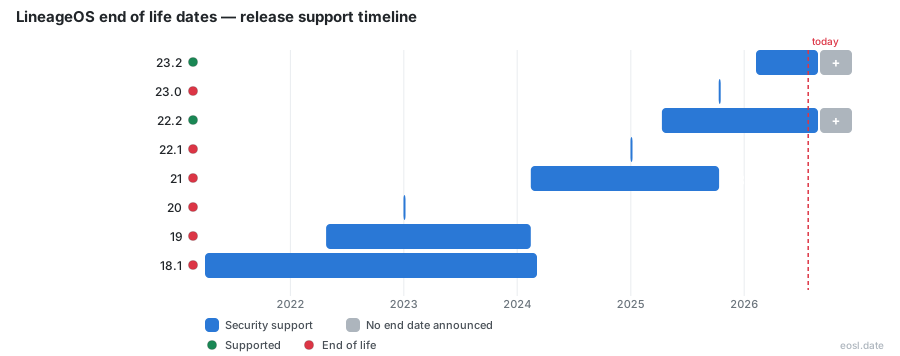
Currently Supported LineageOS Releases - Active EOS/EOSL Support (3)
| Release | Android Version | Released | Security Support |
|---|---|---|---|
| 24.0 | 17 | (3 weeks and 2 days ago) | Active |
| 23.2 | 16 | (8 months ago) | Active |
| 22.2 | 15 | (1 year and 6 months ago) | Active |
LineageOS End of Life (EOL) Releases - No Longer Supported (11)
| Release | Android Version | Released | Security Support |
|---|---|---|---|
| 23.0 | 16 | (1 year ago) | (8 months ago) |
| 22.1 | 15 | (1 year and 10 months ago) | (1 year and 5 months ago) |
| 21 | 14 | (2 years and 8 months ago) | (1 year ago) |
| 20 | 13 | (3 years and 10 months ago) | (1 year and 10 months ago) |
| 19 | 12 | (4 years and 6 months ago) | (2 years and 8 months ago) |
| 18.1 | 11 | (5 years and 7 months ago) | (2 years and 7 months ago) |
| 17.1 | 10 | (6 years and 9 months ago) | (4 years and 6 months ago) |
| 16.0 | 9.0 | (7 years and 8 months ago) | (5 years and 8 months ago) |
| 15.1 | 8.1 | (8 years and 8 months ago) | (6 years and 8 months ago) |
| 13.0 | 6.0.1 | (9 years and 9 months ago) | (8 years and 8 months ago) |
| 14.1 | 7.1.2 | (9 years and 9 months ago) | (7 years and 8 months ago) |
If your phone runs a custom ROM, LineageOS end of life decides how long your Android operating system keeps getting fixes. This open source project is a Linux-based operating system built on AOSP, the successor to CyanogenMod, and it officially maintains two versions at a time (plus a legacy exception described below), so the version you installed has an expiry date that you can check in minutes. The same rule covers every smartphone and tablet it runs on.
LineageOS End of Life Dates by Version
Each LineageOS release tracks one Android version, and its official support ends once the project moves on or Google stops patching the Android base. The table below lists every LineageOS version that still matters, using the schedule published on endoflife.date.
| LineageOS version | Android version | First release | Official support |
|---|---|---|---|
| LineageOS 24.0 | Android 17 | 11 October 2026 | Supported |
| LineageOS 23.2 | Android 16 | 8 February 2026 | Supported |
| LineageOS 23.0 | Android 16 | 11 October 2025 | Ended 28 February 2026 |
| LineageOS 22.2 | Android 15 | 11 April 2025 | Supported |
| LineageOS 22.1 | Android 15 | 31 December 2024 | Ended 13 May 2025 |
| LineageOS 21 | Android 14 | 14 February 2024 | Ended 12 October 2025 |
| LineageOS 20 | Android 13 | 31 December 2022 | Ended 31 December 2024 |
| LineageOS 19 | Android 12 | 26 April 2022 | Ended 14 February 2024 |
| LineageOS 18.1 | Android 11 | 1 April 2021 | Ended 5 March 2024 |
Anything older, from LineageOS 17.1 back to 13.0, has been unsupported for years. Branches that reached EOL no longer receive official builds, although some still get patches through other channels, as described below.
Version History and Release Policy
LineageOS began as a fork of CyanogenMod, so it keeps the old numbering, where the major version number follows the alphabet position of the Android codename, so Android 7.1 Nougat became 14.1. The release policy is simple: the newest branch is built weekly, and the project's charter requires devices to meet minimum standards before a maintainer can ship them.
The release cadence now follows Google. Android 17 arrived in June 2026, and LineageOS 24.0 followed on 11 October 2026, earlier than the team expected. Google itself treats an Android release as dead when it drops out of the Android Security Bulletins, which is why Android 13 reached its own end on 2 March 2026.
Security Patches After Support Ends
Official end of support does not always mean zero security patches. The team keeps merging bulletin fixes into LineageOS 18.1, 19.1 and 20 and has backported security patches for the legacy branches 15.1, 16.0 and 17.1 through November 2025. Because Google distributes no attestable set of patches for those releases, the security patch level string is not changed on them, so a settings screen may look stale even when the patches are present.
Treat this as a bonus, not a promise. Full security updates with matching patch-level strings track the bulletins Google still publishes, which cover Android 14 and newer, and the security support on old branches depends on volunteers who backport each fix by hand. Anything they cannot adapt is skipped, and an unpatched vulnerabilities list grows month by month.
LineageOS Deprecation Rules and Official Builds
LineageOS is an AOSP-based Linux distribution, so its fate is tied to the software Google publishes and to what each manufacturer releases for its hardware. The project's rule is that it maintains two versions simultaneously. A device that is not ported to one of the two latest versions stops receiving official builds, and that is how a deprecation happens: the maintainer loses the build slot, the device falls off the roster, and the final build ships on the day the branch is retired. The most dramatic example came on 5 March 2024, when the team announced the sunsetting of 18.1 shortly after Google ended Android 11 patches, and 52 devices got a last build that same day.
A deprecated branch is not frozen forever. Source code stays on GitHub and Gerrit, where developers and maintainers review every change, and anyone can push a fix to Gerrit for review. A motivated owner can still compile an unofficial build for an old branch. Just remember that unofficial output carries no signed update channel, so you take on the work of rebuilding, flashing and verifying each update yourself.
Legacy Branches for Legacy Devices on Old Kernels
Not every device can reach the newest code. The team decided that legacy devices with a Linux 4.4 or 4.9 kernel will only accept LineageOS 22.2 submissions, because the old Linux code carries countless hacky commits that are hard to pull forward. Those devices keep official builds, with monthly patches, until Google stops distributing Android 15 bulletins.
The kernel a chip family uses caps the newest Android release it can run, so it caps how long that device can stay on the roster. The team's common Linux kernels show the ceiling:
- Qualcomm SM8550 uses Linux 5.15 and covers Android 13 through 17.
- Qualcomm SM8650 uses Linux 6.1 and covers Android 14 through 17.
- Qualcomm SM8750 uses Linux 6.6 and covers Android 15 through 17.
- Qualcomm SM8850 uses Linux 6.12 and covers Android 17 only.
Newer branches are stricter: LineageOS 23.2 and 24.0 only ship kernels with eBPF backports and a build that works without GCC. To reduce duplicate effort, contributors now share SoC-specific common kernels and a pool of compatibility shims for the proprietary libraries that older phones still need. This community work is the reason many older phones remain in the build roster longer than their manufacturers intended.
LineageOS 22.2 and 23.2 Supported Devices
Support is decided per device, not per brand, so check the wiki entry for your exact model. The supported devices list grew from about 109 phone models in 2019 to 196 devices on the roster by 31 December 2024, and roughly 4.5 million devices ran LineageOS in 2025. The table shows how the main brands tend to fare.
| Brand | Typical devices | What end of support means |
|---|---|---|
| Google Pixel | Pixel 4a, newer Pixel phones | Official Google updates stop first, then LineageOS extends the life of the Pixel |
| Samsung | Galaxy S22, Galaxy A series | Samsung stops One UI updates, and LineageOS adds the Samsung model |
| OnePlus | OnePlus One and later OnePlus phones | OnePlus was an early favorite and a OnePlus handset often stays listed for years |
| Xiaomi | POCO X3 Pro, other Xiaomi models | Xiaomi models depend on the unlocked bootloader and the Xiaomi kernel source |
| Motorola | Moto G32 and other Motorola phones | Motorola devices follow the same two-version rule |
| Nokia | Nokia handsets | Nokia has fewer ports, so check the wiki before you buy |
Xiaomi and Motorola phones make up a large share of the list. Check your exact model's wiki page for its current branch, because a Xiaomi or Motorola phone may be on a current branch or one that already ended. Wikipedia's screenshots show a Moto G32 on LineageOS 23.2 and a POCO X3 Pro on LineageOS 18, which is a good picture of the spread (and a Xiaomi or Motorola handset can sit on either side): a Motorola phone on a current branch beside a Xiaomi phone on a branch that reached EOL. A OnePlus or Pixel owner faces the same rule, and a Google Pixel 4a stayed useful after Google stopped its own updates in August 2023.
Samsung Galaxy S22 and the Build Roster
In August 2026 heise reported that the Samsung Galaxy S22 family joined the roster after Samsung ended major updates with One UI 8, which is based on Android 16. Samsung says security patches continue until February 2027, but LineageOS 23 will go beyond that date. The S22 Ultra got a weekly nightly build first, with the S22 Plus and the base model expected to follow. Follow the flashing instructions exactly, since a wrong step can brick a handset.
What to Do With an Unsupported LineageOS Version
Check three things before you decide: your branch in the table above, your device's page on the wiki, and the date of your last security patch. If the branch is unsupported, you have two realistic options, upgrade to a branch your device still receives, or move to another custom ROM or stock firmware if no newer port exists.
- Open the wiki page for your device and read which LineageOS versions it lists.
- Back up your data, because flashing carries risk.
- Follow the upgrade or installation steps for the branch you picked.
- Reinstall gapps if you use Google apps, then confirm the update channel works.
Upgrade Guide for Your Device
The wiki provides an upgrade guide on each device page under "Upgrade to a higher version of LineageOS." If you are on an official build you usually do not need to wipe your phone, unless the page says so, which happens when a device was repartitioned. On non-A/B phones the recovery partition is now updated automatically on the boot after a successful update, and updates are streamed by default on A/B devices, which cuts installation time. The OTA updater does the rest.
Install Guide for Unofficial Builds
If you came from an unofficial build, the upgrade path does not apply, and you should follow the install guide for your device like any new user. LineageOS now also offers browser-based flash tools using WebUSB, for ADB Fastboot, Amlogic and Samsung Odin protocols. They do not replace the wiki, which stays the supported path, and availability varies by device, browser and USB connection.
Google Apps and Play Integrity
Google apps are not bundled in LineageOS for legal reasons, so users flash a gapps package during installation, and you must reflash it after moving to a new branch. The side effect is on Play Integrity: banking and streaming apps that need a locked bootloader may refuse to run, and workarounds exist but are fragile. On the plus side, LineageOS skips the bloatware that manufacturers and carriers preload, which is a main reason people choose it for smartphones and tablets that outlived their vendor's software support. Because the operating system comes from an open software project, any software fix can be reviewed by outside developers, and a manufacturer delay does not block it.