Apple iPad End of Life (EOL) Dates and End of Support (EOS) Dates
Apple iPad end of life (EOL) and end of support (EOS) dates: 17 Apple iPad versions have reached EOL, including Apple iPad iPad (7th generation) (EOL date: May 11, 2026) — no longer receiving security updates or patches. Apple iPad iPad Air 13-inch (M4) is the current supported release — 28 versions in active support. Also see Apple Watch EOSL information for related end-of-life information.
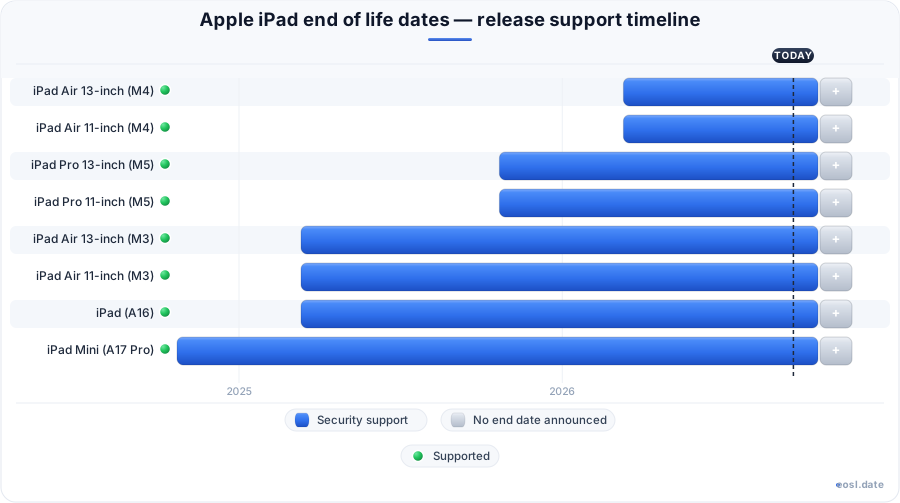
Currently Supported Apple iPad Releases - Active EOS/EOSL Support (28)
| Release | Supported Ipad OS Versions | Released | Supported | Discontinued |
|---|---|---|---|---|
| iPad Air 13-inch (M4) | 26 - 27 | (8 months ago) | Active | — |
| iPad Air 11-inch (M4) | 26 - 27 | (8 months ago) | Active | — |
| iPad Pro 13-inch (M5) | 26 - 27 | (1 year ago) | Active | — |
| iPad Pro 11-inch (M5) | 26 - 27 | (1 year ago) | Active | — |
| iPad Air 13-inch (M3) | 18 - 27 | (1 year and 8 months ago) | Active | (8 months ago) |
| iPad Air 11-inch (M3) | 18 - 27 | (1 year and 8 months ago) | Active | (8 months ago) |
| iPad (A16) | 18 - 27 | (1 year and 8 months ago) | Active | — |
| iPad Mini (A17 Pro) | 18 - 27 | (2 years ago) | Active | — |
| iPad Air 13-inch (M2) | 17 - 27 | (2 years and 6 months ago) | Active | (1 year and 8 months ago) |
| iPad Air 11-inch (M2) | 17 - 27 | (2 years and 6 months ago) | Active | (1 year and 8 months ago) |
| iPad Pro 13-inch (M4) | 17 - 27 | (2 years and 6 months ago) | Active | (1 year and 1 month ago) |
| iPad Pro 11-inch (M4) | 17 - 27 | (2 years and 6 months ago) | Active | (1 year and 1 month ago) |
| iPad Pro 11-inch (4th generation) | 16 - 27 | (4 years ago) | Active | (2 years and 6 months ago) |
| iPad Pro (6th generation) | 16 - 27 | (4 years ago) | Active | (2 years and 6 months ago) |
| iPad (10th generation) | 16 - 27 | (4 years ago) | Active | (1 year and 8 months ago) |
| iPad Air (5th generation) | 15 - 27 | (4 years and 8 months ago) | Active | (2 years and 6 months ago) |
| iPad Mini (6th generation) | 15 - 27 | (5 years and 1 month ago) | Active | (2 years and 1 month ago) |
| iPad (9th generation) | 15 - 27 | (5 years and 1 month ago) | Active | (2 years and 6 months ago) |
| iPad Pro 11-inch (3rd generation) | 14 - 27 | (5 years and 6 months ago) | Active | (4 years and 1 month ago) |
| iPad Pro 12.9-inch (5th generation) | 14 - 27 | (5 years and 6 months ago) | Active | (4 years and 1 month ago) |
| iPad Air (4th generation) | 14 - 27 | (6 years ago) | (in 9 months) | (4 years and 8 months ago) |
| iPad (8th generation) | 14 - 26 | (6 years and 2 months ago) | Active | (5 years and 2 months ago) |
| iPad Pro 11-inch (2nd generation) | 13 - 27 | (6 years and 7 months ago) | Active | (5 years and 7 months ago) |
| iPad Pro 12.9-inch (4th generation) | 13 - 27 | (6 years and 7 months ago) | Active | (5 years and 7 months ago) |
| iPad Air (3rd generation) | 12 - 26 | (7 years and 8 months ago) | Active | (5 years and 2 months ago) |
| iPad Mini (5th generation) | 12- 26 | (7 years and 8 months ago) | Active | (5 years and 2 months ago) |
| iPad Pro 11-inch (1st generation) | 12 - 26 | (8 years ago) | Active | (6 years and 8 months ago) |
| iPad Pro 12.9-inch (3rd generation) | 12 - 26 | (8 years ago) | Active | (6 years and 8 months ago) |
Apple iPad End of Life (EOL) Releases - No Longer Supported (17)
| Release | Supported Ipad OS Versions | Released | Supported | Discontinued |
|---|---|---|---|---|
| iPad (7th generation) | 13 - 18 | (7 years and 1 month ago) | (6 months ago) | (6 years and 2 months ago) |
| iPad (6th generation) | 11 - 17 | (8 years and 7 months ago) | (6 months ago) | (7 years and 2 months ago) |
| iPad Pro 10.5-inch (1st generation) | 9 - 17 | (9 years and 5 months ago) | (2 months ago) | (8 years ago) |
| iPad Pro 12.9-inch (2nd generation) | 10 - 17 | (9 years and 5 months ago) | (2 months ago) | (8 years ago) |
| iPad (5th generation) | 10 - 16 | (9 years and 7 months ago) | (6 months ago) | (8 years and 7 months ago) |
| iPad Pro 9.7-inch (1st generation) | 9 - 16 | (10 years and 8 months ago) | (1 year and 7 months ago) | (9 years and 5 months ago) |
| iPad Pro 12.9-inch (1st generation) | 9 - 16 | (11 years ago) | (1 year and 7 months ago) | (9 years and 5 months ago) |
| iPad Mini 4 | 9 - 15 | (11 years and 2 months ago) | (1 year and 7 months ago) | (7 years and 8 months ago) |
| iPad Air 2 | 8 - 15 | (12 years ago) | (2 years and 2 months ago) | (9 years and 8 months ago) |
| iPad Mini 3 | 8 - 12 | (12 years ago) | (3 years and 9 months ago) | (11 years and 2 months ago) |
| iPad Mini 2 | 7 - 12 | (13 years ago) | (3 years and 9 months ago) | (9 years and 8 months ago) |
| iPad Air (1st generation) | 7 - 12 | (13 years ago) | (3 years and 9 months ago) | (10 years and 8 months ago) |
| iPad (4th generation) | 6 - 10 | (14 years ago) | (7 years and 3 months ago) | (12 years and 1 month ago) |
| iPad Mini (1st generation) | 6 - 9 | (14 years ago) | (7 years and 3 months ago) | (11 years and 5 months ago) |
| iPad (3rd generation) | 5 - 9 | (14 years and 8 months ago) | (7 years and 3 months ago) | (14 years ago) |
| iPad 2 | 4 - 9 | (15 years and 8 months ago) | (7 years and 3 months ago) | (12 years and 8 months ago) |
| iPad (1st generation) | 3 - 5 | (16 years and 7 months ago) | (14 years and 2 months ago) | (15 years and 8 months ago) |
Wondering about the Apple iPad end of life for your tablet, whether it is an iPad Pro, an iPad Air or an iPad mini? Apple never publishes a fixed schedule, but your iPad is fully supported while it runs the latest iPadOS and keeps receiving security updates. This guide shows which iPad models can run iPadOS 27, which ones only get patches, and how to tell when yours is running out of road.
Apple iPad End of Life: What It Means for Your Tablet
For a tablet, end of life means Apple stops providing software support: no new operating system, no security patches and, later, no repair parts. Apple has one of the best support records in the industry, and many models receive six to eight years of major updates. An iPad end of support date therefore arrives gradually in stages rather than on a single day. Apple does not promise how long any older version of iPadOS will be maintained, so the safest approach is to watch what Apple actually ships for your device.
Each stage affects you differently. A device that is still in production will be supported for years, while a discontinued model stays safe only as long as Apple keeps releasing patches for it. Once even those stop, your iPad is nearing the end of its practical lifespan, and daily use becomes a growing risk to your data. Every unpatched vulnerability stays open for good, and every year without a new update makes the exposure worse. Apple released iPadOS 27 on 14 September 2026, and the first update to it, version 27.0.1, was released on 28 September, so the Apple iPad family is still being actively maintained.
Major iPadOS Updates Versus Patches
Major iPadOS updates bring feature updates, interface changes and compatibility improvements. Patch releases fix vulnerabilities and protect your users' accounts. Both are software updates, but only a major update adds new capabilities. Plenty of older iPads keep receiving patches for years after the latest version of the operating system drops them, which stretches their useful life. Any refurbished unit follows the same rules as a new one, so the age of the chip matters more than the box it came in.
When Apple Stops Providing iPad Updates by Generation
Support generally falls into two stages: major iPadOS updates first, then security-only patches. Apple's iPadOS releases cover each generation differently, and Apple Support lists the oldest models it still treats as supported. As of late September 2026, iPadOS 27 is the newest release, and the oldest models it runs are the 2020 iPad Pro and the 9th generation iPad. That makes the oldest supported iPad about six years old, which matches the typical software support window.
Count the years rather than the version numbers. Most iPads get around six years of full updates, some reach eight years, and after that many get two or three more years of patches. A tablet bought four years ago is usually safe, one bought six years ago is on borrowed time, and one bought eight years ago is probably out. Over those years Apple has repeated the cycle for every generation, so ten years of history gives a reliable pattern. Seven years is a fair upper limit for full support, and nine years for any patch at all. Even a model with fifteen years behind it, such as the original, shows how short the original window was.
iPad Pro and iPad Air Generations
Every iPad Pro from the 2nd-generation 11-inch and 4th-generation 12.9-inch onward runs iPadOS 27. Each iPad Air from the 4th generation onward does too. The earlier iPad Pro and Air models stay on iPadOS 26 for security patches, and you cannot upgrade past that point. If your tablet is on the unsupported side of that line, the battery is also likely to have aged, so weigh a replacement soon.
iPad Mini and Base iPad Generations
The iPad mini and the standard iPad follow the same pattern. The 6th-generation mini, the A17 Pro mini and the 9th-generation iPad all run iPadOS 27, as do the 10th-generation iPad and the iPad (A16). Older base iPads, such as the 8th and 7th generations, fall back to earlier branches, and Apple's repair support follows a separate schedule.
iPad Models Compatible With iPadOS 27
This table lists every one of the supported iPad models that can run iPadOS 27, grouped by product line. It reproduces the facts from Apple's own compatibility list, arranged by line so you can scan your iPad Pro, iPad Air or iPad mini quickly. Any of these iPad models is a fully compatible Apple device, although some features need a newer processor and more memory.
| Product line | iPad model | Newest iPadOS |
|---|---|---|
| iPad Pro | iPad Pro 13-inch (M5) | iPadOS 27 |
| iPad Pro | iPad Pro 11-inch (M5) | iPadOS 27 |
| iPad Pro | iPad Pro 13-inch (M4) | iPadOS 27 |
| iPad Pro | iPad Pro 11-inch (M4) | iPadOS 27 |
| iPad Pro | iPad Pro 12.9-inch (6th generation) | iPadOS 27 |
| iPad Pro | iPad Pro 12.9-inch (5th generation) | iPadOS 27 |
| iPad Pro | iPad Pro 12.9-inch (4th generation) | iPadOS 27 |
| iPad Pro | iPad Pro 11-inch (4th generation) | iPadOS 27 |
| iPad Pro | iPad Pro 11-inch (3rd generation) | iPadOS 27 |
| iPad Pro | iPad Pro 11-inch (2nd generation) | iPadOS 27 |
| iPad Air | iPad Air 13-inch (M4) | iPadOS 27 |
| iPad Air | iPad Air 11-inch (M4) | iPadOS 27 |
| iPad Air | iPad Air 13-inch (M3) | iPadOS 27 |
| iPad Air | iPad Air 11-inch (M3) | iPadOS 27 |
| iPad Air | iPad Air 13-inch (M2) | iPadOS 27 |
| iPad Air | iPad Air 11-inch (M2) | iPadOS 27 |
| iPad Air | iPad Air (5th generation) | iPadOS 27 |
| iPad Air | iPad Air (4th generation) | iPadOS 27 |
| iPad mini | iPad mini (A17 Pro) | iPadOS 27 |
| iPad mini | iPad mini (6th generation) | iPadOS 27 |
| iPad | iPad (A16) | iPadOS 27 |
| iPad | iPad (10th generation) | iPadOS 27 |
| iPad | iPad (9th generation) | iPadOS 27 |
Features can vary by model, region, language and carrier. A new iPad Air or iPad Pro with an M-series chip gets the broadest iPadOS 27 feature set, while an older Apple iPad may miss a few. Connectivity differs too: Wi-Fi models and cellular models are both listed, and the port type, USB-C or Lightning, does not decide eligibility. Accessories such as Apple Pencil and Magic Keyboard have their own compatibility rules, so check them before you buy. The display, screen size and storage have no effect on support either. Newer Wi-Fi hardware, a faster chip or a brighter screen adds features, not extra years. Check Wi-Fi and cellular plans, USB-C accessories, the Apple Pencil generation and the Magic Keyboard model for the version you own, because a Magic Keyboard or Apple Pencil that fits one iPad Pro may not fit another. Check the App Store and Safari after each update, and remember that every iPad Pro and iPad Air with USB-C, Wi-Fi and cellular options receives the same patches. The App Store lists which apps need iPadOS 27, and Safari follows the system release.
Is an Unsupported iPad Still Getting Security Updates?
Often, yes. A model dropped by iPadOS 27 is not abandoned. Apple released iPadOS 26.7 on 14 September and iPadOS 26.7.1 on 28 September for the iPads that cannot move up, so even an unsupported iPad in this sense can stay protected for a while. The next table shows where older models stand today.
| iPad model | Last iPadOS | Status |
|---|---|---|
| iPad Pro 12.9-inch (3rd generation) | iPadOS 26.7.1 | Security updates only |
| iPad Pro 11-inch (1st generation) | iPadOS 26.7.1 | Security updates only |
| iPad Air (3rd generation) | iPadOS 26.7.1 | Security updates only |
| iPad (8th generation) | iPadOS 26.7.1 | Security updates only |
| iPad mini (5th generation) | iPadOS 26.7.1 | Security updates only |
| iPad (7th generation) | iPadOS 18.7.10 | Older security branch |
| iPad Pro 12.9-inch (2nd generation) | iPadOS 17 | Support ended 17 Sep 2026 |
| iPad Pro 10.5-inch (1st generation) | iPadOS 17 | Support ended 17 Sep 2026 |
| iPad (6th generation) | iPadOS 17 | Support ended 11 May 2026 |
| iPad (5th generation) | iPadOS 16 | Support ended 11 May 2026 |
| iPad Air 2 | iPadOS 15 | Support ended 16 Sep 2024 |
| iPad mini 4 | iPadOS 15 | Support ended 31 Mar 2025 |
iPadOS 26, 18 and 17 Branches
Apple keeps several branches alive. iPadOS 26 covers the models that iPadOS 27 left behind, iPadOS 18 covers the 7th-generation iPad (iPadOS 18.7.10 arrived on 17 August 2026), and iPadOS 17 reached version 17.7.11 in May 2026. Apple also issued security patches for older systems at the same time, but nobody outside Apple knows how long each branch will continue. This is why support is best judged by the last release date you can actually see on Apple Support rather than by guesswork. Fans of jailbreaking sometimes cite this gap, but a modified system loses the protection that these patches provide.
Vintage and Obsolete iPad Lifecycle Status
Software support and hardware support are separate clocks. Apple classes aging products as vintage and then obsolete, and that label controls whether Apple will still repair a device. Someone asking whether an unsupported iPad can be fixed should look at this classification, because it is independent of the iPadOS branch the tablet runs.
Vintage Products and Repair Support
Under Apple's policy, vintage products may still get repair support where parts remain available, though that depends on the country and the part. It is a short window for hardware repairs, so book a service quickly if your iPad is listed as vintage.
Obsolete Products
Once a device is obsolete, Apple stops servicing it, and its obsolete products status is final. Independent shops may still fix the screen or battery, but without Apple parts. The release year and the production end date together decide when the change happens.
Security Releases for Discontinued iPads
Apple publishes every security update in one place, and the same list covers each platform: iPhone, Mac, Apple Watch, Apple TV and Vision Pro. Because an iPad's end of life is judged against what Apple ships for its sibling platforms, the table below compares recent releases for iOS, macOS, watchOS, tvOS and visionOS alongside the iPad releases, with the CVE information Apple published for each.
| Software update | Available for | Release date | CVE details |
|---|---|---|---|
| iOS 27 and iPadOS 27 | iPhone 11 and later; iPad Pro, iPad Air, iPad and iPad mini on the iPadOS 27 list | 14 Sep 2026 | See Apple's advisory |
| iOS 27.0.1 and iPadOS 27.0.1 | The same iPhone and iPad models | 28 Sep 2026 | No published CVE entries |
| iOS 26.7.1 and iPadOS 26.7.1 | iPhone 11 and later; older iPad models dropped by iPadOS 27 | 28 Sep 2026 | See Apple's advisory |
| iOS 18.7.10 and iPadOS 18.7.10 | iPhone XS, iPhone XS Max, iPhone XR, iPad 7th generation | 17 Aug 2026 | See Apple's advisory |
| macOS Golden Gate 27.0.1 | Mac | 28 Sep 2026 | No published CVE entries |
| watchOS 27.0.1 | Apple Watch Series 9 and later | 28 Sep 2026 | No published CVE entries |
| visionOS 27.0.1 | Apple Vision Pro | 28 Sep 2026 | No published CVE entries |
| tvOS 27 | Apple TV 4K 2nd generation and later | 14 Sep 2026 | See Apple's advisory |
| macOS Tahoe 26.7.1 | Mac running macOS Tahoe | 28 Sep 2026 | See Apple's advisory |
| macOS Sequoia 15.8.1 | Mac running macOS Sequoia | 28 Sep 2026 | See Apple's advisory |
| watchOS 27 | Apple Watch Series 9 and later | 14 Sep 2026 | See Apple's advisory |
| visionOS 27 | Apple Vision Pro | 14 Sep 2026 | See Apple's advisory |
| Safari 27 | macOS Sequoia and macOS Tahoe | 14 Sep 2026 | See Apple's advisory |
Apple generally does not discuss a security vulnerabilities report until an investigation is finished and a fix ships. When a release has CVE entries, you can read which component was affected. When it says there are no published CVE entries, the update is still worth installing. Note that after a software update is installed on iOS, iPadOS, tvOS, watchOS or visionOS, it cannot be downgraded. The same bulletin lists Safari and Xcode updates for macOS, and the macOS releases arrive on the same days as the iPad ones. Each CVE is a numbered record, so the CVE list is the quickest way to see whether a patch fixed something serious, and a missing CVE record simply means nothing was published. A release about a CVE is therefore more urgent than a plain bug fix.
For iPad owners, the useful point is that the pattern is the same everywhere. An Apple release for iOS almost always arrives together with the iPadOS build, so an iPhone owner and an iPad owner get fixes on the same day. The Mac receives macOS builds, the Apple Watch gets watchOS, Apple TV gets tvOS and Vision Pro gets visionOS. An iPhone usually lasts about as long as an iPad in this schedule, but macOS versions are kept alive in three parallel branches, with macOS Tahoe and macOS Sequoia patched next to the newest macOS Golden Gate. Treat the whole Apple bulletin as one calendar: if iOS, macOS, tvOS and watchOS all moved and your iPad branch did not, it has probably lost support. The iPhone, Mac, Apple Watch and Apple TV lines all use this same release rhythm.
- iOS on the iPhone: each iPhone from the iPhone 11 onward runs iOS 27, and an iPhone XS or iPhone XR is limited to iOS 18.
- macOS on the Mac: macOS Golden Gate 27 needs Apple silicon, while macOS Tahoe 26 and macOS Sequoia 15 keep getting fixes, and a macOS release can ship on the same day as iOS.
- watchOS on the Apple Watch: an Apple Watch Series 9 or later runs watchOS 27, so an older Apple Watch drops out first.
- tvOS and visionOS: Apple TV 4K and Vision Pro follow the same numbering as iOS and iPadOS.
- Mixed households: a family with an iPhone, a Mac, an Apple Watch and an iPad should expect the iPhone and iOS to be the last to lose support, because Apple keeps iPhone models going for longer than most iPads.
- Updating order: update macOS, iOS and watchOS before iPadOS if you share iCloud accounts, since a current iPhone or macOS version can sync features that an old iPad cannot read.
To judge when your iPad will lose support, read the schedule by iOS number: iOS 27 and macOS 27 arrived together on 14 September 2026, which tells you Apple still treats the whole range as one product family. When an iPhone or macOS machine in your home reaches its limit, the iPad beside it is usually close behind. The iPhone in your pocket, the macOS laptop on your desk and the Apple tablet on your sofa share the same fix calendar. Newer iPhone and Mac models also use a faster chip, and the latest iPad Pro and iPad Air models use the same Apple silicon chip family as the Mac, which is why Apple can keep supporting them so long. A brighter display or a larger display does not extend that support, but a modern chip does. Even the best display will not rescue a tablet that has lost its patches, and a high-end display adds cost to a repair.
A practical example of how iPad support tracks the rest of the range: when Apple released iOS 26.7.1 and macOS Tahoe 26.7.1 on 28 September, an iPhone 11 and a Mac on macOS Tahoe both received the update, as did every iPad 8th generation and 7th generation on its own branch. An iPhone owner who sees the update notice should check the iPad too, since the iPhone, the iPad and the macOS machine are released on matching schedules. Each time Apple released a build, the macOS notes, the iPhone notes and the iPad notes appeared on one page, and the iPhone list is usually the longest. The 9th generation, 10th generation, 6th generation mini and 5th generation Air share that rhythm, and a new iPad Pro, iPad Pro M5 or older iPad Pro model is released with the same iOS and macOS base. A fresh iPad mini or iPad mini A17 Pro was released in 2024 and a 6th generation iPad mini in 2021, which is why the iPad mini line rarely falls behind.
Security Risks of Obsolete iPads
An obsolete iPad, such as an iPad on iPadOS 17 or earlier, stops receiving Apple fixes, so every newly found weakness stays open. The main security risks are malware reaching you through the browser or a rogue message, plus app compatibility problems as developers raise their minimum operating system requirement. The App Store can stop offering updates for your apps, and some services such as iCloud features may stop working. Browsing in Safari or any other browser on such a tablet is the activity most exposed to security flaws.
Can You Still Use an iPad After Support Ends?
You can, with care: the 5th- and 6th-generation iPads, whose support ended on 11 May 2026, are safe only offline or as media devices. Keep it off banking and email, avoid sideloading, and consider it a media or reading device. For serious work, plan your replacement. A 7th-generation iPad on iPadOS 18 ends in support terms before newer models, so replace it first.
Why Some iPads Lose Support Sooner
Some models ended early because their hardware lacked the memory or processing power that a new iPadOS needs. A short release date history of fast chips helps explain why iPad Pro models outlast base iPads.
To judge your iPad's remaining support against the rest of your devices, line them up: note the iOS version on each iPhone, the macOS version on each Mac and the iPadOS version on each tablet, then mark the one furthest behind. An iPhone stuck on iOS 18, a Mac stuck on macOS Sequoia and an iPad stuck on iPadOS 26 are all signs that Apple is winding down support for that generation of hardware. Keep the iPhone and macOS notes together, because iOS and macOS releases tell you what the next iPad release will fix, and a macOS or iPhone advisory often hints at a flaw that an iPad patch also closes.
How to Check Whether Your iPad Is Obsolete
You can identify your iPad model in under a minute, then compare it with the tables above.
- Open Settings > General > About to read your model name and iPadOS version.
- If the name is unclear, use the Apple Support article that matches the model number to its generation.
- Compare it with the iPadOS 27 list; if it is missing, look at the older-branch table.
- Go to Settings > General > Software Update to install the latest version available for your model.
Once you know the model name, match it to the iPadOS 27 and older-branch tables above to read its support status. The Wikipedia entry for the iPad also lists every model with its release history and market share, for those who want the full tablet history. As a rule, the community-run lifecycle trackers show when each model's support ended or ends in months, which helps you plan. People in education and business fleets also use those dates to schedule replacements, since the iPad is the best-known of the tablet computers in both and holds a large market share.
Buying a Vintage iPad: Is It Worth It?
Should you buy an older iPad? It depends on the remaining support. The oldest model that still runs the newest operating system is the safest used purchase, because it gets the longest security coverage. A cheap vintage unit may already be on its final branch, which makes it poor value however low the price. When the year of release is five or six years back, check which iPadOS it runs before paying, and prefer a new or recent model for anything that holds data you care about.