Apple Watch End of Life (EOL) Dates and End of Support (EOS) Dates
Apple Watch end of life (EOL) and end of support (EOS) dates: 12 Apple Watch versions have reached EOL, including Apple Watch Ultra (EOL date: Sep 14, 2026) — no longer receiving security updates or patches. Apple Watch Ultra 4 is the current supported release — 8 versions in active support. Also see Apple iPhone lifecycle dates for related end-of-life information.
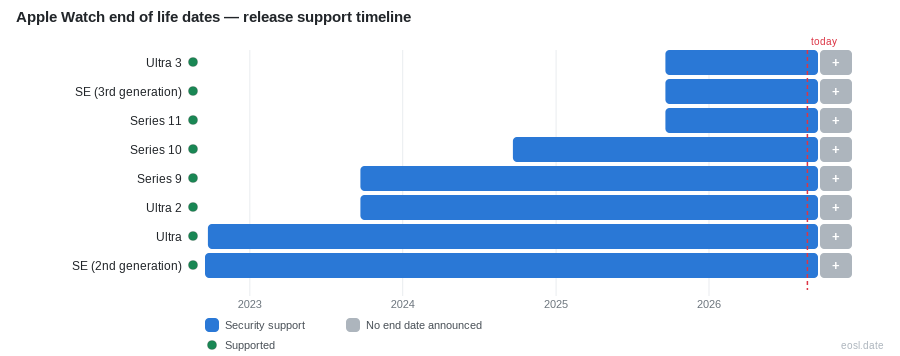
Currently Supported Apple Watch Releases - Active EOS/EOSL Support (8)
| Release | Supported Watch OS Versions | Released | Supported | Discontinued |
|---|---|---|---|---|
| Ultra 4 | 27 | (1 month and 4 weeks ago) | Active | — |
| Series 12 | 27 | (1 month and 4 weeks ago) | Active | — |
| Ultra 3 | 26 - 27 | (1 year and 1 month ago) | Active | (2 months ago) |
| SE (3rd generation) | 26 - 27 | (1 year and 1 month ago) | Active | — |
| Series 11 | 26 - 27 | (1 year and 1 month ago) | Active | (2 months ago) |
| Series 10 | 11 - 27 | (2 years and 1 month ago) | Active | (1 year and 1 month ago) |
| Series 9 | 10 - 27 | (3 years and 1 month ago) | Active | (2 years and 2 months ago) |
| Ultra 2 | 10 - 27 | (3 years and 1 month ago) | Active | (1 year and 1 month ago) |
Apple Watch End of Life (EOL) Releases - No Longer Supported (12)
| Release | Supported Watch OS Versions | Released | Supported | Discontinued |
|---|---|---|---|---|
| Ultra | 9 - 26 | (4 years and 1 month ago) | (2 months ago) | (3 years and 2 months ago) |
| SE (2nd generation) | 9 - 26 | (4 years and 2 months ago) | (2 months ago) | (1 year and 1 month ago) |
| Series 8 | 9 - 26 | (4 years and 2 months ago) | (2 months ago) | (3 years and 2 months ago) |
| Series 7 | 8 - 26 | (5 years and 1 month ago) | (2 months ago) | (4 years and 2 months ago) |
| SE (1st generation) | 7 - 10 | (6 years and 1 month ago) | (2 years and 2 months ago) | (4 years and 2 months ago) |
| Series 6 | 7 - 26 | (6 years and 1 month ago) | (2 months ago) | (5 years and 1 month ago) |
| Series 5 | 6 - 10 | (7 years and 1 month ago) | (2 years and 2 months ago) | (6 years and 2 months ago) |
| Series 4 | 5 - 10 | (8 years and 1 month ago) | (2 years and 2 months ago) | (7 years and 2 months ago) |
| Series 3 | 4 - 8 | (9 years and 1 month ago) | (4 years and 2 months ago) | (4 years and 2 months ago) |
| Series 2 | 3 - 6 | (10 years and 2 months ago) | (6 years and 2 months ago) | (9 years and 2 months ago) |
| Series 1 | 3 - 6 | (10 years and 2 months ago) | (6 years and 2 months ago) | (8 years and 2 months ago) |
| 1st generation | 1 - 4 | (11 years and 6 months ago) | (8 years and 2 months ago) | (10 years and 2 months ago) |
Wondering when your wrist companion stops getting updates? Apple Watch end of life does not mean your watch shuts off. It means Apple stops shipping new watchOS releases for that model, and later stops sending security updates too. Below you can see which Apple Watch models are fully supported today, which are outdated, and what to do next.
Apple Watch End of Life: What It Means for Your Watch
Every Apple Watch goes through the same lifecycle. Apple released it in September (or, once, in October), sells it for a few years, discontinued it when a newer model replaces it, and finally drops it from the newest operating system. Apple Inc., as the maker of both the hardware and the software, decides each of those dates, and the dates below come from the endoflife.date tracker as updated on 6 October 2026 and from a mid-2026 model list. When this smartwatch reaches the last step, it has reached end of life for new features, even though it keeps running.
Apple publishes no single end-of-life calendar for the Apple Watch, so Apple owners piece it together from Apple's own pages: the Apple Watch User Guide lists which Apple Watch is compatible with the newest Apple software, the Apple Store explains Apple trade-in credit, and Apple Support covers Apple service for each Apple Watch. Apple keeps the newest Apple Watch on sale while Apple retires older Apple Watch models, so Apple buyers should check Apple's list before they buy any Apple Watch, new or used.
Will Your Apple Watch Stop Working?
No. An Apple Watch does not stop working on a deadline. As a wearable it keeps telling time, counting steps, showing notifications and doing the other basic functions it always did, including fitness tracking. What you lose is the future: new watch faces, new health features and, eventually, fixes for newly found flaws.
How Long watchOS Support Lasts
Apple Watch hardware usually receives watchOS support for 3 to 6 years, which is shorter than the 5 to 7 years often seen on an iPhone. Once a model cannot run the newest watchOS release, its operating system is frozen at the last version it supported, apart from rare patches.
Security Updates and Apple Watch Support
Apple ships two kinds of software for each watch. A major release adds new features and changes the interface. A software update in between delivers security patches that close vulnerabilities and keep your data protected. Under normal Apple Watch support, a model receives both. After the last major release it may get only occasional fixes, and in the end nothing at all. Without them, app compatibility and performance slowly slip as developers build for newer software. Your iPhone matters here too: the watch pairs with an iPhone running a recent iOS, so a very old iPhone can limit what the pair can do. Apple Inc. announced the pairing rule alongside each watch, and each Apple Watch, whether GPS or cellular, needs an iPhone for setup, backups and health syncing.
Reading a watchOS Version Number
A watchOS version such as 10.6.2 tells you three things. The first number is the major release, the second marks a feature update, and the third marks a small patch. Each model has an initial watchOS version it shipped with and a final watchOS version it can reach. Open Settings, then General, then About on the watch to see the one you are running now. If it matches the final version in the model table below, your watch has reached the end of its software support and no further feature releases will arrive.
Outdated Models That Are Out of Support
These watches no longer receive major upgrades, so they are out of support for the newest software. They still work for everyday tasks. Apple did push a few critical patches to even the oldest models in early 2026, yet the Apple Watch Series 1 had gone almost six years without one before that. Since the new release was announced, Apple Watch Series 6, Series 7, Series 8, the second-generation SE and the original Apple Watch Ultra joined this group, and the endoflife.date tracker lists all of them as ended on 14 September 2026.
| Model | Launched | Final watchOS version | Final patch |
|---|---|---|---|
| Apple Watch (first generation) | Apr 24, 2015 | watchOS 4.3.2 | Sep 17, 2018 |
| Apple Watch Series 1 | Sep 12, 2016 | watchOS 6.3.1 | Feb 2, 2026 |
| Apple Watch Series 2 | Sep 16, 2016 | watchOS 6.3.1 | Feb 2, 2026 |
| Apple Watch Series 3 | Sep 22, 2017 | watchOS 8.8.2 | Mar 24, 2026 |
| Apple Watch Series 4 | Sep 21, 2018 | watchOS 10.6.2 | Feb 2, 2026 |
| Apple Watch Series 5 | Sep 20, 2019 | watchOS 10.6.2 | Feb 2, 2026 |
| Apple Watch SE (first generation) | Sep 18, 2020 | watchOS 10.6.2 | Feb 2, 2026 |
| Apple Watch Series 6 | Sep 18, 2020 | watchOS 26.5 | May 11, 2026 |
| Apple Watch Series 7 | Oct 15, 2021 | watchOS 26.5 | May 11, 2026 |
| Apple Watch SE (second generation) | Sep 16, 2022 | watchOS 26.5 | May 11, 2026 |
| Apple Watch Series 8 | Sep 16, 2022 | watchOS 26.5 | May 11, 2026 |
| Apple Watch Ultra | Sep 23, 2022 | watchOS 26.5 | May 11, 2026 |
Release Date and Last Update
The gap between a model's release date and its final patch shows how long Apple really stands behind it. Taking the six models from Apple Watch Series 3 to Series 8 whose feature support has ended, the average comes to about 5.2 major watchOS releases, or roughly five years, before the model was dropped.
| Model | watchOS releases supported | Years from release to end |
|---|---|---|
| Apple Watch Series 3 | 5 (watchOS 4 to 8) | 5 |
| Apple Watch Series 4 | 6 (watchOS 5 to 10) | 6 |
| Apple Watch Series 5 | 5 (watchOS 6 to 10) | 5 |
| Apple Watch Series 6 | 6 (watchOS 7 to 11, then 26) | 6 |
| Apple Watch Series 7 | 5 (watchOS 8 to 11, then 26) | 5 |
| Apple Watch Series 8 | 4 (watchOS 9 to 11, then 26) | 4 |
Models Dropped in Recent Years
Apple Watch Series 6 and Series 7 were released in 2020 and 2021, and Series 8 followed in 2022. The newest casualties are the biggest group Apple has removed at once. Apple Watch Series 3 and Series 1 are older still, and Apple Watch Series 9 is the cutoff for full support. A model like the Apple Watch Ultra or the second-generation Apple Watch SE still has a healthy battery in most cases, so the hardware may be fine. It simply cannot take the newest software. Older batteries do wear down, though, so a watch from 2020 may need a service visit before it needs a replacement, since battery life and day-to-day performance fade with charge cycles.
Supported Models: Fully Supported Apple Watch Models
The following Apple Watch models receive the newest watchOS and ongoing security fixes, according to the Apple Watch User Guide and the endoflife.date table. These run from the Apple Watch Series 9 forward.
| Model | Launched | watchOS versions supported | Gets new watchOS |
|---|---|---|---|
| Apple Watch Series 9 | Sep 22, 2023 | watchOS 10 to 27 | Yes |
| Apple Watch Ultra 2 | Sep 22, 2023 | watchOS 10 to 27 | Yes |
| Apple Watch Series 10 | Sep 20, 2024 | watchOS 11 to 27 | Yes |
| Apple Watch SE 3 | Sep 19, 2025 | watchOS 26 to 27 | Yes, on sale now |
| Apple Watch Series 11 | Sep 19, 2025 | watchOS 26 to 27 | Yes |
| Apple Watch Ultra 3 | Sep 19, 2025 | watchOS 26 to 27 | Yes |
| Apple Watch Series 12 | Sep 18, 2026 | watchOS 27 | Yes, on sale now |
| Apple Watch Ultra 4 | Sep 18, 2026 | watchOS 27 | Yes, on sale now |
Three of the supported models are still in production: Apple Watch Series 12, Ultra 4 and SE 3. The Apple Watch Series 9, Series 10 and Series 11 were released in 2023, 2024 and 2025, and each one sold with the iPhone-linked health features Apple promotes for the Apple Watch line. Apple Watch Series 10 and Apple Watch Series 11 are the safest used buys for most people, because Apple Watch Series 9, Series 10 and Series 11 all still run the latest release. A cellular Apple Watch Series 10 or a cellular Apple Watch Series 11 also keeps calls and messages working when your iPhone is out of range, and cellular models are widely available in each generation.
What watchOS 27 Changes
Apple announced watchOS 27 in June 2026, and the release brings Siri AI along with other new features. It is also the reason six models dropped out of the supported list, so a watch that handled last year's update may not be compatible with this one. Apple also says a redesigned Health app arrives in late 2026, which works together with your iPhone to turn health and fitness data into insights.
Apple Watch Ultra and Apple Watch SE
Every Apple Watch Series 6 owner asks the same question: is my smartwatch next? Apple Watch Series 6 and its battery are old enough that the answer for features is already yes, and a smartwatch that old gains little from any iPhone update.
The lineup is split into three families: the Series watches, the rugged Apple Watch Ultra and the budget Apple Watch SE. A current Apple Watch Ultra adds a larger case and a bigger battery for long fitness sessions, while the Apple Watch SE keeps the price down. Each family is supported on its own timeline, so check the exact generation, not just the family name. Apple Watch Series 10 and Apple Watch Series 11 were released a year apart, in September 2024 and 2025, and Apple Watch Series 12 arrived in September 2026 alongside Ultra 4. A Series 11 or Series 12 with cellular service also stays compatible with an iPhone while you are away from it. A cellular version follows the same schedule as its GPS-only sibling.
Is an Unsupported Apple Watch Safe to Keep Using?
A watch that has reached its last software update is usually safe enough for telling time, steps and alarms, but the risk grows with what you ask it to do. As an unsupported watch, without regular security updates, any flaw found after the final patch stays open for good, and a watch holds your location, your heart rate and a link to your iPhone.
Payments and Health Data Risks
Your iPhone keeps getting updates even when the watch does not, which is why the phone is the safer place for banking apps. On a watch past its last update, tap-to-pay payments and health tracking are the features most exposed, because no new security patches will arrive. Tap-to-pay puts card tokens on the device and health tracking stores sensitive readings, so treat these as the first features to move to a supported device. Battery wear is a separate hardware limit: an aging Apple Watch battery holds less charge each year even on a current model.
Replacing a Discontinued Apple Watch: Trade In or Refurbished
When your model is discontinued and left behind by the newest software, you have a few sensible paths. Apple's trade-in program gives credit toward a new watch when you hand in an eligible device, so an older Series watch still has some value. Your iPhone also shows the trade-in value in the Apple Store app, and the watch you buy was released more recently than the one you hand in. The next decision is how much you want to pay: a new upgrade costs more, while a recent model bought used keeps the price down.
- Find your Apple Watch model on the back of the watch or in the Apple Watch app on your iPhone, and note the Apple model name.
- Compare it with the tables above to see whether it is fully supported or outdated.
- Decide whether basic functions are enough, or whether you need the newest features.
- Trade in the old watch or sell it before buying its replacement.
- Ask Apple, an Apple Store or Apple Support whether the Apple Watch you plan to buy runs the latest Apple software.
- Keep the Apple ID signed in so Apple can restore the Apple Watch backup on the new Apple Watch.
- Reset the old Apple Watch with Apple's unpair option before handing it over to Apple or anyone else.
- Check the Apple warranty and Apple service options before you buy an Apple Watch from a third party.
Buying Refurbished or Certified Used
A certified used watch can be a good deal, but only if the model is still supported. Before paying, check the model against the supported table above, because a used watch from the outdated list is already past its final update. A used watch from the outdated list will go through the same end of life sooner than you expect, and a Series 9 or newer gives you more years.
What an Outdated Apple Watch Can Still Do
An outdated watch is not trash. It still pairs with your iPhone, shows notifications, records workouts and works as a clock. Keep it for those jobs, avoid installing demanding new apps, and plan to replace it when the battery or screen starts to fail. On the Apple Watch SE or an older Apple Watch Series 1 or Series 3, that means treating it as a simple fitness and notifications device. That is the practical way to think about Apple Watch end of life: the date on the calendar matters less than what you need the watch to do.