GStreamer End of Life (EOL) Dates and End of Support (EOS) Dates
GStreamer end of life (EOL) and end of support (EOS) dates: 13 GStreamer versions have reached EOL, including GStreamer 1.24 — no longer receiving security updates or patches. GStreamer 1.28.9 is the current supported release — 2 versions in active support. Also see Bootstrap end of life dates for related end-of-life information.
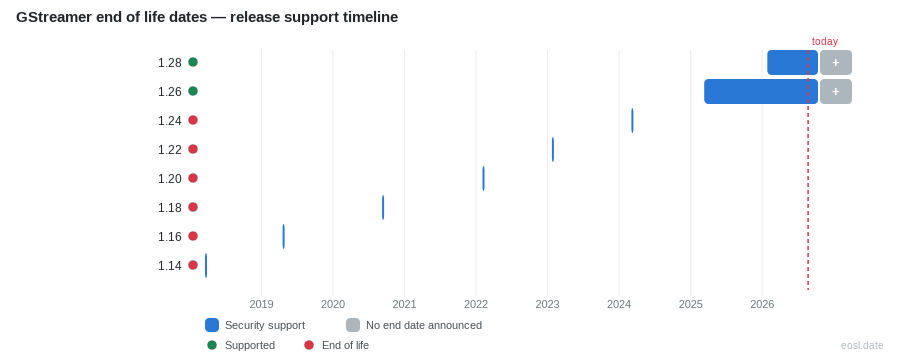
Currently Supported GStreamer Releases - Active EOS/EOSL Support (2)
GStreamer End of Life (EOL) Releases - No Longer Supported (13)
| Release | Released | Supported | Latest |
|---|---|---|---|
| 1.24 | (2 years and 8 months ago) | — | 1.24.13 (1 year and 5 months ago) |
| 1.22 | (3 years and 9 months ago) | — | 1.22.12 (2 years and 6 months ago) |
| 1.20 | (4 years and 9 months ago) | — | 1.20.7 (3 years and 3 months ago) |
| 1.18 | (6 years and 2 months ago) | — | 1.18.6 (4 years and 9 months ago) |
| 1.16 | (7 years and 7 months ago) | — | 1.16.3 (6 years and 1 month ago) |
| 1.14 | (8 years and 8 months ago) | — | 1.14.5 (7 years and 5 months ago) |
| 1.12 | (9 years and 6 months ago) | — | 1.12.5 (8 years and 7 months ago) |
| 1.10 | (10 years ago) | — | 1.10.5 (9 years and 5 months ago) |
| 1.8 | (10 years and 7 months ago) | — | 1.8.3 (10 years and 3 months ago) |
| 1.6 | (11 years and 1 month ago) | — | 1.6.4 (10 years and 7 months ago) |
| 1.4 | (12 years and 4 months ago) | — | 1.4.5 (11 years and 11 months ago) |
| 1.2 | (13 years and 1 month ago) | — | 1.2.4 (12 years and 7 months ago) |
| 1.0 | (14 years and 1 month ago) | — | 1.0.10 (13 years and 2 months ago) |
If a build server, a set-top box or a desktop player in your stack depends on GStreamer, you need to know when your copy stops getting fixes. This guide covers GStreamer end of life: which release series still receive updates, which are no longer maintained, and how to move before support runs out.
GStreamer End of Life: Current EOL Status by Release
The project publishes one stable release series per year or so, and the community keeps fixing each series for a while after it ships. The table below lists every 1.x series with its release date, whether it is still supported and its latest point release, as tracked on endoflife.date on 9 October 2026.
| Release series | First released | Supported | Latest point release |
|---|---|---|---|
| 1.28 | 27 Jan 2026 | Yes | 1.28.8 (8 Oct 2026) |
| 1.26 | 11 Mar 2025 | Yes | 1.26.11 (10 Mar 2026) |
| 1.24 | 4 Mar 2024 | No | 1.24.13 (11 Jun 2025) |
| 1.22 | 23 Jan 2023 | No | 1.22.12 (29 Apr 2024) |
| 1.20 | 3 Feb 2022 | No | 1.20.7 (26 Jul 2023) |
| 1.18 | 8 Sep 2020 | No | 1.18.6 (2 Feb 2022) |
In short, only 1.28 and 1.26 are alive. Everything older has reached EOL, and for audio, video and other media work that means no further fixes from upstream. The release table is the quickest way to judge the version you run today.
How the GStreamer Support Policy Defines EOL
There is no formal end date printed on the website for each series. The support position is informal: looking at history, the project ships a new x.y series about once a year and keeps fixing it for at least a year. That makes EOL something you infer from release activity, not a countdown you can read off a page. Because the support window is unwritten, plan for the shorter end of it, and treat a series as finished once two newer stable series exist.
Stable Release and Development Release Numbering
The version policy uses the minor number to signal intent. Even numbers such as 1.26 and 1.28 are each a stable release that is ready for production. Odd numbers such as 1.27 are a development release: unstable snapshots on the way to the next stable series that you should not ship to customers. The same even and odd rule applied to the older 1.0 line, and a version such as 1.0.10 was simply the last fix in the first stable series.
Semantic Versioning in Practice
The project follows semantic versioning, so a point release inside one series never breaks the API or ABI. Upgrading from 1.26.9 to 1.26.11 is therefore safe, and only a jump to a new series deserves testing. For developers, that guarantee means application code written against the API of one series keeps compiling and linking through every point release, so a fix never forces a rewrite.
Supported Releases Before EOL Arrives
A supported release is one that still receives point releases. Today those are 1.28 and 1.26. Running either one means a reported crash or flaw in the pipeline machinery can reach you as a packaged update instead of a rebuild. A pipeline is a chain of element objects, and each element does one job, such as reading a file, decoding video or mixing audio. Treat 1.26 as the one to watch: as the older of the two, it is next in line for EOL once the project moves on again.
What a Bug Fix Release Changes
Each bug fix release collects small corrections: a fix for a demuxer, a patch for a leak, a timing correction in a plugin. It adds no features, so you can update on a routine schedule. The project announces each point release on its news feed, and the wording usually reads "another bug fix release in the stable series". An update of this kind is also how a codec issue gets resolved without touching your application code.
Old-Stable Releases That Are No Longer Maintained
When a series stops receiving point releases it becomes old-stable for a short while and then is simply unsupported. The 1.22 notes already described the series that way once 1.24 and 1.26 had arrived. An old-stable build may still run fine, but nobody upstream will answer a bug report against it, and each pipeline built on it carries that risk forward.
GStreamer 0.10 Versus 1.0 After EOL
The oldest example is 0.10. The 0.10 and 1.0 families are effectively two different libraries that merely share a name. They install side by side, ignore each other's plugin files and have incompatible API and ABI contracts. The community has treated 1.x as the main stable line since 2012, and the documentation says plainly that 0.10 is abandoned. If you still meet a 0.10 install, migrating to 1.x is a port, not an upgrade, because the API changed.
What EOL Means for Your Application
Reaching EOL does not break your application overnight. What changes is who handles problems. Developers using an unmaintained series have to carry every fix themselves, on Linux servers, Windows desktops and Android devices alike, and rely on whatever their distribution chooses to backport. Every application that plays or records media inherits the age of its library: a Linux media player and a Windows capture tool can both be running a series that nobody upstream looks at anymore.
Security Exposure on Unsupported Releases
The practical risk is security. A parser flaw found today in the current series is fixed there, but nobody will port the fix to 1.20. Any element that handles untrusted files or network streaming input, such as a demuxer or a depayloader, is the exposed surface. A fixed security issue in one series is a public hint about the same flaw in the older ones.
Embedded Devices and Vendor Builds
The hardest cases are embedded products. Chip vendors often pin a specific series in their board support package, and consulting firms port the multimedia framework to each new platform. Check which series your vendor ships before assuming you are covered by upstream dates. On an embedded platform with hardware decoders, a Linux image may carry a series two or three generations behind, and your audio and video element choices depend on vendor-supplied modules.
How EOL Affects Audio and Video Pipelines
A GStreamer pipeline is the heart of any multimedia framework application, and its behaviour depends on the element set underneath it. A typical video pipeline links a source element, a demuxer, a video decoder, a converter and a sink element; an audio pipeline does the same with audio decoders, resamplers and mixers. When the series under that pipeline reaches EOL, nobody fixes a broken decoder element, a clock drift in the audio sink or a negotiation bug between two video elements. Live streaming setups feel it first, because a long-running streaming pipeline exposes the leaks and stalls that a short test never shows.
- Video capture and playback pipeline designs rely on decoder and sink element fixes that only the supported series receive.
- Audio mixing, resampling and capture element bugs are fixed upstream only in the supported series.
- A network streaming element that parses untrusted data needs ongoing support and security attention.
- Any media pipeline that relies on a hardware video element needs vendor support as well as upstream support.
- Test every media pipeline end to end after an upgrade, covering both audio and video paths.
Hardware matters too: a video decoder block, an audio codec chip or a camera media controller each depends on a driver stack, and the video and audio elements built on it age at their own pace. A video capture card may keep working while its media controller element quietly regresses.
The important point is that media bugs rarely show up as a crash. They appear as dropped video frames, audio glitches or a pipeline that refuses to reach the playing state, and those are the reports upstream can no longer help with on an EOL series.
Platform Support: Windows, Linux and Android at EOL
Each platform gets old releases in a different way, so the real support picture varies by where you ship.
- Windows: the project support team builds installers, so a Windows user can upgrade as soon as a new release appears.
- Linux: the distribution decides the series, and long-term distribution releases freeze it for years.
- Android: the libraries are bundled inside each app, so Android developers choose the series themselves.
- Embedded Linux and Windows IoT images: the vendor picks the series, and vendor support may outlast upstream support.
Whatever the platform, the same rule holds: the version that counts is the one your application actually loads at run time, not the one on the project website. A mixed fleet of Windows, Linux and Android clients often runs three different series at once, and every one of them needs its own support check.
Checking Your Installed GStreamer Versions
Before planning anything, confirm which of your GStreamer versions are actually deployed. Every command-line tool carries the major version in its name, so run:
gst-inspect-1.0 --versionThe output names the core library, for example 1.24.2, which you compare with the table above. Also check each plugin set, since the core framework and the plugin modules can be installed from different sources and only the major number has to match. To see that a basic pipeline still runs end to end, try a test pattern:
gst-launch-1.0 videotestsrc ! autovideosinkIf this pipeline opens a window, the video path works; swap in audiotestsrc ! autoaudiosink to check audio. Repeat the check on every platform you deploy to, because a Windows build and a Linux build may report different version numbers.
Upgrading Before a Release Series Reaches EOL
The cheapest moment to upgrade is while your current series is still supported, because a planned move is easier than an emergency one. Pick the newest stable series available for your platform, download it and install it in a test environment before touching production. Keep the application and the library update as separate steps, so a regression is easy to trace.
Binary Packages and Distribution Packages
The project supplies precompiled binary packages for Windows, macOS, iOS and Android. It does not build packages for Linux; those come from the distribution, so the series you can get depends on its release. A stable Windows installer is the easiest download, and an Android build ships the libraries inside the app bundle.
Building From Source Tarballs
Releases are also published as source tarballs. You can compile them yourself, but the modules must all find each other in matching versions, and mixing a source install with system packages in different prefixes causes trouble. If packages exist, prefer them. Building from source makes sense mainly when you need a series newer than your package source offers.
Plugin and Binding Changes Before EOL
A newer series brings more than fixes. Third-party plug-in code and language bindings must be rebuilt against the new libraries. Check any custom Rust or Python code, along with extra codec modules, because that is where an open source project is most likely to lag behind a new series. Many teams now write a Rust plugin for new elements, and the Rust bindings follow the main release cadence, so a Rust crate pinned to 1.20 will eventually stop building. A Python script that wraps a pipeline uses the Python bindings, which must match the installed framework major version. Whichever language you use, the API is the contract you test: confirm every plugin still registers its elements and that each API call you rely on is still present.
- Rust: rebuild every Rust plugin against the new API bindings and rerun its pipeline tests.
- Rust and Python: pin binding versions to the framework series you deploy.
- Python: check that scripts which build a pipeline still import the right Python module and API names.
- C plugin code: recompile every plugin and check the registered element list.
- Every language: the open source bindings follow the same release cadence as the core framework, so budget time for them.
Because the multimedia framework is open source, you can read the changes to any API directly and decide whether your plugin or Rust and Python code is affected. A short audit of the API surface you call is usually enough.
Reading Release Notes for EOL Planning
The release notes for each series list new features, removed elements and known issues. Read the release notes for every series between yours and the latest release, since removals tend to appear without warning in the middle of the jump. Look in particular for changes to streaming protocols, codec support and platform requirements, which are the changes that usually force an application edit.
Plan the support window for your own product the same way. Write down which audio and video formats the application handles, which element provides each one, and which media files you use to test it. That record turns a vague worry about EOL into a short list of video and audio regression checks, each tied to one element, so any support gap is easy to measure after an upgrade.
An EOL Migration Checklist
- Run
gst-inspect-1.0 --versionon every machine and device. - Compare each result with the supported series, 1.28 and 1.26.
- Read the release notes for each series you will cross.
- Rebuild custom plugins against the target series.
- Test your pipelines on a staging copy, then roll out.
Where to Follow EOL Announcements
The release news on the freedesktop project site and the endoflife.date GStreamer page are the two sources worth bookmarking. A gap in point releases, or a new even-numbered series appearing, is the practical signal that an older series has reached EOL. Ask the community forum when a support question is unclear.
EOL Help for Windows and Rust Users
Windows teams can lean on the official installers and the release announcements, while a Rust developer follows the bindings project for API changes. In both cases the support you get is for the supported series only, so an application on an EOL series receives little more than advice to upgrade. Record the result of an EOL check as a short note listing each media element you use, the audio and video formats it handles, and the support status of its series makes the upgrade decision easy to approve.
Common Mistakes When Handling EOL
- Assuming a point release number means the series is current.
- Shipping an odd-numbered build to customers.
- Trusting a vendor image without checking its series or the support its vendor still offers.
- Waiting for a published end date that the project never gives.
- Testing only video playback and forgetting audio, capture or media conversion paths that use a different element.
- Skipping video and audio encode tests, though encoders change between series as often as decoders.