DuckDB End of Life (EOL) Dates and End of Support (EOS) Dates
DuckDB end of life (EOL) and end of support (EOS) dates: 5 DuckDB versions have reached EOL, including DuckDB 1.4 (LTS) (EOL date: Nov 17, 2026) — no longer receiving security updates or patches. DuckDB 1.5 (LTS) reaches its End of Support date on Mar 01, 2027 — plan your upgrade path now. DuckDB 2.0.1 LTS is the current supported release, with support through Oct 21, 2027. Also see CockroachDB lifecycle dates for related end-of-life information.
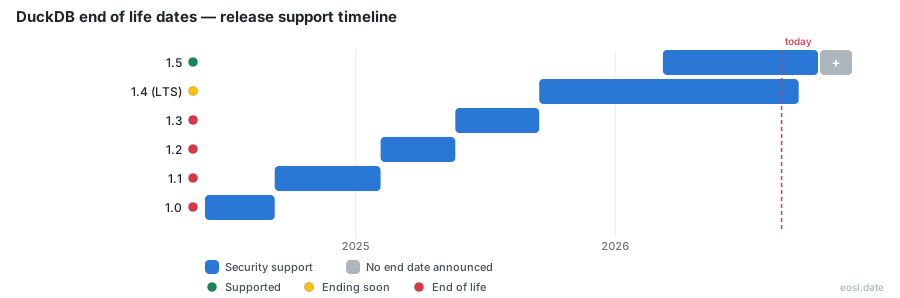
Currently Supported DuckDB Releases - Active EOS/EOSL Support (1)
| Release | Released | Support Status | Latest | LTS |
|---|---|---|---|---|
| 2.0 (LTS) | (1 month ago) | (in 11 months) | 2.0.1 (1 day ago) | LTS |
DuckDB Releases Nearing End of Life - Support Ending Soon (1)
| Release | Released | Support Status | Latest | LTS |
|---|---|---|---|---|
| 1.5 (LTS) | (8 months ago) | (in 3 months) | 1.5.6 (1 month and 3 weeks ago) | LTS |
DuckDB End of Life (EOL) Releases - No Longer Supported (5)
| Release | Released | Support Status | Latest | LTS |
|---|---|---|---|---|
| 1.4 (LTS) | (1 year and 2 months ago) | (4 days ago) | 1.4.5 (5 months ago) | LTS |
| 1.3 | (1 year and 6 months ago) | (1 year and 2 months ago) | 1.3.2 (1 year and 4 months ago) | - |
| 1.2 | (1 year and 9 months ago) | (1 year and 6 months ago) | 1.2.2 (1 year and 7 months ago) | - |
| 1.1 | (2 years and 2 months ago) | (1 year and 9 months ago) | 1.1.3 (2 years ago) | - |
| 1.0 | (2 years and 5 months ago) | (2 years and 2 months ago) | 1.0.0 (2 years and 5 months ago) | - |
Running an old build in production gets risky the day it stops receiving fixes, so knowing the DuckDB end of life schedule matters before the deadline arrives. Today, 26 October 2026, DuckDB 1.4 LTS retires in 22 days, version 1.5 follows in March 2027, and the freshly released 2.0 LTS is covered into October 2027. This guide lists every cutoff, explains the rules behind them, and shows you how to plan the move.
DuckDB End of Life Dates by Version
Each release line has a fixed day when the project stops backporting fixes to it. The table below combines the official release calendar with the third-party tracker endoflife.date, so you can see the end of life dates next to each version number and its release type.
| Version | Release type | Released | Community support ends |
|---|---|---|---|
| 2.0 | LTS | 2026-10-21 | 2027-10-22 |
| 1.5 | Non-LTS (extended) | 2026-03-09 | 2027-03-01 |
| 1.4 | LTS | 2025-09-16 | 2026-11-17 |
| 1.3 | Non-LTS | 2025-05-21 | 2025-09-16 |
| 1.2 | Non-LTS | 2025-02-05 | 2025-05-21 |
| 1.1 | Non-LTS | 2024-09-09 | 2025-02-05 |
| 1.0 | Non-LTS | 2024-06-03 | 2024-09-09 |
Counting from today, 1.4 has 22 days left, 1.5 has 126 days and 2.0 has 361 days. Anything older than 1.4 is already past its cutoff, and every 0.x line ended on 2024-06-03.
Long-Term Support and the DuckDB Version Lifecycle
Until the 1.4 announcement, every new release retired its predecessor automatically. Teams running an analytical, in-process SQL database in production wanted steadier deployments, and the answer was long-term support, which reshaped the version lifecycle: instead of a few months of fixes, selected releases now stay maintained for a year. Fewer forced upgrades also mean less routine maintenance before each cutoff.
LTS Editions and Their Support Period
Starting with 1.4.0, every other DuckDB version is an LTS edition. The support period for each LTS version is a year after release, and the team has already stretched it twice: 1.4 now runs until 17 November 2026, and the non-LTS 1.5 was extended until March 2027. Those exceptions were announced on the release calendar, which makes the LTS label a promise about the minimum, not a guarantee of the exact day. The 1.4.0 announcement originally listed 2026-09-16 as the end date, so always re-check the live page.
Semantic Versioning and Minor Release Cadence
DuckDB follows semantic versioning: larger new features arrive in a minor release such as 1.5, while patch versions like 1.5.6 mostly carry bug fixes, which is why they favour stability. That split tells you where risk lives. A patch inside your supported line is normally safe to apply at once, whereas a minor jump moves you to a line with a different cutoff date and deserves a test run first.
Bugfix Release Cadence and End-of-Life Policy
Inside a supported line, maintainers ship a regular bugfix release. Version 1.5 alone has reached 1.5.6, a rhythm of roughly one patch each month between March and September 2026, and 1.4 received its final bugfixes in 1.4.5 on 17 June 2026. A typical bugfix release carries no new syntax, only corrections, so it pairs well with unattended rollouts.
The end-of-life policy for non-LTS builds is blunt: once any newer version ships, an older non-LTS supported release stops receiving fixes, unless the team grants an extension as it did for 1.5. LTS lines escape that rule and keep their one-year window.
Non-LTS Releases and the Latest Release Rule
If you track the latest release you are never stranded, because it is by definition the newest line. The cost is frequent upgrades. Pinning to a non-LTS major release trades that effort for a short deadline, so check the installation page for the current build and plan an upgrade whenever a newer one appears.
Release Calendar: Upcoming and Past Releases
The official release calendar splits into upcoming releases and past releases. The next planned date is 2026-11-18 for 2.0.1, and these dates are tentative: maintainers may push one back to protect quality. The roadmap lists what the next minor version, 2.1, is expected to add, and its date will shape your plan.
The past releases list reaches back to 0.1.0 in 2019, and every 0.x line is already past its cutoff. Since 0.4.0 only major and minor versions get a codename. Pair the dates with the release notes on GitHub to see what each patch fixed before you apply it.
Supported Versions and Support Period on MotherDuck
MotherDuck, the hosted service built on DuckDB, publishes its own schedule, and it is stricter than the open-source one. Today it supports DuckDB 1.5.6, and clients outside the accepted range cannot connect. It also publishes schedules for DuckLake, the open table format from the DuckDB team, so a DuckLake catalog gets its own support windows next to the engine. When a new DuckDB version needs more than 48 hours to qualify, the service tells users by email and its community Slack. Cloud regions do not all share the same lower bound, which brings compatibility into play.
MotherDuck's list of supported versions is the one to follow if your queries run in its cloud, since a client below the minimum fails even when open-source DuckDB still supports it.
Compatible Client Version Ranges
The compatible client version window differs by region. In US East (N. Virginia) the minimum client version is 1.4.0, while US West (Oregon), Dublin, Frankfurt, Tokyo and Sydney require 1.4.1. The maximum client version is 1.5.6 everywhere. Language client libraries such as jdbc and odbc are published at 1.5.5.0, the CLI bundles at least 1.5.5, and the python package follows its region's range. Update the CLI together with your client, and DuckLake users should check both ranges, since DuckLake and the engine move on separate dates, and a DuckLake mismatch blocks attaches.
Commercial Support After the End of Community Support
When the end of community support passes for a line, the community stops backporting fixes, but the story is not over. DuckDB Labs offers commercial support for older LTS lines after the free window closes, which suits teams that cannot move quickly. MotherDuck sells an extended lifecycle support add-on for similar reasons. Both options buy time, not new features, so use them to schedule the migration, not to avoid it.
Tracking DuckDB End of Life Programmatically
You do not have to check web pages by hand. The release calendar can be downloaded as a CSV file, and DuckDB's own CSV reader can query it. The endoflife.date tracker exposes a JSON API at /api/v1/products/duckdb/, an RSS feed and an iCalendar subscription for reminders. MotherDuck also serves a small JSON document at motherduck.com/docs/duckdb-versions.json with the accepted version range per region, so scripts and CI jobs can fail early. To see what you run today, execute duckdb -version in the shell and compare it with the table above. The official documentation links to each of these sources.
Upgrade Planning Across the Support Lifecycle
A sound plan across the support lifecycle starts early. If you run 1.4, you have 22 days, so move to 1.5 or 2.0 now. The migration notes recommend a shadow system that tracks your production workload before you cut over, and that advice holds for any jump. Open a copy of each database file in the new version first. Parquet is the format most teams lean on, so verify Parquet scans, Parquet exports and partitioned Parquet datasets before anything else.
- Re-run your Parquet reads and writes, since file handling changes often; sample a few large Parquet files and a few small ones.
- Test Iceberg tables, because Iceberg writes only arrived in 1.4 and keep evolving; confirm that Iceberg metadata still loads.
- Check encryption settings on attached files, and confirm your key handling still works.
- Reload every one of your extensions, including httpfs, since a build and its extensions must match; update all extensions together.
- Re-time your slowest queries, as performance shifts between releases, and keep a benchmark script that you can reuse.
If you are leaving 1.4, run this checklist against 1.5 or 2.0 before 17 November. Release by release, the pattern is simple: stay inside a supported line, apply patch versions promptly, and treat each LTS cutoff on the calendar as a firm deadline. Do that and the end-of-life date becomes a planned event rather than an emergency.