ClickHouse End of Life (EOL) Dates and End of Support (EOS) Dates
ClickHouse end of life (EOL) and end of support (EOS) dates: 18 ClickHouse versions have reached EOL, including ClickHouse 26.7 (EOL date: Oct 24, 2026) — no longer receiving security updates or patches. ClickHouse 26.3 (LTS) reaches its End of Support date on Mar 26, 2027 — plan your upgrade path now. ClickHouse 26.10.8.34 is the current supported release — 3 versions in active support. Also see CockroachDB end of life dates for related end-of-life information.
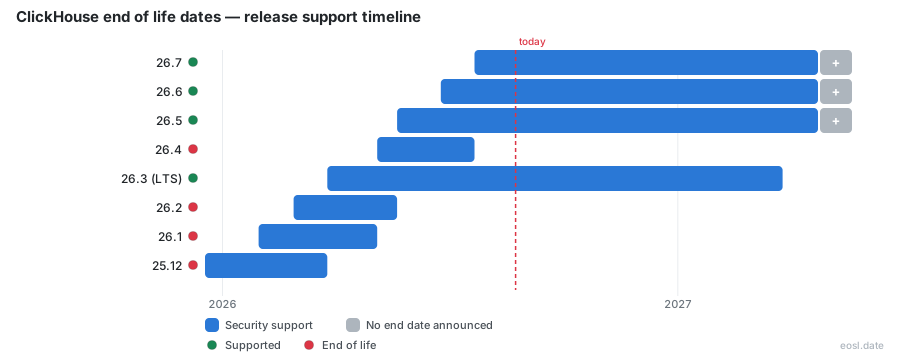
Currently Supported ClickHouse Releases - Active EOS/EOSL Support (3)
| Release | Released | Support | Latest | LTS |
|---|---|---|---|---|
| 26.10 | (4 weeks ago) | Active | 26.10.8.34 (1 day ago) | - |
| 26.9 | (2 months ago) | Active | 26.9.34.16 (1 day ago) | - |
| 26.8 (LTS) | (2 months ago) | (in 9 months) | 26.8.42.13 (1 day ago) | LTS |
ClickHouse Releases Nearing End of Life - Support Ending Soon (1)
| Release | Released | Support | Latest | LTS |
|---|---|---|---|---|
| 26.3 (LTS) | (7 months ago) | (in 4 months) | 26.3.67.30 (1 day ago) | LTS |
ClickHouse End of Life (EOL) Releases - No Longer Supported (18)
| Release | Released | Support | Latest | LTS |
|---|---|---|---|---|
| 26.7 | (3 months ago) | (4 weeks ago) | 26.7.37.6 (4 weeks and 2 days ago) | - |
| 26.6 | (4 months ago) | (2 months ago) | 26.6.8.7 (2 months ago) | - |
| 26.5 | (6 months ago) | (2 months ago) | 26.5.7.64 (3 months ago) | - |
| 26.4 | (6 months ago) | (3 months ago) | 26.4.5.143 (3 months ago) | - |
| 26.2 | (8 months ago) | (6 months ago) | 26.2.19.43 (5 months ago) | - |
| 26.1 | (9 months ago) | (6 months ago) | 26.1.12.23 (6 months ago) | - |
| 25.12 | (11 months ago) | (7 months ago) | 25.12.12.1 (6 months ago) | - |
| 25.11 | (11 months ago) | (8 months ago) | 25.11.9.34 (9 months ago) | - |
| 25.10 | (1 year ago) | (9 months ago) | 25.10.7.6 (6 months ago) | - |
| 25.9 | (1 year and 1 month ago) | (11 months ago) | 25.9.7.56 (11 months ago) | - |
| 25.8 (LTS) | (1 year and 2 months ago) | (2 months ago) | 25.8.33.6 (2 months ago) | LTS |
| 25.7 | (1 year and 3 months ago) | (1 year ago) | 25.7.8.71 (1 year and 1 month ago) | - |
| 25.6 | (1 year and 4 months ago) | (1 year and 1 month ago) | 25.6.13.41 (1 year and 1 month ago) | - |
| 25.5 | (1 year and 5 months ago) | (1 year and 2 months ago) | 25.5.11.15 (1 year and 1 month ago) | - |
| 25.4 | (1 year and 6 months ago) | (1 year and 3 months ago) | 25.4.13.22 (1 year and 3 months ago) | - |
| 25.3 (LTS) | (1 year and 8 months ago) | (8 months ago) | 25.3.14.14 (9 months ago) | LTS |
| 25.2 | (1 year and 8 months ago) | (1 year and 5 months ago) | 25.2.2.39 (1 year and 8 months ago) | - |
| 25.1 | (1 year and 9 months ago) | (1 year and 6 months ago) | 25.1.8.25 (1 year and 8 months ago) | - |
If you run this open-source, column-oriented database management system for OLAP and SQL analytics, knowing the ClickHouse End of Life schedule tells you how long your current release keeps getting fixes. This guide shows which versions are covered today, how support is counted, and when you should plan your next move.
ClickHouse End of Life Dates by Release
Support is tied to the release number, not to the calendar year alone. As of 24 October 2026, the table below shows the newest releases and the point at which each one stops receiving fixes. Check the EOL date before you commit a cluster to any line.
| Release | Type | Released | Support status |
|---|---|---|---|
| 26.9 | Regular stable | 21 Sep 2026 | Supported |
| 26.8 | LTS | 27 Aug 2026 | Supported until 27 Aug 2027 |
| 26.7 | Regular stable | 22 Jul 2026 | Supported |
| 26.6 | Regular stable | 25 Jun 2026 | Ended 21 Sep 2026 |
| 26.3 | LTS | 26 Mar 2026 | Supported until 26 Mar 2027 |
Any version older than 26.7 that is not an LTS line is already out of the supported window. Your latest version choice therefore matters more each month, because a new release arrives about every month and pushes an older one out. For a managed ClickHouse Cloud service the provider handles the upgrade, while a self-managed server leaves the timing to you for both maintenance and risk.
End-of-Life Rules: Long-Term Support and Calendar Versioning
Once a release line drops out of the supported window it reaches end-of-life, and it stops receiving bug and security fixes, which the project ships as a patch inside each release line. A known security flaw then stays unfixed for anyone still on it. The software itself is licensed under Apache 2.0, so you can read every release note before you upgrade, and open software like this keeps its history public.
Long-term support and LTS releases
Twice a year, usually in March and August, one release is marked LTS. A long-term support line is covered for one year instead of a few months, which suits production systems that cannot move every month. Choose one of these when you need a supported release that stays stable for a full year, and treat any other stable sequential release as a short-lived supported release, since its support window is much shorter.
Calendar versioning and minor releases
The release number follows calendar versioning in the form Year.Month.Patch.Build, so 26.9 means September 2026. Each new minor release is published roughly every month, and the last three minor releases are supported. A major version in the policy sense is simply the first two numbers of that string.
ClickHouse Support Services Policy and Severity Levels
The official support services policy covers paying customers, not trial or non-paid use, and its response targets apply only to supported releases; once a version stops being supported, a customer on that software falls outside those targets. Each customer raises a support incident through a named support contact, and the response target depends on the product, the customer tier and the customer type. A committed customer buys an entitlement through an order form, while a pay-as-you-go customer buys on demand. Enterprise, BYOC and private deployments get the fastest targets, and a customer with a technical account manager or TAM Architect receives extra scope on top.
| Product and tier | Severity 1 | Severity 2 | Severity 3 |
|---|---|---|---|
| Cloud Enterprise (committed) | 30 minutes, around the clock | 2 normal business hours | 24 normal business hours |
| Cloud Scale (committed) | 1 hour, around the clock | 4 normal business hours | 24 normal business hours |
| Open-source software | 1 hour, around the clock | 4 normal business hours | 24 normal business hours |
| Cloud Basic | Not available | Not available | 24 normal business hours |
The customer must supply logs and access so the team can work; experimental features, and any platform missing from the supported platforms list for the software, sit outside the support a customer can claim. Normal business hours run from Monday 00:00 UTC to Saturday 00:00 UTC, and a customer on an unlisted tier gets good-faith help without a stated initial response time.
Severity Level 1 response
A Severity Level 1 incident means a critical production failure, such as lost data or a system that is down with no workaround. The customer gets the quickest initial response and continuous case handling until a fix or workaround lands.
Severity Level 2 and 3 response
Severity Level 2 covers a system that still runs in a reduced capacity, and Severity Level 3 covers minor faults and general questions. The target for these two levels is counted in normal business hours rather than around the clock, and, as with Severity Level 1, it applies only while the release is still supported.
Cloud EOL Date and Slow Release Channel
For the managed cloud service, the cloud EOL date is published on the release status page. It falls at least 60 days after the slow release channel finishes rolling out the next version, so a pay-as-you-go customer or committed customer on that channel always has two months of overlap, and the same support dates apply to both. Unless a security exception applies, the date does not move earlier. A hosted server or client library that the customer upgrades on their own schedule does not follow this rule, so confirm which channel your service uses.
Deprecated Versions: Checking and Upgrading
A release is deprecated once it leaves the supported list, and its deprecation date is the day fixes stop. Run clickhouse-client --version to see what you have, then compare it with the table above. A Docker image tag, a GitHub release or a package manager install each reports the same release number, so the check works everywhere. Third-party client packages and other software follow their own support schedule; a client library on NuGet, for example, can be marked deprecated long before the database itself is.
To stay informed, read the machine-readable JSON feed, or subscribe to the RSS feed that tracks each product, so your team is told before a date arrives. When the date is near, plan the migration: read the changelog for compatibility notes, test on a staging server, then move production one step at a time. Staying current keeps your fixes flowing and your analytics stack inside the window, and a customer who waits a full year to upgrade usually faces a larger jump.
Supported versions and latest version
Aim for one of the supported versions on the release list, ideally the newest LTS line if you upgrade once a year. If you can follow each month, the latest version gives you the most recent fixes and features, at the cost of more frequent change.