Bazel End of Life (EOL) Dates and End of Support (EOS) Dates
Bazel end of life (EOL) and end of support (EOS) dates: 3 Bazel versions have reached EOL, including Bazel 6 (LTS) (EOL date: Dec 31, 2025) — no longer receiving security updates or patches. Bazel 7 (LTS) reaches its End of Support date on Dec 31, 2026 — plan your upgrade path now. Bazel 9.3.3 LTS is the current supported release, with support through Dec 31, 2028 — 2 versions in active support. Also see pnpm lifecycle dates for related end-of-life information.
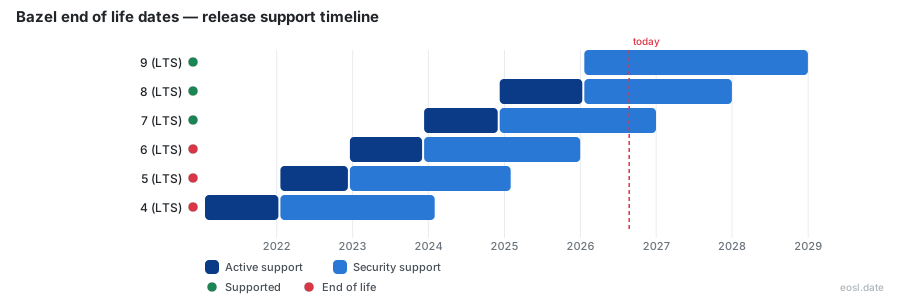
Currently Supported Bazel Releases - Active EOS/EOSL Support (2)
Bazel Releases Nearing End of Life - Support Ending Soon (1)
| Release | Released | Security Support | Active Support | Latest | LTS |
|---|---|---|---|---|---|
| 7 (LTS) | (2 years and 11 months ago) | (in 1 month and 1 week) | (1 year and 11 months ago) | 7.7.3 (2 days ago) | LTS |
Bazel End of Life (EOL) Releases - No Longer Supported (3)
| Release | Released | Security Support | Active Support | Latest | LTS |
|---|---|---|---|---|---|
| 6 (LTS) | (3 years and 11 months ago) | (10 months ago) | (2 years and 11 months ago) | 6.6.0 (10 months ago) | LTS |
| 5 (LTS) | (4 years and 10 months ago) | (1 year and 9 months ago) | (3 years and 11 months ago) | 5.4.1 (3 years and 7 months ago) | LTS |
| 4 (LTS) | (5 years and 10 months ago) | (2 years and 9 months ago) | (4 years and 10 months ago) | 4.2.4 (3 years and 7 months ago) | LTS |
Your Bazel end of life date decides how long your build keeps receiving fixes, and it depends on which LTS line you run. Bazel 9 is the current release with active support, Bazel 8 and Bazel 7 get security fixes only, and Bazel 6 is already past its last date. Here is each date, what every stage covers, and how to plan an upgrade in time.
Bazel End of Life Dates at a Glance
Every major Bazel release is an LTS release, and each moves through two stages: active support, then security support. The table below shows where each LTS release stands in late October 2026, with the latest patch for each line.
| LTS release | Released | Active support ended | Security support ends | Latest patch |
|---|---|---|---|---|
| Bazel 9 | 20 Jan 2026 | Still active | 31 Dec 2028 | 9.3.1 |
| Bazel 8 | 9 Dec 2024 | 20 Jan 2026 | 31 Dec 2027 | 8.8.2 |
| Bazel 7 | 11 Dec 2023 | 9 Dec 2024 | 31 Dec 2026 | 7.7.2 |
| Bazel 6 | 19 Dec 2022 | 11 Dec 2023 | Ended 31 Dec 2025 | 6.6.0 |
Run one of the supported version numbers in the last column, or a newer one. Checking bazel --version tells you where you stand.
How the Release Model Works
Google started building Bazel's ancestor, Blaze, in 2006 to keep a huge monorepo fast and correct. It then released Bazel as an open-source build system in March 2015, and version 1.0 followed in October 2019. This open source build tool has shipped under the Apache License ever since, so the software is free to run, and support dates are a project decision rather than a contract. Google also sets them. As an open-source project, Bazel relies on a volunteer community too.
Since Bazel 4, the project publishes two kinds of builds. Each major LTS release moves through the stages in the table, while the main branch produces a steady stream of fresh builds. Those are described next.
Rolling Releases Versus LTS Tracks
Rolling releases carry the newest features straight from GitHub, with no promise of a long fix window. An LTS release trades speed for stability, which is why production teams normally stay on LTS.
What Active Support Covers
While an LTS line has active support, Bazel engineers and the wider community land bug fixes and selected improvements on it. A patch from this stage can include critical bug fixes and backward compatible changes, such as a performance tweak that any project can pick up with no edits. Nothing new is promised when the stage ends, and that is the point where you should begin reading the next line's notes. A Java service or any other build target keeps compiling, but no one fixes it for you.
Security Support and Your Upgrade Deadline
Once active support ends, security support keeps only the patches that matter for security. Bazel 7.7.2, released on 23 October 2026, is an example: it removed two distrusted root certificates from the bundled JDK. After the final date, a new vulnerability simply stays unfixed in that line, and a CI job focused on testing will not warn you. With 65 days left until 31 December 2026, a Bazel 7 team has a short upgrade window, so check compatibility with your rulesets and read the documentation for each step.
Bazel 6 and Older Bazel Versions
Bazel 6 lost its last support on 31 December 2025, and earlier lines are further behind: Bazel 5 ended on 31 January 2025 and Bazel 4 on 31 January 2024. The Bazel 7 and Bazel 8 announcements each carried a deprecation notice for the line two majors back, so the pattern is predictable. Treat any build still on these old versions as unsupported software, and run bazel info in CI to log the exact version before you plan a jump.
Bazel 7 End of Support in December 2026
Bazel 7 made Bzlmod, remote caching improvements and platform-based toolchain resolution the defaults, so it was a big step for every build and for Java builds in particular. Its Android and C++ rules now share one toolchain resolution path with other rules, and rule authors can test new rule extension APIs.
The WORKSPACE Change in Bazel 7
Bazel 7 enabled the new Bzlmod system for external dependencies, which reads a MODULE.bazel file; the old WORKSPACE mechanism kept working beside it. If your project has no such file, Bazel creates an empty one, which can alter label handling slightly.
Build Without the Bytes and Skymeld
Builds using remote execution or remote caching now download only top-level outputs, and Skymeld lets targets run as soon as their analysis finishes. Both help every build finish sooner, and neither changes how you write a build file.
Bazel 8 Release Highlights
Bazel 8 followed in December 2024 and moved many rulesets out of the core, a job done in Starlark. Java rules now live in rules_java, C++ toolchain symbols in rules_cc, Python rules in rules_python, and Kotlin projects load their rules from separate repositories too. A temporary flag auto-loads those rules, but add explicit load statements before moving past this line, since they work on Bazel 6, 7 and 8 alike. Bazel 8 also turned the WORKSPACE file off by default.
Starlark Rules Moved Into Separate Repositories
The extension language, Starlark, now carries the rules for Android, Protobuf and shell scripts as well, so rule authors can update them without waiting for a core release. Cloud-based teams like that independence.
Symbolic Macros
Symbolic macros give macro authors typed attributes and a visibility model that protects internal targets.
Bazel 9 as the Current LTS Release
The newest LTS release for your build is Bazel 9, which arrived on 20 January 2026 and removed the WORKSPACE system. Its latest patch, 9.3.1, shipped on 20 October 2026, and further patch releases appear on GitHub with general, core and external dependency notes, plus fixes for Android and C++. The Bazel Central Registry hosts the modules you now depend on, and every Starlark rule they ship is versioned separately from the core. Google's engineers still publish the build binaries that you download.
Bazel 10 and Future Bazel Releases
Bazel 10.0.0rc2 appeared on 22 October 2026. It is a pre-release candidate, so do not ship production builds with it. Read the release notes of every pre-release for the planned changes, and use Bazelisk to try a newer line without touching your pinned version.
Incompatible Flags Flipped in Bazel 10
Bazel 10 flips several flags, including --incompatible_no_implicit_file_export, and its notes also list flags that will flip in a later major release. These changes are backwards incompatible, so test them on Bazel 9 using Bazelisk with the --migrate option.
How Bazel Version Numbers Work
Each number tells you what you are upgrading to, and every version follows one fixed scheme.
Semantic Versioning in Practice
The project uses semantic versioning, so the first number only changes when behavior breaks.
Major Release, Minor Release and Patch Release
A major release brings changes that are not backward compatible and starts a new LTS line. A minor release adds backward-compatible fixes and features back-ported from the main branch. A patch release contains only critical fixes.
Migrating to a Newer Bazel Release
Upgrade your build one LTS line at a time, since each step removes flags that the next one expects you to have fixed. First read the notes, then flip each incompatible flag in your .bazelrc, and finally update dependency management so nothing relies on WORKSPACE.
Migration Guide for Bzlmod
The project's Bzlmod migration guide on GitHub gives step-by-step advice for moving from WORKSPACE to MODULE.bazel. Do it while you are still on Bazel 7 or 8, because Bazel 9 no longer reads the old file.