Gradle End of Life (EOL) Dates and End of Support (EOS) Dates
Gradle end of life (EOL) and end of support (EOS) dates: 7 Gradle versions have reached EOL, including Gradle 7 (EOL date: Jul 31, 2025) — no longer receiving security updates or patches. Gradle 9.9.2 is the current supported release — 2 versions in active support. Also see Bazel end of support dates for related end-of-life information.
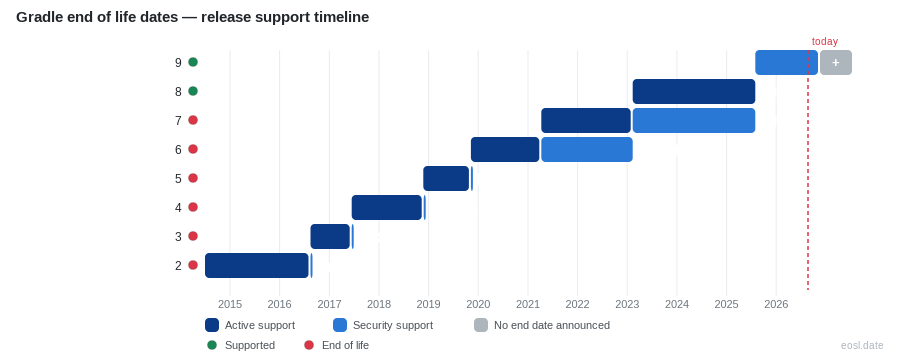
Currently Supported Gradle Releases - Active EOS/EOSL Support (2)
| Release | Running Java Versions | Tested Android Versions | Tested Groovy Versions | Tested Java Versions | Tested Kotlin Versions | Released | Critical Bug and Security Fixes | Active Support | Latest |
|---|---|---|---|---|---|---|---|---|---|
| 9 | 17 - 26 | 9.0 - 9.4.0-alpha03 | 1.5.8 - 5.0.2 | 8 - 26 | 2.0.0 - 2.4.20-Beta1 | (1 year and 3 months ago) | Active | Active | 9.9.2 (5 days ago) |
| 8 | 8 - 24 | 7.3 - 8.9 | 1.5.8 - 4.0.0 | 8 - 24 | 1.6.10 - 2.1.20-RC3 | (3 years and 9 months ago) | Active | (1 year and 3 months ago) | 8.14.8 (5 days ago) |
Gradle End of Life (EOL) Releases - No Longer Supported (7)
| Release | Running Java Versions | Tested Android Versions | Tested Groovy Versions | Tested Java Versions | Tested Kotlin Versions | Released | Critical Bug and Security Fixes | Active Support | Latest |
|---|---|---|---|---|---|---|---|---|---|
| 7 | 8 - 19 | 4.1 - 4.2, 7.0 - 7.4 | 1.5.8 - 4.0.0 | 8 - 19 | 1.3.72 - 1.7.10 | (5 years and 7 months ago) | (1 year and 3 months ago) | (3 years and 9 months ago) | 7.6.6 (1 year and 4 months ago) |
| 6 | 8 - 15 | 3.4 - 3.6, 4.0 - 4.2 | 1.5.8 - 2.5.12 | 8 - 16 | 1.3.21 - 1.4.20 | (7 years ago) | (3 years and 9 months ago) | (5 years and 7 months ago) | 6.9.4 (3 years and 9 months ago) |
| 5 | 8 - 12 | N/A | N/A | N/A | N/A | (8 years ago) | (7 years ago) | (7 years ago) | 5.6.4 (7 years ago) |
| 4 | 8 - 10 | N/A | N/A | N/A | N/A | (9 years and 5 months ago) | (7 years and 11 months ago) | (7 years and 11 months ago) | 4.10.3 (7 years and 11 months ago) |
| 3 | 8 | N/A | N/A | N/A | N/A | (10 years and 3 months ago) | (9 years and 5 months ago) | (9 years and 5 months ago) | 3.5.1 (9 years and 5 months ago) |
| 2 | 8 | N/A | N/A | N/A | N/A | (12 years and 4 months ago) | (10 years and 3 months ago) | (10 years and 3 months ago) | 2.14.1 (10 years and 4 months ago) |
| 1 | N/A | N/A | N/A | N/A | N/A | (14 years and 5 months ago) | (12 years and 4 months ago) | (12 years and 4 months ago) | 1.12.0 (12 years and 6 months ago) |
Checking Gradle end of life status tells you whether the build tool behind your Java, Kotlin or Android project still gets patches. This guide explains how build automation support ends for developers, which major lines are still covered, and what to do before your version loses fixes.
Gradle End of Life Dates and Supported Majors
Every major release moves through active support, then security-only coverage, then nothing. The table shows where each major line stands on 27 October 2026, using the dates Gradle publishes.
| Major | Released | Active support ended | Security coverage ended |
|---|---|---|---|
| 9 | 31 Jul 2025 | Still active | Still covered |
| 8 | 10 Feb 2023 | 31 Jul 2025 | Still covered |
| 7 | 9 Apr 2021 | 10 Feb 2023 | 31 Jul 2025 |
| 6 | 8 Nov 2019 | 9 Apr 2021 | 10 Feb 2023 |
| 5 | 23 Nov 2018 | 8 Nov 2019 | 8 Nov 2019 |
The latest release is 9.8.2, published on 19 October 2026, and the latest minor of the previous line is 8.14.6. The current major is 9, so anything older sits outside the release line that still gets patches.
How the Gradle EOL Policy Works
The end-of-life policy is simple: when a new major arrives, the one before it drops to critical fixes only, and the one before that is retired. Each build starts as a nightly build, becomes a release candidate, and reaches general availability after about a week unless a regression appears. The release end-of-life policy also covers patch releases, which replace a final build when a bug needs a quick correction. The release window stays open until the candidate is stable, and a retired line gets no new fixes at all.
Active Support and Security Fixes
During active support a line gets features, improvements and security fixes. Fixes land first in the newest minor, so staying current is the cheapest way to stay protected.
Critical Bug Fixes for the Previous Major Version
Once the next major ships, the previous major version receives only critical bug and security patches. That maintenance phase is a grace period for your team to plan a move, not a place to stay.
Gradle Versions and the Feature Lifecycle
Support ends for releases, but individual features also age. The feature lifecycle labels every API and command as internal, incubating, public or deprecated, and the release notes announce each change.
Internal and Incubating Features
Internal features can change without notice, so avoid them. An incubating feature is open to feedback and may still change before it graduates, which is why plugins relying on it need testing after each upgrade.
Public and Deprecated Features
A public feature stays public until it is deprecated, and deprecation shows a runtime warning in your build output. Deprecated code is removed in a later major, so clear those warnings while stability is high.
Backward Compatibility Across Each Gradle Release
Gradle follows semantic versioning. The backward compatibility promise says a public feature survives across a minor release and is removed only after deprecation, normally in the next major. This lifecycle makes upgrading inside one major low risk, and jumping across two majors the point where builds break.
Gradle Version Compatibility with Java, Kotlin and Groovy
Compatibility is the most common reason teams delay an upgrade. Every line supports only a window of tools, so check the matrix before you touch the wrapper. Java toolchains help by pinning the JDK per project, which keeps testing and the runtime consistent across the ecosystem and your dependency set.
Java Support
Gradle 9 runs on Java 17 through 26, while Gradle 8 runs on 8 through 24. Compiling and testing accept an older JDK than the runtime, so a legacy codebase can still build.
Kotlin, Groovy and Android
Gradle 9 covers Kotlin 2.0 and newer and Groovy up to 5, and each Android Gradle plugin line pairs with specific Gradle versions, so confirm the pair together.
Security Risks of End-of-Life Gradle
Running a retired line means shipping production artifacts from software with known vulnerabilities nobody will patch, and new vulnerabilities stay open once disclosed. The build step is an attack surface: past supply chain incidents altered the compiler or build environment without touching source code. The Gradle Wrapper JAR is a prime target because every developer and CI job runs it. For teams with compliance duties, that risk is hard to defend, since scanners check dependencies and source but rarely the build step itself.
Extended Security Maintenance for Older Gradle Releases
If you cannot move yet, the paid security subscription adds extended security maintenance for high and critical issues beyond the open source policy. A service-level agreement sets the fix targets at 7 days for critical and 30 days for high severity, and subscribers get advance notice under responsible disclosure. The open source community policy itself does not change.
How to Upgrade When a Line Is Maintenance Only
Treat this like any other software update: start with the upgrade guide for your major, move to the final release in that line, fix every deprecation warning, then step to the next major. Run ./gradlew wrapper --gradle-version 9.8.2 to update the wrapper, then rebuild. Version 8 users gain the configuration cache, a faster build cache and better performance, which pays back the effort within days.