pnpm End of Life (EOL) Dates and End of Support (EOS) Dates
pnpm end of life (EOL) and end of support (EOS) dates: 6 pnpm versions have reached EOL, including pnpm 9 (EOL date: Apr 30, 2026) — no longer receiving security updates or patches. pnpm 11 reaches its End of Support date on Apr 30, 2027 — plan your upgrade path now. pnpm 12.22.0 is the current supported release — 2 versions in active support. Also see Bazel end of life for related end-of-life information.
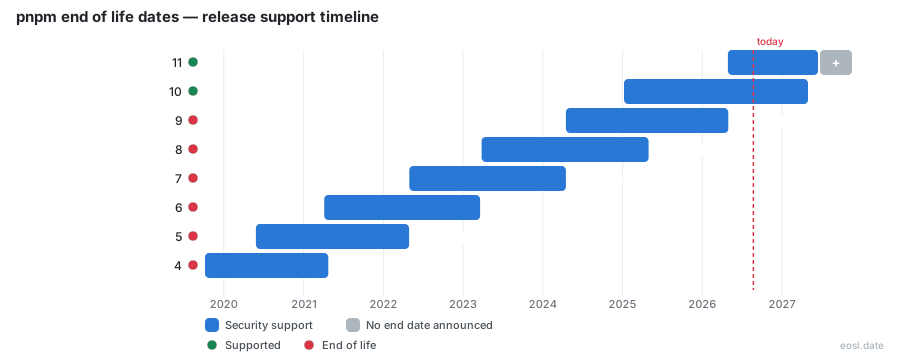
Currently Supported pnpm Releases - Active EOS/EOSL Support (2)
pnpm Releases Nearing End of Life - Support Ending Soon (1)
| Release | Released | Support | Latest |
|---|---|---|---|
| 11 | (6 months ago) | (in 5 months) | 11.28.13 (5 days ago) |
pnpm End of Life (EOL) Releases - No Longer Supported (6)
| Release | Released | Support | Latest |
|---|---|---|---|
| 9 | (2 years and 7 months ago) | (6 months ago) | 9.15.9 (1 year and 8 months ago) |
| 8 | (3 years and 7 months ago) | (1 year and 6 months ago) | 8.15.9 (2 years and 4 months ago) |
| 7 | (4 years and 6 months ago) | (2 years and 7 months ago) | 7.33.7 (2 years and 9 months ago) |
| 6 | (5 years and 7 months ago) | (3 years and 8 months ago) | 6.35.1 (4 years ago) |
| 5 | (6 years and 5 months ago) | (4 years and 6 months ago) | 5.18.11 (5 years and 2 months ago) |
| 4 | (7 years and 1 month ago) | (5 years and 6 months ago) | 4.14.4 (6 years and 5 months ago) |
Wondering when to upgrade? pnpm end of life is the date a major version stops receiving fixes, and for versions 10 and 11 that date is 30 April 2027. Because pnpm is a drop-in replacement for npm that helps JavaScript developers save disk space, you probably rely on it daily, so knowing which release is still maintained tells you when to move. This guide lists each version, its support status and the steps to take first.
pnpm End of Life Dates for Every pnpm Version
The table shows when each major version was released, when its support ended or will end, and the latest stable release as of 26 October 2026. Run pnpm --version, find your row, and update if support has already ended.
| Major | Released | Support status | Latest build |
|---|---|---|---|
| 12 | 26 Aug 2026 | Supported | 12.15.0 |
| 11 | 28 Apr 2026 | Ends 30 Apr 2027 | 11.28.8 |
| 10 | 7 Jan 2025 | Ends 30 Apr 2027 | 10.34.9 |
| 9 | 16 Apr 2024 | Lapsed 30 Apr 2026 | 9.15.9 |
| 8 | 27 Mar 2023 | Lapsed 30 Apr 2025 | 8.15.9 |
| 7 | 30 Apr 2022 | Lapsed 16 Apr 2024 | 7.33.7 |
Security Support for the pnpm Package Manager
Only supported majors get security fixes. Each major brings minor changes that add features and patch changes that fix bugs, such as a stricter shim check. Once a major's support is gone, every direct dependency and every transitive dependency inherits that gap, and one vulnerable dependency can leave a project exposed.
History: From TypeScript Roots to a Rust Rewrite
The open-source project began in 2016 as a disk-saving alternative to npm. It keeps one copy of each file in a content-addressable store and uses hard links to share it. Version 1.0 shipped in 2017, and version 12 is a rewrite in Rust built for performance. It is now a leading JavaScript package manager beside Yarn, Bun and Deno.
What Changed Across Each Supported Release
Every supported release adds new configuration settings and command behaviour, so read the notes before you move up.
Security by Default and Supply Chain Defenses
Version 10 blocks lifecycle scripts by default, closing a major supply chain route. A trust policy set to no-downgrade also makes an install fail when a package's provenance weakens.
Node.js Runtime Management
pnpm can download and pin a Node.js runtime for each project, with Deno and Bun supported too. Installation of that runtime happens automatically before any script runs.
Global Virtual Store and Config Dependencies
The global virtual store links dependencies from one disk location, so identical graphs are shared. Config dependencies share hooks across a monorepo, and a catalog entry can point to a registry version or a local tarball.
Upgrading Before pnpm End of Life
This checklist suits any JavaScript project, from a single package to a large monorepo.
- Compare your version with the table above.
- Move to the newest major, set it in package.json, then run install so the lockfile regenerates.
- Review pnpm-workspace.yaml and every workspace setting for renamed options.
- Delete node_modules and reinstall all dependencies to confirm a clean build.
- Run each package script in your pipeline, then run a fresh install in CI to prove it works on a clean machine.