Zabbix End of Life (EOL) Dates and End of Support (EOS) Dates
Zabbix end of life (EOL) and end of support (EOS) dates: 6 Zabbix versions have reached EOL, including Zabbix 7.2 (EOL date: Dec 31, 2025) — no longer receiving security updates or patches. Zabbix 6.0 (LTS) reaches its End of Support date on Feb 28, 2027 — plan your upgrade path now. Zabbix 8.0.0 LTS is the current supported release, with support through Nov 30, 2031 — 3 versions in active support. Also see CakePHP EOSL dates for related end-of-life information.
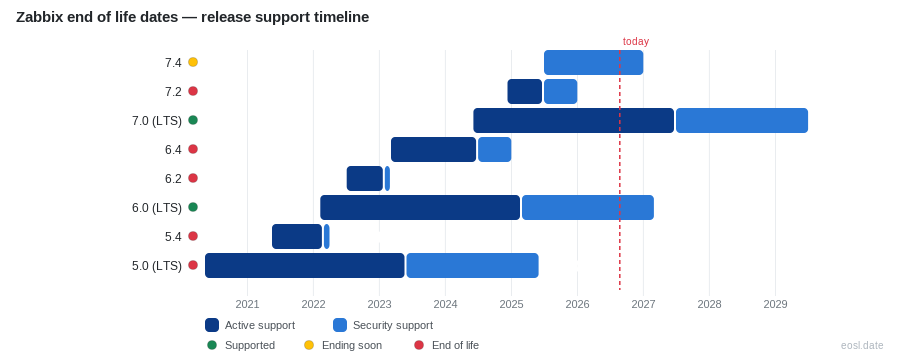
Currently Supported Zabbix Releases - Active EOS/EOSL Support (3)
| Release | Released | Security Support | Active Support | Latest | LTS |
|---|---|---|---|---|---|
| 8.0 (LTS) | (1 week and 1 day ago) | (in 5 years) | (in 3 years) | 8.0.0 (1 week and 1 day ago) | LTS |
| 7.4 | (1 year and 4 months ago) | (in 6 months) | (1 day ago) | 7.4.16 (3 weeks and 3 days ago) | - |
| 7.0 (LTS) | (2 years and 5 months ago) | (in 2 years and 7 months) | (in 7 months) | 7.0.32 (3 weeks and 3 days ago) | LTS |
Zabbix Releases Nearing End of Life - Support Ending Soon (1)
| Release | Released | Security Support | Active Support | Latest | LTS |
|---|---|---|---|---|---|
| 6.0 (LTS) | (4 years and 9 months ago) | (in 3 months) | (1 year and 8 months ago) | 6.0.49 (3 weeks and 3 days ago) | LTS |
Zabbix End of Life (EOL) Releases - No Longer Supported (6)
| Release | Released | Security Support | Active Support | Latest | LTS |
|---|---|---|---|---|---|
| 7.2 | (1 year and 11 months ago) | (10 months ago) | (1 year and 4 months ago) | 7.2.15 (10 months ago) | - |
| 6.4 | (3 years and 8 months ago) | (1 year and 10 months ago) | (2 years and 4 months ago) | 6.4.21 (1 year and 9 months ago) | - |
| 6.2 | (4 years and 4 months ago) | (3 years and 8 months ago) | (3 years and 9 months ago) | 6.2.9 (3 years and 7 months ago) | - |
| 5.4 | (5 years and 5 months ago) | (4 years and 7 months ago) | (4 years and 8 months ago) | 5.4.12 (4 years and 7 months ago) | - |
| 5.0 (LTS) | (6 years and 6 months ago) | (1 year and 5 months ago) | (3 years and 5 months ago) | 5.0.47 (1 year and 5 months ago) | LTS |
| 4.0 (LTS) | (8 years and 1 month ago) | (3 years ago) | (5 years ago) | 4.0.50 (3 years ago) | LTS |
Zabbix is an open source platform, and if your open-source monitoring stack still runs an older release, the Zabbix end of life calendar decides when your servers, proxies and agents stop receiving patches. This guide lists every release date and support cutoff, so you can see which versions of your IT infrastructure are covered today and which ones are already unsupported. It also explains the support phases and how to plan an upgrade, so the cloud services, virtual machines and physical servers Zabbix watches stay covered.
Zabbix End of Life Dates for Every Release
All Zabbix releases move through the same stages, and the table below shows where each version of the Zabbix releases sits as of 27 October 2026. The EOL status of a release depends on its type, because LTS lines are kept for years while standard lines are retired within months. Dates come from the official Zabbix policy and from the endoflife.date tracker, so a few entries differ by a day or two between sources.
| Version | Type | Release date | End of full support | End of limited support | Status |
|---|---|---|---|---|---|
| Zabbix 7.4 | Standard | 30 Jun 2025 | When 8.0 LTS ships | 31 Mar 2027 | Supported |
| Zabbix 7.2 | Standard | 10 Dec 2024 | 30 Jun 2025 | 31 Dec 2025 | Ended |
| Zabbix 7.0 LTS | LTS | 4 Jun 2024 | 30 Jun 2027 | 30 Jun 2029 | Supported |
| Zabbix 6.4 | Standard | 6 Mar 2023 | 30 Jun 2024 | 31 Dec 2024 | Ended |
| Zabbix 6.2 | Standard | 4 Jul 2022 | 31 Jan 2023 | 28 Feb 2023 | Ended |
| Zabbix 6.0 LTS | LTS | 8 Feb 2022 | 28 Feb 2025 | 28 Feb 2027 | Limited support only |
| Zabbix 5.4 | Standard | 17 May 2021 | 28 Feb 2022 | 31 Mar 2022 | Ended |
| Zabbix 5.0 LTS | LTS | 11 May 2020 | 31 May 2023 | 31 May 2025 | Ended |
| Zabbix 4.0 LTS | LTS | 1 Oct 2018 | 31 Oct 2021 | 31 Oct 2023 | Unsupported |
In short, only Zabbix 7.4, 7.0 and 6.0 still receive any maintenance, and the 6.0 line ends in about four months. Every other release is deprecated, so plan migration work now rather than after the cutoff.
Zabbix 7.4, 7.0 and 6.0: Supported Releases
Zabbix 7.0 LTS is the safest choice today because its security support runs until 30 June 2029 and its active support continues until 30 June 2027. Zabbix 7.4 is a standard release, so it only stays in full support until the next LTS arrives, then drops to critical patches. Zabbix 6.0 is already past its full-support window, so it gets critical fixes only until 28 February 2027.
- Zabbix 7.0 LTS: full support until 30 June 2027, limited support until 30 June 2029.
- Zabbix 6.0 LTS: limited support only, ending 28 February 2027.
- Zabbix 7.4: the newest standard line, with its limited support ending 31 March 2027.
Zabbix 8.0 LTS Release Date and Later Versions
Zabbix 8.0 LTS is the next long-term line, and every planned release carries a target quarter. The official policy lists its release for Q4 2026, with full support until Q4 2029 and limited support until Q4 2031, and the roadmap points to November 2026. The latest release notes already cover a release candidate, 8.0.0rc2, published on 21 October 2026. After that, the roadmap lists Zabbix 8.2 for September 2027, Zabbix 8.4 for March 2028 and Zabbix 9.0 LTS for September 2028.
Older Zabbix 5.0 and 4.0 Releases
Zabbix 5.0 LTS stopped receiving fixes on 31 May 2025, and Zabbix 4.0 LTS stopped on 31 October 2023. Both are long out of date, every version number is frozen, and the final builds are 5.0.47 and 4.0.50. Any server still on Zabbix 5.0 or Zabbix 4.0 should be treated as a retired system with known, unpatched flaws.
- Zabbix 5.0 and Zabbix 5.4: final builds 5.0.47 and 5.4.12.
- Zabbix 4.0: final build 4.0.50, last released in October 2023.
- Zabbix 5.0 and Zabbix 4.0 packages remain archived but are retired.
Zabbix Life Cycle: LTS Release and Standard Release Phases
The Zabbix life cycle is built around two tracks. A lifecycle that moves in predictable steps lets you schedule upgrades years in advance, which is the whole point of the policy. An LTS release arrives about every 1.5 years, and a standard release arrives roughly every six months, with two standard releases between each pair of LTS versions. Standard lines also bring feature updates sooner, while LTS lines trade speed for stability.
Full Support and Limited Support Explained
During full support a release gets new features, bug fixes and security patches. Limited support narrows that to critical fixes and security fixes, so you receive critical and security issues only, and no new functionality.
- LTS: about 1.5 years in development, 3 years of full support, then 2 years of limited support, so five years of coverage in total.
- Standard: 6 months of development, 6 months of full support, then a limited-support window that lasts until the next standard release.
Long-Term Support and Release Cadence
The release cadence is deliberately steady, and it is what fixes each release's cutoff date in advance. Long-term support means an LTS line is the one to pick for production monitoring, while standard lines suit teams that upgrade often and want newer features. After each release, Zabbix updates all platforms within 24 hours.
What End-of-Support Means for Deprecated Zabbix Versions
When a release reaches end-of-support, Zabbix stops publishing critical and security fixes for it, the build becomes deprecated and stays downloadable only for the 12-month retention window, and your maintenance work shifts to you. The practical risk is security: a known vulnerability in an old frontend or server stays open, and new operating system releases may no longer be tested against your build. If you run Zabbix on regulated systems, an unsupported monitoring layer can also trip compliance checks, so treat the date as a hard deadline and budget for the downtime of an upgrade window.
This is the point where a Zabbix end of life date stops being a calendar entry and becomes an operational risk, because nobody ships you a patch after it passes.
Retention Period and Security Exceptions
The policy sets out a few rules for deprecated versions:
- Retention period: deprecated releases stay downloadable for 12 months after the cutoff, then they are removed permanently.
- Security exceptions: critical patches for a deprecated release may still be issued case by case.
- Policy enforcement: support for retired platforms ends unless a paid contract covers them, and support for a new OS starts in development releases only.
- Quarterly OS review: Zabbix reviews compatibility with new operating systems and vendor timelines every quarter, and drops systems that are no longer supported.
When a Support Contract Is the Only Option
If you cannot move off an old release in time, a support contract is the only route to continued help. Paid support from Zabbix covers platforms that the public policy no longer does, and professional services can handle the migration itself.
Zabbix Release Policy: Supported Systems and Distribution
The Zabbix release policy also decides which platforms get a given version. Supported systems are enterprise-grade operating systems such as RHEL, Debian, Ubuntu LTS, Oracle Linux, SUSE, AlmaLinux and Rocky Linux. The supported platforms list for agents is broader and covers FreeBSD, OpenBSD, Windows, Solaris and HP-UX. The architecture support table below shows how each component is covered.
| Component | Platforms | Notes |
|---|---|---|
| Zabbix server | RHEL, Debian, Ubuntu LTS, SUSE | MySQL, PostgreSQL or TimescaleDB database backends |
| Zabbix proxy | Same Linux systems as the server | SNMP, network and agent collection |
| Zabbix agent | Linux, Windows, FreeBSD, OpenBSD | Most widely available binaries |
| Zabbix agent 2 | Linux and Windows | Plugin-based monitoring of Docker and databases |
| Zabbix agent (legacy platforms) | Solaris, HP-UX, AIX | Agent only; server and proxy are excluded |
Each component and package type below follows the same support window as its release: Zabbix agents run on endpoints, the Zabbix server and Zabbix proxy collect and process data, and the Zabbix frontend serves the web interface. Zabbix packages ship as .deb and .rpm files, and the Zabbix appliance is a pre-configured virtual machine. Containers run on Docker or Podman, with images built for several CPU architectures, and cloud images exist for AWS and Azure. Orchestrated deployments also work on Kubernetes through the certified OpenShift operator.
Delivery is wide: the main distribution channels are zabbix.com, the CDN, the package repositories, Docker Hub and the Red Hat catalog, and most components appear the same day as the release. Platforms such as Solaris, HP-UX and AIX only support agents, so a mixed estate needs a plan for the older hosts.
Upgrade Planning Before a Zabbix Version Reaches EOL
Start by checking what you run. Use zabbix_server -V on the server host, compare the number with the table above, and then pick the shortest safe upgrade path. The Zabbix roadmap shows what is coming in 8.0 and beyond, and it helps you decide whether to jump to a current LTS or wait for the next one.
These changes are the main reasons to move from an older line to a supported LTS:
- Zabbix 7.0 LTS added synthetic web monitoring, proxy high availability and load balancing, and native multi-factor authentication.
- Zabbix 7.0 LTS replaced synchronous pollers with asynchronous ones, which improved performance and scalability for agent, SNMP and HTTP checks.
- Zabbix 7.0 LTS introduced new templates and dashboard widgets for cloud and network vendors, plus a history.push API method.
- Zabbix 8.0 LTS adds OpenTelemetry-based observability, with log-based and tracing views, plus a refreshed set of templates.
Read the Release Notes First
Before you upgrade, read the release notes and the installation and upgrade notes for your target build. Each entry carries a ZBXNEXT or ZBX ticket, and the notes also list bug fixes, so you can search the changelog for anything that touches your own templates, dashboards or API integrations. A staged test on a copy of your database will show how long the schema change takes before the real window.
The Zabbix 8.0.0rc2 notes show what you inherit when you leave a retired line for the new LTS. Each line is a ZBXNEXT ticket, tagged with the part of the product it touches:
- ZBXNEXT-10083: OpenTelemetry trace visualization in the frontend, a new dashboard view for tracing data.
- ZBXNEXT-10084: an OpenTelemetry collector added to the Zabbix proxy, with an API for the APM data source (ZBXNEXT-10680).
- ZBXNEXT-10469: API access turned off by default for all user roles, so existing API scripts need an explicit permission.
- ZBXNEXT-10814: public access removed from every hostinterface API method except get.
- ZBXNEXT-10334: no API methods for users whose role has an empty allow list.
- ZBXNEXT-10837 and ZBXNEXT-10625: updated ClickHouse and Elasticsearch support, plus MySQL and PostgreSQL database compatibility reviews for the server.
- ZBXNEXT-10111 and ZBXNEXT-10722: SNMP interface changes, including a Retries field and macro support for the maximum repetition count, which help SNMP polling performance.
- ZBXNEXT-10154 and ZBXNEXT-10316: refreshed Linux and Windows templates for the Zabbix agent, with new dashboard layouts.
- ZBXNEXT-10451: a pprof profiler for Zabbix agent 2, useful for performance troubleshooting.
- ZBXNEXT-9185: a permission-based visibility model for proxies and proxy groups, which tightens authentication and role-based access.
- ZBXNEXT-10550 and ZBXNEXT-10808: new OpenTelemetry templates and a multi-cloud cost dashboard template.
Moving from a retired release to 7.0 or 8.0 means reading the template entries closely, because a template update can change item keys and break custom triggers. Check the API entries too: an integration that worked on Zabbix 7.0 may need a role change on Zabbix 8.0, and a network device template can behave differently after an SNMP change. Test authentication roles and API tokens in a staging copy before you move production. List every script that calls the API, from backup jobs to ticketing hooks, and run each against the staging API first. Since the API is off by default for new roles, grant each role only the API methods its script needs, and re-test the API after the upgrade. Compare versions with the changelog search so you see the delta between your current build and the target one.