Silverstripe CMS End of Life (EOL) Dates and End of Support (EOS) Dates
Silverstripe CMS end of life (EOL) and end of support (EOS) dates: 15 Silverstripe CMS versions have reached EOL, including Silverstripe CMS 6.1 (EOL date: Oct 18, 2026) — no longer receiving security updates or patches. Silverstripe CMS 6.3.0 is the current supported release, with support through Oct 31, 2027 — 3 versions in active support. Also see CakePHP end of support dates for related end-of-life information.
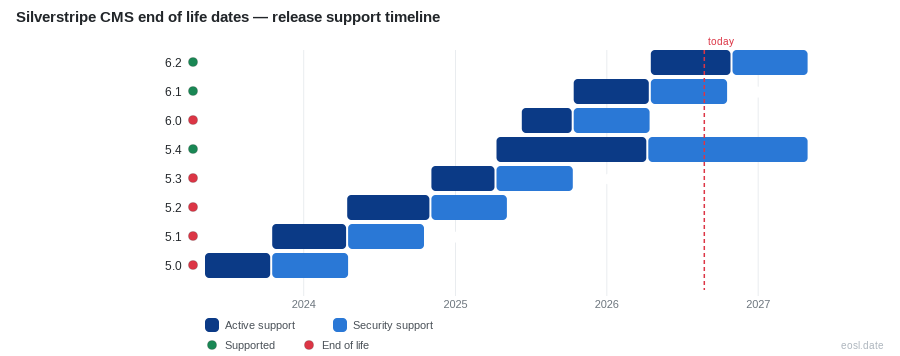
Currently Supported Silverstripe CMS Releases - Active EOS/EOSL Support (3)
| Release | Released | Security Support | Active Development | Latest |
|---|---|---|---|---|
| 6.3 | (2 weeks and 1 day ago) | (in 11 months) | (in 5 months) | 6.3.0 (2 weeks and 1 day ago) |
| 6.2 | (6 months ago) | (in 5 months) | (2 weeks and 1 day ago) | 6.2.0 (6 months ago) |
| 5.4 | (1 year and 7 months ago) | (in 5 months) | (7 months ago) | 5.4.0 (1 year and 7 months ago) |
Silverstripe CMS End of Life (EOL) Releases - No Longer Supported (15)
| Release | Released | Security Support | Active Development | Latest |
|---|---|---|---|---|
| 6.1 | (1 year ago) | (3 weeks and 4 days ago) | (6 months ago) | 6.1.0 (1 year ago) |
| 6.0 | (1 year and 5 months ago) | (6 months ago) | (1 year ago) | 6.0.0 (1 year and 5 months ago) |
| 5.3 | (2 years ago) | (1 year and 1 month ago) | (1 year and 7 months ago) | 5.3.0 (2 years ago) |
| 5.2 | (2 years and 6 months ago) | (1 year and 6 months ago) | (2 years ago) | 5.2.0 (2 years and 6 months ago) |
| 5.1 | (3 years ago) | (2 years ago) | (2 years and 6 months ago) | 5.1.0 (3 years ago) |
| 5.0 | (3 years and 6 months ago) | (2 years and 6 months ago) | (3 years ago) | 5.0.0 (3 years and 6 months ago) |
| 4.13 | (3 years and 6 months ago) | (1 year and 5 months ago) | (2 years and 6 months ago) | 4.13.0 (3 years and 6 months ago) |
| 4.12 | (3 years and 10 months ago) | (3 years ago) | (3 years and 6 months ago) | 4.12.1 (3 years and 10 months ago) |
| 4.11 | (4 years and 4 months ago) | (3 years and 5 months ago) | (3 years and 10 months ago) | 4.11.2 (4 years and 4 months ago) |
| 4.10 | (4 years and 9 months ago) | (3 years and 10 months ago) | (4 years and 4 months ago) | 4.10.0 (4 years and 9 months ago) |
| 3.7 | (8 years and 5 months ago) | (5 years and 1 month ago) | — | 3.7.5 (6 years and 3 months ago) |
| 3.1 | (13 years and 1 month ago) | (9 years and 10 months ago) | — | 3.1.21 (9 years and 11 months ago) |
| 3.0 | (14 years and 4 months ago) | (11 years and 1 month ago) | — | 3.0.14 (11 years and 5 months ago) |
| 2.4 | (15 years and 9 months ago) | (11 years and 7 months ago) | — | 2.4.13 (13 years and 1 month ago) |
| 2.3 | (17 years and 8 months ago) | — | — | 2.3.13 (15 years ago) |
Running a site on Silverstripe CMS means knowing when your version stops getting help, so this guide explains Silverstripe CMS end of life in plain terms: what you lose, how the phases of support work, and how to move before the open source project retires your release. The phase you are in decides how urgent your upgrade really is.
Silverstripe CMS End of Life: What Losing Support Really Means
When a version reaches end of life, the core team stops working on it. The official documentation for retired versions says it plainly: the version "will not receive any additional bug fixes or documentation updates." Your site keeps running, but the framework underneath it is frozen.
In practice, retirement means four things stop at once:
- Bug fixes for the core and the modules built on it
- Security patches for newly reported flaws
- Updates to the documentation you rely on when something breaks
- Any new features, which usually stop well before retirement
One detail surprises many site owners: old releases are not deleted. The team confirmed that when a version reaches end of life, unsupported releases stay available on GitHub and Packagist, so a Composer install of a retired version will still succeed. That convenience is a trap, because a working install is not a supported one. The wider community also moves on, and every release announcement points readers toward the current line.
Silverstripe 2.4 End-of-Life: Lessons for Every Site
The clearest case study is SilverStripe 2.4, which was retired on 31 March, capping the first open source distribution of the CMS. The team's own announcement asked owners to move to SilverStripe 3, and the reasons it gave still apply to any retirement. Content authors got a more streamlined interface. Developers got a safer, faster ORM and a rebuilt template language. The inventory of modules for the newer line dwarfed the old one by nearly ten to one.
Why Legacy Code Still Needs an Upgrade
A common objection is "my site never changes, so why bother?" The announcement answered with a vacant-house comparison: an untouched site still ages. Once a version is retired, nobody patches it, so your Legacy code is on its own, so hackers keep building tools against flaws that will never be fixed. Browsers keep changing too. Your host may also retire an old sunsetted version of PHP, and the moment it does, a frozen site can stop working overnight. Each year you wait, an upgrade gets harder and experienced developers of the old code get scarcer.
Preventative Care Versus Disaster Recovery Costs
The jump from 2.4 to 3.1 was described as far from seamless, yet the costs arrive either way. Staying on a retired release means paying for an emergency upgrade after a breach, while a planned move happens when the version still gets security fixes. That is preventative care versus disaster recovery. Community-built upgrade scripts softened the move then, and the same logic holds for every retired version since.
When CMS 4 Becomes an Unsupported Release
The team published its plan for CMS 4 in the announcement for 4.13.0, the last planned minor release of that line. It was built as a launch pad for CMS 5 and a clear target for later patches. The same release policy logic applies to every release line: the support window closes when the next major version ships, as set out in the major release policy. Once CMS 6 arrives, an older line stops receiving fixes in any form and becomes an unsupported release, including for its supported modules. For exact dates, check the support timeline table on the official site rather than relying on a third-party summary.
The Bug and Security Fixes Phase
Right after the last minor release, a line enters its bug and security fixes phase. In practical terms, no new features land, and individual modules receive patch releases that carry bug and security fixes. Your site is still in good shape here, because security fixes keep coming and nothing is being removed.
Final Phase: Reading the Changelog
About a year later, the line drops to security fixes only: bug fixes stop, and only high-impact vulnerability patches ship. This is your last comfortable window before retirement. After that, the line reaches end-of-life and is not supported in any form. Skim each changelog to see what the line no longer receives.
Upgrade Process: Moving to CMS 5
The 4.13 release added better handling of deprecation warnings, which is the foundation of a calm upgrade process. A sensible order looks like this:
- Update to the final minor release of your current line.
- Fix every deprecation warning it reports.
- Check each module for a compatible version.
- Upgrade through Composer on a staging copy, never on live.
Start by checking what you run now:
composer show silverstripe/frameworkIf you have no in-house developer, talk to your digital agency or browse the professional partner directory and filter by location.
Sunsetted Version Risks: Security Vulnerabilities, PHP and MySQL
The biggest risk of staying on retired software is that security vulnerabilities keep being found while your release gets no security patch. Past security releases show how real this is: one 4.4 patch closed CVE-2019-12246, a denial-of-service issue in the flush and development URL tools, and it also added a confirmation step to protect dev/* URLs. Other vulnerabilities fixed in the same era included cross-site request forgery. A retired version never receives a fix like these. Retirement also removes code over time, because a deprecation marks the features the next version will drop. Your web server logs may show nothing wrong until the day an attacker finds an unpatched route.
Server Requirements and PHP Version
Retirement of the platform underneath your site matters as much as the CMS itself. The server requirements change release to release: MySQL 5.5 reached end of life in December 2018, so MySQL 5.5 support was dropped in 4.4, which asks for 5.6 or newer. The same applies to PHP. Community advice has been to move to at least PHP 8.0, since 7.3 and 7.4 had already retired, and any current PHP version choice should match what your CMS line supports.
Migration Tasks and Developer Help
Getting off a retired line takes migration work, not just a version bump. Releases such as 4.4 introduced optional migration tasks for asset URLs and thumbnails, run from the command line:
vendor/bin/sake dev/tasks/MigrateFileTaskTreat each migration as a rehearsal: run it on a copy, check your files still resolve, then repeat it on live. Ask a developer to confirm that the migration plan matches your hosting. Once your data and files move cleanly, your site is on a supported line again and the end of life clock restarts in your favour.