Yarn End of Life (EOL) Dates and End of Support (EOS) Dates
Yarn end of life (EOL) and end of support (EOS) dates: 2 Yarn versions have reached EOL, including Yarn 3 (EOL date: Dec 04, 2024) — no longer receiving security updates or patches. Yarn 4.18.1 is the current supported release — 2 versions in active support. Also see Bazel EOSL information for related end-of-life information.
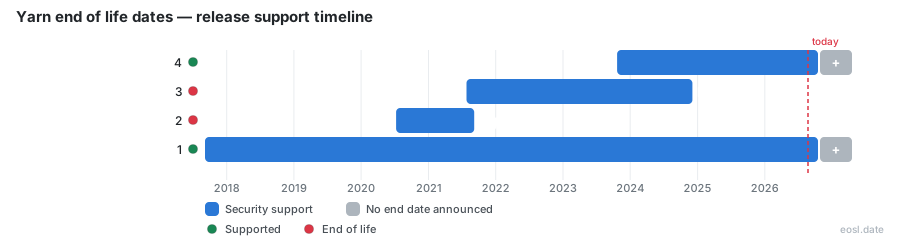
Currently Supported Yarn Releases - Active EOS/EOSL Support (2)
Yarn End of Life (EOL) Releases - No Longer Supported (2)
If you are checking yarn end of life status before your next release, the short answer is that this package manager for the JavaScript ecosystem has no single cutoff date. Facebook and Meta engineers helped launch it in 2016, but the project is now independent, and each major line has its own security story. Plug and Play, plugins and the newest release all belong to Yarn 2 and later, so the real question is which line your project runs today.
Yarn End of Life Status at a Glance
The most useful summary tracks each release line's latest version and its security support. The active line is Yarn 4, with 4.18.1 published on 24 September 2026. Yarn 3 stopped receiving fixes after 3.8.7 in December 2024, Yarn 2 stopped at 2.4.3 in September 2021, and the original line carries on with only rare patches after 1.22.22. The source for the active line lives in the Berry repository on GitHub, where issues and release notes are public, and the older repository on GitHub is where the maintenance-mode status was discussed.
| Release line | First released | Security support | Latest version |
|---|---|---|---|
| Yarn 4 | 22 October 2023 | Yes | 4.18.1 |
| Yarn 3 | 26 July 2021 | Ended December 2024 | 3.8.7 |
| Yarn 2 | 9 July 2020 | Ended September 2021 | 2.4.3 |
| Yarn 1 | 5 September 2017 | Critical fixes only | 1.22.22 |
Treat any row marked as ended as retired for planning purposes. Running a supported release means Yarn 4 for new work, because it is the only line still gaining improvements.
Lifecycle policy and release dates
Yarn's lifecycle policy is not clearly defined on its website, and the dates above come from release history on GitHub plus third-party trackers. For the original line there is no end-of-life date published at all, so "how long until it stops" has no official answer. Plan around the behavior of the project, not a calendar entry. Every JavaScript team that depends on a frozen tool should write down its own retirement date instead.
Yarn Classic in Maintenance Mode
Yarn Classic is the 1.x series that most older projects still use. It entered maintenance mode in January 2020, which means no new features and only critical and security fixes. Development continues on the 2+ line, so the old code base is maintained mostly as a courtesy to existing users, and your project should not count on bug reports being answered quickly.
The practical effect is a slow drift. Each month, Yarn Classic falls a little further behind Node.js releases, registry changes and the way modern dependencies are published, and nobody is committed to closing that gap. Projects with many workspaces feel it first, because resolving shared dependencies across workspaces is where the older installer is weakest, and every extra workspace multiplies the number of dependencies to patch by hand.
What still gets patched
Only fixes required for vulnerabilities are patched in the old branch. Ergonomic bugs, performance work and tooling requests are redirected to the newer line. If a security fix lands upstream in a library, you should not assume Yarn Classic will ship a wrapper for it, which is the root of the problem described below.
Yarn Berry Versions and Release History
The rewrite started with Yarn 2 in 2020 and is code-named Berry. It was written in TypeScript, and it brought a full test suite, plugins, and a new installation strategy. A changelog entry exists for every release, and only the Yarn 4 entries still describe supported behavior, and the pattern is consistent: major versions rename defaults and drop old runtimes, while minor releases mostly add commands and fix bugs.
Yarn 4 and Node.js compatibility
Yarn 4 dropped support for Node.js versions below 18.12 and changed several defaults. The compressionLevel setting now defaults to 0, and yarn workspaces foreach asks for an explicit flag. These breaking changes are documented in the changelog, so read it before an upgrade. Compatibility with TypeScript projects is strong, since type definitions ship with the packages, so TypeScript teams lose nothing by moving from an unsupported line to Yarn 4.
Yarn 3 and Yarn 2 release history
Yarn 3 refined Plug and Play and added the offline workflow; Yarn 2 introduced it. If you still run either one, you are on a line with no more security fixes, and the least painful route is to jump to Yarn 4 using yarn set version stable instead of stepping through every release.
Transitive CVEs While Support Is Frozen
The real danger of staying on the old line is not Yarn itself. It is that Yarn Classic cannot update one nested package without touching the rest of the lockfile, so a patched dependency deep in your tree can stay vulnerable for months. A scanner reports a CVE, you run an audit, and the tool has no clean way to apply the fix. Compromised packages are harder to remove under those conditions, because the usual answer is a broad manual override that can break CI.
- Run
yarn auditin CI and read which vulnerabilities are transitive. - Pin a safe version in
resolutions, then remove the entry once the parent library catches up. - Regenerate the lockfile in a separate commit so you can revert it cleanly.
What surgical updates look like
A surgical update upgrades one dependency and nothing else. Berry supports it through yarn up with a specific package name, and pnpm and Bun have their own ways of doing the same. Classic can only approximate it with yarn upgrade followed by a version, which often moves neighbors in the lockfile too.
Migrating From Yarn 1.x to Other Package Managers
You have three realistic paths when you migrate away from the old line: the newest Yarn, pnpm, or Bun. Whichever you pick, the migration is easier on a branch where CI already passes, because install behavior and the lockfile format change. Many teams also use npm as a baseline to compare resolution results, since npm is available everywhere. Changing the tool for dozens of dependencies is mostly mechanical, but budget time for scripts that assume a node_modules folder, because each install can behave differently once node_modules disappears, and any tool that reads files straight out of node_modules will need a configuration change.
- Record the current version with
yarn --versionand commit your lockfile. - Enable Corepack so the repository declares its own package manager.
- Run the new install command, then run install again on a clean clone to confirm it works, and review the diff in dependencies.
- Re-run tests, then your build and CI pipeline.
Moving to Yarn Berry
Staying in the Yarn family keeps your commands and workspaces familiar. It also keeps the JavaScript toolchain you already know. Berry reads most existing manifests, and you can set nodeLinker: node-modules if your tools are not ready for Plug and Play yet. This is the lowest-risk first step for a large monorepo.
Choosing pnpm
pnpm stores one copy of each package on disk and links it into every project, which saves space and makes every install fast, even in a repository with many workspaces and thousands of dependencies. Its audit tooling can update a single nested package, which closes the transitive gap noted earlier.
Choosing Bun
Bun bundles a runtime with a very fast installer, but its lockfile and update options differ from Yarn's, so verify that your CI images and registry settings behave the same way before you commit to it.
Plug'n'Play Features Beyond the Frozen Branch
These features exist only on the lines that still receive fixes, which is a large part of why staying on the retired branch costs you. Yarn 2 and later replace the node_modules folder with a single .pnp.cjs resolver file by default. Without node_modules, Plug'n'Play made applications start faster and removed phantom dependencies, though some JavaScript tools needed updates before they worked with it, and some editors needed a TypeScript SDK patch before type checking worked again. Compatibility in the ecosystem has improved, and a node-modules linker remains available as a fallback.
Workspaces and zero-installs
Workspaces let a monorepo hold many packages that share one lockfile and install in a single pass. Each of the workspaces can declare its own dependencies, and the workspaces protocol links them together. Zero-installs go one step further: you commit the cache, so a fresh checkout needs no download. Both features are available on Yarn 4, so they are part of what you gain by leaving the old branch, and both work best when every workspace agrees on one version of shared dependencies.
Offline cache and constraints
The offline cache stores each downloaded package as a single archive file, which keeps the cache compact and easy to inspect. Constraints let you enforce rules across workspaces, such as requiring the same TypeScript version in every manifest. Together they make a large repository more predictable on a supported release.
Protocols and release workflow
Protocols tell Yarn how to resolve a package, for example from a Git repository with the git protocol or as a patched copy with patch. Both are Yarn 4 features you gain over the retired branch. The release workflow upgrades dependent workspaces automatically when a root package changes version.
How Plugins and npm Compare Once Classic Is Frozen
Most Yarn features are implemented as plugins, including yarn add and yarn install. Plugins can add resolvers, fetchers, linkers and commands, so teams can extend the tool without waiting for upstream. By contrast, npm ships a fixed feature set, and unlike pnpm or Bun it has no plugin system, and relies on the public npm registry, though its workspaces support has matured, and npm remains the default that every Node.js installer ships with. Now that Classic is retired, choose between staying on Yarn 4 and moving to npm on extensibility and the cache strategy you want, not on speed alone.
Checking Your Yarn Version Against Its End-of-Life Status
Open a terminal in your project and run yarn --version. A result starting with 1 means your project is on the retired original branch; 2 or 3 means a line without fixes; 4 is the line that still receives them. In a repository that uses Corepack, check the packageManager field in package.json as well, because it decides which version actually runs.
Reading yarn --version output
If the version is older than the latest in your line, upgrade within it first, then plan the jump to Yarn 4 with yarn set version stable. Cached registry settings in .yarnrc.yml may need to be reviewed afterward, since the Berry configuration file replaces the older .yarnrc.