Squid End of Life (EOL) Dates and End of Support (EOS) Dates
Squid end of life (EOL) and end of support (EOS) dates: 13 Squid versions have reached EOL, including Squid 6 (EOL date: Jul 10, 2025) — no longer receiving security updates or patches. Squid 7.8 is the current supported release. Also see Chef Supermarket EOSL dates for related end-of-life information.
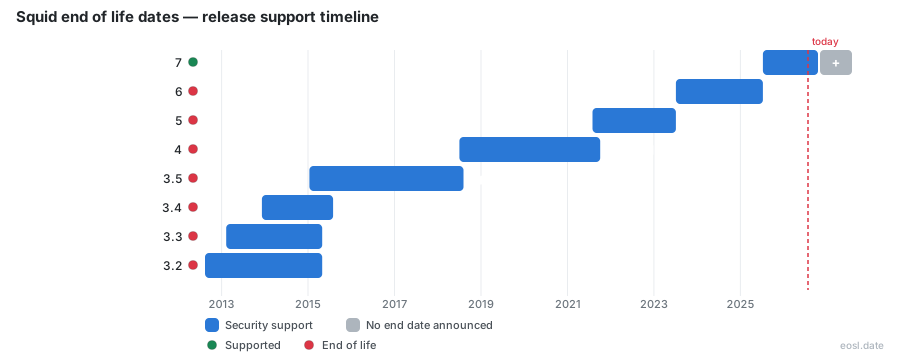
Currently Supported Squid Releases - Active EOS/EOSL Support (1)
| Release | Released | Security Support | Latest |
|---|---|---|---|
| 7 | (1 year and 4 months ago) | Active | 7.8 (3 weeks and 1 day ago) |
Squid End of Life (EOL) Releases - No Longer Supported (13)
| Release | Released | Security Support | Latest |
|---|---|---|---|
| 6 | (3 years and 4 months ago) | (1 year and 4 months ago) | 6.14 (1 year and 4 months ago) |
| 5 | (5 years and 3 months ago) | (3 years and 4 months ago) | 5.9 (3 years and 6 months ago) |
| 4 | (8 years and 4 months ago) | (5 years and 1 month ago) | 4.17 (5 years and 1 month ago) |
| 3.5 | (11 years and 10 months ago) | (8 years and 3 months ago) | 3.5.28 (8 years and 4 months ago) |
| 3.4 | (12 years and 11 months ago) | (11 years and 3 months ago) | 3.4.14 (11 years and 3 months ago) |
| 3.3 | (13 years and 9 months ago) | (11 years and 6 months ago) | 3.3.14 (11 years and 6 months ago) |
| 3.2 | (14 years and 3 months ago) | (11 years and 6 months ago) | 3.2.14 (11 years and 6 months ago) |
| 3.1 | (16 years and 7 months ago) | (13 years and 10 months ago) | 3.1.23 (13 years and 10 months ago) |
| 2.7 | (18 years and 5 months ago) | (16 years and 8 months ago) | 2.7.9 (16 years and 8 months ago) |
| 3.0 | (18 years and 11 months ago) | (15 years and 2 months ago) | 3.0.26 (15 years and 2 months ago) |
| 2.6 | (20 years and 4 months ago) | (16 years and 7 months ago) | 2.6.24 (16 years and 7 months ago) |
| 2.5 | (24 years and 1 month ago) | (20 years and 6 months ago) | 2.5.14 (20 years and 6 months ago) |
| 2.4 | (25 years and 8 months ago) | (24 years and 4 months ago) | 2.4.7 (24 years and 4 months ago) |
If your Squid proxy runs a branch whose maintainers no longer publish fixes, you are dealing with Squid end of life: the software keeps serving traffic, but every new flaw stays open. This guide shows how to confirm where your branch stands, what the security exposure looks like, and how to verify the service after you upgrade.
Squid End of Life: What Ended Support Means for You
Each major branch receives bug fixes and security maintenance only while the project supports it. Once support ended for a branch, no new patch, advisory backport or bug fix arrives for it. The Squid 6 branch reached that point in July 2025, and distributions such as Azure Linux have since discussed moving from 6.13 to 7.5.
A vulnerability scanner makes the consequence visible. The Nessus plugin for CVE-2016-4051 reports a high CVSS v3 base score of 8.8 (medium, 6.8, under CVSS v2) and a patch publication date of 20 April 2016. Treat that report as a signal, not a verdict: the plugin reads the version number from the banner, and a vendor-supplied patch does not change the banner, so a fixed server can still appear as a false positive. The reverse also holds, because a clean scan on an unsupported branch only means nobody has published the next flaw yet. Over time, each unpatched bug raises the risk of running a web-facing proxy, and the severity rating attached to every new vulnerability decides how urgent your response is. Published vulnerabilities give anyone the details needed to write an exploit and attack the proxy that carries your HTTP and HTTPS traffic.
Checking Your Squid Version and Stable Release Branch
Start by identifying which stable release branch you run, because the 2.x, 3.x, 4.x, 5.x and 6.x lines are each handled separately in every advisory. The project publishes its stable releases and release notes on the official download pages, and the newest version is the only line that should be treated as fully supported.
Run squid -v to Read the Build Configuration
Run squid -v on the server. The output prints the version number and the build configuration flags, which matter as much as the number itself. The ESI advisory shows why: in the default configuration of every release from 3.0 to 6.9, ESI is enabled, while the default build configuration since 6.10 disables it. A build is vulnerable if the output includes --enable-esi, and safe from that bug if it includes --disable-esi. Packagers often change these defaults, so read the flags rather than assuming. If you compile from sources, keep the configure line you used in your notes.
Affected Versions and Patched Versions Explained
Every advisory lists affected versions, patched versions and a "fixed in version" line. Anything older than the oldest tested release should be assumed vulnerable, and a prepackaged version needs a check with whoever built it. For URN handling, SQUID-2025:1 lists releases up to 6.3 as affected and names 6.4 as the fix.
Security Risks of an Unsupported Squid Cache
An unsupported Squid cache sits between your clients and the internet, so it handles credentials, session data and other confidential data in memory. A flaw there is not a minor bug, because an attacker who exploits it can reach what passes through the proxy. Input validation errors are the usual root cause across the advisories below.
Buffer Overflow and Remote Code Execution Flaws
The URN advisory, CVE-2025-54574, describes a heap buffer overflow that lets a remote server deliver up to 4KB of heap memory to the client. The older cachemgr.cgi issue is a buffer overflow that an unauthenticated remote attacker can use for remote code execution or to run arbitrary code. Each fix shipped as a security update for supported branches only, and the URN workaround is to disable URN access with acl URN proto URN followed by http_access deny URN.
Denial of Service Through ESI on a Reverse Proxy
The SQUID-2024:4 advisory covers denial of service bugs in how Squid parses ESI tags, such as ESI when, assign, include and try. They matter only when Squid runs as a reverse proxy with ESI built in, and a trusted server can abuse them to hurt every client using the proxy. Patch the build, or rebuild without the feature. Squid 7.0 carries the fix, and vendors can backport it as a vendor-supplied patch.
Upgrade Path for an Unsupported Squid Proxy
Moving off a retired branch is the real fix; a workaround only buys time. Plan the upgrade to the latest supported release, test your configuration against it in a lab, and install it during a quiet window. Doing this before the next advisory beats scrambling after it, and it ends the Squid end of life exposure instead of managing it.
Packages From Your Binary Package Vendor
On Linux, most teams get Squid as packages from a distribution, such as a CentOS release. For installation and upgrade support on a binary build, your first contact is your binary package vendor, and the patch archives on the project site help only when you compile yourself. If the vendor ships no newer package, build from sources or switch to a repository that does.
Post-Upgrade Checks for Your Squid Web Proxy
After the new package is in place, debug the setup before users notice. Read the log, confirm the listening port for HTTPS clients is the same port as before, and make sure each ACL still matches. A source ACL that worked on an older release should be tested with a real client, since a typo in one rule can open or block everything. Start with the access.log file and the cache log: a log that stays quiet after a restart is as suspicious as a log full of errors. Compare the log timestamps against the restart time, then use squid -v to confirm the new build.
Authentication Helpers and Squid ACL Rules
Test each helper separately: Kerberos, NTLM, basic authentication, digest authentication and negotiate authentication. A helper that crashes too rapidly takes the proxy down with it. One well-known case involved squidGuard failing after an LDAP lookup was added to a source ACL, so verify squidGuard and its blacklists after the upgrade, and check the squidGuard log for redirector errors. Teams that chain a local proxy such as cntlm in front of Squid should test that hop too.
Shutdown, Restart and Log Review
Restart the service under systemd and read the journalctl output. A clean stop shows a shutdown message, a wait for active connections, the line "Exiting normally" and removal of the PID file; if a stop always takes 30 seconds, the wait for active connections is the reason. A NetworkManager dispatcher script that stops and starts Squid by location, a common forum setup, will expose the delay. Compare each log line with what the previous version wrote, and keep a copy of the old log for reference. If a log entry repeats every few seconds, open the log at that time stamp and debug from there; a clean log after a full day of traffic is your sign-off.
Squid-cache Advisories, Support Channels and Release Notes
Subscribe to the project's announcements at http://www.squid-cache.org/Advisories/ and report non-security bugs at https://bugs.squid-cache.org/, the Bugzilla database for the latest stable release. The squid-users mailing list is the main support point for source builds, while security-sensitive reports go to a closed list. Each advisory carries contact details, credits and a revision history, so you can see what changed and who found it.