Dapr End of Life (EOL) Dates and End of Support (EOS) Dates
Dapr end of life (EOL) and end of support (EOS) dates: 9 Dapr versions have reached EOL, including Dapr Dapr Runtime 1.16 (EOL date: Oct 22, 2026) — no longer receiving security updates or patches. Dapr 1.19.2 is the current supported release — 3 versions in active support. Also see Chef Supermarket lifecycle dates for related end-of-life information.
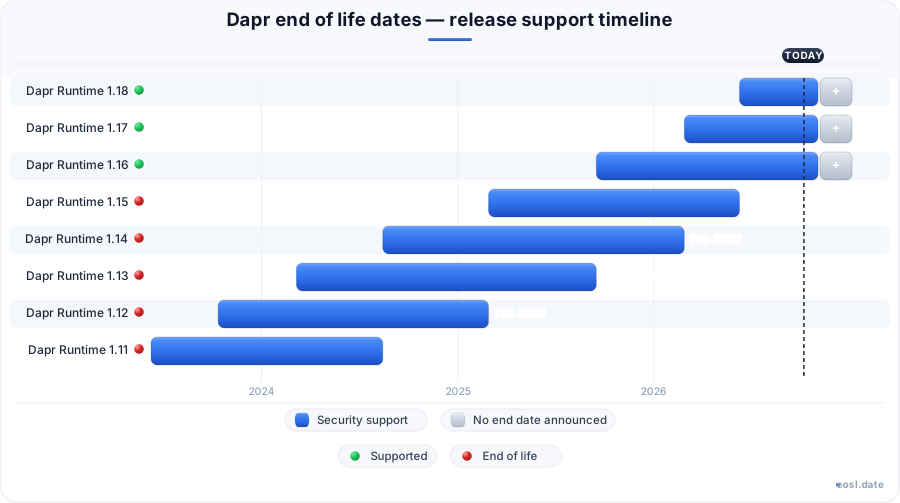
Currently Supported Dapr Releases - Active EOS/EOSL Support (3)
Dapr End of Life (EOL) Releases - No Longer Supported (9)
| Release | Released | Security Support | Latest |
|---|---|---|---|
| Dapr Runtime 1.16 | (1 year and 2 months ago) | (1 month ago) | 1.16.21 (1 month and 1 day ago) |
| Dapr Runtime 1.15 | (1 year and 8 months ago) | (5 months ago) | 1.15.14 (7 months ago) |
| Dapr Runtime 1.14 | (2 years and 3 months ago) | (8 months ago) | 1.14.5 (1 year and 7 months ago) |
| Dapr Runtime 1.13 | (2 years and 8 months ago) | (1 year and 2 months ago) | 1.13.6 (2 years and 1 month ago) |
| Dapr Runtime 1.12 | (3 years and 1 month ago) | (1 year and 8 months ago) | 1.12.5 (2 years and 9 months ago) |
| Dapr Runtime 1.11 | (3 years and 5 months ago) | (2 years and 3 months ago) | 1.11.6 (3 years ago) |
| Dapr Runtime 1.10 | (3 years and 9 months ago) | (2 years and 8 months ago) | 1.10.10 (3 years ago) |
| Dapr Runtime 1.9 | (4 years and 1 month ago) | (3 years and 1 month ago) | 1.9.6 (3 years and 9 months ago) |
| Dapr Runtime 1.8 | (4 years and 4 months ago) | (3 years and 5 months ago) | 1.8.7 (3 years and 11 months ago) |
If you run microservices on the Dapr runtime, Dapr end of life works differently from most software: the project publishes no fixed expiry dates, so your version simply stops receiving fixes once newer minor releases arrive. As of 27 October 2026, only 1.19, 1.18 and 1.17 are supported, and every older line is unsupported.
Dapr End of Life: How the Support Model Works
Dapr follows a rolling schedule rather than a calendar, and every Dapr release inherits it. The project documents its release policy for the runtime, CLI, SDKs and other repositories at versions 1.x and above, and that policy decides when a version drops out of support. Each release line is supported only while it is the current minor or one of the two before it. When a new minor ships, the oldest of those three loses its patches, which is why this page tracks support by release line instead of by date promised in advance.
No Fixed End-of-Life Schedule
Third-party trackers confirm that Dapr does not publish fixed end-of-life dates and has no long-term support track, and every line shows LTS: No. Earlier lines remain usable, but newer lines have superseded them, and the older ones stop receiving fixes. Treat the day the third newer minor release ships as your end-of-support day.
Versioning: MAJOR, MINOR and PATCH
Dapr uses semantic versioning in the MAJOR.MINOR.PATCH form, and each part carries a different promise:
- MAJOR changes when the runtime breaks backward compatible behavior, such as an API change.
- MINOR marks the regular release cadence, with new features, bug fixes and security fixes.
- PATCH covers critical issues and hotfix releases only.
Breaking changes are announced in the release notes, so reading them is part of every upgrade.
Supported Versions of the Dapr Runtime
The table below lists the supported versions of Dapr releases as published on the official support page and the endoflife.date tracker, with the newest patch each line has reached.
| Release line | Release date | Latest patch | Status | Release notes |
|---|---|---|---|---|
| 1.19 | 22 Oct 2026 | 1.19.0 | Supported (current) | v1.19.0 release notes |
| 1.18 | 10 Jun 2026 | 1.18.9 | Supported | v1.18.9 release notes |
| 1.17 | 27 Feb 2026 | 1.17.18 | Supported | v1.17.18 release notes |
Only the packaged combination of runtime, CLI and SDK versions is tested together, and any other combination is unsupported. The official policy has applied since 1.8.0, the first release where three versions are supported at once: the current and previous two minor lines. Every Dapr runtime patch inside those lines follows the same rule.
Latest Version and the Latest Tag
The latest version is 1.19.0, released on 22 October 2026, and it is the newest supported line. Its release highlights are faster workflow, jobs and reminders: performance tests against 1.18.0 show workflow throughput up to 40% higher. Opt-in actors placement in the scheduler also removes the need for the placement service, and the scheduler now routes each reminder to the host running the actors. That is a reason to move up, but the support reason is stronger, since the Dapr runtime patches only the three newest lines and its durable execution engine for workflow and AI agents runs inside the same sidecar. The latest image tag always points at the highest MAJOR.MINOR.PATCH ever published, so a patch on 1.17 shipped after 1.19.0 does not move it.
How the Rolling Window Moves
The documented release cycle sets a guarantee for the window: at least 13 weeks separate minor releases, which gives you a minimum 9 month window to upgrade from a version that has dropped out of support. In practice the gaps run longer. The last two intervals were 103 days (1.17 to 1.18) and 134 days (1.18 to 1.19). Staying inside the window is your operational responsibility, because the Dapr runtime does not patch what it no longer supports, and if you fall behind you may need intermediate upgrades. Each minor release moves the window forward by one line.
End-of-Life Dates for Every Release Line
Because the window is rule-based, you can work out each line's support end from the release table. The dates below come from the official table and endoflife.date, and I derived the 1.16 row myself from the same rule. A line lost support the day the third newer minor release shipped, and the third column shows how long that took.
| Release line | Released | Support lost when | Supported for | Status |
|---|---|---|---|---|
| 1.16 | 16 Sep 2025 | 1.19 shipped, 22 Oct 2026 | 401 days | Unsupported |
| 1.15 | 27 Feb 2025 | 1.18 shipped, 10 Jun 2026 | 468 days | Unsupported |
| 1.14 | 14 Aug 2024 | 1.17 shipped, 27 Feb 2026 | 562 days | Unsupported |
| 1.13 | 6 Mar 2024 | 1.16 shipped, 16 Sep 2025 | 559 days | Unsupported |
| 1.12 | 12 Oct 2023 | 1.15 shipped, 27 Feb 2025 | 504 days | Unsupported |
| 1.11 | 9 Jun 2023 | 1.14 shipped, 14 Aug 2024 | 432 days | Unsupported |
| 1.10 | 16 Feb 2023 | 1.13 shipped, 6 Mar 2024 | 384 days | Unsupported |
| 1.9 | 13 Oct 2022 | 1.12 shipped, 12 Oct 2023 | 364 days | Unsupported |
| 1.8 | 7 Jul 2022 | 1.11 shipped, 9 Jun 2023 | 337 days | Unsupported |
Every line before 1.8 is unsupported too. The quarter-style cadence of about four minor releases a year means a line typically lives roughly a year to a year and a half.
Estimating When Your Version Loses Support
To plan ahead, find your line, count three minor releases forward and expect that third release as your cutoff. Since 1.17 is the oldest supported line, Dapr support for it should end when 1.20 ships. At the recent gaps of 103 to 134 days after 22 October 2026, that points to February or March 2027, though this is an estimate rather than an announced date. A patch release on a supported line never extends the line itself.
Upgrade Paths When Your Version Is Unsupported
If you run an unsupported line, the safest move is the tested upgrade paths. Dapr only guarantees seamless upgrade steps within a minor version or to the next minor, for example 1.6.4 to 1.7.0. Jumping several minor versions at once is untested, so go one line at a time and read each target's notes first.
Upgrading on Kubernetes
On Kubernetes, the control plane runs the operator, the sidecar injector, the scheduler and placement services, so upgrade it with Helm, running helm upgrade against the Dapr chart, or with the CLI before you restart app Deployment resources. The Helm release also upgrades the Dapr runtime services, and the operator manages sidecar injection and component updates for every app in the cluster. Check the Kubernetes version skew policy before a Kubernetes upgrade too. Roll the control plane first and your pods pick up the new sidecar on their next restart, which keeps the container versions aligned. The operator fix in 1.18.9 matters most on a shared Kubernetes cluster.
Upgrading Self-Hosted Installations
For a self-hosted setup, update the CLI, then run the init command again so Docker pulls the matching runtime, and finally the dashboard. Test with your own components, and run a service invocation call between two local apps, before you roll it to production machines.
Dapr Runtime and SDK Compatibility
Dapr commits to non-breaking SDK changes except where security requires otherwise. Newer SDKs support the latest runtime and the two before it (N-2), and a new runtime supports the current SDK and two previous versions. Check each SDK version against the runtime you run.
| SDK | With 1.19.0 | With 1.18.9 | With 1.17.18 |
|---|---|---|---|
| Java | 1.19.0 | 1.18.1 | 1.17.5 |
| Go | 1.16.0 | 1.15.0 | 1.14.2 |
| Python | 1.19.0 | 1.18.3 | 1.17.5 |
| .NET | 1.19.0 | 1.18.10 | 1.17.9 |
| JavaScript | 3.19.0 | 3.18.0 | 3.17.0 |
The Go SDK needs go-sdk v1.16.0 for 1.19, and the Java, Python and .NET SDKs changed workflow behavior in 1.19, so test your workflow code before you bump any SDK. The JavaScript workflow engine does not use the shared stateful history option, while Python, Java, .NET and Go enable it by default.
Dapr CLI and Dashboard Versions
The CLI ships with each packaged release and installs the matching runtime, while the dashboard follows its own numbering. Both belong to the tested set, so update them together with the components you rely on for state, pub/sub and bindings.
Breaking Changes and Deprecation Notices in Dapr Releases
Every release page ends with a list of breaking changes and deprecation notices. Four of the five security fixes in 1.19 change behavior, and the notes say that 1.19 contains changes mostly in the SDKs. Look for changed defaults in service invocation, since service invocation sits on the request path of most apps, and in pub/sub, and for any feature moving from alpha through beta to stable, because a removed alpha API can stop a working app on the very next minor.
Release Notes to Read Before Upgrading
Open the release notes for your target and every line in between. Look at the release highlights, then the changes to state management and the building blocks you use, then the upgrade section. Skim the contributor list only if you are curious.
Security Fixes and Release Support
Patches are reserved for supported lines. A supported release means a hotfix ships when a critical issue, such as a broken mainline scenario, or a security problem appears, and each case is reviewed individually. These security hot fixes are the real reason end of support matters: the 1.18.9 and 1.17.18 patches on 21 October 2026 closed an operator flaw that exposed resources and secrets scoped to other apps, and an unsupported 1.16 line gets no such fix. Versio.io lists the project under the Apache License 2.0 and counts 131 versions affected by a CVE, which is another reason to keep security fixes flowing by staying on a supported line.
Release Lifecycle for Sidecar Images
The sidecar image is published to the GitHub Container Registry and Docker Registry, and only images from supported lines receive patches. The default image contains all components. Since 1.11 there is also a variant containing only stable components, tagged with the -stablecomponents suffix. On Kubernetes, you can override the image per app with the dapr.io/sidecar-image annotation.
Default and Stable-Components Sidecar Images
The sidecar default is daprio/daprd:<version>. Pin it to a supported patch, not to latest, so a rebuild never changes your runtime behind your back.
Dapr Support Policy for Dependencies
Each supported release line is tested against specific dependency versions, so an outdated dependency can make a runtime version unsupported in practice. Because Dapr is a portable, serverless-friendly runtime used by developers for resilient, event-driven stateless and stateful microservices on cloud and edge, and now for workflow and AI agents with durable execution, a stale dependency can reach every one of those apps. Kubernetes follows its own version skew policy, with OpenTelemetry collector v0.101.0 and Prometheus v2.28 tested for 1.19.0.
What Ended When Release 1.15 Left Support
Release 1.15 reached that point on 10 June 2026, the day 1.18 shipped. Its last patch was 1.15.14, released on 16 April 2026, so anything found after that day stays unfixed on that line.
Timeline From 1.15 to 1.19
- 27 Feb 2025: 1.15 released.
- 10 Jun 2026: 1.18 ships, 1.15 leaves support.
- 22 Oct 2026: 1.19 ships, 1.16 leaves support.
What to Do When a Version Is No Longer Supported
Treat a line that is no longer supported as an incident with a deadline. Pick the next supported minor, ideally from the current Dapr release, schedule the one-at-a-time upgrades, and freeze unrelated changes until you finish.
Escalation Checklist for Maintainers
- Record the line and patch you run today.
- List the lines you must cross to reach 1.17 or newer.
- Read each breaking-change section on the way.
Lifecycle Data From EOL Trackers
Trackers turn the policy into a table. Endoflife.date lists each line with its security support flag, while Versio.io counts 31 release lines and 451 versions and says Dapr follows a latest-version model. They can lag by a few days after a release, so the official support page wins on conflict.
Trackers Versus the Official Support Table
On 23 October 2026, endoflife.date still showed 1.16 as supported, while the official table already marked 1.16.21 unsupported. Verify against the official table before you rely on any third-party status.
Unsupported Release Risks for Production Clusters
An unsupported cluster collects unpatched security issues, drifts from the tested SDK and component set, and makes later upgrades harder because skipped minors can force intermediate steps.
Mitigations While You Plan the Upgrade
Restrict network access to the control plane, monitor the security advisories on the project's release page, and keep a rollback image of your last working sidecar ready.