Shopware End of Life (EOL) Dates and End of Support (EOS) Dates
Shopware end of life (EOL) and end of support (EOS) dates: 12 Shopware versions have reached EOL, including Shopware 5.7 (EOL date: Jul 31, 2024) — no longer receiving security updates or patches. Shopware 6.7.16.0 is the current supported release, with support through Feb 28, 2028 — 3 versions in active support. Also see Cachet EOSL dates for related end-of-life information.
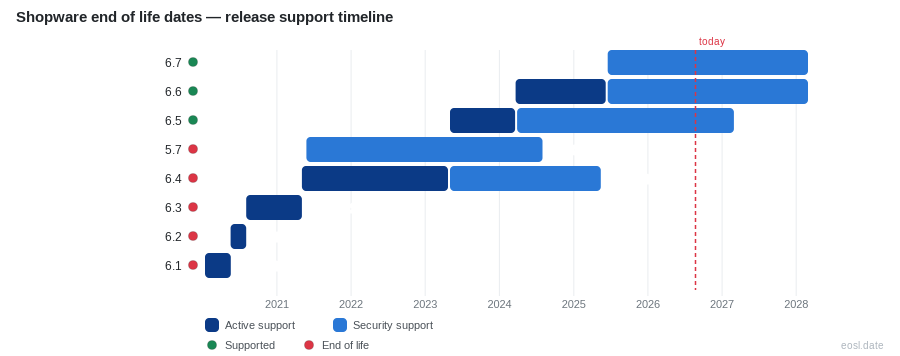
Currently Supported Shopware Releases - Active EOS/EOSL Support (3)
| Release | Supported Php Versions | Released | Security Support | Active Support | Latest |
|---|---|---|---|---|---|
| 6.7 | 8.2 - 8.5 | (1 year and 5 months ago) | (in 1 year and 3 months) | Active | 6.7.16.0 (3 weeks and 5 days ago) |
| 6.6 | 8.2 - 8.5 | (2 years and 7 months ago) | (in 1 year and 3 months) | (1 year and 5 months ago) | 6.6.10.31 (2 weeks and 1 day ago) |
| 6.5 | 8.1 - 8.3 | (3 years and 6 months ago) | (in 3 months) | (2 years and 7 months ago) | 6.5.8.19 (5 months ago) |
Shopware End of Life (EOL) Releases - No Longer Supported (12)
| Release | Supported Php Versions | Released | Security Support | Active Support | Latest |
|---|---|---|---|---|---|
| 5.7 | N/A | (5 years and 5 months ago) | (2 years and 3 months ago) | — | 5.7.20 (1 year and 5 months ago) |
| 6.4 | 7.4 - 8.3 | (5 years and 6 months ago) | (1 year and 6 months ago) | (3 years and 6 months ago) | 6.4.20.2 (3 years and 6 months ago) |
| 6.3 | 7.2 - 7.4 | (6 years and 3 months ago) | — | (5 years and 6 months ago) | 6.3.5.4 (5 years and 6 months ago) |
| 6.2 | 7.2 - 7.4 | (6 years and 5 months ago) | — | (6 years and 3 months ago) | 6.2.3 (6 years and 4 months ago) |
| 6.1 | 7.2 - 7.4 | (6 years and 10 months ago) | — | (6 years and 5 months ago) | 6.1.6 (6 years and 6 months ago) |
| 5.6 | N/A | (7 years and 3 months ago) | — | (5 years and 5 months ago) | 5.6.10 (5 years and 6 months ago) |
| 5.5 | N/A | (8 years and 2 months ago) | — | (7 years and 3 months ago) | 5.5.10 (7 years and 5 months ago) |
| 5.4 | N/A | (8 years and 8 months ago) | — | (8 years and 1 month ago) | 5.4.6 (8 years and 3 months ago) |
| 5.3 | N/A | (9 years and 3 months ago) | — | (8 years and 8 months ago) | 5.3.7 (8 years and 10 months ago) |
| 5.2 | N/A | (10 years and 4 months ago) | — | (9 years and 3 months ago) | 5.2.27 (9 years and 4 months ago) |
| 5.1 | N/A | (11 years ago) | — | (10 years and 4 months ago) | 5.1.6 (10 years and 5 months ago) |
| 5.0 | N/A | (11 years and 6 months ago) | — | (11 years ago) | 5.0.4 (11 years and 2 months ago) |
Running an e-commerce platform on a release nobody patches is a quiet risk, and Shopware end of life dates decide how long each version keeps receiving security fixes. This guide shows which version is supported today, what changes the day support stops, and which route suits your shop.
Shopware Release Policy and Release Calendar
The Shopware release policy ties support to the major release cycle instead of fixed timelines. The release calendar in the official documentation sorts every version into one of four states:
- Maintained version: the latest minor version of the current major cycle, patched whenever necessary.
- Extended support: the last minor of the previous major cycle, which gets selective bug fixes until the next major arrives.
- Security fixes only: fixes arrive through a security plugin, not through a direct patch update.
- End of life version: nothing is actively supported anymore, so you should update as soon as possible.
Hosting changes who does the work. Shopware SaaS applies monthly updates for you, while PaaS and self-hosted installations of the Community Edition leave every update in your hands.
Major Release, Minor Release and Patch Cycles
Shopware 6 follows semantic versioning, so the version number reads 6.major.minor.patch. A number such as 6.7.2.0 is a minor release, 6.7.2.3 is a patch, and 6.8.0.0 would be a major release; the position of the zero tells you the type, and semver.org explains the convention. A major release arrives once a year, a minor release on the first Monday of each month, and a patch only on demand.
The type predicts your workload. A major release brings breaking changes and deprecations as dependencies such as Symfony and Vue.js move forward, and a release candidate appears roughly two months earlier so extension authors can adapt. Minor releases and patches need testing but rarely break anything. GitHub lists every release, past and present.
Which Shopware Versions Have Reached End of Support
The table below uses the dates published by endoflife.date in October 2026. Read it from the right: the last column shows when a version stops receiving security help.
| Version | Released | Active support ended | Security support ends |
|---|---|---|---|
| 6.7 | 17 June 2025 | Still active | 28 February 2028 |
| 6.6 | 21 March 2024 | 17 June 2025 | 28 February 2028 |
| 6.5 | 3 May 2023 | 28 March 2024 | 28 February 2027 |
| 6.4 | 4 May 2021 | 3 May 2023 | 14 May 2025 |
| 5.7 | 26 May 2021 | Ended | 31 July 2024 |
Only 6.7 is a maintained version, and the Shopware 6 line is the only one still in play; 6.6 and 6.5 are in the security-only window, and 6.5 is the next to lapse. Everything older, including every Shopware 5 release, has passed its end of support. PHP matters too: 6.6 and 6.7 run on PHP 8.2 to 8.5, 6.5 on PHP 8.1 to 8.3, and 6.4 on PHP 7.4 to 8.3. The latest version always has the widest runtime options, and a Shopware 5 or Shopware 6 shop should check it first, and commercial long-term support for Shopware 5 exists only through a third-party vendor.
What Shopware End of Life Means for a Live Shop
Nobody switches your store off, and the Shopware 5 platform simply stops receiving security updates. Shopware 5 development stopped completely at the end of July 2024, after a four-year transition, so a Shopware 5 end of life shop keeps taking orders, yet Shopware 5 gets no updates and Shopware 5 owners lose bug fixes and security updates. For an end of life version, new security updates stop, and every vulnerability found afterwards stays open on a vulnerable online shop. Customers notice slow pages and broken checkouts sooner than they notice a missing patch, and merchants lose the ability to adopt new technology and integrations. Treat the date as the start of a risk clock, not as a shutdown; the migration clock starts the same day.
Why Legacy Systems Sunset
Shopware 5 and Shopware 6 show the pattern: a software vendor that ships a new generation of its e-commerce software must maintain two code lines at once. Over time, software patches for the older line cost more, fewer customers justify the expense, and the old architecture can no longer meet current security standards. Monolithic designs hit that wall first, which is why a legacy platform eventually gets its sunset date. For Shopware 5, that meant a plugin-based design that could not become API-first.
Why Shopware 5 Is Outdated
Shopware 5 served mid-sized retailers well because Shopware 5 stores went live quickly, and the ecommerce market once rewarded that. Its weakness is customization through plugins rather than APIs; it is not truly headless, and it lacks the modularity and scalability that an API-first system offers. Those limits made a rebuild, not another update, the realistic path.
Discontinued Shopware 5: SafeFive Patch Subscription
Shopware named SafeFive as the provider for security work after the product was discontinued. SafeFive is an independent initiative, owned by Paddox GmbH, and sells a patch subscription to cover what Shopware stopped doing. For Shopware 5 shops, SafeFive offers:
- Security patches for Shopware 5.5 and later, delivered to the shop backend through its security plugin since August 2024.
- Compatibility patches, shipped as separate update ZIP files for versions from 5.7.18 onward, so the shop can run on newer technology such as MySQL 8 or PHP 8.
- A five-year commitment from August 2024, with advance notice of any extension.
The limits matter as much. There are no general bug fixes and no further development, enrolment is not automatic (you contact SafeFive yourself), and a release older than 5.5 falls outside its scope. Contract terms depend on your net turnover and contract length. Past security updates include a cross-site scripting fix in the backend, so the SafeFive subscription addresses real flaws, but SafeFive complements active maintenance by your agency or hosting provider; it does not replace a support contract with a team that knows your shop.
Hosting and PHP Compatibility for Unsupported Versions
For most stores the pressing deadline belongs to PHP. Shopware 5.7.20 runs on PHP 7.4, 8.0, 8.1 and 8.2 and nothing newer. PHP 8.1, 8.0 and 7.4 are already out of life, and PHP 8.2 gets security fixes only until 31 December 2026. From 2027 none of the runtimes an unsupported Shopware 5 shop can use will receive PHP security fixes, so any security vulnerabilities in the runtime stay open unless your host provides extended patching.
Ask your hosting provider these questions before the date arrives:
- Which PHP version do we run today, and when will you retire it?
- Do you patch PHP 8.2 after its official end, and from what date?
- How much notice do we get before a PHP version is removed from our server?
Plugins and Extensions After the Sunset
Shopware 5 plugin vendors stop releasing compatibility updates once the core is unsupported, and SafeFive covers the core only, not third-party code. Audit every extension in your Shopware 5 shop: note who maintains it, when it last shipped an update, and whether a Shopware 6 equivalent exists. Shops heavy with bespoke work face the biggest bill, because custom code must be rewritten for Shopware 6, not just upgraded. Retire unused plugins now and keep the result as a simple list for your migration estimate.
The Risk of Staying on Shopware 5 Without Extended Support
Shopware offers no extended support for version 5 itself, so remaining there is a stopgap, not a strategy. Stable shops with plenty of bespoke work can run for a while on active maintenance and a patch subscription, but the risk grows each month: attackers target software that no longer gets security attention, compatibility gaps widen, and customers lose trust when something breaks. If you stay, document a hard exit date, keep backups tested, and budget for the migration you are postponing.
Migration Options After EOL
Whichever platform you choose, the migration is a project, not an upgrade. Because Shopware 6 was a complete rebuild, even a Shopware 6 migration within the Shopware family amounts to replatforming, so compare alternatives before you commit.
Moving to Shopware 6
Shopware 6 is the supported successor to Shopware 5 and keeps familiar concepts and adds a rule builder, Flow Builder automation and a more flexible administration. Themes and extensions need replacements, your data needs mapping, and every migration step needs a test run. Merchants who run a standard online store often finish quickly; heavily customized ones should plan several months.
Shopify, Adobe Commerce and Magento
Shopware 5 shops leaving the platform often weigh Shopify, which trades control for convenience: hosting and updates are handled for you. Adobe Commerce, formerly Magento, suits larger companies with complex needs but remains a monolithic system. If you consider a Magento route, check its vendor's own support timeline first.
Headless Commerce Platforms
Headless and composable ecommerce platforms expose everything through APIs and update continuously, so a Shopware 5 owner who wants to avoid another forced upgrade can pick an API-first platform, Shopware 6 headless included. They fit fast-growing retailers with developers who can run a modular stack, and they demand more architecture work up front.
How to Decide: Sunset Support Checklist
Work through these points in order and the right route usually becomes clear:
- Which exact version do you run, and is it 5.5 or later so a patch subscription applies?
- Which PHP version does your host provide, and what is its date?
- How many plugins and custom modules would need rewriting?
- Do you need headless flexibility, or is a standard storefront enough?
- What budget and calendar window can you commit to the move?
A shop with a stable setup and mostly standard features can survive a short while on maintenance, but an end-of-life platform only gets harder to protect. Plan the move while you still choose the timing, because an end-of-life deadline you ignore will eventually choose it for you. A shop that starts now has time to test, compare and migrate calmly to Shopware 6 or another ecommerce platform.