Qt End of Life (EOL) Dates and End of Support (EOS) Dates
Qt end of life (EOL) and end of support (EOS) dates: 19 Qt versions have reached EOL, including Qt 6.11 (EOL date: Sep 30, 2026) — no longer receiving security updates or patches. Qt 6.12 (LTS) reaches its End of Support date on Apr 01, 2027 — plan your upgrade path now. Also see CKEditor end of support life for related end-of-life information.
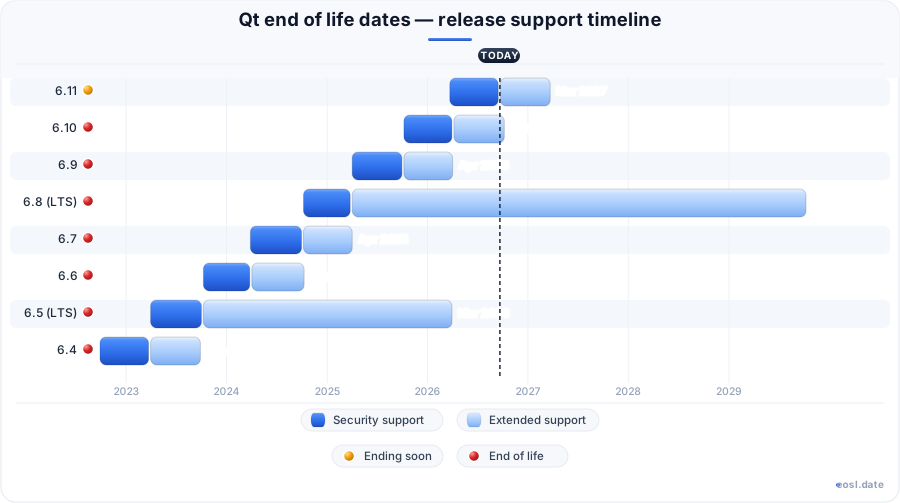
Qt Releases Nearing End of Life - Support Ending Soon (1)
| Release | Released | OSS support | Commercial support | Latest | LTS |
|---|---|---|---|---|---|
| 6.12 (LTS) | (1 month and 2 weeks ago) | (in 4 months) | (in 4 years and 10 months) | 6.12.0 (1 month and 2 weeks ago) | LTS |
Qt End of Life (EOL) Releases - No Longer Supported (19)
| Release | Released | OSS support | Commercial support | Latest | LTS |
|---|---|---|---|---|---|
| 6.11 | (7 months ago) | (1 month and 2 weeks ago) | (in 4 months) | 6.11.3 (3 weeks and 3 days ago) | - |
| 6.10 | (1 year and 1 month ago) | (7 months ago) | (1 month and 1 week ago) | 6.10.3 (7 months ago) | - |
| 6.9 | (1 year and 7 months ago) | (1 year and 1 month ago) | (7 months ago) | 6.9.3 (1 year and 1 month ago) | - |
| 6.8 (LTS) | (2 years and 1 month ago) | (1 year and 7 months ago) | (in 2 years and 10 months) | 6.8.3 (1 year and 7 months ago) | LTS |
| 6.7 | (2 years and 7 months ago) | (2 years and 1 month ago) | (1 year and 7 months ago) | 6.7.3 (2 years and 1 month ago) | - |
| 6.6 | (3 years and 1 month ago) | (2 years and 7 months ago) | (2 years and 1 month ago) | 6.6.3 (2 years and 7 months ago) | - |
| 6.5 (LTS) | (3 years and 7 months ago) | (2 years and 11 months ago) | (7 months ago) | 6.5.8 (2 years and 11 months ago) | LTS |
| 6.4 | (4 years and 1 month ago) | (3 years and 7 months ago) | (3 years and 1 month ago) | 6.4.3 (3 years and 8 months ago) | - |
| 6.3 | (4 years and 7 months ago) | (4 years and 1 month ago) | (3 years and 7 months ago) | 6.3.2 (4 years and 2 months ago) | - |
| 6.2 (LTS) | (5 years and 1 month ago) | (4 years and 7 months ago) | (2 years and 1 month ago) | 6.2.4 (4 years and 8 months ago) | LTS |
| 6.1 | (5 years and 6 months ago) | (5 years and 1 month ago) | (4 years and 6 months ago) | 6.1.3 (5 years and 2 months ago) | - |
| 6.0 | (5 years and 11 months ago) | (5 years and 6 months ago) | (4 years and 11 months ago) | 6.0.4 (5 years and 6 months ago) | - |
| 5.15 (LTS) | (6 years and 5 months ago) | (5 years and 11 months ago) | (1 year and 5 months ago) | 5.15.17 (1 year and 5 months ago) | LTS |
| 5.14 | (6 years and 11 months ago) | (5 years and 11 months ago) | Active | 5.14.2 (6 years and 7 months ago) | - |
| 5.13 | (7 years and 5 months ago) | (6 years and 5 months ago) | Active | 5.13.2 (7 years ago) | - |
| 5.12 (LTS) | (7 years and 11 months ago) | (4 years and 11 months ago) | Active | 5.12.12 (4 years and 11 months ago) | LTS |
| 5.9 | (9 years and 5 months ago) | (6 years and 5 months ago) | Active | 5.9.9 (6 years and 11 months ago) | - |
| 5.6 (LTS) | (10 years and 8 months ago) | (7 years and 8 months ago) | Active | 5.6.3 (9 years and 1 month ago) | LTS |
| 4.8 (LTS) | (14 years and 11 months ago) | (10 years and 10 months ago) | Active | 4.8.7 (11 years and 5 months ago) | LTS |
If your product ships on Qt, Qt end of life dates decide when security fixes stop arriving and when you must pay for patches or move to a newer version. The Qt framework is a cross-platform toolkit for software development in C++ and QML, so one missed support deadline can ripple across every desktop, mobile and embedded application you build. This guide lists the dates for each series, explains how the schedule works and shows what to do when your release runs out of support.
Qt End of Life Dates by Version
The table below follows the schedule published for each series. Community support covers the free Community Edition, while commercial support covers license holders. The dates reflect the Qt Group calendar as tracked on endoflife.date at the start of October 2026, so confirm them on the official Qt site before you plan a rollout.
| Version | Type | Released | Community end date | Commercial end date |
|---|---|---|---|---|
| Qt 6.12 | LTS | 30 Sep 2026 | 1 Apr 2027 | 1 Oct 2031 |
| Qt 6.11 | Minor | 23 Mar 2026 | 30 Sep 2026 | 23 Mar 2027 |
| Qt 6.10 | Minor | 7 Oct 2025 | 7 Apr 2026 | 7 Oct 2026 |
| Qt 6.8 | LTS | 7 Oct 2024 | 2 Apr 2025 | 8 Oct 2029 |
| Qt 6.5 | LTS | 31 Mar 2023 | 13 Dec 2023 | 31 Mar 2026 |
| Qt 5.15 | LTS | 25 May 2020 | 8 Dec 2020 | 25 May 2025 |
| Qt 4.8 | LTS | 15 Dec 2011 | 31 Dec 2015 | Unavailable |
To see which build you run today, type qmake --version in a terminal and compare the result with the first column.
Qt 6.12 LTS and Windows 10
This newest long-term support line, released on 30 September 2026, receives commercial coverage until 1 October 2031. It is also the last line that includes Windows 10 among its supported platforms. Microsoft ended mainstream updates for that operating system on 14 October 2025, and consumer Extended Security Updates run to 13 October 2026, so an upgrade gives your desktop team room to leave Windows 10 on its own schedule.
Older releases: Qt 4 and earlier
Older lines are long gone. The fifth series ended with 5.15, its final feature milestone, and the last Qt 4 build, 4.8.7, appeared in May 2015. Any application still on Qt 4 is more than a decade past its last update. Before 2024, a commercial window lasted three years instead of five, so legacy numbers rarely compare directly with today's schedule.
How the Qt Release Cycle Works Until Support Ends
Qt follows semantic versioning: a major release changes the architecture, a minor release adds features, and patch releases carry fixes. A fresh feature set arrives about every six months, and the community side supports it only until the next one ships. Every date in the table above comes from that rhythm, and each release's support period follows from it.
Standard support and long-term support
Standard support delivers bug fixes and security fixes for a limited window. Starting with Qt 6.8, every 4th minor release becomes a long-term support (LTS) edition that commercial customers can rely on for five years, with technical support included. Community users do not get that benefit, so they are expected to adopt each new feature set roughly twice a year.
Who sets the Qt schedule
The Qt Group, a publicly listed company, leads its development together with the Qt Project, an open-governance community of individual and corporate contributors. The Qt Company sells the commercial license and the plans described later. The KDE community has long been tied to this arrangement: the KDE Free Qt Foundation holds agreements that keep Qt available as open source. KDE's own desktop software is built on Qt, so that community watches these deadlines closely.
Qt 5 End of Support and the Qt 6.5 EOL
Support for the Qt 5 series is over. After 26 May 2025, the Qt Company stopped issuing community updates and security patches for the 5.15 line, so only paying subscribers can still receive fixes. Since the start of 2025, the framework has seen three critical patches, and two of them touched Qt 5 versions, which makes staying on it a business decision as much as a technical one. This is the same deadline many embedded teams now plan around.
Ending of free updates for Qt 5.15
It is the LTS version that outlived the rest of the series. Community support ended in December 2020, and the commercial window closed on 25 May 2025. Commercial builds are opened to the public within twelve months, but that is a courtesy, not a plan you can budget around. Open-source teams lean on the KDE patch collection covered below instead.
Why the 6.5 LTS line ends in April 2026
Qt 6.5, released in March 2023, left regular coverage after 3 April 2026 and entered the EoS state, where only additional services apply. The jump from 6.5 to newer releases is gentle because Qt 6 keeps binary compliance and full source compliance between minor versions, so the work is mostly a rebuild. Teams that truly cannot move can buy maintenance patches instead.
Extended Support Options After End-of-Support
The Qt Company sells two separate safety nets once a line leaves standard coverage, and they solve different problems. Both cover Qt's own software, never your application code, and both carry a cost on top of your existing license, so price them against the effort of upgrading before you commit.
Extended security maintenance
Extended Security Maintenance is a support subscription that supplies critical vulnerability and security patches for most Qt libraries after the deadline. Each seat needs an active developer license, and the subscription excludes technical support, help applying the patches and fixes for third-party libraries. When an issue is confirmed, work begins and patches follow as soon as they are ready.
Extended support and professional services
Extended Support restores standard terms for an old line, but it caps each ticket at five hours of work, and more than 96% of cases close within that limit. It applies to a specific line, such as an old Qt framework or Qt Creator build. If you need help with a particular environment or hardware target, Qt Professional Services can scope a custom project. Ask for a commercial license quote early, because the extended plan adds to your bill.
Planning a Migration Before End-of-Life
A migration plan for a Qt line nearing end-of-life starts with an inventory of the Qt modules each software product uses, then a decision on whether to upgrade, buy time or leave. Qt 6 is not a drop-in replacement for the previous series, so allow time for testing and quality assurance, not only for compiling.
Treat the work like any software project: inventory first, then a pilot, then a staged rollout. Pick one small application, move it to the current release line, and record every build error. That pilot tells your development team whether the full effort takes weeks or quarters, and it shows which modules need replacing before you touch the main codebase. Update your build system and continuous integration images at the same time, because CMake is the preferred build tool for current Qt, and then migrate the remaining applications in order of exposure. A team coming from Qt 5 should expect the pilot to surface the removed modules described next.
API and behavioural changes
Moving off Qt 5 before its deadline means handling these removals. Several modules were removed or rebuilt. Qt Script is gone, and XmlPatterns was removed, which hurts projects that process XQuery or XPath. Changes to QVector and QList can force code edits, and the old OpenGL module gave way to a rendering stack built on the Rendering Hardware Interface, which may break custom rendering. The QML type system was overhauled for CMake, so older Qt Quick import patterns and dynamically registered types need review. The newer series also expects a C++17 compiler, so older toolchains must move too, and C++ code that leaned on removed APIs needs edits. Qt Widgets, the classic widget toolkit in the framework, remains available.
Evaluating alternatives
If extended coverage for an old line costs more than moving to a current long-term line such as 6.8, upgrading wins on price alone. If renewal costs still worry you, compare open-source toolkits and weigh vendor lock-in before the deadline. A software bill of materials shows how many components depend on Qt, and rewriting a large C++ codebase in another toolkit takes far longer than an upgrade, so run any cost review in parallel with the upgrade work on your Qt 5 codebase.
Licensing and Risks When Qt Is Unsupported
Once the 5.15 or 6.5 line loses coverage, an unsupported line exposes users to vulnerabilities, and your license decides which fixes you can still obtain. Understanding both parts keeps the budget realistic.
Open-source and commercial licensing
Qt is available under a paid license and under the open-source GPL 2.0, GPL 3.0 and LGPL 3.0 terms. Choose the GPL only if you can publish your own source, since it carries copyleft obligations that the LGPL relaxes. The Community Edition receives support only until the next release, while commercial customers hold the long window. Open-source users can look to community patches instead: the KDE Project maintains a patch collection that keeps the 5.15 line usable, and the KDE contributors who run it describe it as best effort. The KDE Free Qt Foundation agreement is the backstop behind those terms, and members who contribute through the Qt Project can also help backport fixes. Developer license seats must stay active if you buy any extended plan.
Compliance and legal risk
Shipping software on the 5.15 line after 25 May 2025 means no patches for known vulnerabilities, and the European Union's Cyber Resilience Act places responsibility for them on vendors who ship products, so you cannot treat missing patches as a purely technical risk. Postponing an upgrade also builds technical debt, because every skipped step widens the gap your development roadmap eventually has to close.
Qt EOL by Platform: Desktop, Embedded and Mobile
Qt targets Linux, Windows, macOS, Android, iOS, WebAssembly and embedded systems from a single C++ codebase, so each platform feels the deadline differently. A desktop application also follows the operating system vendor's own timeline, and desktop software on an unpatched toolkit turns into a liability quickly. Embedded software often stays in the field for a decade, so Qt Quick and QML interfaces there need an LTS version with a long window, and mobile apps tend to move faster because the app stores force regular rebuilds against current platform SDKs.
Because Qt is a cross-platform toolkit, one outdated line affects every platform at once. A team shipping the same software to Windows, Linux and a touchscreen device should pick one LTS line for all three and keep one upgrade calendar against its end date. Qt Quick projects collect the most breakage: a cross-platform Qt Quick codebase that skipped upgrades for years pays for it on every platform, desktop included. Plan your platform matrix first, and check the supported platforms page for each target before you pick a line.