Font Awesome End of Life (EOL) Dates and End of Support (EOS) Dates
Font Awesome end of life (EOL) and end of support (EOS) dates: 4 Font Awesome versions have reached EOL, including Font Awesome 4 — no longer receiving security updates or patches. Font Awesome 7.3.1 is the current supported release — 3 versions in active support. Also see CKEditor end of support dates for related end-of-life information.
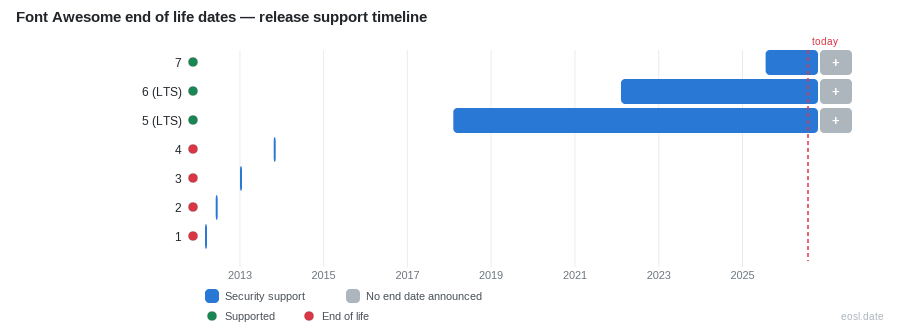
Currently Supported Font Awesome Releases - Active EOS/EOSL Support (3)
Font Awesome End of Life (EOL) Releases - No Longer Supported (4)
| Release | Released | Security Support | Latest | LTS |
|---|---|---|---|---|
| 4 | (13 years and 1 month ago) | — | 4.7.0 (10 years and 1 month ago) | - |
| 3 | (13 years and 10 months ago) | — | 3.2.1 (13 years and 5 months ago) | - |
| 2 | (14 years and 5 months ago) | — | 2.0.0 (14 years and 5 months ago) | - |
| 1 | (14 years and 8 months ago) | — | 1.0.0 (14 years and 8 months ago) | - |
Font Awesome end of life is not one date but a staggered schedule: the icon library and toolkit that millions of designers and developers rely on retires each major version separately. Here you can see which releases still receive fixes, which are finished, and what to do before your project is left running on code nobody maintains.
Font Awesome End of Life: Which Versions Are Retired
According to the endoflife.date tracker (updated 24 September 2026), versions 1 through 4 no longer get security fixes, while the newest release is current and the two before it sit in a reduced-support state. Anything labelled "No" in the security column is retired.
| Release | Released | Security support | Latest |
|---|---|---|---|
| 7 | 22 Jul 2025 | Yes | 7.3.1 (15 Jul 2026) |
| 6 | 07 Feb 2022 | Yes, critical fixes | 6.7.2 (16 Dec 2024) |
| 5 | 05 Feb 2018 | Yes, critical fixes | 5.15.4 (04 Aug 2021) |
| 4 | 23 Oct 2013 | No | 4.7.0 (24 Oct 2016) |
| 3 | 02 Jan 2013 | No | 3.2.1 (17 Jun 2013) |
| 2 and 1 | Mar-Jun 2012 | No | 2.0.0 and 1.0.0 |
End-of-Life Dates for Every Fontawesome Release
The project does not publish a calendar date on which an old version "dies"; a version is retired the moment the maintainers stop shipping releases for it. Font Awesome 3 stopped at 3.2.1 in June 2013, and Font Awesome 4 stopped at 4.7.0 in October 2016, after growing to 675 icons. Both are now end-of-life, so a site still loading them gets no fixes at all.
Fontawesome 6 also removed Internet Explorer support while staying backward compatible with the two generations before it, which is why many teams moved up without rewriting markup.
Long Term Support for Older Releases
When a new major version ships, the maintainers can move the previous one into long term support (LTS). That label means the version stays installable, stays maintained and still gets patches that matter, but nothing new is added.
Font Awesome 6 status
Version 6 was marked as supported only for critical bug fixes once the next generation arrived. Its last release in the tracker is 6.7.2 from December 2024, so expect stability, not features.
Font Awesome 5 status
Sources disagree here. The endoflife.date page lists version 5 as supported with security fixes, yet the project's own GitHub readme says versions 3, 4 and 5 are end-of-life with no further versions planned. Plan as if the official repository is right, and treat 5.15.4 (August 2021) as the final build.
What LTS Means for Security Support
That tag is a promise about risk, not about progress. You still get critical bug fixes and security patches, but you will not see new icons, new styles or compatibility work for newer browsers. Ordinary bug fixes, such as a misaligned glyph, may simply never ship.
In practice, this tier buys a project still on release 6 or 5 time to upgrade on its own schedule. It is not a place to stay indefinitely, because the gap between the version you run and the current release only widens.
Font Awesome Free Licensing After Fontawesome Support Ends
Retiring a version does not revoke your right to keep using it. Font Awesome Free remains open source and GPL friendly, so you can keep it in commercial projects. The terms differ by file type:
- Icons: CC BY 4.0 license for the .svg and .js files
- Fonts: SIL OFL 1.1 license for web and desktop font files
- Code: MIT license for everything that is not a font or icon
Attribution is required by all three, and the downloaded files already carry the comments that satisfy it. Every brand icon carries its owner's trademark and may only represent that company. Font Awesome Pro is a paid subscription with extra styles, so confirm your plan before assuming a retired Pro version is covered.
Fontawesome Semantic Versioning and the Upgrading Path
The project follows Semantic Versioning as closely as it can: major.minor.patch. A patch version will never knowingly break backward compatibility. A minor release can, but the maintainers promise clear steps in an upgrading guide and never remove icons in minor or patch updates.
The current major release is an "umbrella release" covering many file types, so it bends those rules slightly: any release may redesign an existing icon. Read the changelog and the change log entry on the documentation site before each jump. Web and desktop projects have separate upgrade instructions.
Why Developers Leave Fontawesome Icons Behind
A widely shared 2022 post called the library unsustainable for modern web development. Its complaints are worth knowing, even if you disagree, because they explain why many teams treat end-of-life as a prompt to switch rather than upgrade:
- Version and variant juggling. Solid, regular, light, duotone and brands live in separate files with different markup, and an icon from one version may not exist in another.
- Weight. A page needing six icons can still pull in thousands of font glyphs. Fontawesome CSS and webfonts eat bandwidth unless you tree-shake them.
- Single SVG files. Importing only the icons you use sidesteps most problems.
The author even lumped it with jQuery and Bootstrap as tools that served well and then aged out. TailwindCSS and JavaScript bundlers can prune unused icons, which weakens the case somewhat.
Moving Off a Retired Version: A Migration Checklist
- Find the version you run: check your npm lockfile, the CDN URL or the font file header.
- Confirm whether you use Free or Pro, since the Pro-only icons need a matching subscription.
- Download the current release from GitHub and read its upgrading notes.
- Replace renamed icons, then test each page in a staging build.
- Follow the project through the endoflife.date calendar, RSS feed or API so the next retirement is not a surprise.
Latest Fontawesome Version and Release Schedule
Font Awesome 7 arrived in July 2025 and is the only version expected to keep gaining features. Each release is listed on the versions page with its date and a link to its full documentation. Upgrade early rather than late; the longer you wait, the more renamed icons you will have to fix at once.