Proxmox Mail Gateway End of Life (EOL) Dates and End of Support (EOS) Dates
Proxmox Mail Gateway end of life (EOL) and end of support (EOS) dates: 5 Proxmox Mail Gateway versions have reached EOL, including Proxmox Mail Gateway 8 (EOL date: Aug 31, 2026) — no longer receiving security updates or patches. Proxmox Mail Gateway 9.1 is the current supported release. Also see Artifactory end of support life for related end-of-life information.
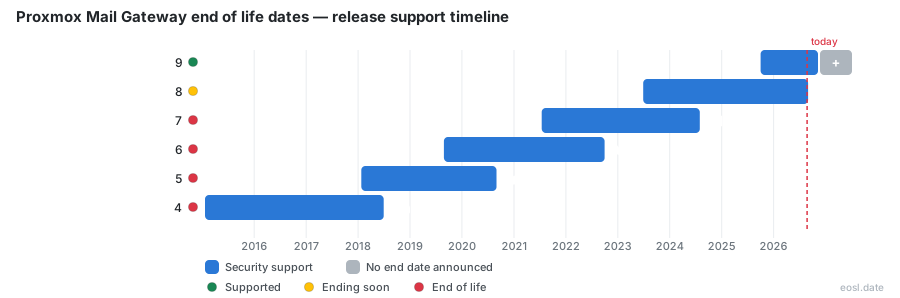
Currently Supported Proxmox Mail Gateway Releases - Active EOS/EOSL Support (1)
| Release | Released | Security Support | Latest |
|---|---|---|---|
| 9 | (1 year and 1 month ago) | Active | 9.1 (5 months ago) |
Proxmox Mail Gateway End of Life (EOL) Releases - No Longer Supported (5)
| Release | Released | Security Support | Latest |
|---|---|---|---|
| 8 | (3 years and 4 months ago) | (2 months ago) | 8.2 (1 year and 8 months ago) |
| 7 | (5 years and 4 months ago) | (2 years and 3 months ago) | 7.4 (2 years and 8 months ago) |
| 6 | (7 years and 2 months ago) | (4 years and 1 month ago) | 6.4 (5 years and 7 months ago) |
| 5 | (8 years and 9 months ago) | (6 years and 2 months ago) | 5.2 (7 years and 7 months ago) |
| 4 | (11 years and 10 months ago) | (8 years and 4 months ago) | 4.1 (10 years and 3 months ago) |
If your Proxmox Mail Gateway end of life date is the question on your desk, the short answer is that release 8 lost its fixes on 31 August 2026, while release 9 is the supported line. This open-source email security appliance filters spam, viruses and phishing before mail reaches your mail server, so running it past support leaves unpatched software at the very edge of your network. Here is what your options are.
Proxmox Mail Gateway End of Life: Current Status by Release
Every major release of the mail gateway has a published end date, and the tracker at endoflife.date lists each one beside the final version that line reached. Only the newest line is fully supported today, which makes the supported release easy to name: it is the 9 series, currently at 9.1.
- Mail gateway release 9: still supported, current version 9.1 from 11 June 2026.
- Mail gateway release 8: fixes ended, final version 8.2 from 27 February 2025.
- Mail gateway release 7 and older: long finished, so any PMG host still on them has been unpatched for years.
To see where a host stands, run pmgversion -v on that PMG host and compare the output with the table further down. If the number starts with anything other than 9, the Proxmox Mail Gateway is out of support and belongs on your list. The appliance accepts SMTP traffic, scores every message for spam, scans it with ClamAV, parks suspect mail in a quarantine you manage from the web interface, and exposes the same functions through an API. The mail gateway also handles DKIM signing and TLS for the systems behind it. Because all of that sits in front of your inbox servers, an unpatched PMG box is a bigger risk than an unpatched desktop, and each PMG node in a cluster needs the same attention.
Proxmox Mail Gateway 8 EOL: What Ended on 31 August 2026
Proxmox Mail Gateway 8 shipped on 29 June 2023 and is based on Debian 12 "Bookworm", whose standard support window drove the schedule. Since the end of August 2026 the 8 series gets no new updates, no maintenance releases and no bug fixes from Proxmox. Release 8.2 is the final stop, and a mail gateway on it will not receive anything further. The PMG team has moved on to the 9 series, so the PMG plans no longer include work for 8.
That matters because a mail proxy is exposed to the internet by design. Your SMTP port accepts connections from anyone, so every unpatched vulnerability in the Postfix, SpamAssassin or ClamAV stack is reachable, and an attacker only needs one. A compromised mail gateway can also expose the internal system it protects, the quarantine contents and any API credentials stored on it. Plan maintenance now rather than after the first incident:
- Inventory every mail gateway and PMG node and note its version, including standby nodes in a cluster.
- Take a configuration backup and a Proxmox Backup Server snapshot before touching anything.
- Schedule the move to release 9 in a quiet mail window.
- Keep a rollback path until SMTP delivery and spam filtering are confirmed working.
Older hosts have it worse: release 7 on Debian 11 "Bullseye" lost support on 31 July 2024, and release 6 on Debian 10 "Buster" on 30 September 2022. For those, a clean migration to a fresh install from the ISO beats a chain of in-place upgrades; download the current ISO, restore the configuration backup and re-point the MX record. Teams still running Proxmox Mail Gateway 8 can take the direct route described below, and a pre-upgrade snapshot on the Proxmox VE host gives them a quick way back.
How the Debian Release Cycle Sets the Mail Gateway Support Timeline
The support timeline for the Proxmox Mail Gateway appliance is not arbitrary. Each major release is built on a matching Debian release and stays supported for about as long as Debian gives that base standard support, roughly three years. Because the mail gateway follows the Debian cycle, you can estimate the next end date as soon as a new base appears, and each new base brings a newer Linux kernel along with it. That is why a new PMG release feels like a fresh operating system rather than a routine patch, and why the ISO installer always carries the whole platform. The kernel choice matters too: 8.2 defaulted to kernel 6.8 and allowed an opt-in kernel 6.11, whereas 9.1 defaults to the newer kernel, so check hardware compatibility on every mail gateway before the switch.
Major Version Overlap Period
When a new major version arrives, Proxmox keeps the previous one alive for an overlap period of about one year, with critical fixes only. The window exists so you can test the upgrade. Release 9 arrived on 1 October 2025 and release 8 closed eleven months later, so the window was a little shorter than a full year for this cycle. Use that time to rehearse the move on a clone of your PMG node, because the kernel, the PostgreSQL version and the AppArmor profile all change.
Minor Release and Point Release Updates
Inside a major line, only the newest minor release is maintained. Proxmox treats each point release, such as 8.1 or 8.2, as a replacement for the one before it, so you should always move to the newest one within your major cycle; an older build is effectively unsupported once the next ships. Fixes are not backported to older versions, and a freshly downloaded ISO always carries the newest of them, which is why every PMG install should start from the current image.
PMG Release History From Version 4 to 9.1
The release history below combines the endoflife.date schedule with the official notes for the mail gateway. Read it from the bottom up to see how steadily each line has reached its end of support after roughly three years.
| Release | Debian base | First released | Support ended | Last version |
|---|---|---|---|---|
| 9 | 13 "Trixie" | 1 Oct 2025 | Still supported | 9.1 (11 Jun 2026) |
| 8 | 12 "Bookworm" | 29 Jun 2023 | 31 Aug 2026 | 8.2 (27 Feb 2025) |
| 7 | 11 "Bullseye" | 15 Jul 2021 | 31 Jul 2024 | 7.4 (29 Feb 2024) |
| 6 | 10 "Buster" | 27 Aug 2019 | 30 Sep 2022 | 6.4 (30 Mar 2021) |
| 5 | 9 | 23 Jan 2018 | 31 Aug 2020 | 5.2 (26 Mar 2019) |
| 4 | 8 | 20 Jan 2015 | 30 Jun 2018 | 4.1 (22 Aug 2016) |
Support has followed the same pattern every time: about three years per release, ending in the month the Debian base loses its own support. Along the way the notes also record what changed: SpamAssassin 4 support, a newer kernel, ZFS updates and a growing rule system. Pre-flight tooling for the previous jump, pmg7to8, was a good example of the care that goes into each upgrade path, and the same approach carries over to 9 for every PMG node you run.
Upgrade Planning: Moving Your Mail Gateway to the Latest Version
Proxmox documents a direct upgrade from 8 to 9 for the mail gateway, and it describes the move from 8.2 to the 9 series as seamless. You work through apt on a host with valid repository entries, and you read the official guide before starting. Always take the latest version within the new major line, so you are not stuck on an interim release.
A short upgrade routine works well for most teams:
- Update the 8.2 system fully, then reboot onto its newest kernel.
- Back up the configuration, rule system and quarantine database to a Proxmox Backup Server or another server.
- Switch the apt sources to Trixie and follow the written upgrade steps.
- Test inbound and outbound SMTP, then send a few spam and virus samples through.
- Check that TLS certificates, DKIM keys, API tokens and authentication realms still work after the reboot, and that TLS is still enforced for partner domains.
Breaking Changes to Review Before Upgrading
Leaving the unsupported 8 series means accepting some changes. The 9 series introduces several breaking changes, and the notes list each one; read every one of the breaking changes before you start:
- The test repository is now named
pmg-test, so update any apt source that points at it. - The REST API changed in places, so scripts and monitoring that call the API may need edits, and your automation should be tested against the new API before you trust it.
- Network interface names can shift with the new kernel, which can break a static configuration on the mail gateway.
- AppArmor 4 ships by default and may block unusual custom setups.
- In 9.1, the system users for
pmg-smtp-filterandpmgpolicychanged, so custom check scripts need adaptation.
Known Issues After the 8 to 9 Upgrade
Among the known issues, systemd may log "System is tainted: unmerged-bin" after boot. That message is harmless, but it alarms administrators who see it for the first time. Even with this message, upgrading is still better than staying on unsupported 8. Review the documented list again after each update, because Proxmox adds entries as reports come in, and check the kernel messages and the PMG logs once after the first reboot.
Mail Gateway 9.1 Roadmap Highlights and Release Notes
The roadmap describes Proxmox Mail Gateway 9.1 as a new release on Debian Trixie 13.5. It bundles SpamAssassin 4.0.2 with updated rulesets, ClamAV 1.4.4, PostgreSQL 17, the Linux 7.0 kernel as the new stable default and ZFS 2.4. The ISO installer, which installs on bare metal or in a virtual machine, carries all of this, and a container appliance remains an option inside Proxmox VE, with the mail gateway sized like any other guest. Check the release notes for the full change log before you upgrade.
Staying supported is the main reason to move, but operations teams will also notice several practical gains in the web interface and the API backend:
- The PMG Dashboard shows the top senders next to the top receivers.
- The Tracking Center lets you configure how many results it returns, and its log view handles long Postfix queue IDs.
- Administrators can set a login banner that users must acknowledge before sign-in.
- Optional audit logging records the envelope and decoded From, To and Subject headers, but stays off by default because they can contain personal data.
- Email administrators get stronger authentication, because authentication can use OpenID Connect realms, which Proxmox first introduced as single sign-on in 8.2 with providers like Keycloak and Zitadel, so OpenID Connect sign-in covers the web interface and the API, and the Tracking Center log shows who signed in. Tracking Center search also helps you confirm that mail still flows after a login change.
- The REST API keeps growing, so any API client you wrote for release 8 deserves a retest, and the web interface uses that same API for everything.
These engine details matter for planning, because release 9 keeps receiving them while release 8 is frozen. Third-party pages sometimes describe the filter engine as Rspamd, yet Proxmox's own notes document SpamAssassin and ClamAV, and those are what you should plan around. The PMG rule system still drives every decision: it matches on sender, receiver, content type and spam score, and the same rule system applies DKIM, SPF and DMARC checks and handles TLS requirements for SMTP connections. Mail filtering rules you wrote for release 8 migrate with the configuration, which is one reason the filtering feels familiar after the move, and SpamAssassin scores still decide what lands in the quarantine.
Quarantine, Backup and Login Changes
The spam quarantine got several upgrades in the desktop and the mobile-friendly web interface. You can mark messages as seen in shared mailboxes, read the summed positive and negative spam scores at a glance, load external images in HTML mails only on demand, and copy a quarantine login link for a recipient. Each recipient still has a personal quarantine view, an administrator can see the whole quarantine, and the quarantine digest email links users straight into it; the quarantine is the first place to look after any upgrade. None of this is available to a host stuck on the unsupported 8 series, which is the practical argument for moving. On the backup side, the Proxmox Backup Server integration for the mail gateway now supports client-side backup encryption with key management, an optional master key for recovery, and a button that triggers a backup verification. Because an encrypted backup only helps if you can read it later, store that key outside the gateway. Automated installation through proxmox-auto-install-assistant, which arrived in 8.2 for unattended installation, also makes rebuilding a replacement host much faster, since you can bake an answer file into the ISO; automated installation suits large deployments, and the unattended path works well for a PMG cluster.
PMG Security Support, Bug Fixes and CVE Reporting
The security support rule is blunt: Proxmox only supports the newest build of a version that is not yet EOL. Its reporting page tells you to confirm the problem exists on a supported release before you report it, and links to the support tables for Proxmox VE, Proxmox Backup Server and the mail gateway.
If you find a flaw, send plain text email to the Proxmox security team with enough detail to reproduce it. They normally confirm receipt within one Austrian business day, release fixes as soon as a robust change exists, and may hold back sensitive details from commits at the reporter's request. The security reporting page also explains that a CVE is not normally assigned or required, though it welcomes hearing about any ID you obtain. That matters for compliance: an auditor who asks whether your email server still receives vendor updates expects a dated answer, and running release 8 now yields the wrong one.
Subscription Tiers and Technical Support for PMG
Proxmox Mail Gateway is free under the GNU AGPLv3, so the code and the ISO cost nothing; PMG users pay only for the extras. A subscription adds access to the enterprise repository, whose updates are tested more thoroughly and arrive through the web interface. Enterprise customers also get a stable update stream for each mail gateway. At the Basic level and above, technical support from the Proxmox team is included, and prices began at EUR 180 per host per year for unlimited users and domains when release 8.2 launched. Resellers such as Instelligence describe Basic, Standard and Premium tiers with response times from two business days down to four hours.
Whatever you pay, the support you buy only covers a release that is still alive, so a subscription cannot rescue an unsupported 8 host. A paid plan does not extend an end date, so keep your deployment on the current series. Place the PMG appliance between your firewall and the internal mail server, point your MX record at it, and the antivirus and anti-spam layers stay effective against malware, trojans and phishing, while LDAP lookups and a recipient server list remain available. High-availability clusters need every mail gateway node on the same series, and a community install without paid access still runs the same code, so it must follow the same end dates, and the license terms never change that. Server administrators should treat the license as free software, not as a support contract.