Oracle JDK End of Life (EOL) Dates and End of Support (EOS) Dates
Oracle JDK end of life (EOL) and end of support (EOS) dates: 25 Oracle JDK versions have reached EOL, including Oracle JDK 26 (EOL date: Sep 18, 2026) — no longer receiving security updates or patches. Oracle JDK 27 reaches its End of Support date on Mar 31, 2027 — plan your upgrade path now. Oracle JDK 25.0.5.0.3 LTS is the current supported release, with support through Sep 30, 2030 — 2 versions in active support. Also see GraalVM Community Edition end of support life for related end-of-life information.
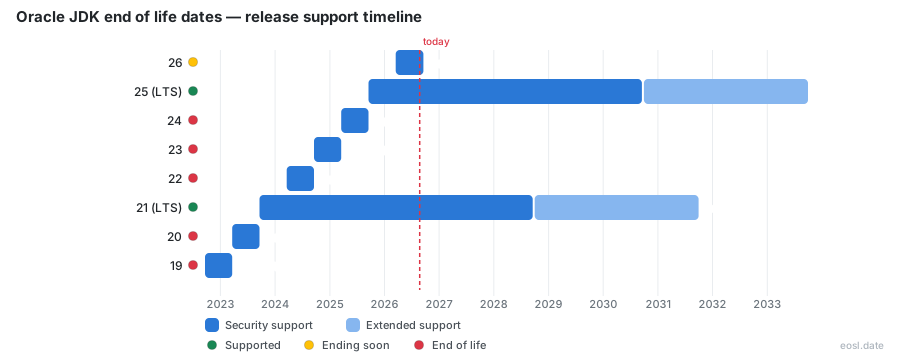
Currently Supported Oracle JDK Releases - Active EOS/EOSL Support (2)
| Release | Released | Premier Support | Extended Support | Latest | LTS |
|---|---|---|---|---|---|
| 25 (LTS) | (1 year and 2 months ago) | (in 3 years and 10 months) | (in 6 years and 10 months) | 25.0.5.0.3 (4 weeks and 1 day ago) | LTS |
| 21 (LTS) | (3 years and 2 months ago) | (in 1 year and 10 months) | (in 4 years and 10 months) | 21.0.13.0.3 (4 weeks and 1 day ago) | LTS |
Oracle JDK Releases Nearing End of Life - Support Ending Soon (1)
| Release | Released | Premier Support | Extended Support | Latest | LTS |
|---|---|---|---|---|---|
| 27 | (2 months ago) | (in 4 months) | Active | 27.0.1.0.3 (4 weeks and 1 day ago) | - |
Oracle JDK End of Life (EOL) Releases - No Longer Supported (25)
| Release | Released | Premier Support | Extended Support | Latest | LTS |
|---|---|---|---|---|---|
| 26 | (8 months ago) | (2 months ago) | Active | 26.0.2.1 (3 months ago) | - |
| 24 | (1 year and 8 months ago) | (1 year and 2 months ago) | Active | 24.0.2 (1 year and 4 months ago) | - |
| 23 | (2 years and 2 months ago) | (1 year and 8 months ago) | Active | 23.0.2 (1 year and 10 months ago) | - |
| 22 | (2 years and 8 months ago) | (2 years and 2 months ago) | Active | 22.0.2 (2 years and 4 months ago) | - |
| 20 | (3 years and 8 months ago) | (3 years and 2 months ago) | Active | 20.0.2 (3 years and 4 months ago) | - |
| 19 | (4 years and 2 months ago) | (3 years and 8 months ago) | Active | 19.0.2 (3 years and 10 months ago) | - |
| 18 | (4 years and 8 months ago) | (4 years and 2 months ago) | Active | 18.0.2.1 (4 years and 3 months ago) | - |
| 17 (LTS) | (5 years and 2 months ago) | (1 month and 3 weeks ago) | (in 2 years and 10 months) | 17.0.21.0.3 (4 weeks and 1 day ago) | LTS |
| 16 | (5 years and 8 months ago) | (5 years and 2 months ago) | Active | 16.0.2 (5 years and 4 months ago) | - |
| 15 | (6 years and 2 months ago) | (5 years and 8 months ago) | Active | 15.0.2 (5 years and 10 months ago) | - |
| 14 | (6 years and 8 months ago) | (6 years and 2 months ago) | Active | 14.0.2 (6 years and 4 months ago) | - |
| 13 | (7 years and 2 months ago) | (6 years and 8 months ago) | Active | 13.0.2 (6 years and 10 months ago) | - |
| 12 | (7 years and 8 months ago) | (7 years and 2 months ago) | Active | 12.0.2 (7 years and 4 months ago) | - |
| 11 (LTS) | (8 years and 1 month ago) | (3 years and 1 month ago) | (in 5 years and 2 months) | 11.0.33.0.3 (4 weeks and 1 day ago) | LTS |
| 10 | (8 years and 8 months ago) | (8 years and 1 month ago) | Active | 10.0.2 (8 years and 4 months ago) | - |
| 9 | (9 years and 2 months ago) | (8 years and 8 months ago) | Active | 9.0.4 (8 years and 10 months ago) | - |
| 8 (LTS) | (12 years and 8 months ago) | (4 years and 7 months ago) | (in 4 years and 1 month) | 8u511b33 (4 weeks and 1 day ago) | LTS |
| 7 (LTS) | (15 years and 4 months ago) | (7 years and 3 months ago) | (4 years and 4 months ago) | 7u351 (4 years and 4 months ago) | LTS |
| 6 | (19 years and 11 months ago) | (7 years and 10 months ago) | Active | 6u211 (8 years and 1 month ago) | - |
| 5 | (22 years and 1 month ago) | (17 years ago) | Active | 5.0u85 (11 years and 7 months ago) | - |
| 1.4 | (24 years and 9 months ago) | (18 years ago) | Active | 1.4.2_42 (13 years and 9 months ago) | - |
| 1.3 | (26 years and 6 months ago) | (20 years and 7 months ago) | Active | 1.3.1_32 (15 years and 1 month ago) | - |
| 1.2 | (27 years and 11 months ago) | (22 years and 11 months ago) | Active | 1.2.2_18 (19 years and 10 months ago) | - |
| 1.1 | (29 years and 9 months ago) | (24 years and 1 month ago) | Active | 1.1.8_010 (24 years and 1 month ago) | - |
| 1.0 | (30 years and 9 months ago) | (30 years and 6 months ago) | Active | 1.0.2 (30 years and 6 months ago) | - |
If you run Java in production, Oracle JDK end of life is the date your patches stop, and it differs for every release you might be running. This guide lays out the Oracle JDK and OpenJDK support dates for Java 8, 11, 17, 21 and 25, explains what each Oracle support tier covers, and shows you what to do before your build runs out of security updates.
Oracle JDK End of Life: Dates for Each LTS Release
Oracle publishes its commitments in the Java SE support roadmap, and the dates on it apply to the commercially supported Oracle JDK builds that Oracle customers receive. Java SE 8, 11, 17, 21 and 25 are the long-term support (LTS) releases. Every other feature release is a non-LTS release that Oracle treats as a cumulative set of enhancements on the latest LTS line, so it is superseded as soon as the next feature release ships. Oracle states that it intends to deliver an LTS release every two years, with Java 29 planned for September 2027.
| LTS release | General availability | Premier support until | Extended support until | Sustaining support |
|---|---|---|---|---|
| Java SE 8 | March 2014 | March 2022 | December 2030 | Indefinite |
| Java SE 11 | September 2018 | September 2023 | January 2032 | Indefinite |
| Java SE 17 | September 2021 | September 2026 | September 2029 | Indefinite |
| Java SE 21 | September 2023 | September 2028 | September 2031 | Indefinite |
| Java SE 25 | September 2025 | September 2030 | September 2033 | Indefinite |
| Java SE 29 (planned) | September 2027 | September 2032 | September 2035 | Indefinite |
Premier Support, Extended Support and Sustaining Support
The Oracle Lifetime Support Policy defines three tiers. Premier support delivers minor improvements, bug fixes and security fixes for at least five years after release. Extended support is available for LTS releases only and continues the same security patches and bug fixes for three more years beyond premier support. Sustaining support never ends, but it gives you access to Oracle staff and existing patches rather than new fixes, so a release in that stage is effectively frozen.
Reading the Java SE Support Roadmap Table
The roadmap dates are not a promise that a release stays free until then. They describe what Oracle customers, meaning holders of a Java SE subscription or support contract, receive. As of the page's October 2026 update, Java 17 has just left premier support, so it now sits in the extended window that runs through September 2029. Anyone planning around a date should check the live support roadmap and the endoflife.date page for Oracle JDK, which tracks the same dates and publishes the latest patch release per line.
Each supported Oracle JDK line also has a current patch version, and comparing it with what your servers report is the fastest security check you can do. The October 2026 Critical Patch Update produced the latest release of every Java line that Oracle still maintains:
| Oracle JDK line | Latest Java version (October 2026) | Status of the release |
|---|---|---|
| Oracle JDK 27 | 27.0.1.0.2 | Newest feature release, non-LTS |
| Oracle JDK 25 | 25.0.5.0.2 | Current LTS release |
| Oracle JDK 21 | 21.0.13.0.2 | LTS release in premier support |
| Oracle JDK 17 | 17.0.21.0.2 | LTS release, now in extended support |
| Oracle JDK 11 | 11.0.33.0.2 | LTS release in extended support |
| Oracle JDK 8 | 8u511 | LTS release in extended support |
If a Java server reports a version older than the one in this table, it is missing at least one Oracle security release, and every missing release means more Java security flaws that attackers can use. A non-LTS release such as Oracle JDK 26 already left support in September 2026, which shows how quickly a feature release becomes a retired Java version.
What End of Support Means for Your Java Runtime
When a release reaches end of support, the vendor ships its final update, and no security vulnerabilities discovered afterward will be fixed in that build, whatever you are willing to pay. An end of lifecycle marker therefore describes a stop in security fixes, bug fixes and technical support together, not a date on which your applications stop running. The Java runtime keeps working, but it slowly turns into technical debt because every new flaw stays open.
The practical consequence is that "is Java 8 end-of-life?" has no single answer. OpenJDK is a source project; what you run is a build of OpenJDK from a vendor, and each JDK distribution follows its own timeline. Oracle JDK is one such build: a closed-source, TCK-tested and certified build of OpenJDK.
For security teams the version number matters less than the build behind it. Oracle JDK, the OpenJDK builds from Oracle at jdk.java.net, and every other OpenJDK distribution share one code base, yet each release of the Java platform has a separate security record. Oracle JDK builds carry the Oracle licence and a commercial support contract, while Oracle OpenJDK builds are free software that receive updates only until the next release arrives, six months later. Software that relies on a specific Oracle Java SE version should record that version, the vendor and the license in the same inventory, because the Java security fixes you receive depend on all three.
Java Release Cadence and Long-Term Support
Since Java 10, the platform follows a rapid-release cycle: a feature release every six months, in March and September, with a six-month release life for non-LTS builds. An LTS release arrives every two years, which is the release cadence in place since Java 17 (it was every three years before). Security fixes reach every supported line in quarterly updates that follow Oracle's January, April, July and October Critical Patch Update cycle. These critical patch updates bundle dozens of fixes, and the vendors of other OpenJDK builds align their own quarterly updates to that Critical Patch Update calendar.
What Java End of Life Means for Patches
Once a build crosses its cutoff, the next Critical Patch Update simply skips it. The vulnerabilities fixed in that cycle stay unpatched on your servers, and attackers can read the public advisories to find them. That is why a retired runtime is riskier month by month, rather than all at once.
Oracle Java SE Licensing and the End of Free Updates
Oracle's licensing changed more than once, and the changes decide whether you can legally keep installing updates. Since September 2017, Oracle has published OpenJDK builds under a free open source license, and since September 2025 it offers Oracle JDK 25 under the Oracle No-Fee Terms and Conditions license, a free use license for all users. Updates to Oracle JDK 25 released after September 2028 are planned to move to the Oracle Technology Network license, the same agreement that covers Java 8, 11, 17 and 21.
That agreement is free of charge for personal use and development use only. Running Oracle JDK 8, 11, 17 or 21 in production after the free window therefore means buying a Java SE subscription, or switching to a builder that offers free updates. The Oracle Java SE licensing FAQ covers edge cases, and you should read it before an audit, not after.
JDK 8 Licensing and the Java Plugin
Java SE 8 went through the end of permissive licensing process for legacy releases in April 2019. Oracle continues to provide free public updates through java.com for personal and development use indefinitely, and promises at least 18 months of notice before it sets an end-of-availability date. Commercial users get Java 8 updates through My Oracle Support, and the Oracle JRE download page now points everyone else to the personal-use channel. The JRE is the runtime-only package, so desktop installs still depend on it. Oracle does not plan to move desktops from Java 8 to later versions through the auto update feature, and the Java Plugin and Java Web Start have a shorter five-year support life because the deployment stack is deprecated. Oracle encourages developers to package applications with their own custom runtime instead.
Java 17 and 21 Updates Under the OTN License
Java 17 shipped in September 2021, and public updates through September 2024 were under a permissive license. Oracle JDK 17 updates released from October 15, 2024 fall under the OTN license, and updates to Oracle JDK 21 follow the same path in the October 2026 cycle after public updates ran through September 2025. Anyone wanting to stay on a permissively licensed line should plan a move to Oracle JDK 25 or later.
Java 8 EOL Dates by Distribution
Java 8, released in March 2014, is the longest-lived release in Java's history, and vendors keep extending it because so much of the enterprise installed base still depends on it. A 2024 survey from New Relic found just under 29% of monitored applications still running Java 8 in production. The table compares the EOL dates by distribution for the most common builds.
| Distribution | Java 8 support ends | Notes |
|---|---|---|
| Red Hat build of OpenJDK 8 | November 30, 2026 | Paid Extended Life Cycle Support continues to 2030 |
| Eclipse Temurin 8 | December 2030 | Free builds |
| Amazon Corretto 8 | December 2030 | Free builds |
| Oracle Java SE 8 | December 2030 (extended) | Commercial customers |
| BellSoft Liberica JDK 8 | March 2031 | Longest window |
Eclipse Temurin, Amazon Corretto and Azul Zulu
Eclipse Temurin, Amazon Corretto and Azul Zulu all offer free Java 8 builds through the end of 2030, so a team that cannot move yet can switch vendor without touching its code. Each distribution is a drop-in replacement for the others at the binary level.
Red Hat and Liberica JDK
The row that most teams should check first is Red Hat, because its build is the default OpenJDK 8 package on RHEL and in many UBI container images. After November 30, 2026, Red Hat customers either buy extended coverage, move to another vendor, or accept an unsupported runtime. Liberica JDK from BellSoft offers a long window, with Liberica JDK 8 supported until March 2031, and the vendor also sells a performance edition. Microsoft's own build starts at Java 11, so it has no Java 8 line.
Java 11 End of Lifecycle Timeline
Java 11, released in September 2018, was the first LTS of the six-month era. Many teams assume "LTS" means supported everywhere, but a few distributions have already dropped it. Red Hat's build and BellSoft's standard coverage ended in October 2024, while Red Hat's paid subscription carries Java 11 through October 2027. Eclipse Temurin supports it until at least October 2027, and Microsoft Build of OpenJDK until September 2027. Amazon Corretto and Azul Zulu extend Java 11 to January 2032 at no cost, and Liberica runs to March 2032. On the Oracle side, extended support for Oracle JDK 11 lasts until January 2032, so a company that keeps its subscription is covered for years.
A commonly repeated claim that Oracle Java 11 reaches the Java 11 end of life in September 2026 conflicts with Oracle's own roadmap, which lists that date as the end of premier support for the Java 17 line; treat the vendor's roadmap as the authority. The same confusion explains why a headline about Oracle Java 8 and 11 end of life can mean three different cutoffs.
For planning, JDK 11 is the line where vendor choice matters most. A team running Oracle JDK 11 under a subscription has extended support to January 2032, a team running Red Hat JDK 11 without the paid add-on is already outside support, and a team running Temurin or Corretto JDK 11 sits somewhere in between. Because JDK 11 builds are interchangeable, the cheapest fix for the Oracle JDK 11 licensing question is often to swap in another JDK 11 build; a planned jump from JDK 11 to JDK 17 or JDK 21 can follow later. Compare each JDK 11 vendor date before you decide, because the JDK 11 gap between vendors is more than five years.
What Is Pinned to Java 11
Many "Java 11 shops" are really Spring Boot 2.7 shops, because Boot 2.7 runs on Java 11 and has been past its own open-source support since June 2023. Quarkus 2.16 is the last 2.x line on a Java 11 baseline, and Grails 6 and Apache Tomcat 10.1 also set Java 11 as their floor. A runtime that is covered while the framework above it is not leaves you exposed in the framework layer.
Java 17 and the Sunset of Premier Support
Java 17 is where the modern framework generation begins: Spring Boot 3, Quarkus 3 and Grails 7 all require it. The date to mark is September 30, 2026, when Oracle JDK 17 left premier support and entered extended support, which runs to September 2029. Other vendors differ: Microsoft's build and Red Hat's build run to September and October 2027, Eclipse Temurin to October 2027, Amazon Corretto to October 2029, Azul to September 2029, and BellSoft Liberica to March 2030. In practice, JDK 17 users who do not pay Oracle are on the free OTN terms only for development, so production teams should decide between a subscription and a move to a free vendor build.
What Is Pinned to JDK 17
By itself the platform is healthy; the pressure comes from upgrading the libraries above it. Moving applications from Spring Boot 2.7 to 3.x needs a Java 17 baseline and the javax to jakarta namespace migration, which is why many teams plan the framework upgrade and the JDK upgrade as one project.
Java 21 and Java 25: Current LTS Lines on the Support Roadmap
The two newest LTS lines are the safest long-term targets. Java 21 (September 2023) is supported by Oracle until September 2028 in premier support and September 2031 in extended support; Red Hat and Eclipse Temurin run to December 2029, Corretto to October 2030, Azul to September 2031 and Liberica to March 2032. Java 25, released in September 2025, gets Oracle premier support until September 2030 and extended support until September 2033, with Eclipse Temurin to September 2031, Corretto to July 2032, Azul to September 2033 and Liberica to March 2034. JDK 21 and JDK 25 are the lines most vendors now recommend as the destination for any migration, with JDK 25 offering the longest runway. Oracle expects the next LTS, Java 29, in September 2027.
Business Risks of Unsupported Java
Staying on an unsupported Java release is not only an IT housekeeping problem. It creates a chain of risks that BellSoft groups into four areas: security, operations, compliance and cost.
- Security exposure. Every quarterly Critical Patch Update fixes dozens of newly found flaws, and after the cutoff those security vulnerabilities remain in your production environment permanently.
- Operational failure. Database vendors, application servers and library maintainers move on and drop old JDKs without warning, so an emergency migration becomes necessary under pressure. A rushed project can take three to six months for a straightforward application and a year or more for a complex enterprise system.
- Regulatory compliance. Frameworks such as the Cyber Resilience Act, PCI DSS (section 6.3.1), HIPAA and FISMA expect software components to be maintained, and auditors flag an unpatched JVM quickly. Failing an audit can even affect cyber insurance coverage.
- Higher cost. Older JVMs lack modern garbage collection and JIT improvements; BellSoft estimates that legacy runtimes need 20-40% more compute for the same workload, which raises infrastructure costs.
These operational risks compound because the runtime rarely sits alone. Struts 2.5, Tomcat 8.5 (EOL since March 2024) and Hibernate 5.6 often sit above a retired JDK, and an unpatched framework above an unpatched runtime is the real risk in many enterprise estates. A weak audit result in this stack is the usual first sign of trouble.
Security is the part of the Java platform that ages fastest. Every Java security release removes flaws in the class libraries, the networking stack, the cryptography providers and the JVM itself, and each Oracle security release is documented in a public advisory. Because the advisory lists what was fixed, it also tells an attacker what is still broken in every Java build that missed the update. The security gap grows with each quarter, so a Java security team gains little from a one-time scan; it needs a regular process that compares every Java version in use with the newest release of the same Java line. Security teams should also remember that a retired Java runtime inside a vendor product is still your exposure, even if you never installed it yourself.
Java security work has a second side, which is the cryptography defaults. Newer Java releases disable weak algorithms and tighten certificate validation, and an old Java release keeps accepting them. Moving to a current Java version therefore improves security beyond the individual bug fixes, because the platform defaults change with each release. Teams that delay the move often discover the difference during a penetration test, when an outdated Java TLS configuration is reported as a security finding.
A workable Java security programme for a company that depends on Oracle JDK and OpenJDK has six parts, and each one protects security in a different way:
- Java security inventory. List every Java runtime with its Java version and Java vendor, because Java security starts with knowing which Java is installed on each server, laptop and container image.
- Java security patch cadence. Apply each Oracle security release within a fixed window after the quarterly Critical Patch Update, and record the Java security patch level of every Java application.
- Java security monitoring. Subscribe to the Oracle security alerts and the OpenJDK vulnerability announcements, so the security team learns about a Java flaw on the day the advisory appears, not weeks later.
- Java security testing. Run each Java application against the newest Java release in a test environment, because a Java security upgrade that nobody has tested becomes a Java outage.
- Java security ownership. Give every Java service a named owner who is accountable for its Java version, its security patches and its end-of-support date, so a retired Java runtime cannot remain unnoticed.
- Java security exceptions. When a Java application cannot move, record the security risk, the extra controls such as network isolation, and the date the Java exception expires.
Oracle JDK and OpenJDK users share the same security obligations, and the security advisories for Java apply equally to both. What changes with an Oracle JDK subscription is who delivers the Java security fix and how long Oracle keeps delivering it. With an OpenJDK build, the Java security release comes from the vendor you chose, so the security promise is only as long as that vendor's published support dates. This is why a Java security review always asks two questions: which Java release is running, and which Oracle or OpenJDK vendor stands behind its security updates. Security reviewers who record only "Java 17" have not answered either question.
It also helps to separate security debt from feature debt. Feature debt means your Java code does not use modern Java features, which costs developer time. Security debt means your Java runtime lacks the latest security fixes, which costs trust, audit results and sometimes a breach. A Java team can live with feature debt for years, but Java security debt has an expiry date, and Oracle's support roadmap shows when. Every release in the Java support roadmap that you ignore adds Java security debt, and the Oracle JDK release you choose today decides how much security debt you carry in 2030.
Migration Strategy and Upgrade Paths Off a Retired JDK
Your options fall into three groups, and the right one depends on how much you can change and how soon. A sound migration strategy starts with an inventory of what you run, then picks the least risky route.
- Switch vendor, keep the version. Move Oracle JDK 8 or 11 to a free build such as Temurin, Corretto or Liberica. Nothing in your code changes, and you gain years of free updates.
- Buy a subscription. Keep Oracle JDK under a Java SE subscription or pay for Red Hat's Extended Life Cycle Support if you need certified commercial support.
- Upgrade the platform. Move to Java 17, 21 or 25, usually together with the framework. This ends the dependence on legacy lines, but it is the largest project.
A Java migration plan works best when it is written down as a Java project with an owner, a Java test plan and a date. Start with the Java applications that face the internet, because their Java security exposure is highest, then move internal Java batch jobs and Java desktop tools. For each Java application, record the current Java version, the target Java version, the Java libraries that must change and the Java security benefit of the move. Time the Java cutover just after a Critical Patch Update, so the new Java build already contains the newest security fixes, and plan the next Java security review for the following critical patch update. Teams that treat Java migration as a one-off event repeat the same Java emergency every few years, while teams that adopt each new Java LTS release on a schedule keep their Java security posture steady and their Java skills current. Whichever you choose, treat the move as phased work: build and test on the new runtime in staging, fix the removed APIs and reflection warnings, then roll out gradually. Vendors such as HeroDevs also sell patched builds of end-of-life frameworks if the application layer cannot move yet, and BellSoft's performance edition of Liberica can offset the extra compute that an old JVM demands.
Checking Whether Your JDK Distribution Is End-of-Life
Before acting on any date, confirm what you are actually running. Run java -version on each host or container image and read the vendor line, which tells you whether it is Oracle, Temurin, Corretto, Zulu or a Red Hat build. The site whichjdk.com helps you choose a distribution, and endoflife.date lists product identifiers such as the CPE strings (cpe:/a:oracle:jdk and cpe:2.3:a:oracle:jdk) that scanners use to match a build to known vulnerabilities. Check the supported release column in your scanner against the vendor's table, not against the Java version number alone.
Use this short checklist for every Java deployment you find:
- Which Java vendor and Java version does the host report, and is it an Oracle JDK or an OpenJDK build?
- Which Oracle JDK release line is it, and does the vendor still ship security updates for that Java release?
- Is the Java license suited to production, or does it allow personal and development use only?
- Which Java framework or application server depends on this JDK version, and when does that support end?
- Where does the team download its Java updates, and does a Java security advisory reach the people who install them?
Also check where Java is hidden: base container images, application servers, build agents, and bundled runtimes inside third-party products. A vendor's subscription contract may cover only some of them.
Taking Action Before the Deadline
Make a short list of every Java workload, mark the date your distribution stops patching it, and sort by the earliest deadline. The most urgent dates in the tables above are Red Hat's Java 8 cutoff on November 30, 2026 and Oracle JDK 17's move into extended support. For each workload choose a route: change vendor, buy coverage, or upgrade to Java 21 or 25. Record the decision and the next review date, and re-check the timeline each January, April, July and October when new patch releases land. Share the Java list with the people who own each Java service, and ask them to confirm the Java version, the Java vendor and the Java support date in writing. A Java owner who knows that the Java runtime loses security fixes on a named day will schedule the Java upgrade; a Java owner who has never seen the Java support roadmap will not. Review the Java list every quarter, add every new Java application to it, and remove each Java server that has been retired. Keep the Java security evidence, such as scan reports and Java patch records, in one place so an auditor can see the Java security history of each application without a search. When a new Java LTS release appears, add it to the Java plan the same week, because the Java team that decides early chooses its Java version calmly. Planning early keeps the migration a scheduled project and not an emergency, and it keeps your security, compliance and production teams aligned on one deadline. In short, know which Java you run, know when that Java stops receiving fixes, and move your Java workloads to a supported Java LTS release before the Java support date passes. Whether your Java estate is ten servers or ten thousand, the same Java rule holds: a supported Java runtime is cheaper than a Java emergency, and the Java dates in this guide tell you how much time you have.