Oracle Database End of Life (EOL) Dates and End of Support (EOS) Dates
Oracle Database end of life (EOL) and end of support (EOS) dates: 9 Oracle Database versions have reached EOL, including Oracle Database 18c (EOL date: Jun 30, 2021) — no longer receiving security updates or patches. Oracle Database 26ai (LTR) LTS is the current supported release, with support through Dec 31, 2031 — 3 versions in active support. Also see MySQL end of service life for related end-of-life information.
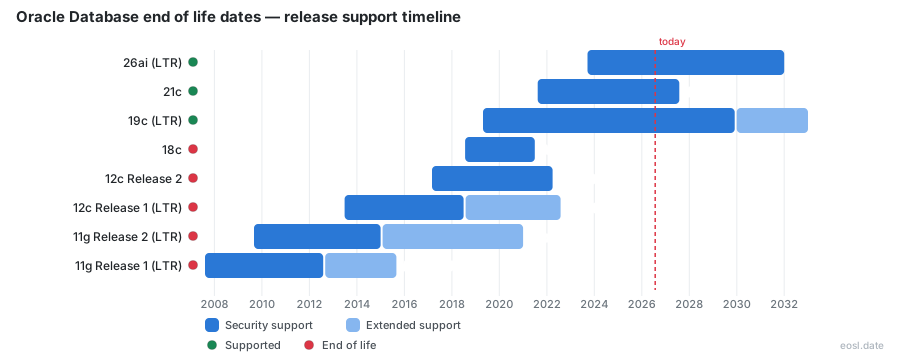
Currently Supported Oracle Database Releases - Active EOS/EOSL Support (3)
| Release | Released | Premier Support | Extended Support | LTS |
|---|---|---|---|---|
| 26ai (LTR) | (3 years and 1 month ago) | (in 5 years and 1 month) | Active | LTS |
| 21c | (5 years and 3 months ago) | (in 8 months) | Active | - |
| 19c (LTR) | (7 years and 6 months ago) | (in 3 years and 1 month) | (in 6 years and 1 month) | LTS |
Oracle Database End of Life (EOL) Releases - No Longer Supported (9)
| Release | Released | Premier Support | Extended Support | LTS |
|---|---|---|---|---|
| 18c | (8 years and 3 months ago) | (5 years and 4 months ago) | Active | - |
| 12c Release 2 | (9 years and 8 months ago) | (4 years and 7 months ago) | Active | - |
| 12c Release 1 (LTR) | (13 years and 4 months ago) | (8 years and 3 months ago) | (4 years and 3 months ago) | LTS |
| 11g Release 2 (LTR) | (17 years and 2 months ago) | (11 years and 9 months ago) | (5 years and 10 months ago) | LTS |
| 11g Release 1 (LTR) | (19 years and 3 months ago) | (14 years and 2 months ago) | (11 years and 2 months ago) | LTS |
| 10g Release 2 (LTR) | (21 years and 4 months ago) | (16 years and 3 months ago) | (11 years and 3 months ago) | LTS |
| 10g Release 1 (LTR) | (23 years and 2 months ago) | (17 years and 9 months ago) | (14 years and 10 months ago) | LTS |
| 9i Release 2 (LTR) | (24 years and 6 months ago) | (19 years and 3 months ago) | (16 years and 3 months ago) | LTS |
| 9i Release 1 | (25 years and 5 months ago) | (22 years and 10 months ago) | Active | - |
If your Oracle estate runs on a release close to its deadline, Oracle Database end of life is the date to plan around, because after it Oracle stops shipping the fixes that organizations rely on. This guide lists every Oracle end of life date for the Oracle Database lifecycle, explains what end of support changes for your Oracle data, and shows how to plan the move before the clock runs out.
Oracle Database End of Life Dates by Release
Oracle publishes dates per release, and the Oracle Database releases people ask about most are 19c, 21c, 23ai and 26ai. The table lists when Oracle Database Premier Support and Extended Support end for each of these Oracle Database versions on Oracle Linux and other Linux x86-64 servers, taken from the schedule Oracle keeps for self-managed servers. Oracle tracks many more releases than the six shown, and Oracle can revise any Oracle date, so confirm it in My Oracle Support before you commit your Oracle budget.
| Oracle Database release | Released | Premier ends | Extended ends |
|---|---|---|---|
| Oracle 26ai (LTR) | October 2025 | December 2031 | Not yet announced |
| Oracle 21c (innovation) | August 2021 | July 2027 | Not available |
| Oracle 19c (LTR) | April 2019 | December 2029 | December 2032 |
| Oracle 12c Release 2 | March 2017 | March 2022 | Not available |
| Oracle 12c Release 1 | June 2013 | July 2018 | July 2022 |
| Oracle 11g Release 2 | September 2009 | January 2015 | December 2020 |
These end of life dates are the anchor for every Oracle database in your estate. The subsections below explain what each date means for the releases most teams still run.
Oracle Database is a relational database queried through SQL, so every Oracle application that uses its data inherits the database's deadline: the oldest certified Oracle database version sets how soon your enterprise can move. Check which applications connect to each Oracle database before you read the dates.
Oracle 19c Premier Support and Extended Support Dates
Oracle 19c remains the Oracle Database release most enterprise organizations still run in production, and the one whose retirement plan carries the most business risk. Oracle extended its schedule, so Premier Support for 19c now runs to December 2029 and Extended Support runs to December 2032. These dates give your DBA team about three more years of fixes for the Oracle Database after Premier Support ends, but that stretch adds fees, so treat 2029 as the practical deadline for your Oracle databases and the applications that sit on them.
Oracle 23ai and 26ai Support Timeline
The next Oracle Database release after 19c began life as 23ai and became 26ai in October 2025, when Oracle replaced it with a Release Update while keeping 23 as the leading number. Premier coverage for 23ai and 26ai runs to December 2031, and Oracle has not announced an Extended window for these newest releases. The 26ai release adds AI vector search to Oracle Autonomous Database and to local servers, so many teams use an older release's deadline as the trigger to move.
Oracle 11g and 12c Expired Dates
Oracle 11g Release 2 left Extended coverage in December 2020 and 12c Release 1 left it in July 2022, so both are unsupported systems today. Neither gets new security fixes, and Oracle only offers Sustaining Support, which keeps documentation and existing fixes available. If an audit turns up an Oracle 11g or 12c database, treat it as a legacy system that needs replacing now, and replay your key SQL against the replacement to compare its performance with the old Oracle database before the cutover, because SQL plans can change between releases.
What End of Support Means for Your Oracle Release
When Oracle announces that a technology has reached the end of its useful life, it describes a sequence of milestones, not one event. Every Oracle product follows the same path from sale to retirement, and each milestone removes something an enterprise depends on: new purchases, fixes from Oracle or an escalation route when production stops. Knowing the order lets you judge the risk to your Oracle data at each point and sequence the budget and infrastructure work for your Oracle database estate.
- End of sale: Oracle stops selling new licenses or hardware, so you can keep operating what you own but cannot expand capacity.
- End of Premier Support: regular bug fixes, quarterly security patches and new certifications stop unless you pay for the next stage.
- End of Extended Support: Oracle retires the product from its roadmap, and your team must handle incidents on its own.
Hardware follows the same path. Oracle engineered systems such as Exadata carry a last ship date and a final service date, after which Exadata firmware and component fixes are no longer available from Oracle. The reliability and stability of the Oracle database tier depend on the Exadata hardware, the operating systems and the Oracle software together, so Oracle EOL work has to cover all three layers, and Exadata end of service dates can force a database platform move even when the Oracle Database release is still supported.
Support Stages from Premier to Sustaining
Oracle describes three support stages. Premier Support is the comprehensive stage, with maintenance and new features for five years from general availability. Extended Support continues the maintenance for an additional extended support fee, and Oracle sometimes offers free extended support for a limited window on some releases, so ask your Oracle account team whether a fee waived period applies to your Oracle Database version. Sustaining Support lasts as long as you use the software, but it only gives you online tools, rights to newer releases and existing fixes, with no new Critical Patch Updates.
Ordering Cutoffs Before Retirement
For a database, the end of sale means Oracle stops selling new licenses for that release, so growth must rely on a newer Oracle Database. Oracle announces it well ahead, and it posts an end of service notice for the hardware too, after the last ship date. Your coverage for existing Oracle systems usually continues, which makes this milestone an early warning for the longer migration ahead.
Oracle Lifetime Support Policy and Release Schedule
The Oracle Lifetime Support Policy defines every date in this guide. It covers software such as Oracle Database and middleware, the Applications Unlimited family, and hardware with its operating systems, and it is the source Oracle uses for each published Oracle schedule. Every product line has its own terms in the policy, so read the entry for the Oracle products you run instead of assuming the database rules also cover your Oracle applications.
For software, Premier Support lasts five years from general availability and Sustaining coverage continues indefinitely. For Oracle applications such as PeopleSoft, JD Edwards, Siebel and Oracle E-Business Suite, Oracle has committed to Premier Support through at least 2037 on the Continuous Innovation releases, so those Oracle applications follow a different timetable than the Oracle Database. Applications, middleware and database releases do not expire together, which is why one Oracle applications estate can mix products with 2029 and 2037 deadlines. Java is a common dependency, and Oracle has granted Java 8 a fee waiver of its own, which matters because Oracle Database 19c can depend on Java for some features and some bundled middleware.
Applications matter here because Oracle applications such as PeopleSoft and JD Edwards list the database versions they are certified on, so the database deadline drives the timing of every application upgrade above it. Record the certified database for each of your Oracle applications, and expect the applications on the oldest database releases to feel the pressure first, since older releases and their applications retire sooner than newer releases do. Treat the technology stack as one unit.
Long-Term Release and Innovation Release Explained
Oracle now ships two kinds of releases, and the type decides how long your window lasts. A long-term release gets five years of Premier coverage and three years of Extended coverage, so you can stay on it for eight years. An innovation release such as 21c gets at least two years of Premier coverage and no Extended stage, which makes it a poor fit for stability. Customers often need four years or more to move between those releases, so start your Oracle upgrade strategy early and pick the upgrade path with the longest runway.
Monthly Recommended Patches and Release Updates
Patching changed in November 2022, when Oracle introduced Monthly Recommended Patches and retired the older Release Update Revisions in January 2023. Each quarterly update still carries the security fixes, and the monthly patches give you tested fixes between quarters. Patches stop when Premier coverage for your database release ends, because only a supported Oracle Database receives either kind. To find which release you run, execute a quick SQL statement in SQL*Plus or any SQL client: SELECT BANNER_FULL FROM V$VERSION;
Support Lifecycle Risks for Unsupported Oracle Systems
Running an Oracle Database release past its end-of-support date does not break the database overnight, which is exactly why the risk is easy to ignore. Your data keeps flowing and your SQL keeps running, but the security posture, the compliance position and the spending all worsen every month, and the problems tend to arrive together. Performance tuning advice dries up too, and a problem in production has no vendor escalation behind it.
The risk builds in three layers. First comes the data layer: the Oracle database stores customer, payment and operational data, so a breach of an unsupported Oracle database exposes the most sensitive data in the enterprise. Second comes the application layer: Oracle applications such as PeopleSoft and E-Business Suite certify against specific database versions, so an unsupported Oracle database can block fixes for every application above it. Third comes the performance layer: new SQL features, optimizer improvements and performance fixes ship only for supported Oracle Database releases, so slow SQL on an old Oracle database tends to stay slow. List each layer separately in your risk register, because each one is a reason for enterprise leaders to fund the move early.
Security Risks and Compliance Gaps
Once an unsupported Oracle Database release stops receiving Critical Patch Updates, a database holding customer data is exposed to the vulnerabilities published each quarter, and attackers actively scan for unpatched Oracle listeners. Unpatched exposure invites cyberattacks that can threaten business continuity. Security trouble becomes a compliance problem at your next audit, because unsupported software can fail audits under GDPR, HIPAA and SOX when there is no evidence of timely patching. Regulators treat compliance gaps in data retention and access control as the enterprise's responsibility, so document your plan before the auditors ask, and keep compliance evidence for every database in scope.
Escalating Support Costs and Legacy Systems
The cost of staying on an old Oracle Database release is rarely one line item. Extended Support fees rise the longer you stay, outside providers add their own risk, and your team spends its time maintaining legacy systems instead of building features. One industry estimate puts upkeep on an end-of-life enterprise system at $300,000 to $500,000 a year, so compare the fees and that estimate with the one-time price of upgrading or moving off the old release when you build the plan. These escalating costs also hide an opportunity cost, because modernization of the Oracle data tier waits while the team patches the past.
Migration Paths Before End of Extended Support
You have three realistic options when an Oracle release nears its deadline: patch up to a newer version in place, move the data to a newer release or a cloud service, or decommission the system and archive its data. The right choice depends on how much the application still matters to the business and how much downtime it can tolerate. Oracle Data Guard protects Enterprise Edition users during a cutover, and standby tools give Standard Edition users similar protection. Oracle Data Guard keeps a standby copy of your Oracle data in sync, so Data Guard lets you switch to the upgraded Oracle database in minutes and then retire the old primary once the data matches. Data Guard needs Enterprise Edition, which is why Standard Edition shops rely on third-party standby tools for the same job.
On-Premises, ODA and Cloud Routes to 26ai
Oracle 23ai first arrived on Oracle Cloud Infrastructure and Oracle Database Appliance, so cloud customers adopted it first, while on-premises teams stayed on 19c until the on-premises release became generally available. The same path now applies to 26ai. If you prefer the cloud, Oracle's multicloud offerings place Autonomous Database inside Microsoft Azure, Google Cloud and Amazon Web Services data centers, although licensing and architecture limits can make portability harder than it first looks. On-premises teams can trial the free edition before they commit.
Data Archiving and Decommissioning Old Oracle Systems
When a database release reaches the end of Extended Support and its applications are no longer used daily, archive the data and retire the instance instead of paying for coverage. A sound project begins with dependency mapping, moves the data with change data capture so downtime stays near zero, and keeps records searchable under your retention rules, so you can switch off the old servers and still answer an audit. Data archiving costs less than paying for Extended coverage on a system nobody uses.
Oracle EOL Planning Checklist
Turn the dates in this guide into a plan your team can follow. Work through the steps in order, and revisit them every year when Oracle revises its policy. A recommended action for each Oracle system keeps the list actionable.
- Inventory every Oracle Database, Oracle application and engineered system, and record its release and patch level.
- Match each item to its Premier and Extended end dates in the Oracle schedule.
- Rank systems by business risk, and flag any that fall under a compliance requirement.
- Choose to move, modernize or decommission each system, and set a recommended action and an owner.
- Schedule the work at least twelve months before Premier coverage ends, then rehearse the cutover on a copy of production data.