nginx End of Life (EOL) Dates and End of Support (EOS) Dates
nginx end of life (EOL) and end of support (EOS) dates: 30 nginx versions have reached EOL, including nginx 1.29 (EOL date: May 13, 2026) — no longer receiving security updates or patches. nginx 1.31.8 is the current supported release — 2 versions in active support. Also see Caddy EOSL information for related end-of-life information.
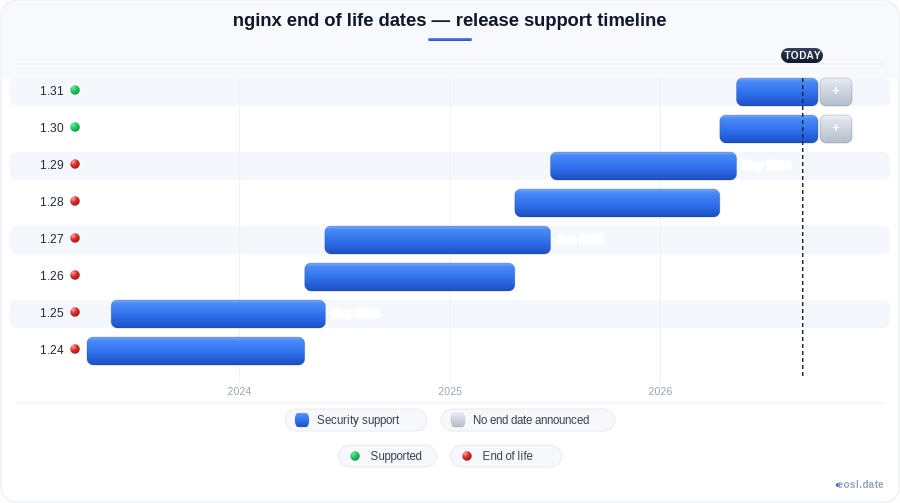
Currently Supported nginx Releases - Active EOS/EOSL Support (2)
nginx End of Life (EOL) Releases - No Longer Supported (30)
| Release | Released | Security Support | Latest |
|---|---|---|---|
| 1.29 | (1 year and 4 months ago) | (6 months ago) | 1.29.8 (7 months ago) |
| 1.28 | (1 year and 6 months ago) | (6 months ago) | 1.28.3 (7 months ago) |
| 1.27 | (2 years and 5 months ago) | (1 year and 4 months ago) | 1.27.5 (1 year and 6 months ago) |
| 1.26 | (2 years and 6 months ago) | (1 year and 6 months ago) | 1.26.3 (1 year and 9 months ago) |
| 1.25 | (3 years and 5 months ago) | (2 years and 5 months ago) | 1.25.5 (2 years and 6 months ago) |
| 1.24 | (3 years and 7 months ago) | (2 years and 6 months ago) | 1.24.0 (3 years and 7 months ago) |
| 1.23 | (4 years and 4 months ago) | (3 years and 5 months ago) | 1.23.4 (3 years and 7 months ago) |
| 1.22 | (4 years and 5 months ago) | (3 years and 7 months ago) | 1.22.1 (4 years ago) |
| 1.21 | (5 years and 5 months ago) | (4 years and 4 months ago) | 1.21.6 (4 years and 9 months ago) |
| 1.20 | (5 years and 6 months ago) | (4 years and 5 months ago) | 1.20.2 (4 years and 11 months ago) |
| 1.19 | (6 years and 5 months ago) | (5 years and 5 months ago) | 1.19.10 (5 years and 7 months ago) |
| 1.18 | (6 years and 6 months ago) | (5 years and 6 months ago) | 1.18.0 (6 years and 6 months ago) |
| 1.17 | (7 years and 5 months ago) | (6 years and 5 months ago) | 1.17.10 (6 years and 6 months ago) |
| 1.16 | (7 years and 6 months ago) | (6 years and 6 months ago) | 1.16.1 (7 years and 3 months ago) |
| 1.15 | (8 years and 5 months ago) | (7 years and 5 months ago) | 1.15.12 (7 years and 6 months ago) |
| 1.14 | (8 years and 6 months ago) | (7 years and 6 months ago) | 1.14.2 (7 years and 11 months ago) |
| 1.13 | (9 years and 6 months ago) | (8 years and 5 months ago) | 1.13.12 (8 years and 7 months ago) |
| 1.12 | (9 years and 7 months ago) | (8 years and 6 months ago) | 1.12.2 (9 years ago) |
| 1.11 | (10 years and 5 months ago) | (9 years and 6 months ago) | 1.11.13 (9 years and 7 months ago) |
| 1.10 | (10 years and 6 months ago) | (9 years and 7 months ago) | 1.10.3 (9 years and 9 months ago) |
| 1.9 | (11 years and 6 months ago) | (10 years and 5 months ago) | 1.9.15 (10 years and 6 months ago) |
| 1.8 | (11 years and 6 months ago) | (10 years and 6 months ago) | 1.8.1 (10 years and 9 months ago) |
| 1.7 | (12 years and 6 months ago) | (11 years and 6 months ago) | 1.7.12 (11 years and 7 months ago) |
| 1.6 | (12 years and 6 months ago) | (11 years and 6 months ago) | 1.6.3 (11 years and 7 months ago) |
| 1.5 | (13 years and 6 months ago) | (12 years and 6 months ago) | 1.5.13 (12 years and 7 months ago) |
| 1.4 | (13 years and 6 months ago) | (12 years and 6 months ago) | 1.4.7 (12 years and 7 months ago) |
| 1.3 | (14 years and 5 months ago) | (13 years and 6 months ago) | 1.3.16 (13 years and 6 months ago) |
| 1.2 | (14 years and 6 months ago) | (13 years and 6 months ago) | 1.2.9 (13 years and 6 months ago) |
| 1.1 | (15 years and 3 months ago) | (14 years and 5 months ago) | 1.1.19 (14 years and 7 months ago) |
| 1.0 | (15 years and 7 months ago) | (14 years and 6 months ago) | 1.0.15 (14 years and 7 months ago) |
If your web server or reverse proxy runs NGINX, NGINX end of life decides how long your server keeps receiving security support, and the answer depends on which build you run. This guide shows which branches are still supported, how the NGINX Plus model works, and what the Ingress NGINX shutdown means for Kubernetes software running in production.
NGINX End of Life Dates for Supported Releases
The project ships two kinds of version, and only the newest two lines are supported at any time. As of 22 October 2026, 1.31 and 1.30 still receive security fixes, bug fixes and security patches. Every older release has lost technical support, so a vulnerability found tomorrow will never be patched there. NGINX is an HTTP server, a load balancer and a proxy at once, which is why an unpatched build is a serious security exposure for your infrastructure.
| Branch | Released | Support status | Latest patch |
|---|---|---|---|
| 1.31 | 13 May 2026 | Supported | 1.31.8 (21 Oct 2026) |
| 1.30 | 14 Apr 2026 | Supported | 1.30.6 (14 Oct 2026) |
| 1.29 | 24 Jun 2025 | Ended 13 May 2026 | 1.29.8 (07 Apr 2026) |
| 1.28 | 23 Apr 2025 | Ended 14 Apr 2026 | 1.28.3 (24 Mar 2026) |
| 1.27 | 28 May 2024 | Ended 24 Jun 2025 | 1.27.5 (16 Apr 2025) |
| 1.26 | 23 Apr 2024 | Ended 23 Apr 2025 | 1.26.3 (05 Feb 2025) |
Run nginx -v on each host and compare the output with the table. Anything below 1.30 is past end of support, and the pattern is steady: a branch stops receiving patches roughly when the next one in its line arrives.
Mainline and Stable Release Branches
The mainline branch is the active development line where new features and bug fixes land first. The stable branch takes only fixes for high-severity bugs and gets no new features, which suits an open-source production deployment that values predictability over novelty. Both receive the same fixes for serious flaws, such as the buffer overflow in the HTTP/3 module fixed in September 2026 (CVE-2026-90439), and the October 2026 builds closed another buffer overflow with alias and rewrite (CVE-2026-15176). That same October patch release also fixed a request body injection flaw in HTTP/3 and a TLS session ticket forgery bug affecting encryption key rotation. Every one of those fixes landed only on supported lines.
Reading the Versioning Scheme
The middle number tells you the line. An odd number there, like 1.31, marks the development line; an even number, like 1.30, marks the fix-only line. The final number is the patch level, so 1.30.6 is the sixth fix build on that line. When release numbering looks confusing, check the second digit first, then confirm the patch against the latest build for that branch. Treat a pinned old deployment as a dependency that must be re-checked on every new patch.
Distribution builds deserve a separate check. A Linux host on Ubuntu or Debian may ship an older NGINX build, and the distributor, not the NGINX project, decides how long that operating system package gets patched. An Ubuntu LTS release and a Debian release both carry their own support windows, so confirm the distro schedule as well as the upstream supported list. Any Linux box built from source, including container images based on Debian or Ubuntu, needs the same check for its modules, cryptography libraries and configuration files.
Linux Distribution Packages and Their Support Windows
Most Linux servers run NGINX from a distribution package, so the support window is set twice: once by the NGINX project and once by the distributor. On Ubuntu, the archive build of NGINX is patched for as long as that Ubuntu release is in support, and Debian does the same for each Debian release. Both distributors usually backport a security fix into their own older version number instead of jumping to the newest upstream branch. That means a nginx -v reading of 1.18 on a patched Ubuntu host can be safe, while the same number on a hand-built Linux box is not.
- Ubuntu: check the Ubuntu security notices for NGINX and note when your Ubuntu release loses support.
- Debian: read the Debian security tracker for your Debian release and its NGINX packages.
- Official repositories: the NGINX project publishes packages for Ubuntu and Debian that follow the upstream lines directly.
- Containers: a Docker image on a Debian or Ubuntu base inherits both the NGINX version and the base image's Linux support dates.
The Linux distribution also controls which modules you can install. Dynamic modules must match the exact NGINX build, so a version bump on Ubuntu or Debian means reinstalling every module and re-testing your configuration. Run nginx -t after each change before reloading the server, and keep the configuration in version control so a rollback is quick. Ubuntu LTS and Debian are both long-lived, yet neither promises the newest HTTP/3 behaviour, so teams that need current HTTP/3 or TLS features often add the official Linux repository.
NGINX Plus Lifecycle and Release Tracks
The commercial product follows its own lifecycle. Since 13 May 2026, NGINX Plus and the NGINX Ingress Controller use one unified model: an annual LTS release, each one supported for three years from its general availability date. F5 sells this enterprise edition, so the vendor publishes its own support period, separate from the branches in the table above. NGINX Plus and its LTS builds also carry support for the Linux distributions F5 lists, including Ubuntu and Debian.
Choose NGINX Plus when an enterprise contract, a service-level agreement or paid vendor coverage matters more than cost. The enterprise subscription bundles the server, the proxy features and direct support. Large enterprise teams often standardise on one LTS line across every server, because one LTS baseline simplifies security reviews. An enterprise buyer also gets support for the Ingress Controller, so the same NGINX Plus track covers both the proxy and Kubernetes edge.
NGINX Plus Long-Term Support (LTS) Release Track
The long-term support release track is built for stability. The current LTS line is PLS.37, and its patch builds receive only security fixes and CVE mitigations, never new features. The latest NGINX Plus LTS build, PLS.37.0.7.1, shipped on 14 October 2026. Pick this LTS line when change control is strict and you want the full three-year window.
NGINX Plus Continuous Release Cadence
The continuous release line is the opposite trade. Continuous builds carry the newest features and fixes, but they are never patched: a security fix arrives as the next release, and only the latest one is supported. The current NGINX Plus continuous build is PLS.37.2.0.1. When a new annual LTS version appears, the earlier line stops getting new continuous builds, so staying current is part of the contract.
Release Schedule and Upgrade Strategy
A workable release schedule habit is simple: check the NGINX Plus release page monthly and log each LTS patch. Teams on the older R36 line should choose a track as part of their upgrade strategy: LTS for stability, continuous for features. An upgrade from R36 can move to the next LTS with minimal effort, or stay on the current one when validation is heavy.
Ingress NGINX Retirement Timeline
The Kubernetes project announced the retirement of Ingress NGINX on 11 November 2025. Best-effort maintenance continued until March 2026; after that there are no further releases, no bug fixes and no updates for newly found vulnerabilities. The repository is archived, existing clusters keep running, and traffic still flows, but nobody upstream will patch the controller again. The Kubernetes Ingress API itself is feature-frozen rather than removed, and the timeline for the controller is now fixed. The Ingress controller that sits in front of your services is simply unsupported. Operators should plan maintenance windows for the switch rather than wait.
What the Ingress NGINX EOL Covers
People often confuse two projects. The retired one is the community Ingress controller in the kubernetes/ingress-nginx repository. The NGINX Ingress Controller from F5 is a different codebase and stays maintained, and the NGINX web server itself is untouched. So this EOL concerns one Kubernetes controller, not the server you may run on plain hosts. Check which image your cluster actually pulls before you panic or relax.
Why Maintainers Walked Away
The maintainers were one or two volunteers working evenings and weekends. Years of flexibility, such as arbitrary configuration snippets, piled up as technical debt and became a security liability, and the planned successor never matured. With volunteers unable to staff the project, retiring it was the safest call for the cloud native ecosystem, and it is why the controller now has no upstream patches.
Risks of Running End-of-Life Releases
An NGINX release past its support window sits directly in the request path, so every unpatched flaw in the six advisories below is yours to carry. The main dangers are unpatched flaws, failed reviews and compatibility risks as surrounding tools move on. The security exposure compounds because every new advisory applies to you while the fix does not. Weigh that risk against the effort of an upgrade; for most teams, moving is cheaper.
Finding Unsupported Servers in Your Linux Fleet
Start with an inventory, because most unsupported NGINX installs hide on forgotten Linux hosts. Each Linux server needs a quick security check, and the steps are the same on every Linux distribution.
- List every Linux server that runs NGINX, including containers and build images based on a Linux userland.
- Run
nginx -Von each Linux host to capture the version, the compiled-in modules and the build flags. - Compare each result with the branch table, then with the Linux distributor's own security notices.
- Flag every server whose version is below 1.30 and whose Linux package has no backported security fix.
- Rank the flagged Linux machines by exposure, putting internet-facing server roles first.
Treat the output as a living register. Each Linux server on the list needs an owner, a target version and a date. Third-party modules deserve their own line, since a custom modules build breaks on every Linux upgrade and tends to be the reason a server stays behind. Teams that automate the scan on every Linux image keep security debt visible, and a weekly report to the security channel is usually enough. The register also gives you evidence for the security review, because a Linux fleet with a documented plan is easier to defend than one with no records at all. A Linux server behind a patched proxy is better protected, though never fully so. Whatever Linux distribution you run, the NGINX version and the Linux package date are the two facts to record.
Missing Security Updates and CVE Exposure
Without security updates, each new CVE becomes permanent. The October 2026 advisories, covering a use-after-free in the SSI module with AIO and a TLS session forgery issue, show how fast the list grows. A single vulnerability such as CVE-2026-95101 in HTTP/3 can expose request bodies, and an end-of-life host will never receive that fix. Keep a short record of each CVE and the version that closes it. Every vulnerability below was fixed only on supported lines, and each CVE counts against an old server.
| Advisory | Flaw | Fixed in |
|---|---|---|
| CVE-2026-90439 | Buffer overflow in the HTTP/3 module | 1.30.5 and 1.31.6 |
| CVE-2026-15176 | Buffer overflow with alias and rewrite | 1.30.6 and 1.31.7 |
| CVE-2026-93479 | Buffer overflow when evaluating string expressions with variables | 1.30.6 and 1.31.7 |
| CVE-2026-95101 | Request body injection in HTTP/3 | 1.30.6 and 1.31.7 |
| CVE-2026-97629 | Session forgery with TLS session ticket key rotation | 1.30.6 and 1.31.7 |
| CVE-2026-97205 | Use-after-free with the SSI module and AIO | 1.30.6 and 1.31.7 |
The buffer overflow entries matter most, because memory corruption in a proxy that faces the internet is the classic route to remote code execution. Three separate buffer overflow bugs and three other flaw types show why every security advisory should trigger a version check on every server.
Compliance and Audit Pressure
Reviewers now flag unsupported software in the request path. A failed audit against SOC 2, PCI DSS or HIPAA turns an unpatched proxy into a compliance finding even if nothing has been breached. Document your plan and the date you will move; most frameworks expect supported, patched components in the request path, and a build past its support window cannot show that.
Migration Options After End of Support
Your realistic migration paths are short. You can migrate to a maintained controller, move to the newer routing API, or buy coverage while you plan. Whichever you choose, schedule the work, test in staging and avoid downtime by moving traffic gradually. Migrating one service at a time keeps rollback simple. Teams running the plain server instead can simply move to 1.30 or 1.31, or to an NGINX Plus LTS build.
Gateway API and Other Alternatives
The Gateway API is the long-term successor to Ingress, and several alternatives are drop-in controllers: Traefik, HAProxy and Envoy-based options. Pick the Gateway API if you can rewrite your routing, and a controller swap if you need speed. A Gateway API rollout also lets you retire snippet-style annotations.
Commercial Support While You Migrate
If you cannot move yet, commercial support from a provider can keep you patched during the transition. Treat it as a bridge, not a destination, and set a final cut-over date.