Caddy End of Life (EOL) Dates and End of Support (EOS) Dates
Caddy end of life (EOL) and end of support (EOS) dates: 1 has reached EOL — EOL date: Jul 01, 2020. This version no longer receives security updates, patches, or support. Caddy 2.11.9 is the current supported release. Also see nginx EOSL dates for related end-of-life information.
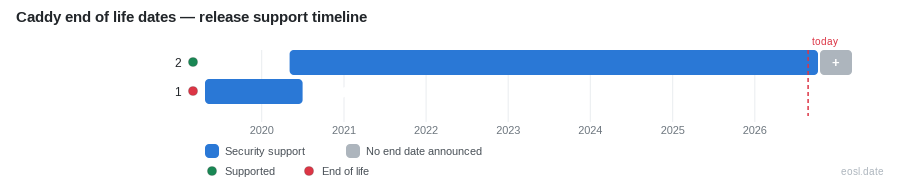
Currently Supported Caddy Releases - Active EOS/EOSL Support (1)
| Release | Released | Security Support | Latest |
|---|---|---|---|
| 2 | (6 years and 6 months ago) | Active | 2.11.9 (1 week and 1 day ago) |
Caddy End of Life (EOL) Releases - No Longer Supported (1)
| Release | Released | Security Support | Latest |
|---|---|---|---|
| 1 | (7 years and 6 months ago) | (6 years and 4 months ago) | 1.0.5 (6 years and 8 months ago) |
Wondering whether your install is still safe to run? Caddy end of life works differently from most software: this extensible, multi-platform web server with automatic HTTPS only treats the newest release as supported. That makes the 2.x line the only safe choice today, and the sections below show how to confirm it for your own server.
Caddy end of life status at a glance
Three release lines exist, and only one is current. The table below lists each line with its release date, its final version and whether it still gets security support. To see which build you are running, type caddy version in a shell.
| Release line | Released | Latest version | Status |
|---|---|---|---|
| 2 | 4 May 2020 | 2.11.7 (3 Oct 2026) | Supported, with security support |
| 1 | 24 Apr 2019 | 1.0.5 (28 Feb 2020) | Ended on 1 Jul 2020 |
| 0 | 28 Apr 2015 | 0.11.5 (4 Mar 2019) | Superseded long ago |
The vendor tag on Versio.io lists the project under ZeroSSL, while the category on endoflife.date is server-app. Neither listing marks any line as LTS, and the code ships under the Apache License 2.0.
Does Caddy have a fixed end-of-life schedule?
No. Caddy follows a "latest version" model instead of publishing a calendar of cutoff dates. Only the newest release counts as supported, and every older line is superseded as soon as a newer one ships. Version 1 is the clearest example: its support stopped on 1 July 2020, about two months after version 2 arrived, so anyone still on it has been upgrading late for years.
In practice that means a missing end-of-life dates table is not a sign of safety. It means you should check the project itself, not wait for a notice.
Which Caddy version is current?
The current build is 2.11.7, released on 3 October 2026 through GitHub, and it is a patch release that repairs regressions from 2.11.6. Versio.io counts 151 builds across all lines, and 57 of them are flagged as unstable versions.
Caddy 2: the latest version
The 2.x line has 102 builds since May 2020. Its latest version fixes a crash over HTTP/2 and streams that were cut off after a minute, both caused by new idle timeouts. If you run 2.11.6, move up. The same release also added support for the Incremental header field, which lets the reverse proxy forward streaming responses at once.
Because TLS certificates are handled by the server itself, an outdated build also means outdated certificate logic, so do not treat the number as cosmetic. A patch version bump inside 2.x is normally safe to take.
Version history and changelog for Caddy releases
Every build is released with notes on GitHub, so the version history of the project is public and searchable. Each entry lists highlights and a changelog, and the notes thank the contributors and maintainers who wrote the fixes. The project is free and open source and relies on sponsors, but that funding does not create a guaranteed support window.
Changelog notes from contributors
Read the changelog before every upgrade rather than after. Because the server is written in Go, entries sometimes mention a Go toolchain bump, and each one names the pull request behind the change, so you can see whether a fix touches your setup. The CVE count on Versio.io is the reason to be strict: 94 of the 151 builds are affected by at least one.
Security fixes and breaking changes under the release policy
Recent notes separate security fixes from breaking changes, and the 2.11.6 notes carry both. That matters because a behaviour change can arrive in the same build as a patch you need. Under the project's release policy you cannot stay on an old build and still expect fixes, since only the newest one is maintained. Let a patch go unapplied and the exposure keeps growing.
Security patches to apply first
Treat security patches as the priority and apply them before feature changes. A server that terminates TLS and HTTPS for the public internet carries more risk than an internal tool, so schedule that upgrade first. For compliance work, record the exact version you run and the date you moved to it.
Plan your upgrade across the Caddy lifecycle
A good plan has three steps: read the notes, test the new build against a copy of your config, then roll it out, and only go live once the test copy behaves. Official Docker images and OS packages track the same releases and serve HTTPS the same way, so pulling a new tag is usually enough. If you terminate traffic through a reverse proxy setup, test the proxy paths too, because the timeout bug above only showed up under streaming.
- Run
caddy versionand note the current build. - Compare it with the newest tag on GitHub.
- Validate your configuration and any imported configuration snippets before you reload.
- Watch logs for TLS and proxy errors after the move.
Automatic HTTPS and TLS after an upgrade
One reason people pick this server is automatic HTTPS: it obtains and renews a certificate for every site without extra tooling. After an upgrade, load one site and confirm the TLS handshake still succeeds and the certificate has not changed unexpectedly. Because HTTPS is on by default, a broken renewal shows up quickly in the browser.
Caddyfile and JSON config checks
Your Caddyfile is converted to the native JSON config by a config adapter. Before moving to a supported build, keep the Caddyfile and the rest of your configuration under version control so you can roll the Caddyfile back along with the binary, and keep API access to the admin endpoint restricted.
What an unsupported web server means for TLS and HTTPS
Running a build past its support window is a bigger deal for a server that handles TLS than for most software. Outdated TLS code can miss fixes, and an unpatched HTTPS endpoint is the one part of your stack that every visitor touches. The server also manages a private PKI when you ask it to, so a stale build affects every certificate it issues, internal or public.
Long-term support and the support window
There is no long-term support track here, and no LTS flag on either listing. The support window is whatever the newest release gives you. If you need a fixed window, pin your own review date every quarter and treat that as your policy, since the vendor will not set one.
Where to verify the support dates
Use three sources. First, the release page on GitHub shows the newest tag and its notes. Second, endoflife.date exposes a JSON API and an RSS feed, plus an iCalendar feed you can subscribe to. Third, its product page lists package identifiers for Docker, Debian, Homebrew and others, which helps when you install from a package manager rather than from source.
Release date checks with the API
Poll the API from a scheduled job and read the API response, compare the newest tag with caddy version on your hosts, and alert when they differ. The same data lists the supported release and its release date, so a short script is enough and a stale server cannot go unnoticed. Pair it with the software's own notes on GitHub and you will know about a new build the day it ships.