Moodle End of Life (EOL) Dates and End of Support (EOS) Dates
Moodle end of life (EOL) and end of support (EOS) dates: 10 Moodle versions have reached EOL, including Moodle 5.0 (EOL date: Oct 05, 2026) — no longer receiving security updates or patches. Moodle 5.3.0 LTS is the current supported release, with support through Oct 01, 2029 — 4 versions in active support. Also see API Platform EOSL dates for related end-of-life information.
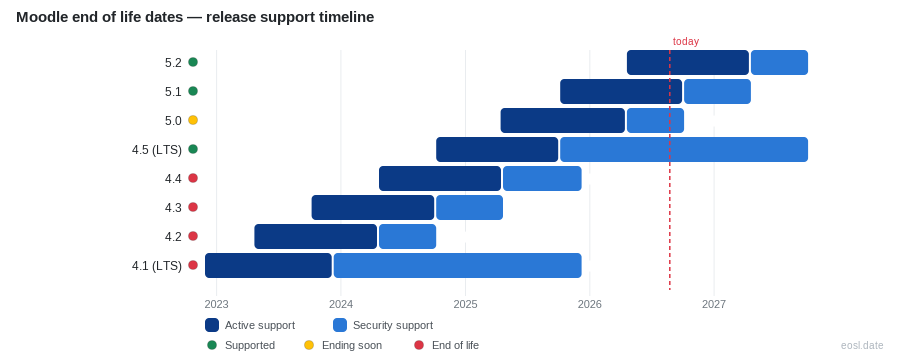
Currently Supported Moodle Releases - Active EOS/EOSL Support (4)
| Release | Supported Php Versions | Released | Security Support | Active Support | Latest | LTS |
|---|---|---|---|---|---|---|
| 5.3 (LTS) | 8.3 - 8.4 | (1 month and 1 week ago) | (in 2 years and 10 months) | (in 10 months) | 5.3.0 (1 month and 1 week ago) | LTS |
| 5.2 | 8.2 - 8.4 | (6 months ago) | (in 10 months) | (in 5 months) | 5.2.4 (1 month and 1 week ago) | - |
| 5.1 | 8.2 - 8.4 | (1 year and 1 month ago) | (in 5 months) | (1 month and 1 week ago) | 5.1.8 (1 month and 1 week ago) | - |
| 4.5 (LTS) | 8.1 - 8.3 | (2 years and 1 month ago) | (in 10 months) | (1 year and 1 month ago) | 4.5.15 (1 month and 1 week ago) | LTS |
Moodle End of Life (EOL) Releases - No Longer Supported (10)
| Release | Supported Php Versions | Released | Security Support | Active Support | Latest | LTS |
|---|---|---|---|---|---|---|
| 5.0 | 8.1 - 8.4 | (1 year and 6 months ago) | (1 month and 1 week ago) | (6 months ago) | 5.0.11 (1 month and 1 week ago) | - |
| 4.4 | 8.1 - 8.3 | (2 years and 6 months ago) | (11 months ago) | (1 year and 6 months ago) | 4.4.12 (11 months ago) | - |
| 4.3 | 8.0 - 8.2 | (3 years and 1 month ago) | (1 year and 6 months ago) | (2 years and 1 month ago) | 4.3.12 (1 year and 6 months ago) | - |
| 4.2 | 8.0 - 8.2 | (3 years and 6 months ago) | (2 years and 1 month ago) | (2 years and 6 months ago) | 4.2.11 (2 years and 1 month ago) | - |
| 4.1 (LTS) | 7.4 - 8.1 | (3 years and 11 months ago) | (11 months ago) | (2 years and 11 months ago) | 4.1.22 (11 months ago) | LTS |
| 4.0 | 7.3 - 8.0 | (4 years and 6 months ago) | (2 years and 11 months ago) | (3 years and 6 months ago) | 4.0.12 (2 years and 11 months ago) | - |
| 3.11 | 7.3 - 8.0 | (5 years and 5 months ago) | (2 years and 11 months ago) | (3 years and 11 months ago) | 3.11.18 (2 years and 11 months ago) | - |
| 3.10 | 7.2 - 7.4 | (6 years ago) | (4 years and 6 months ago) | (5 years ago) | 3.10.11 (4 years and 6 months ago) | - |
| 3.9 (LTS) | 7.2 - 7.4 | (6 years and 4 months ago) | (2 years and 11 months ago) | (5 years and 6 months ago) | 3.9.25 (2 years and 11 months ago) | LTS |
| 3.8 | 7.1 - 7.4 | (6 years and 11 months ago) | (5 years and 6 months ago) | (6 years ago) | 3.8.9 (5 years and 6 months ago) | - |
Your Moodle end of life date is fixed years in advance, and on 5 October 2026 it arrived for Moodle 5.0, the newest branch to lose its last security fixes. If you run this open source learning platform, you need to know which version you are on, when its coverage stops and what to do next. Below you will find every date, the risks of waiting and an upgrade plan.
Moodle end of life dates by version
Moodle publishes its support dates on the developer release calendar, and the table below shows the versions that matter right now. Dates for Moodle 4.5 and the 5.x series are the official ones, and the status column reflects 27 October 2026.
| Version | Type | Released | General support until | Security support ends | Status |
|---|---|---|---|---|---|
| Moodle 5.3 | LTS | 5 October 2026 | 4 October 2027 | 1 October 2029 | Stable |
| Moodle 5.2 | Standard | 20 April 2026 | 19 April 2027 | 4 October 2027 | Supported |
| Moodle 5.1 | Standard | 6 October 2025 | 5 October 2026 | 19 April 2027 | Security only |
| Moodle 5.0 | Standard | 14 April 2025 | 20 April 2026 | 5 October 2026 | Ended |
| Moodle 4.5 | LTS | 7 October 2024 | 6 October 2025 | 4 October 2027 | Security only |
Everything older, including 4.4, 4.3, 4.2 and the 4.1 LTS, has already passed its final maintenance date and no longer gets security patches.
What end-of-life (EOL) means in the Moodle release cycle
Moodle is a learning management system, also called a course management system, that educators, schools and universities use to build online courses. It follows a predictable release cycle: a major version every six months, in April and October, and a minor release roughly every two months. A point release only carries bug fixes and security updates, so a version never changes character halfway through its life. Each minor release rolls up earlier bug fixes, which means skipping one never loses a fix.
Under the support policy, a standard release passes through two stages before it ends, which is why one version can look supported on a Monday and unsupported by Tuesday.
General support and security-only support
For the first 12 months, general support delivers bug fixes and security fixes. After that, security-only support adds fixes for vulnerabilities and data loss for another six months, giving 18 months in total. In plain terms, a standard release gets 12 months of bug fixes and 18 months of security cover from its first day, then it ends. When that final window closes, a version is at end-of-life and receives no further minor release. Moodle 5.0.11 was the last one for its branch.
LTS releases and long-term support
Every fourth version is a long-term support release. An LTS keeps bug fixes for 12 months and security coverage for 36 months, so 4.5 and 5.3 give you the longest runway. Standard releases last 18 months, whereas an LTS lasts double that or more. Only the first 12 months bring regular bug fixes and each minor release. The 12 months of general bug fixes matter less to a production site than the protection that follows. Choose an LTS when your team can only upgrade once a year.
Check whether security support covers your site
Log in as a site administrator, open Site administration, then Notifications, and read the version at the bottom of the page. You can also open version.php in your code directory. If the number starts with 5.0, or with anything older than 4.5, your security support is gone and the site is unsupported.
Treat this check as routine. Moodle LMS, and any hosting provider managing it for you, should flag the date, and your Moodle provider should be able to quote your exact version. If they cannot, that is a warning in itself.
Moodle Workplace and Moodle 5.1 sites
Moodle Workplace shares major versions with the core platform, but its support dates can differ by a day. Sites on Moodle 5.1 are not at the end yet: general bug fixes stopped on 5 October 2026, leaving about six months of security-only cover until 19 April 2027. That is the 18 months a standard release is promised, so use the remaining time for planning, not for ignoring the date.
Supported Moodle versions and when support ends
On 27 October 2026, four Moodle versions are still supported: 5.3, 5.2, 5.1 and the 4.5 LTS. The 4.6 build was an experimental preview that never counted as a production version. Because Moodle releases follow a rhythm, you can predict the next date: Moodle 5.2 drops to security-only on 19 April 2027.
The release notes and upgrade notes for each version list what changed, so read them before you move. Those documents also separate a stable version from one that is only receiving security updates.
Risks of running Moodle after end of support
Nothing dramatic happens the morning after. Courses load, and learners log in, but known security vulnerabilities stay open on your version. The risk grows quietly, which makes it easy to postpone.
- Unpatched vulnerability reports: once a version ends, new security advisories are fixed only in supported versions, and their details become public.
- Serious flaw types: remote code execution, cross-site scripting and SQL injection bugs have all been fixed in recent Moodle releases. A public exploit module has existed since late 2024 for CVE-2024-43425.
- Exposed data: learner records, grades and sometimes payment details sit in your records.
- Compliance gaps: GDPR obligations, an auditor's vulnerability checklist or Cyber Essentials certification all assume maintained software.
For example, Moodle 4.3 ended on 21 April 2025, and by September 2026 at least 13 advisories affected it with no upstream patch. Every one of those is a security vulnerability that you carry alone.
Why sites stay on old versions past EOL
A major upgrade is mechanically simple, yet the surrounding work is not. A typical site runs 20 to 80 plugins, and each one must declare support for the target release. Third-party plugins that were abandoned need replacing or forking, and the bug fixes you relied on may never reach them.
- Themes and custom code: a theme built on the Bootstrap 4 base needs rework, and deprecated APIs break custom code.
- Hosting and server requirements: a newer version needs newer PHP and a compatible data layer, which can mean an operating system change.
- Calendar: universities upgrade between terms, so a missed window means a wait of months.
Plan testing on a staging copy first, with a developer who can read the upgrade notes. Skipping several versions at once makes the job larger than a yearly step ever is.
EOL upgrade path from Moodle 5.0 to 5.3
For most sites on Moodle 5.0, the sensible upgrade path, after 12 months of bug fixes and 18 months of cover, is a move to 5.2 first, then to the 5.3 LTS once it has settled. Follow these steps:
- Back up the database, code and data directory.
- Audit every plugin against the target version.
- Upgrade a staging copy and test your key courses.
- Update production in a quiet period, then check the Notifications page.
Skipping from 4.5 straight to 5.3 is allowed, but each hop teaches you what broke. Read the upgrade notes and release notes for each stop, because the upgrade notes list changed settings and the release notes list bug fixes and removed features. Keep the official documentation and the upgrade notes open beside your staging copy.
PHP support for each release
The PHP versions a version accepts also move with every release, so verify the stack before you start:
- Moodle 5.3: PHP 8.3 to 8.4
- Moodle 5.1 and 5.2: PHP 8.2 to 8.4
- Moodle 5.0: PHP 8.1 to 8.4
- Moodle 4.5: PHP 8.1 to 8.3
Developers can also pull dates through the endoflife.date API, an RSS feed or an iCalendar feed to be reminded early.
EOL options for Moodle 4.3 and IOMAD sites
When a version reaches end of life and you cannot move yet, a commercial extended maintenance offer such as Never-Ending Support can bridge the gap. It forks the final upstream release and uses backports to deliver every later security patch, with no new features, so your plugins and database schema stay as they are.
The same approach covers IOMAD (and IOMAD 4.3 specifically), the multi-tenant Moodle distribution used for corporate training. Treat it as a stopgap, not a plan. IOMAD sites often run many tenants, so one missed fix affects every tenant, and any host that supports IOMAD should say so in writing: ask your Moodle provider what it covers, how fast it ships fixes and what evidence you get for an audit.